










About Circuit Master 2
Most games that ask you to connect things tell you the moment you get it right. The line lights up, the pipe fills, the level ends. Circuit Master 2 keeps quiet. You drop wire pieces onto a circuit board, and nothing judges them until you press the red power button under it. Only then does the board answer.
That one button is what makes it a puzzle and not a colouring exercise. A piece that sits neatly in a square is not proof of anything. You have to look at the whole path from the power source to the machine and decide you believe it. Then you press.
The game is credited to a developer listed as Beedo Games. It was published in December 2025.
Here is what we did, so you know how far to trust us. We played for about four minutes. We failed level 1 once, replayed it and passed it, and then placed two pieces on level 2 without finishing it. We only ever handled wires. The developer's description also mentions fans and machines to place; we did not get far enough to meet them.
The first level is one wire and one gap
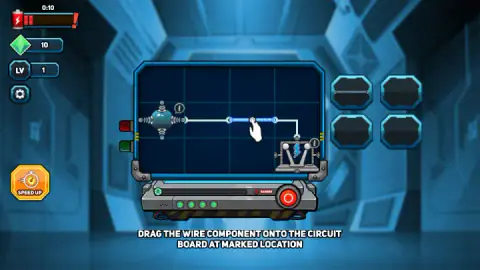
Level 1 is a lesson on a small board, four squares wide and three tall. The source is on the left, the machine in the bottom right corner, and the wire between them is missing a single straight section in the middle.
The tray holds exactly that section. A white hand points at it, and a line of text across the bottom tells you to drag the wire onto the marked spot. Both the source and the machine carry a small badge with a letter i. We did not click either badge.
Once the wire was in, we clicked the red button and the game moved us to level 2. Our gem counter went from 10 to 16 on the way. That is the only reward we saw, and it was the only level we passed, so we cannot say whether every level pays six.
Level 2 makes the board bigger and bends the pieces
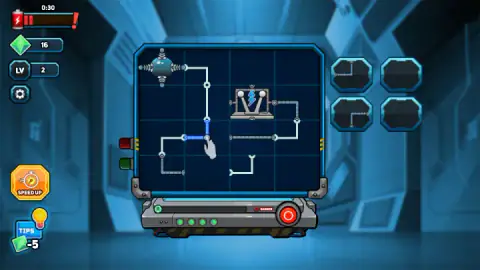
The second board is four squares by four. The source moves to the top left corner and the machine sits near the middle, with wire connectors on all four of its sides.
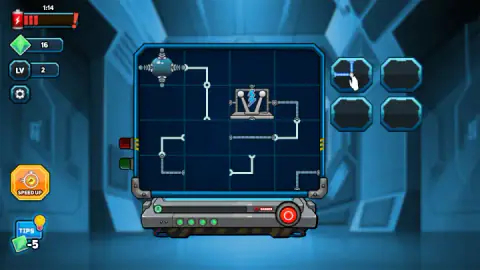
The printed wiring is no longer one line with a hole in it. Several separate runs cross the board, each ending at the edge of an empty square. The tray holds bent pieces now, corners that turn a wire through a right angle, and there is more than one square where a corner could go.
This is where the game starts asking for thought. A corner can face four ways, and the two we handled faced different ways. We did not find a way to turn a piece, and we did not look hard for one, so treat each piece as fixed until you learn otherwise.
Level 2 is also where a Tips button appears in the bottom left corner, with a light bulb and a price of 5 gems. With 16 gems in hand that is three hints. We bought none.
The battery in the corner is a clock, and it does not wait
The top left of the screen shows a battery with a red bar, a warning mark and a countdown above it. The highest reading we caught was 1:20.
Two things about it surprised us. First, passing level 1 did not reset it. We pressed the power button with about a minute left, and level 2 opened with 0:54 on the clock. Second, an ad break is slotted between those two levels, and the countdown kept moving while the notice was on screen.
What we cannot tell you is what happens at zero. Twice we saw the clock under ten seconds, and the next time we looked it was back above 1:10. Neither time did we catch a failure card. On level 2 one of our placed pieces was back in the tray afterwards, so something may have been undone, but we did not see it happen.
Failing costs an ad, or a restart
We did see the failure card once, on level 1, before we understood the game. A grey-haired scientist with scorched hair holds a red cable over the words Circuit Failed. There were 24 seconds still on the clock, so running out of time is not the only way to lose. The likeliest cause is that the power went on while the gap was still open, though we cannot prove it.
The card offers three buttons. Resume carries a video icon and the line above it says to watch an ad to resume the game. Home leaves the level. Replay starts it again. We went back into level 1 without an ad and the clock was above a minute again.
The idea is older than it looks, and the physics is half right
In 1989 a British studio called The Assembly Line released Pipe Mania for the Amiga, sold in North America by Lucasfilm Games as Pipe Dream. You were handed pipe sections you could not rotate, a short delay to lay them on a grid, and then a liquid started flowing whether you were ready or not.
Circuit Master 2 keeps that shape: fixed pieces, a grid, a clock. Its one real change is who starts the flow. In Pipe Mania the liquid comes when the delay runs out. Here you send the current yourself, which turns the last second of every level into a decision.
As a lesson in electricity it gets one thing right and skips another. A gap in a wire does stop the current, exactly as an open switch does. But a real circuit is a closed loop: the current needs a way back to the source. On the first board the wire runs one way, from source to machine, and that is enough. It is a fair simplification for a children's puzzle, and a good question to ask a child who has just beaten level 1.
Who it is for
It suits players who like quiet logic puzzles and do not mind a clock. It is filed under games for children, and the first level is gentle enough for that. The second is a real step up, and the timer and the fussy dragging may frustrate the youngest.
On the name: we have not played an earlier Circuit Master and there is none in our catalogue, so we cannot tell you what the 2 adds.
More connection puzzles to try next
Turnline: Relaxing Puzzle is from the same family at a calmer pace: you rotate tiles until every line joins up. Connect Line works the same way with line segments that must form one network. Block Crush shares the tray: pieces that do not rotate, dragged onto a grid. The rest are under kids games.
Screenshots
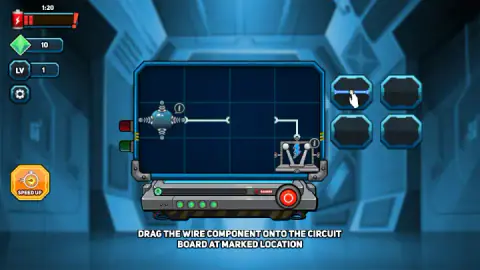
Taken by opening the game ourselves and letting it run — not supplied by the publisher, and not the same picture every other site shows.
How to play Circuit Master 2
- Read the board. A round power source with coils sits on one side. A machine, drawn as a metal frame with a lightning bolt, sits on another. Printed wires run between them, with gaps.
- Look at the tray. Four slots to the right of the board hold the pieces you have been given.
- Drag a piece into a gap. A piece that is seated turns bright blue, and its slot in the tray keeps a faint outline of it.
- Press the red button under the board. This is the test. Wire it right and you go to the next level.
- Watch the battery. The clock in the top left corner is running the whole time.
What our session taught us:
- Dragging is fussier than it looks. On level 1 there is one wire and one gap, and it still took us several tries, close to a minute, before the wire landed. Check that the piece has turned blue on the board before you move on.
- A seated piece can still be the wrong piece. On level 2 we put a corner into the centre square and it lit up like any other. It joined the wire coming down from the source to a run leading left, away from the machine. The board did not object. It would have objected at the button.
- Trace the path backwards. Start at the machine and follow its wire to the first gap. That tells you which way the missing piece has to bend, which is quicker than trying pieces from the source end.
- Do not wait for the clock to help you. It did not pause when a notice covered the screen between levels.
Controls
| Drag a piece from the tray (mouse) | Carries a wire piece from the four slots on the right onto a square of the board |
|---|---|
| Click the red round button under the board | Switches the power on and tests the circuit |
| TIPS button (bottom left, from level 2) | A hint that costs 5 gems; we did not use it |
| SPEED UP button (left side) | We did not press it |
| Touch (phones and tablets) | Per the developer, the same drag and tap with a finger; we did not try it |
Features
- Circuit boards with gaps, and a tray of up to four wire pieces to fill them
- A red power button that tests your wiring, so nothing is checked until you ask
- A battery clock that kept counting across the level change in our session
- A guided first level with a single straight wire and a hand that points at it
- A second level on a bigger board, four squares by four, with bent pieces
- Gems as currency, 10 at the start and 16 after level 1, and a hint that costs 5
- Made by Beedo Games
Game details
- Developer
- Beedo Games
- Release date
- December 2025
- Last updated
- August 10, 2026
- Added here
- October 2025
- Technology
- HTML5 (2D)
- Platforms
- Browser (desktop, mouse), Browser (mobile & tablet)
- Classification
- Puzzle
- Saved progress
- Saving, when available, is managed by this game. Mava cannot confirm your level.
FAQ
How do you play Circuit Master 2?
Each level shows a circuit board with a power source, a machine and a wire between them that has gaps. Drag the pieces from the tray on the right into the gaps, then click the red round button under the board to switch the power on. If the wiring is right you move to the next level.
Is there a time limit in Circuit Master 2?
Yes. A battery in the top left corner counts down in minutes and seconds, and the highest reading we caught was 1:20. In our session it did not restart when we passed level 1, so level 2 began with less than a minute on it.
What happens when you fail a level in Circuit Master 2?
A card reading Circuit Failed comes up with three buttons: Resume, Home and Replay. Resume asks you to watch an ad first. Replay starts the level again without one.
What are gems for in Circuit Master 2?
They pay for hints. We had 10 gems on level 1 and 16 after passing it, and from level 2 a Tips button shows a price of 5. We did not buy a hint, so we cannot describe what it shows.
What does the Speed Up button do in Circuit Master 2?
We did not press it, so we cannot say. It is an orange button with a stopwatch on the left side of the screen, and it is there from the first level.
Is Circuit Master 2 a good game for young children?
The idea is simple enough for a child: fill the gap, press the button. The clock is the catch. It kept running while we fumbled a drag, so a very young player may need help or patience with the Replay button.
Do you need to play Circuit Master before Circuit Master 2?
No. The first level of Circuit Master 2 teaches the whole idea with one wire and an instruction on screen. We have not played an earlier Circuit Master and cannot compare the two.
Who made Circuit Master 2?
It is credited to a developer listed as Beedo Games. It was published on 1 December 2025.