









About CHUTE
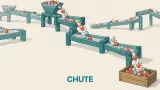
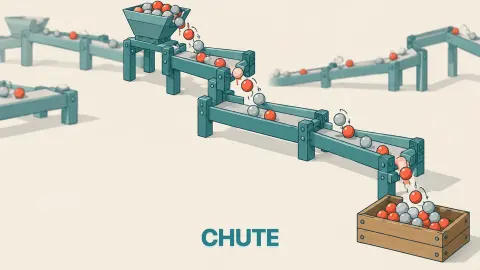
Most factory games move things for you. There is a belt, the belt runs, and your job is to put machines beside it. CHUTE takes the belt away. The only thing that moves a part is falling, so if there is no piece under it, it drops off the board and is gone.
That one rule turns a cheerful little workshop into a building puzzle. A hopper at the top pours grey parts, a bin at the bottom wants a set number of them, and you fill the cells in between with chutes, curves, rails and machines. Then you press Start and watch. You do not steer anything during the run; the machine is whatever you built.
No studio is credited on it, and the distributor added it to the shelf we carry late in October 2026. Its listing promises 96 levels and a crew of eight characters.
So, honestly: we played the first level, Cherry Drops, for about ten minutes, and we did not finish it. We pressed Start once, too early, and watched the parts spill. Then we followed the robot's tutorial and still ended with six pieces on the board that did not join up. What follows is what that first level taught us, mistakes included.
Cherry Drops: the first shift, and our first spill
The level opens with a card headed Red paint. The painter, it explains, holds a part a moment and paints it. Two colours in a row mix: red + blue is purple. Below that: Put it in the stream before the bin. A button reads Let's build.
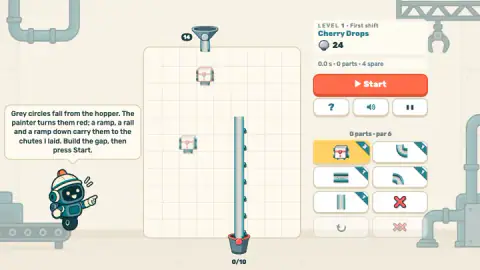
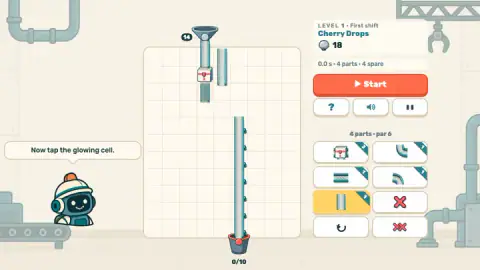
Then the board. A hopper marked 14 sits at the top of a cream grid, a long pre-laid chute runs down the right half to a bin marked 0/10, and the space between is empty. The robot foreman, a small figure in a hard hat, spells out the plan: Grey circles fall from the hopper. The painter turns them red; a ramp, a rail and a ramp down carry them to the chutes I laid. Build the gap, then press Start.
We started a run before building anything. The Start button turned into Running... and the grey parts poured off the board. After 8.1 seconds the panel came up headed Spilled, with a raccoon in overalls saying We'll call that a rehearsal. The scores read 0 parts against a par of 6, 8.1 seconds against a par of 23, and 5 spilled out of 4 spare. Behind the panel the robot added Gravity is doing most of the work. As usual.
The panel offers Retry and Map, and a third button, Build the whole solution, marked AD: going by its label, it builds the answer for you in return for watching an advert. We left it alone and pressed Retry.
What the tutorial asks, and where we went wrong
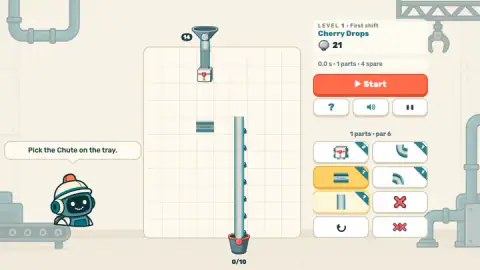
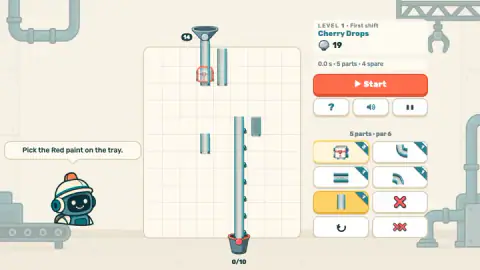
After Retry the robot breaks the job into steps. Pick the Red paint on the tray. Then Now tap the glowing cell, with one cell outlined in orange under the hopper. Then Pick the Chute on the tray.
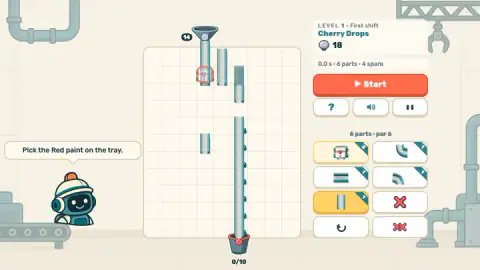
The painter costs 3 and we placed it, so the counter dropped from 24 to 21. The trouble started with the chutes. We placed them by dragging and clicking near where we thought they should go, and several landed in cells beside the column instead of under the painter. One went onto the painter's own cell and replaced it, and the robot went back to Pick the Red paint on the tray.
By the end we had six parts on the board, exactly the par, and none of them joined the hopper to the long chute. The timer still read 0.0 seconds and the bin 0/10. We did not press Start again. The listing says you place a part by picking a tool and then tapping a cell, and that tapping a ramp again flips it; a slower, tap-by-tap approach, following the glowing cell each time, looks like the way through. We have not tested it.
Why real factories use gravity, and where it stops
CHUTE's rule is not invented. Warehouses have long used gravity conveyors: chutes and roller lines set on a slight downward slope, with no motor at all. A UK warehouse-equipment supplier, Spaceguard, sums up the appeal as no power, little upkeep and carrying on through a power cut.
The same source lists the limits, and they read like the game's rules. Gravity works in one direction only, down, so nothing climbs. You cannot control how fast things descend. And goods keep moving until they hit whatever is ahead of them, so a line can pile up.
That is the design of CHUTE in three sentences. The hopper is always above the bin because nothing goes up without help; the listing says lifts and pipes arrive in a later wing. A part with nothing under it falls off the board, as ours did. And the listing's own warning, that a slow machine just makes a queue, is the pile-up problem: a painter can only paint so fast, so a hopper that pours quicker than that needs a second line beside the first.
Who it is for
CHUTE is a planning puzzle, not a reflex one. Nothing is timed while you build, and the run only starts when you press the button, so a child can poke at the tray and an adult can count cells and chase the par. The first level is gentle, with a foreman narrating every step. Even so, it caught us: the only thing between us and the bin was placing six pieces in the right cells.
If you like moving things by gravity, Dig & Flow - Save Water has you carve channels through sand so water can fall where it is needed. Marble Factory runs coloured marbles round a looping belt into their boxes, and Assemble Factory Puzzle asks you to place machines on an assembly line. The rest are in puzzle games.
Screenshots
How to play CHUTE
- Read the board. The hopper's number is how many parts it holds; the bin's number, 0/10 on the first level, is how many it needs. The difference is your spare: the parts you can afford to lose.
- Pick a part on the tray. The tile turns yellow. Each tile has its price in the corner, and the counter under the level name shows what you have left.
- Tap a cell to place it. Build an unbroken path down from the hopper, with the painter somewhere in the stream if the bin wants coloured parts.
- Press Start. The hopper opens and the parts fall through your line. A x2 button speeds the run up.
- Fill the bin before you run out of spares. If the spills pass the spare count, the run ends and you rebuild.
Tips from our game:
- Do not press Start to see what happens. With nothing built, all you learn is that parts fall, and the run is over in eight seconds.
- Look for the pieces the level already gives you. On the first board a long chute is laid from the middle of the grid down to the bin; the robot calls it "the chutes I laid". Your job is only the gap above it.
- Placing a part on an occupied cell swaps it. We dropped a chute on the painter, the painter vanished and the counter rose by two, which is the difference between their prices.
- Watch the par. The panel says 0 parts · par 6 before you start, which tells you the intended answer uses six pieces. We reached six without a working line, which is a fair sign that we put them in the wrong places.
- The undo arrow and the double red X stay grey until something is on the board. The single red X removes one part.
Controls
| Click or tap a tile in the tray | Picks that part: the painter, a curve, a rail or a straight chute. The tile turns yellow |
|---|---|
| Click or tap a cell on the grid | Places the picked part there and takes its cost from the counter. A cell that already holds a part gets the new one instead |
| Start button | Opens the hopper and runs the line. A button marked x2 appears during the run |
| Red X / undo / double red X (tray) | Remove one part, take back the last placement, clear the board |
| Keyboard (per the game's listing) | 1-9 pick a tool, Space starts the run, R restarts the level, Esc pauses |
Features
- Nothing moves on its own: a part only travels by falling, so every cell between the hopper and the bin needs a piece
- Each part in the tray has a price, and the counter shows what you have left to build with
- A par for parts and a par for time sit beside every board, and the result panel scores you against both
- The painter turns grey parts red, and two painters in a row mix their colours
- Spares are a real margin: the first hopper holds 14 parts for a bin of 10, and a fifth spill ends the run
- A robot foreman talks you through the first level one step at a time
Game details
- Developer
- Partner studio
- Release date
- October 2026
- Last updated
- October 26, 2026
- Added here
- October 2026
- Technology
- HTML5 (2D)
- Platforms
- Browser (desktop), Browser (mobile & tablet, touch)
- Saved progress
- Saving, when available, is managed by this game. Mava cannot confirm your level.
FAQ
How do you play CHUTE?
Pick a part on the tray, then tap a cell on the grid to place it, and build an unbroken path from the hopper at the top to the bin at the bottom. Parts only move by falling, so a gap anywhere means they spill. When the line is built, press Start and the hopper opens. The level is won when the bin is filled with the parts it asks for.
What does "spare" mean in CHUTE?
It is how many parts you are allowed to lose. On the first level the hopper holds 14 parts and the bin wants 10, so you have 4 spare. Our first run spilled 5 and ended on a panel headed Spilled.
What happens if you press Start too early in CHUTE?
The parts fall straight out of the hopper and are lost. We did it on the first level with nothing built: after 8.1 seconds five parts had spilled, one more than the spares allow, and the run stopped. The game took it kindly, with the line We'll call that a rehearsal, and offered Retry and Map.
What is the number under the level name in CHUTE?
It is what you have to build with. Every tile on the tray carries its price in the corner. On the first level the painter cost 3 and the chutes and curves 1 each, and the counter fell from 24 to 21 when we placed the painter.
What does the painter do in CHUTE?
It holds a part for a moment and paints it, so grey parts that pass through it come out red. The game's own card adds that two painters in a row mix their colours, so red and blue make purple. It has to sit in the stream before the bin.
Why did my part disappear in CHUTE?
Placing a part on a cell that already holds one replaces it. We dropped a chute on top of the painter by mistake; the painter vanished, the counter went back up by the difference in price, and the robot asked us to pick the red paint again.
How many levels does CHUTE have?
The game's listing says 96 levels in eight wings, each adding one new idea, plus a Daily Shift with a new order every day. We only played the first level, Cherry Drops, so we cannot confirm the rest.
Who made CHUTE?
The studio is not named anywhere we can check, so this page does not name one rather than guess. CHUTE reached our catalogue in October 2026 and runs free in a browser.