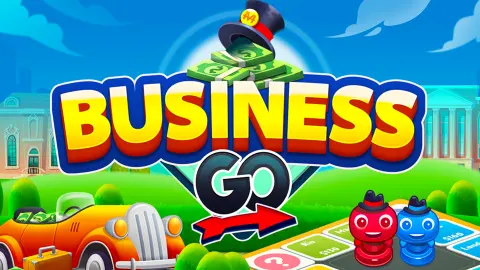







About Business Go
Most property board games ask for a table and an evening. Business Go cuts that down to 20 squares and one die per player, and money moves almost at once: in our game the first rent changed hands on the fourth roll.
We chose Play Offline and played as Ali, the name the menu gave us, against a computer-controlled rival called Tanvi. Each of us started with $1000. You roll, your token walks, and if it stops on a free city you can buy it or send it to auction. Anyone who lands there afterwards pays you rent.
Now for how little we saw. We spent ten minutes with the game and threw the die five times. We lost a minute to a friends room that never opened, reloaded, and then spent over three minutes clicking the wrong thing. So this page has no finished game in it, no bankruptcy and no winner. What it does have is every dollar of those five rolls, and the two mistakes that will save you the same wait.
The game is credited to Card Guru Games. It was published on 26 May 2025 and updated on 29 October 2026.
Our whole game, to the dollar
The five rolls fit in a table, and the balances on screen agree with it exactly.
| Roll | Player | Where it landed | What happened | Cash after |
|---|---|---|---|---|
| 5 | Ali | Question mark corner | Hospital bill of $50 | Ali $950 |
| 6 | Tanvi | Rio | Bought for $130 | Tanvi $870 |
| 5 | Tanvi | Paris | Bought for $160 | Tanvi $710 |
| 6 | Ali | Paris | Paid Tanvi $40 rent | Ali $910, Tanvi $750 |
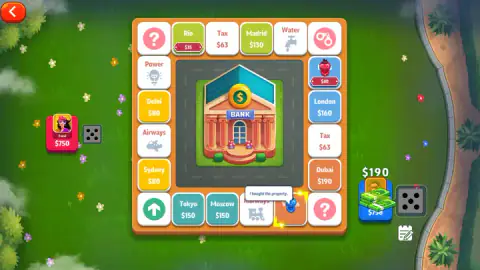
| 5 | Ali | Vegas | Bought for $190 | Ali $720 |
Tanvi bought both cities she landed on, a small sample but a clear start. And being second is costly: our token stopped on Paris one roll after she took it, before we owned anything.
A six seems to buy another roll
Look at the order in the table. Tanvi threw a 6 and went again. We threw a 6 and the arrow came straight back to our die, and we did not have to press anything to keep the turn. Throws of 5 did not do this. So a six buys another roll, or at least it did both times we saw one.
On a board this short, that matters. An extra throw is an extra chance to reach a free city before the other player does. The screen never said it in words, so treat this as our reading until you check Game Rules.
Rent starts near a quarter of the price
Three cities were bought in our game, and each square then showed its rent.
| City | Price | Rent |
|---|---|---|
| Rio | $130 | $35 |
| Paris | $160 | $40 |
| Vegas | $190 | $50 |
So an unimproved city pays for itself after about four visits. The card for Vegas shows where the real money is. It lists three upgrade levels, each costing $120.
The first level lifts the rent from $50 to $170, so one visit from a rival would nearly cover it. The top level reaches $450.
We never got to use this: Build was dimmed with Vegas as our only city, and so were Sell and Reclaim, while Mortgage and Trade were lit. The cities come in coloured pairs, so owning both may be what unlocks Build. We could not test that.
Half the board is cities
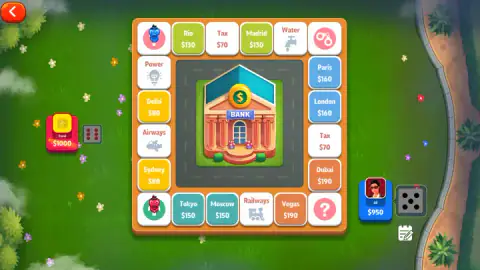
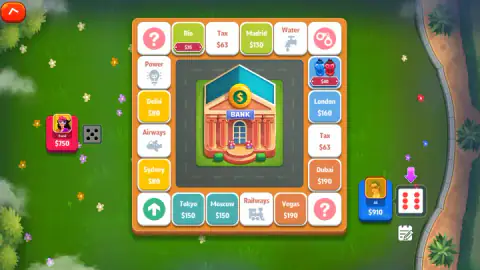
Going clockwise from the green arrow, the cities sit in five colour pairs. The price does not simply climb, because the last pair drops back below the one before it.
| Colour | Cities | Price each |
|---|---|---|
| Yellow | Sydney, Delhi | $80 |
| Lime | Rio, Madrid | $130 |
| Blue | Paris, London | $160 |
| Orange | Dubai, Vegas | $190 |
| Teal | Moscow, Tokyo | $150 |
The other half is two Tax squares, four corners and four services: Water, Power, Airways and Railways. The services show a picture and no price, and neither of us stopped on one. The corners are the green arrow, two question marks and a pair of handcuffs. Nobody finished a lap either, so we do not know whether passing the arrow pays anything.
With one die, a lap takes about six rolls on average. That is why rent feels close: the rival you just bought ahead of will be back at your city soon.
The Tax squares follow your cash
This one surprised us. The two Tax squares do not hold a fixed price.
| Our cash when the turn began | Tax squares read |
|---|---|
| $1000 | $70 |
| $950 | $66 |
| $910 | $63 |
That fits a tax of about 7 percent of the cash held at the start of your turn. Buying Vegas did not change the figure, so it seems to be set only at that point. We never landed on one, so we have not paid it, and three readings are not much to go on. If the pattern holds, money you have already turned into cities is money the Tax squares cannot touch.
Friends, online and the coin offer
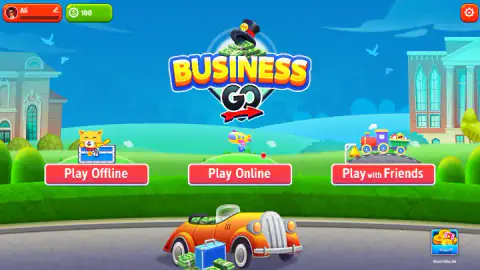
Play with Friends opens a panel with 2, 3 or 4 players, a coin amount, a create button and a field for a friend's code. For us this panel came up in Spanish, as Jugar con amigos, though the menu behind it was in English. Its create button took us to a spinner reading sala de la creación, and after close to a minute with no room code we reloaded. We cannot say why.
A card offering 100 coins for watching a video also appeared in Spanish. Its blue button reads Reloj, which looks like a literal translation of watch, as in the thing on your wrist. The green Cancelar button dismisses it. We never took the offer, and Play Online stayed untried.
What we did not reach
- A second lap, or even a first one. Passing the start square is still a mystery to us.
- The Done button. It was on screen when our session ended, so we never saw the turn after it.
- Auction, Trade, Mortgage, Build, Sell and Reclaim. We know them only as buttons.
- The handcuffs corner, the services and the Tax squares. Nobody landed on them.
- How a game ends. We saw no bankruptcy and no winner, and we do not know what the coin amount does.
- Three or four players, and a phone.
Who it is for, and what to play next
It suits someone who wants a property game with a computer opponent and no pressure. The board sat waiting for us for more than three minutes without a timer or a penalty, which also makes it forgiving for a child learning how rent works. City cards print every price, so there is little to remember.
Card Guru Games also made Durak, the Russian card game of attack and defence against computer opponents. If you mainly want dice and a board, Ludo World makes you choose which token to move, which this game never does. Slides And Climbs has one die and 100 squares, and Yatzy makes you pay for extra rolls.
More in our multiplayer games.
Screenshots
Taken by opening the game ourselves and letting it run — not supplied by the publisher, and not the same picture every other site shows.
How to play Business Go
- Start a game. Press Play Offline, pick 2, 3 or 4 players and press Start. We left the coin amount at 100.
- Click your die when the pink arrow points at it. Your token sets off clockwise from the green arrow corner by itself. There is nothing to move by hand.
- Decide on the city. A free city brings up a card with its prices and two buttons, Buy and Auction. The money leaves as soon as you buy, and the square then shows its rent in your colour.
- Press Done. Once you own a city, your die is replaced by a blue Done button when you have finished, with a column of options above it: Build, Sell, Mortgage, Reclaim and Trade.
- Let your rival play. Tanvi rolled and bought with no input from us, a few seconds per move.
Tips from our run:
- Follow the arrow and nothing else. After our six, the arrow pointed at a die still showing that 6. We took it for a throw waiting to be used and clicked our card instead, again and again, which only opens Player Information. The number is your last throw. Click the die.
- Tanvi's die is not yours. We finished the session clicking it for over a minute while the game waited for our Done button.
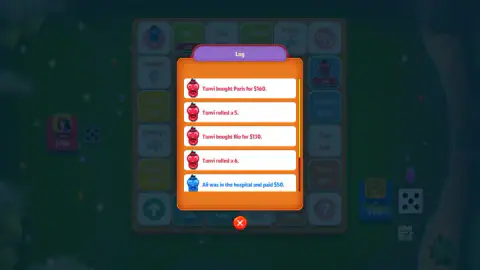
- The notebook under your die is the Log. It is the quickest way to find out why your cash just changed.
- Read the Game Rules first. They sit behind the red arrow at the top left, which looks like a way out but opens a menu with Resume. We did not read them, and it shows.
Controls
| Click your die when the pink arrow points at it | Rolls; your token then walks clockwise by itself |
|---|---|
| Click Buy or Auction on a city card | Buys the city or sends it to auction; we only tried Buy |
| Click the blue Done button | Appears where your die was once you own a city; the game waits on it |
| Click your own card | Opens Player Information with your cash and properties, and nothing else |
| Click the notebook under the die | Opens the Log, the written history of every roll and purchase |
| Click the red arrow, top left | Opens Resume, Music, Sound, Game Rules and Quit |
| Space and Enter | Did nothing on the board for us |
Features
- A 20-square board: ten cities in five coloured pairs, two Tax squares, four services and four corners
- One die each; in our game a six came with another roll, both times
- A computer-controlled rival, Tanvi, who rolled and bought without any input from us
- City cards listing price, rent, mortgage value and three upgrade levels, with a choice of Buy or Auction
- Tax squares whose price fell as our cash fell: $70, then $66, then $63
- A Log that records each roll and purchase in plain sentences
- Three ways in: Play Offline, Play Online and Play with Friends, for 2, 3 or 4 players
Game details
- Developer
- Card Guru Games
- Release date
- May 2025
- Last updated
- October 29, 2026
- Added here
- May 2025
- Technology
- HTML5 (Unity)
- Platforms
- Browser (desktop)
- Classification
- Cards & Board , Multiplayer , Strategy
- Saved progress
- Saving, when available, is managed by this game. Mava cannot confirm your level.
FAQ
How do you play Business Go?
Click your die when the pink arrow points at it, and your token walks that many squares clockwise by itself. If it stops on a free city, a card offers Buy or Auction. Once you own a city, your die turns into a blue Done button, and pressing it is how you finish. Cities charge rent to whoever lands on them next.
Why is Business Go stuck on my turn?
Look for the pink arrow beside your card, because it marks what the game is waiting for. If it points at a die showing a number, click the die: that number is your last throw, not a roll waiting to be moved. If it points at a blue Done button, click that. Clicking your card or your rival's die does not move the game on.
Does a six give you another roll in Business Go?
It did both times we saw one. Tanvi threw a 6, bought Rio and rolled again at once, and our own 6 was followed by the arrow returning to our die. Throws of 5 passed the turn or brought up the Done button instead. Two cases are not proof, and we did not open the Game Rules screen to check.
How much money do you start with in Business Go?
Both players had $1000 in our offline game for two, with the setup amount left at 100. That amount has a coin icon beside it and is separate from the $1000. Our coin balance on the menu also read 100. We did not finish a game, so we cannot say what happens to those coins.
What do the question mark corners do in Business Go?
The board has two corners marked with a question mark. Landing on one cost us $50, and the Log explained it as a hospital bill. That is the only time we landed on one, so we cannot tell you what else they can do or whether they ever pay out.
Can you play Business Go with friends?
The menu has a Play with Friends button with a choice of 2, 3 or 4 players, a create button and a field for joining with a code. When we pressed create, we sat on a spinner for close to a minute without getting a room, then reloaded. We played offline after that, and Play Online stayed untried.
Can you play Business Go on a phone?
We played on a computer with a mouse and did not try a phone, and our catalogue does not list it for mobile. Everything we did was a single click on a large button, and the keyboard did nothing on the board. The screen was landscape for the whole session.
Who made Business Go?
The game is credited to Card Guru Games, the studio behind Durak as well. It was published on 26 May 2025 and last updated on 29 October 2026.