











About Stamp the Parcel
Most idle clickers let you tap anywhere and count the money. Stamp the Parcel looks like one of those, and for the first minutes it plays like one. Then you notice the purse is barely moving.
The reason is the stamp. Every click drops a red rubber stamp with a dashed ring on the sorting desk, and the envelopes are spread across it. In some of our screenshots the green mat in the middle was empty, with the envelopes around it on the wood.
Around that sits a familiar idle shape: a wooden desk in a pixel-art post office, a counter full of upgrades, a dock of menus and a chain of post offices to work through. The first one is the Village Post Office.
The developer is listed as ikonode and the release as November 2026. When we played it, the game and no reviews or guides anywhere else.
Where the stamp lands is the whole game
Early on, one stamp on one envelope paid $8 in our game. That is not much, and it is the honest rate of the Village Post Office before you upgrade anything.
The stamp lands with a ring around it, and the Counter sells a way to widen that ring, which tells you that reach matters.
We learned this the hard way. For about four minutes we kept stamping close to the same spot in the middle of the desk, and the purse crept from $1.16K to $1.18K.
So treat it less like a tapping game and more like a game of aim. Move the stamp to where the envelopes are rather than hammering one spot. This is also what Wider Stamp is for: each level adds a little reach to the stamp.
Fever is the burst worth waiting for
The bar beside the desk looks like decoration. It is the most important thing on screen.
Each stamp fills it a little. When it reaches the top it turns rainbow, the word FEVER fills the desk, and a line reads x2 postage · 10s. An Express Rush timer counts down in the top left corner. During those seconds, hits showed up as numbers in the hundreds rather than single digits.
In our run, the purse sat at $1.16K just before the bar filled and read $8.18K as the Fever began. A task banner completed at the same moment, so we cannot say how much of the jump came from each.
Two things follow. First, the bar is free: the yellow Watch ad Express Rush button beside the desk offers the same rush for an ad, but stamping gets you there on its own. Second, Fever rewards the same aim as normal play, only faster. Click on clusters of parcels, and click a lot.
A keepsake card can slide in on the right in the middle of a Fever. Ours did, with a Rare Aurora Jar. Press Keep and get back to stamping; the timer does not wait.
The Counter: three upgrades, three different prices
The Counter opens a list headed by a Watch ad coin sack, then three upgrades:
- Better Postage multiplies what each parcel pays. It starts at $60.
- Wider Stamp makes the stamp's ring reach further. It starts at $80.
- Sorting Belt makes parcels arrive faster. It starts at $88.
Better Postage is the obvious first buy, and its level cap runs into the hundreds. Its price does not stay put, though. One level later it cost $114, and by the eighth it cost $817.
The other two never moved, because we never bought them. They still cost $80 and $88, roughly a tenth of the next postage level.
That is the choice the Counter puts in front of you. A wider ring means more parcels per stamp, and a faster belt means more parcels on the desk to hit. Both feed the same aim that pays during Fever. Once postage costs several times more than the others, spreading your money around is the better deal.
Keepsakes and tasks
Stamping sometimes turns up more than postage. A card slides in from the right with a new item, its rarity and a short line of text. We kept two keepsakes, one of them the Rare Aurora Jar.
The dock also has Collection and Album buttons, which is where these items end up. We did not open them, so we cannot say what a full album gives you.
Task banners mark milestones at the top of the screen. Our first was First Shift; another, Unwrapped, came during the Fever. The Tasks button in the dock lists them.
What we played, and what we did not
We played one session of about ten minutes on a computer with a mouse, all of it in the Village Post Office. We stamped, filled the Express bar once, set off one Fever, kept two keepsakes and bought Better Postage several times.
We did not open Collection, Album, Mail Tube, Route, Stamp Tree or Tasks. We did not buy Wider Stamp or Sorting Belt, move to the next post office or see what the postmarks do. We did not test the Space key or offline earnings, and we did not play on a phone. The game's description says clerks keep stamping while you are away; we did not get far enough to have clerks.
An ad-break screen came up once during our session. The other ads are buttons you choose to press.
Who it is for
It suits players who like a calm clicker with a small skill hidden inside: watching the desk, aiming at the envelopes, saving effort for the Fever. The pixel-art office, with its lamps, plants and shelves of mail, is pleasant to sit in.
It is not a game that rewards mindless tapping. If you want to click one spot and watch numbers climb, the first office will feel slow.
More idle games
Idle Airport Tycoon and Idle Supermarket Tycoon have the same pull of upgrades and growing income, in an airport and a shopping mall. Idle Chicken Farm adds merging to the loop.
More in our clicker games.
Screenshots
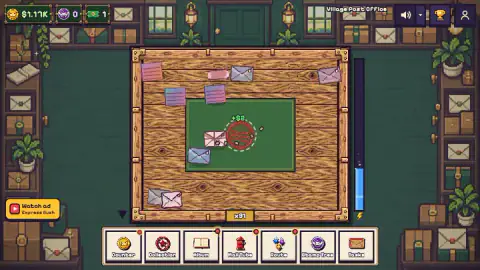
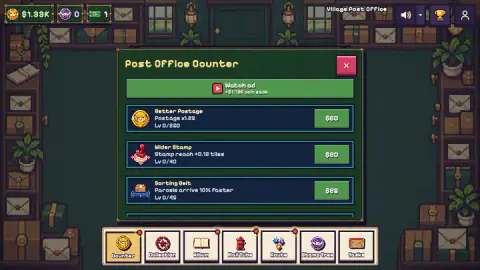
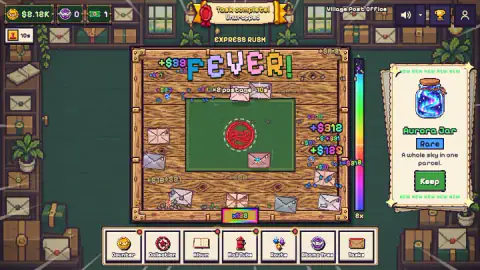
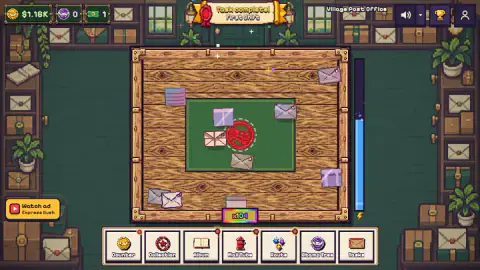
Taken by opening the game ourselves and letting it run — not supplied by the publisher, and not the same picture every other site shows.
How to play Stamp the Parcel
- Skip or read the short tutorial. It points at your coins and the dock at the bottom.
- Click or tap a parcel on the desk. The stamp lands there and a small green number tells you what it paid.
- Watch the tall bar to the right of the desk. It fills as you stamp. When it is full, Fever starts.
- Open the Counter in the dock and spend your postage on upgrades.
- When a card slides in on the right with a new item, press Keep to add it to your collection.
Tips from our run:
- Aim at the parcels, not at one fixed spot in the middle of the desk.
- Save your fastest clicking for Fever. Its hits paid in the hundreds, against single digits before.
- Do not pour everything into Better Postage. Its price runs away from the other two upgrades.
Controls
| Click or tap on the desk | Drops the red stamp there |
|---|---|
| Space | Stamps a random parcel, according to the game's instructions (we played with the mouse) |
| Dock buttons (bottom) | Counter, Collection, Album, Mail Tube, Route, Stamp Tree and Tasks |
| Keep (side card) | Keeps a keepsake that turned up while stamping |
| Hold Move | Moves you to the next post office once it lights up, according to the game's instructions (we did not get there) |
Features
- A red stamp with a ring, and a Wider Stamp upgrade that adds to its reach
- An Express bar beside the desk that fills as you stamp and sets off a free 10-second Fever with double postage
- A Counter with Better Postage, Wider Stamp and Sorting Belt, each with its own price curve
- Keepsakes that drop while you stamp, such as a Rare Aurora Jar
- Task banners for milestones, starting with First Shift
- A chain of post offices, starting with the Village Post Office
Game details
- Developer
- ikonode
- Release date
- November 2026
- Added here
- November 2026
- Technology
- HTML5 (2D)
- Platforms
- Browser (desktop), Browser (mobile & tablet, touch)
- Saved progress
- Saving, when available, is managed by this game. Mava cannot confirm your level.
FAQ
How do you play Stamp the Parcel?
Click or tap the wooden desk and a red stamp lands where you pointed. Stamped parcels pay postage, which you spend on upgrades at the Counter in the dock at the bottom. The game's instructions add that Space stamps a random parcel.
How do you get Fever in Stamp the Parcel?
Keep stamping. The tall bar to the right of the desk fills with each hit, turns rainbow when it is full, and then Fever starts: double postage for 10 seconds, shown with an Express Rush timer. You do not need the Watch ad Express Rush button; in our run the bar got there on its own.
What should I buy first in Stamp the Parcel?
Better Postage is the first upgrade at the Counter and the cheapest at the start, at $60. Its price climbs fast: $114 for the next level and $817 by level 8 in our game. By then Wider Stamp ($80) and Sorting Belt ($88) cost a tenth as much, so they are worth a look.
Why is my money not going up in Stamp the Parcel?
In our game, clicking the same spot in the middle of the desk over and over left the purse almost flat for about four minutes. Aim at the parcels themselves, keep the Express bar filling for Fever, and look at the cheaper upgrades at the Counter.
What are keepsakes in Stamp the Parcel?
Collectible items that turn up while you stamp. A card slides in on the right with the item's name, its rarity and a Keep button. We kept two, one of them a Rare Aurora Jar.
Does Stamp the Parcel have ads?
Ads are optional rewards: a Watch ad button for an Express Rush beside the desk, and a coin sack offer at the top of the Counter. In our session one the ad-break screen also came up between moves.
Who made Stamp the Parcel?
The developer is listed as ikonode and the release as November 2026. We found no other page about the game to confirm it.
Can you play Stamp the Parcel on a phone?
The game's listing gives Android and iOS, and the game's own instructions say click or tap. We played it on a computer with a mouse, so we cannot say how it feels on a touch screen.