

About Mine - Survival & Creative
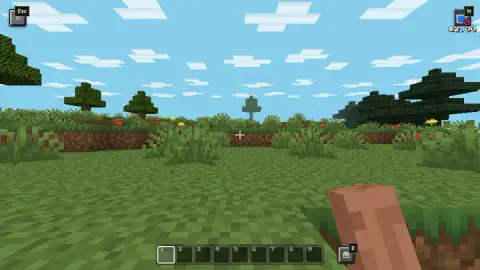
You press Create World, the screen fades into a meadow of tall grass and red poppies, and your character has nothing in his hand. Not a block, not a tool. The nine slots at the bottom are empty too. That is the first thing Mine - Survival & Creative asks you to work out: in Creative, everything you can build with lives in a separate window, and you have to go and get it.
This is a 3D block sandbox by TrickyBit, published in November 2026. You walk a world made of cubes, break blocks, place new ones and, if you choose Survival, gather what you need instead of having it handed to you. If you have played Minecraft, the keys and the hotbar will feel familiar; this is a separate game, not Mojang's.
We played one Creative world on a computer for about ten minutes, from the start screen to nightfall. What follows is what we saw in that session, plus what the game's own listing promises, marked as such.
Your hands start empty, so the palette comes first
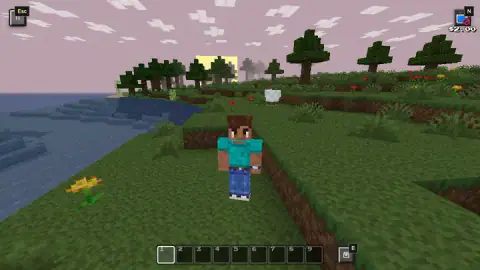
In first person you see a bare arm and a crosshair, and the hotbar shows nine empty slots, numbered 1 to 9. They stayed empty for our whole session. With nothing in your hand there is nothing to place, so the first stop is the palette.
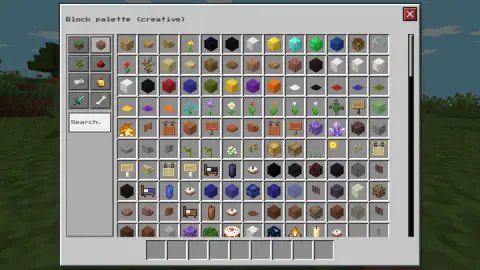
The fix is the Block palette (creative). We opened it with the square button marked E just to the right of the hotbar; the instructions say the E key does the same. It fills most of the screen. On the left are eight category tabs, shown as icons: a grass block, bricks, a sapling, red dust, an iron bar, a golden apple, a sword and a bone. Under them sits a Search box. The main grid shows well over a hundred items before you even scroll: coloured wool and concrete-style cubes, glass, flowers, beds, signs, cakes, candles, lanterns and a campfire.
The Search box is the quick way through. Typing a word is faster than scrolling a grid that size. Along the bottom of the window runs its own row of nine slots, matching your hotbar. The red X in the top corner closes it and puts you back in the world.
Read the outline before you click
Aim at the ground and a thin black wireframe box appears around the block you are pointing at. In our run, a left click took exactly what that box framed, and the box does not always frame what you expect.
At our first click, the outline was wrapped around a tuft of tall grass, a block of its own. One left click and the tuft was gone; the soil underneath was untouched. Meadows near the start are covered in these tufts and in flowers. If you are trying to dig, expect the first click on a grassy spot to clear the plants, and look at the outline again before the second.
Night arrives about six minutes in, even in Creative
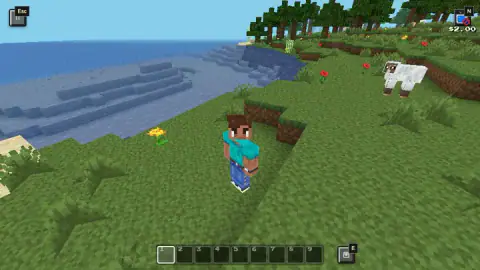
In our world, Creative did not switch off the clock. We created our world, wandered down to the shore where the sea steps down in blue terraces and sheep graze, and about six minutes later the sky turned pink. A minute after that it was night, with stars overhead, and it stayed dark for the last three minutes of our session.
Nothing attacked us in the dark, but the screen gets very dim. The ground, your character and the edges of blocks all blur together, so it becomes hard to tell one block from the next. Plan around it: do your fine work while the sun is up, and use the dark minutes for walking or for laying out rough shapes.
The pause menu has a Shaders: Off button with a red "Try it!" tag. According to the game's listing, shaders add real-time shadows. We left them off, so we cannot say whether they make nights easier to read.
First person or third person: press V
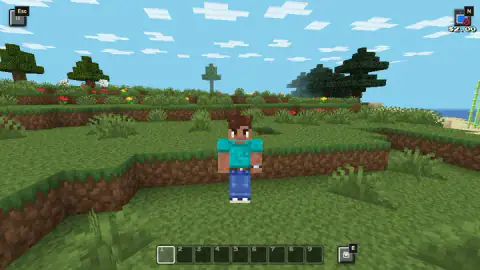
The game gives you two cameras. First person shows your arm and the crosshair, which makes it easy to aim at a single block. Third person puts the camera behind your character, a blocky boy in a teal shirt and blue trousers, so you can see where you stand on a slope or next to the water.
Most of our session ran in third person. When we pressed V, the view snapped back to first person. Use third person to look around and to check that you are not about to step off a ledge. Use first person when you need to hit one exact block.
Coins, the starter kit and the $2.00
There are two numbers on screen that are easy to misread.
The coin balance is the gold coin counter at the top left of the menus. It read 70 on the Create World screen and had not moved when we paused. The same screen shows a padlocked Starter kit, labelled Explorer, Miner and Builder, priced at 250 coins. With what we had, it was out of reach. In Creative the palette already holds the blocks, so the kit is not needed to start building. The pause menu also has a Shop; we did not open it, so we do not know how coins are earned or what they buy.
The $2.00 at the top right during play is something else. It sits under a small TV with a red no-entry sign and an N key badge, and it never changed in any of our captures. It looks like an offer tied to ads rather than a balance, though we did not press it to find out. You do not need to touch it to play.
Pausing, ad breaks and getting the mouse back
Press Esc, or the pause button in the top left, and you get the Paused menu: Back to game, How to play, Achievements, Skins, Shop, Mode: Creative, Shaders and Save and quit. A banner at the top says "Click to keep playing": after Back to game, click once inside the game to carry on.
The first time we paused, a notice covered the menu first. It said the ad had been skipped this time and offered a Continue playing button. Expect that pausing can bring an ad break.
What Survival and the Maps tab add, by the game's own account
We did not play Survival. The game's listing says that in Survival you gather wood and stone, make a crafting table, tools and torches, plant a garden, raise animals, mine ores and build a shelter before night. It also lists 20 parkour and adventure maps under the Maps tab, which we saw on the start screen but did not open, plus over 60 character skins with an editor, a pixel colouring mini-game, a bow and minecarts. The listing also says your world saves automatically. None of that is part of our run, so treat it as the developer's description, not as something we checked.
More block games to try
If breaking things is the part you like, TNT Sandbox is a block world built around explosions, and +1 Pickaxe: Break Blocks 3D is about digging through blocks with an ever stronger pickaxe. Toybox: Pixel World Sandbox is a 2D sandbox where you place blocks and characters and watch what happens. More in our 3D games.
Screenshots
How to play Mine - Survival & Creative
- On the Create World screen, keep or change the name, pick Survival or Creative and a Normal or Flat world, then press the green Create World button.
- Walk with W A S D and look around with the mouse. Space jumps, according to the game's instructions.
- Left click breaks the block framed by the thin black outline.
- In Creative, open the Block palette with E or the E button by the hotbar, pick a block, and place it with a right click (the game's instructions; we did not place one).
- Press Esc to pause. To keep playing, press Back to game and click inside the game.
Tips from our run
- Watch the outline before you click. If it frames a tuft of tall grass, your click takes the grass, not the ground under it.
- Do your detailed building in the first few minutes of daylight.
- The $2.00 in the top right never changed in our run. It does not behave like a score or a balance.
Controls
| W A S D / arrow keys | Walk; Space jumps, according to the game's instructions |
|---|---|
| Left click | Break the block inside the black outline |
| Right click | Place the block in your hand, according to the game's instructions |
| E or the E button by the hotbar | Open the Block palette in Creative (we used the on-screen button); close it with the red X |
| 1-9 / mouse wheel | Pick a hotbar slot, according to the game's instructions |
| V | Switch the camera between third person and first person (in our run it brought back first person) |
| Esc | Pause; click inside the game afterwards to get the mouse back |
| F or double Space | Fly in Creative, according to the game's instructions |
Features
- Two modes on the Create World screen: Survival and Creative, with Creative preselected, and a Normal or Flat world
- A creative Block palette with eight category tabs, a Search box and well over a hundred items on its first screen
- First-person and third-person views, switched with V
- A day-night cycle that runs in Creative too: in our first world, dusk came about six minutes in and dark night soon after
- A Maps tab next to World; the game's listing says it holds 20 parkour and adventure maps
- A coin balance (70 in our first session) and a Starter kit priced at 250 coins
Game details
- Developer
- TrickyBit
- Release date
- November 2026
- Last updated
- November 10, 2026
- Added here
- November 2026
- Technology
- HTML5 (WebGL, 3D)
- Platforms
- Browser (desktop, keyboard and mouse)
- Saved progress
- Saving, when available, is managed by this game. Mava cannot confirm your level.
FAQ
How do you build in Mine - Survival & Creative?
In Creative your hand and all nine hotbar slots start empty, so there is nothing to place yet. Open the Block palette with E or the E button beside the hotbar, choose a block, then place it with a right click according to the game's instructions. Left click breaks whatever block the black outline is framing.
Is the $2.00 in the corner my money in Mine - Survival & Creative?
It does not appear to be. The $2.00 sits under a small TV icon with a red no-entry sign and an N key badge, and it never changed during our session, so it looks like an offer tied to ads rather than a balance. The coin balance is the gold counter shown in the menus, which read 70 when we started.
Does night come in Creative mode in Mine - Survival & Creative?
Yes. In our Creative world the sky turned pink about six minutes after we created it and was fully dark about a minute later. At night the screen gets very dark, so it is harder to see what you are building.
How do you switch to third person in Mine - Survival & Creative?
Press V. In our session it switched the camera from third person, behind the character, back to first person, where you see only your arm and a crosshair.
Can I play Mine - Survival & Creative on a phone?
It is listed for Android and iOS, and the game's instructions describe a left stick to move, swipes to look around and buttons for jumping, acting and the inventory. We played it on a computer with keyboard and mouse only.
Who made Mine - Survival & Creative?
TrickyBit, according to its listing, and it was published on 9 November 2026. It is an independent block sandbox and has no connection to Mojang.