




About Masterpiece Unharmed
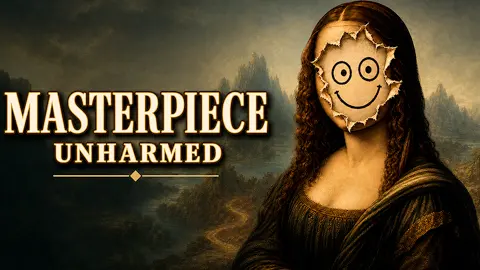
The case card calls it a small jagged mark. Then the canvas loads and the Mona Lisa has no face. Where Leonardo painted the smile there is a ragged white hole, above it a countdown reading 3:00, and somewhere off screen an inspector putting away his coat.
What lifts Masterpiece Unharmed above a colouring page is that the repair gets marked. Hand the painting in and the game lines three pictures up next to each other, labelled Original, After damage and Your repair, prints a percentage, fills in as many of three stars as you earned, and lets the inspector say his piece. Our stars stayed empty, the percentage read 0 %, the screen said the inspector was displeased, and the man with the magnifying glass wrote us up: "Is this restoration or a confession? Very well, I will record the latter."
We earned that nought the embarrassing way, and it is the most useful thing on this page. The red button at the bottom of the screen says Inspect, which sounds like a magnifier you press to study the damage. It is the hand-in button. Press it and the attempt is over, whatever is on the canvas. Three times in a row we submitted a painting we had not touched.
The game is credited to VeturGames and has been available from August 2026. You play a museum restorer on the night shift, and the tools are a brush, an eraser and a colour picker, plus undo and redo, a size slider and an opacity slider.
The inspection screen is the real game
Most painting games end when you run out of canvas. This one ends with a verdict.
Press Inspect and the scene cuts to the restorer handing over the work, then to a screen with a gold magnifying glass on it that says the inspector is examining the painting and that you should not touch anything. Then INSPECTION COMPLETE appears, with your score, your stars, and the comparison strip: the painting as Leonardo left it, the painting with the damage, and whatever you did about it.
That strip is why the game does not need to explain its scoring. You can see the gap. Show mistakes narrows it down further, and then Retry drops you back on the case card with the clock full again, or Main menu takes you out. There is no partial credit for running out of time that we could find: the attempt is scored on what the canvas looks like when you hand it in.
The clock, and the story wrapped around it
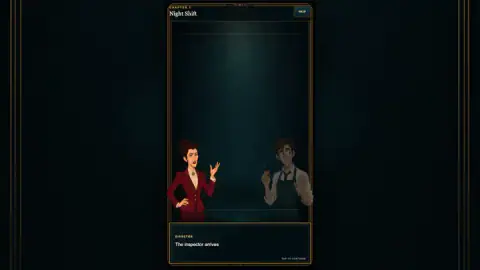
Chapter 1 is called Night Shift. A figure in a red coat catches the restorer looking at a painting he would rather not explain, and the dialogue does the setting-up: "Is that... the Mona Lisa without a face?" The official version arrives on the case card, where the museum cat fell off a ceiling beam and the damage is written down as a small jagged mark. The gap between that phrase and the hole on the canvas is the game's whole sense of humour.
The scenes are short, they always have a skip, and they do not get in the way of a retry. The platform's ad layer is more insistent: it appeared several times in our run, between the story and the case card and while the inspector was examining the work, each time announcing that the ad had been skipped and offering a button to carry on. That layer belongs to the distributor, not to the game.
Real restorers fill the hole and then make sure you can tell
The game's inspector wants a repair nobody can see. Real conservation asks for the opposite, and that contrast is the most interesting thing about the subject.
New paint added to a loss is called inpainting, and the guidance published by the American Institute for Conservation is blunt about the limits. It stays inside the damaged area: you fill the hole, you do not repaint the picture around it, and you do not use the chance to change what the work looks like. It should be as reversible as the materials allow, so the next conservator can take your work off again. And every effort should be made to keep it detectable by ordinary examination — if anything, by using pigments that are not the ones the artist used.
The colour matching is where the game and the real job line up. That same guidance has conservators put a blotter with a hole cut in it over the colour they are copying, so the surrounding paint cannot fool the eye, and then mix the match slightly lighter and cooler than its neighbours. The Pick color tool is that blotter, done instantly: it takes the exact value of one spot with nothing around it. What it cannot do is choose the spot, which is the part that actually takes judgement.
The scale of the damage is the joke. The worst thing to happen to the real painting in living memory, according to its Wikipedia article, was a stone thrown in December 1956: it broke the glass and knocked a speck of pigment off near the left elbow, and a restorer touched it up with watercolour. The face has suffered more from help than from harm — the article notes that an aggressive cleaning in 1809 took off part of the upper paint layer and left it looking washed out. The game hands you a face that is simply gone, and three minutes.
Who it is for, and what we did not see
It suits players who like spot-the-difference and colouring but want a target, a clock and a mark at the end. The whole thing is a tall panel in the middle of a dark gallery wall, framed in gold, shaped for a phone; on a desktop the sides stay black. Nothing in it is crude or violent — the villains are a cat and a careless restorer.
Be clear about how little of it we have seen. We never passed case one, so the comparison the listing promises after a successful restoration, the later paintings, the harder damage and the shorter clocks are all things we are taking on trust. We never pressed Recall or bought the two extra minutes, we never lowered the opacity slider, and we have not played it on a phone.
More painting and picture puzzles
If the comparison strip is the part you like, Pixel Differences is a straight spot-the-difference race against a shrinking bar. Art Master Puzzle fills a pencil sketch with coloured cut-outs and no clock at all. Hidden Paint 3D hides objects in a colourless scene, and Pixel Art - Color by Numbers is colouring with the matching already done for you. More of them are under puzzle games.
Screenshots
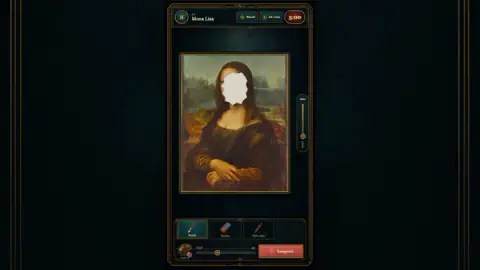
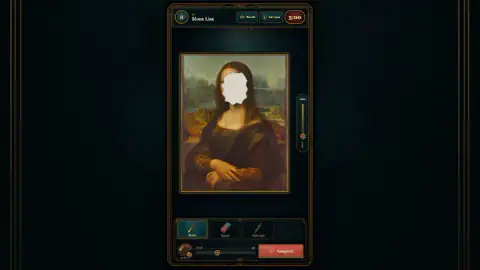
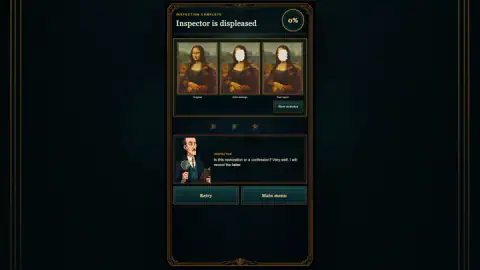
Taken by opening the game ourselves and letting it run — not supplied by the publisher, and not the same picture every other site shows.
How to play Masterpiece Unharmed
- Click through the opening scene, or jump it with SKIP in the top right corner. Each case starts with the museum staff arguing about the mess.
- Read the case card: the painting, its painter, what happened to it, and how long until the inspector arrives. Press Start restoration and the clock starts.
- Take a colour with Pick color, clicking an undamaged patch right next to the hole. Switch to Brush, set the width on the size slider, and paint the white area out.
- Clean up with Eraser, or step back with undo and redo. The opacity slider down the right-hand side of the canvas controls how solid your paint goes on; it starts at 100 %.
- Press Inspect before the countdown runs out — but only when the hole is actually covered, because that press ends the attempt.
What a failed case teaches you:
- Inspect means "I am finished". Nothing you do before it matters if you press it by reflex. A blank canvas is worth 0 % and no stars.
- The clock is real time. In an earlier sitting we watched it drop twenty-one seconds while we spent twenty-one choosing colours. Three minutes is shorter than it sounds.
- There is an escape valve. Beside the clock sits a button reading Ad +2min: two more minutes for an ad break. Next to it is Recall, which we left alone both times.
- Read the result screen before you retry. Show mistakes is the only thing in the game that explains the percentage. The three pictures tell you how far off you were; that button tells you where.
- Sample more than once. A face is not one colour. The forehead, the shadow under the chin and the dark veil over the hair each need their own pick.
Controls
| Left click on Brush, Eraser or Pick color | Chooses the tool; the one in use is lit |
|---|---|
| Click on the painting with Pick color | Samples a colour from the picture to paint with |
| Click or drag inside the white area with Brush | Lays paint; undo and redo sit next to the tools |
| Size slider beside the colour swatch | Sets how wide the brush paints |
| Opacity slider at the right of the canvas | How solid the paint goes on; it starts at 100 % |
| Ad +2min, beside the clock | Offers two more minutes in exchange for an ad break |
| Inspect | Hands the work in at once and ends the attempt; it does not look at the damage for you |
Features
- A short comic-strip story before each case, with a SKIP button if you only want to paint
- A case card naming the painting, its painter, what went wrong and the time until the inspector arrives
- The Mona Lisa, by Leonardo da Vinci, as case one, with a white hole where the face should be
- Three tools (brush, eraser, colour picker) plus undo, redo, a colour swatch, a size slider and an opacity slider
- A three-minute countdown that runs in real time, and a button that trades an ad for two more minutes
- An inspection screen that shows the original, the damage and your repair side by side, with a percentage and up to three stars
Game details
- Developer
- VeturGames
- Release date
- August 2026
- Last updated
- August 12, 2026
- Added here
- July 2026
- Technology
- HTML5
- Platforms
- Browser (desktop)
- Classification
- Puzzle
- Saved progress
- Saving, when available, is managed by this game. Mava cannot confirm your level.
FAQ
How do you play Masterpiece Unharmed?
Each case shows you a damaged famous painting and gives you three minutes before the inspector arrives. You pick a colour out of the picture itself, paint over the white damaged area with the brush, fix mistakes with the eraser or undo, and press Inspect to hand the work in. The inspector then scores the repair as a percentage and up to three stars.
What does the Inspect button do in Masterpiece Unharmed?
It submits your restoration straight away. It is not a way to examine the damage first. In our run we pressed it before painting anything, three attempts in a row, and each one ended at once with a score of 0 %.
What is the first painting in Masterpiece Unharmed?
Case one is the Mona Lisa, credited on the case card to Leonardo da Vinci. The story says the museum cat fell from a ceiling beam, and the card calls the result a small jagged mark, but on the canvas the whole face is a white hole.
How long do you have to restore a painting in Masterpiece Unharmed?
The first case gives you three minutes, shown as a countdown above the canvas. It runs in real time, so sampling colours costs you clock. Retry puts it back to 3:00, and a button marked Ad +2min offers two more minutes in exchange for an ad break.
How is Masterpiece Unharmed scored?
Press Inspect and the inspector examines the work behind a screen that tells you not to touch anything. Then the inspection screen puts the original, the damaged painting and your repair side by side, prints a percentage, fills in up to three stars and has the inspector pass comment. A blank canvas scores 0 % with no stars.
What does the Show mistakes button do?
It sits on the inspection screen, next to the three pictures of the painting, and it is the game's own explanation of where your repair went wrong. It is the one place that turns the percentage into something you can act on before you press Retry.
How many paintings are in Masterpiece Unharmed?
We only played case one, the Mona Lisa, in Chapter 1, Night Shift. The game's listing describes a series of famous paintings with harder damage and less time as you go, but we never passed the first case, so we cannot count them.
Who made Masterpiece Unharmed?
The game's listing credits VeturGames. It was published on 11 August 2026.