







About Gas Station 24: Simulator
Most station and shop games start you behind a counter, or in front of a menu with a buy button. Gas Station 24: Simulator starts you standing on a patch of open grass, a long walk from your own forecourt, with one line of text across the top of the screen: "Pick up fuel from the tanker truck".
That first order sets the tone. Before a single car is served, somebody has to fetch the fuel, and that somebody is you, on foot.
An honest note before the rules. We have been in twice and neither visit finished that opening errand. The shorter one got the fuel onto the attendant's back and carried it as far as the forecourt. The longer one, ten minutes of walking, never picked it up at all: the line at the top never changed, and the coins in the corner read the same 200 at the end as at the start. The gap between those two visits is the most useful thing we can tell you about this game, and it is the reason the advice below is so exact.
The game is credited to choclate games, spelled that way. It was published in September 2026.
The first order is a walk, and the pile is the target
The opening scene is small enough to describe in full. A grey tanker truck sits on the bend of the road. Behind it, a pile of red barrels lies loose on the tarmac, and a red arrow points down at them. That arrow is the game saying "here", and it is pointing at the barrels rather than at the vehicle named in the order.
That mismatch between the words and the arrow is the whole puzzle of the first minute. The order says truck; the fuel is on the ground behind it. Our first instinct, twice, was to walk to the cab and try the mouse, which is time spent on nothing.
When the pick-up does fire, it fires on contact and in silence. The attendant is suddenly carrying a stack taller than he is, and the order at the top is replaced by the next one. The stack does not slow him down or fall off: we crossed road, grass and forecourt with it still in place.
A red arrow does the job of a map
There is no minimap. What you get is that one arrow, and it works in two modes. While the target is on screen, it floats above it. Once you walk far enough that the target is out of frame, it slides to the edge of the screen on the side you need to head for, and sits there pointing outward.
In our long session that was the only thing keeping us oriented. For stretches of several minutes the screen was nothing but grass, bushes and a strip of road, with the arrow pinned to the bottom edge. Read it like a compass needle and the empty map stops being a problem; ignore it and you will walk in circles, which is a fair description of most of our ten minutes.
It also settles one question for you. On the forecourt there is a white dashed outline with Fuel pump written in red and a price below it, and it looks exactly like the place to drop the barrels. The arrow says otherwise: it pointed past that outline, not into it. The storage is somewhere further on. We take the outline for a spot where a pump can be bought, and we never tested that.
The station you have not earned yet
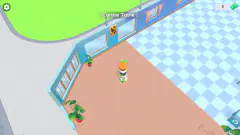
You can walk over to your own forecourt at any time, and it is worth doing once, because it shows you what the game is holding back. It is a grey apron with two pale platform strips, a pair of marked bays and one dashed outline with that price on it. Tidy, lit, and completely idle.
A white car stands on the approach road at the bottom of it. We saw it twice, about twenty-five seconds apart, in exactly the same spot, and it had not moved either time. Nothing on screen asked us to serve it: the order at the top still wanted the fuel. So if you are expecting a queue of customers in the first minutes, that is not what this opening is.
The rest of the screen is just as quiet. Money sits in the top left corner with a green plus beside it, the level bar in the middle reads Level 1, and a Fuel in storage meter sits in the top right with a red barrel icon. Across ten minutes none of the three visibly changed. Along the bottom there are six buttons: Tasks, Achievements, Personnel, Upgrades, Money and Settings. The names promise hired staff and paid improvements; we never opened one, so that is all we can honestly say about them.
What we did not see
The unloading, and therefore the storage itself. No car refuelled, no coin earned, no coin spent, no second level. The game's own description promises cars to serve, payments to collect and a business to expand, and none of it reached us in either visit.
No ad break appeared in ten minutes of play, which is worth knowing and is still too short a run to promise anything about later. The only sound we heard in the whole session was the one that played when we pressed the start button. Nothing here was tried on a phone, though the game is listed for Android and iOS.
Who it is for
It suits players who like management games where you do the chores yourself before anything runs on its own, and who do not mind a slow, quiet first five minutes. Nothing on screen hurries you: there is no timer, no customer shouting, no fail state that we could find.
If you want a station that earns from the first tap, this opening will test your patience. It is a walk with an errand, and the errand can stall completely if you stop a step short of the barrels. Knowing that before you start is worth more here than any tip about money.
More management games to try
Idle Supermarket Tycoon fits out a shop inside an empty mall, one fridge and one till at a time. Idle Airport Tycoon does the same with check-in counters and security gates, and Idle Hotel Empire Tycoon with rooms and furniture. For hands-on work behind a counter, Shop Cashier Simulator 3D has you scan the items and count out the change. The rest are in the clicker games category.
Screenshots
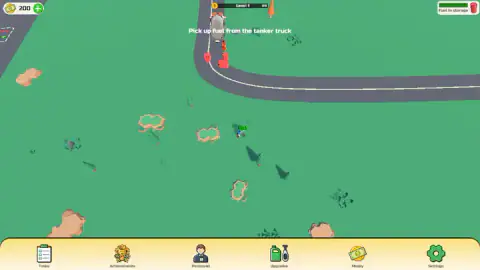
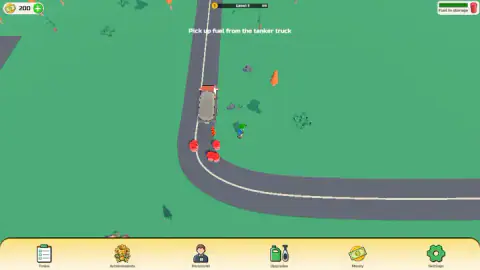
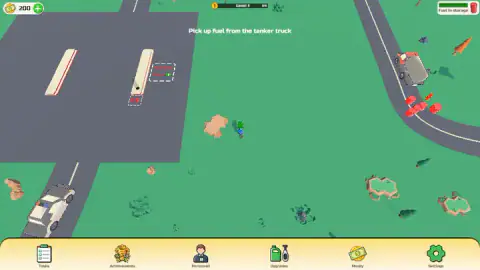
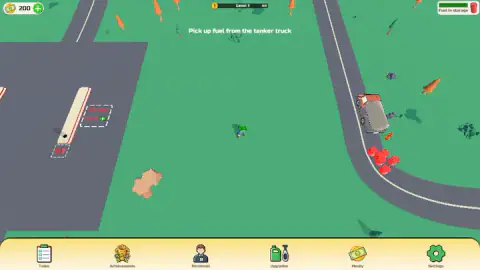
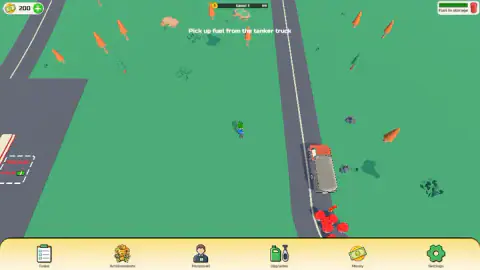
Taken by opening the game ourselves and letting it run — not supplied by the publisher, and not the same picture every other site shows.
How to play Gas Station 24: Simulator
- Press the purple Let's Play button on the title card. The map opens with the first order already written across the top.
- Walk with the arrow keys. The view is from above and the camera is locked on your attendant, so he stays in the middle of the screen and the world slides around him.
- Follow the red arrow to the grey tanker truck parked on a bend. The fuel is not in the cab. It is the loose pile of red barrels on the tarmac behind it, and the arrow hangs over the pile, not over the truck.
- Walk onto the barrels, not up to them. When it takes, the attendant straightens up with a stack of barrels on his back and the order changes to "Take the fuel to the storage and unload it here".
- Follow the arrow on to the grey forecourt and past it.
Tips from our two sessions:
- Beside the pile is not on the pile. This is where our long session went wrong. We stood on the grass a step from the truck, then on the road just below the barrels, with the arrow in plain view, and nothing happened for minutes on end.
- Nothing here is clicked. Clicks on the barrels, clicks on the truck from every angle, dragging the attendant with the mouse: none of it moved the game on, and none of it made a sound. If an order will not clear, it is your position that is wrong, not your mouse.
- Watch the line at the top, because nothing else tells you. When the pick-up did work for us, no window opened and nothing chimed. The text simply changed.
- Do not wander onto the open grass. It looks the same in every direction and swallows both landmarks at once. Twice we ended up on a bare field with no truck and no forecourt on screen, steering by the arrow alone.
- One trip does not empty the pile. Barrels were still lying on the road after we walked off with a stack.
Controls
| Arrow keys | Walk the attendant in four directions; the camera stays locked on him, so the map slides around him |
|---|---|
| Walk onto the barrels | Picks the fuel up as a stack, with no key to press. Standing beside the pile was not enough for us |
| Mouse | Clicks on the truck and on the barrels, and dragging the attendant, did nothing in either session |
| Bottom bar | Six buttons (Tasks, Achievements, Personnel, Upgrades, Money, Settings); we did not open them |
Features
- A top-down map of open grass, country roads and a grey forecourt, with one attendant you walk around yourself
- One written order at a time across the top of the screen, starting with "Pick up fuel from the tanker truck"
- Fuel arrives as a loose pile of red barrels on the road behind a tanker truck, and never from the cab
- A red arrow marks the target: it hangs over the pile, and slides to the edge of the screen once the target is out of view
- No minimap and no compass: the grass is wide enough to lose both the truck and the forecourt at once
- A forecourt with two marked bays, one of them a dashed outline labelled Fuel pump with a price under it
- 200 coins in hand and a Level 1 bar that neither moved in ten minutes of play
Game details
- Developer
- choclate games
- Release date
- September 2026
- Last updated
- September 4, 2026
- Added here
- August 2026
- Technology
- HTML5 (3D)
- Platforms
- Browser (desktop, keyboard), Browser (mobile & tablet)
- Classification
- 3D , Clicker , Simulation , Strategy
- Saved progress
- Saving, when available, is managed by this game. Mava cannot confirm your level.
FAQ
How do you play Gas Station 24 Simulator?
You walk a station attendant around a top-down map and follow the order written at the top of the screen. The first one sends you to a tanker truck to pick up fuel, and the next tells you to carry it to the storage and unload it. A red arrow shows where the current order wants you to go, and it is the only navigation aid the game gives you.
What are the controls of Gas Station 24 Simulator?
On a computer the arrow keys walk the attendant in four directions, and that is the whole control scheme we found. Clicking the truck or the barrels with the mouse did nothing in either of our sessions, and neither did dragging the attendant. The game is listed for Android and iOS too, but we only played with a keyboard.
How do you pick up fuel from the tanker truck in Gas Station 24 Simulator?
Do not stop at the cab. The fuel is the pile of red barrels lying on the road behind the truck, with a red arrow pointing down at it. Walk onto the pile rather than up to it. Standing a step away on the grass did nothing for us, and the order only changed once the attendant was on top of the barrels.
Why does the order in Gas Station 24 Simulator not change when I reach the truck?
Because reaching the truck is not the task. In our longer session we spent ten minutes around the truck, standing beside the cab and then on the road below the barrels and clicking both, and the line at the top still read "Pick up fuel from the tanker truck". Walking the attendant onto the barrel pile itself is what cleared it for us.
Where is the storage in Gas Station 24 Simulator?
Follow the red arrow at the edge of the screen. It led us to the grey forecourt and kept pointing further on, past a dashed outline marked Fuel pump, so that outline is not the storage. We never reached the unloading spot ourselves, so we cannot describe it.
Is Gas Station 24 Simulator free, and do you need to download it?
It is free and runs in the browser with nothing to install. We saw no ad break in about ten minutes of play, which is still too short a session to promise there are none later on.
Who made Gas Station 24 Simulator?
The game is credited to choclate games, spelled that way. It was published in September 2026.