









About Build a Skyscraper!
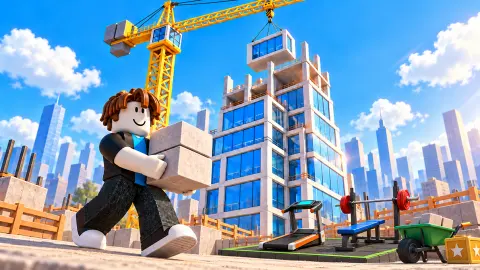
Most building games put you in charge. You pick the shape, you drop the pieces, you watch your tower rise. Build a Skyscraper! makes you a worker on someone else's site. The tower is already standing when you arrive, the plan is fixed, and your job is to walk to the depot, pick up blocks and carry them up to the floor being built. Over and over.
What turns that into a game is the bar at the top of the screen. It read FLOOR 7 / 43 · Office Tower when we joined, with a block count underneath that the whole crowd fills together: 3,532 blocks for the finished tower. Each block you place adds to it, and according to the game it also pays you. The money goes into upgrades, the upgrades let you carry more, and more blocks per trip means a faster climb up the Contribution ranking.
We have to be straight about our session. In about ten minutes on a computer, the tower climbed twelve floors while we carried nothing. Our Capacity stayed at 0/1, our money at $0 and our Contribution at zero from the first second to the last. Everything we learned came from watching the site run around us, and from what kept us out of it.
Build a Skyscraper! is by Superec Games, according to the game's listing, and it was published on 25 October 2026.
A tower nobody builds alone
The site keeps working whether you do or not. When we arrived, the bar read 882 blocks. Ten minutes later it read 2,372, twelve floors higher.
In that time the Contribution line went from #10 to #8, but the number in brackets, the blocks that were ours, stayed at 0. The rank moved without us doing anything.
That is worth knowing before you start. The tower is shared, so the floor number is not your score. Your own progress is the money, the diamonds, your Speed and Strength levels, and the count of Skyscrapers you have helped finish. All of ours read zero. A floor finishing while you stand at the depot pays you nothing.
The crowd around you is part of the show. Builders walk by with titles under their names, like Bricklayer or Newbie, and stacks of blocks over their heads. The chat scrolls with lines such as "anyone wanna team?" and "bench press op". We cannot say whether every one of them is a person. It is credited to one-player games, and some lines turned up word for word under two different names. What we can say is that the tower rose quickly with them, and not at all with us.
How real skyscrapers solved the same problem
The hard part of building tall was never the steel. It was getting materials to the right floor fast enough, which is exactly the loop this game is about.
The Empire State Building in New York went up in about 410 days, opening in 1931, and at its fastest the frame rose four and a half floors a week. There was no room to store anything on the street, so whatever was delivered had to go into the building that same day. Builders laid a small railway on the floors: carts carried bricks and other materials from storage to the material hoists, and more track on the upper floors took them where they were needed. As each floor was finished, the track was moved up.
Build a Skyscraper! is that system with a person in place of every cart. The depot is the storage, you are the rail car, the green path is the track and the ELEVATOR is the hoist. Capacity is the size of your cart. And just like on a real site, the floor only rises as fast as blocks reach it, which is why the upgrades are all about carrying more and moving faster, never about building better.
What the money and upgrades are for
We could not buy anything, so this part comes from what is on screen and from the game's own description, and we will keep the two apart.
On screen, down the left side, sit SKINS, REWARDS (with a red dot, which usually means something is waiting) and SHOP. On the right are UPGRADES and PETS, and a gear icon for settings. Around the site we saw a PET EGGS stall, a CRANE sign, a GYMS sign and a "10x Gym" marked Locked. The bottom bar shows your money and diamonds.
The game's description says placed blocks earn coins. It also says that treadmills train speed and the bench press trains strength, that strength lets you carry more blocks, and that bigger gyms unlock as you go. Pets hatched from eggs give boosts, there are quests and free gifts, and a Sky Spa sits on the roof. It adds that progress is saved by itself. We saw none of those in action.
Who Build a Skyscraper! is for
It suits players who enjoy idle-style games where numbers grow, and anyone who likes to have something ticking along while they chat. There is no timer, no enemy and no way to lose. The tower is big, bright and blocky, and easy to read for younger players.
It is not a building game in the creative sense. You never choose where a block goes or what the tower looks like. If you want to design and then defend your own structure, the same studio's Build and Defend your Base does that, and Build Car for Kill Zombies lets you put a vehicle together part by part. For pure number-growing, Superec Games also has Bird Game Clicker. More games with real depth on screen are in 3D games.
Screenshots
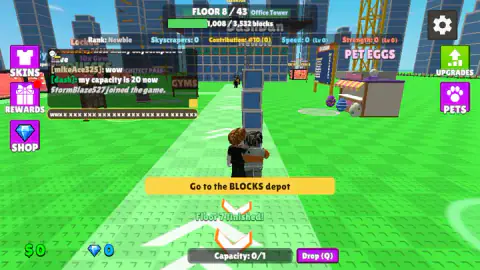
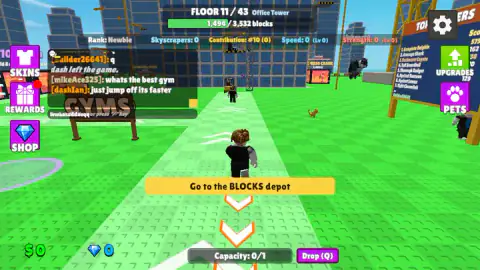
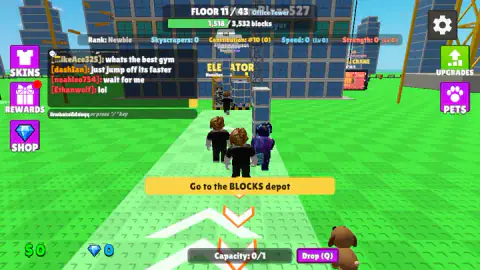
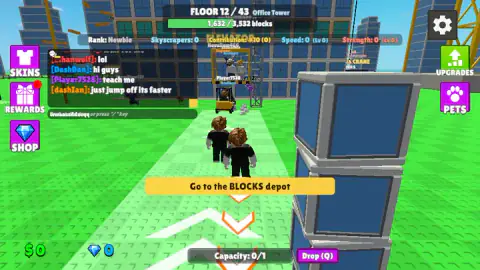
Taken by opening the game ourselves and letting it run — not supplied by the publisher, and not the same picture every other site shows.
How to play Build a Skyscraper!
- Follow the yellow banner. "Go to the BLOCKS depot" sits in the middle of the screen with orange arrows under it, and a green path with white chevrons leads the way.
- Pick up blocks. At the BLOCKS warehouse, hold E. The game's instructions say this fills your load up to your capacity. Others carry their blocks as a stack over their heads.
- Carry them to the tower. Walk back along the path with WASD and Space to jump. There is an ELEVATOR cage on the side of the building.
- Place them. Hold E in the green zone of the current floor. The bar at the top moves, and when a floor is done, a line like "Floor 7 finished!" appears under the banner.
- Spend and repeat. Use UPGRADES, PETS and the gyms to carry more and move faster, then go back for the next load.
Tips from our session:
- Click the world before you walk. The chat box in the top left takes keyboard input. Several of our movement keys ended up as a row of letters in the chat field instead of moving the builder. If your character will not move, that is the first thing to check.
- Read the stats line, not just the floor. Under the progress bar sit Rank, Skyscrapers, Contribution, Speed and Strength. Contribution is the only one that tells you how much of the floor is yours.
- The elevator is not the only way. The chat had complaints that it is slow, and the line we saw repeated most was "just jump off its faster".
- Drop (Q) is a real button. It throws away what you carry. Keep your finger off it on the walk back.
Controls
| W A S D | Walk (according to the game's instructions) |
|---|---|
| Space | Jump |
| Hold right mouse button | Look around |
| Hold E | Pick up blocks at the BLOCKS warehouse, then place them in the green zone of the floor being built |
| Q | Drop the load you are carrying (the Drop (Q) button does the same) |
| / | Open the chat box |
| Esc | Settings (the gear icon in the top right) |
Features
- One shared tower: a 43-floor Office Tower that needs 3,532 blocks, with a progress bar everyone fills together
- A loop of fetch and carry: blocks from the BLOCKS depot, along a green path with arrows, up to the current floor
- Your load is limited: you start with Capacity 0/1, and the upgrades are about carrying and moving more
- A Contribution ranking that shows where you stand among the builders on the current floor
- Speed and Strength stats with their own levels, a Rank title and a count of finished skyscrapers
- Skins, pets from a PET EGGS stall, a shop, rewards and an elevator up the side of the tower
- A chat box in the corner, with other named builders walking, carrying and talking around you
Game details
- Developer
- Superec Games
- Release date
- October 2026
- Last updated
- October 26, 2026
- Added here
- October 2026
- Technology
- HTML5 (WebGL 3D)
- Platforms
- Browser (desktop, keyboard & mouse), Browser (mobile & tablet, touch)
- Classification
- 3D , Arcade , Casual , Clicker , Simulation
- Download size
- 12.1 MB
- Ad requests
- 5 (some)
- Has a save
- Yes
- Saved progress
- Saving, when available, is managed by this game. Mava cannot confirm your level.
Measured by opening the game ourselves on 2026-09-11, not taken from the feed. Twelve seconds on a phone-sized screen, with ad requests counted and blocked rather than loaded.
FAQ
How do you play Build a Skyscraper!?
Walk to the BLOCKS depot, hold E to pick up blocks, carry them along the green path to the tower and hold E in the green zone of the current floor to place them. Every placed block counts towards the tower's progress bar. According to the game, placing blocks earns money for upgrades, so you can carry more on each trip.
How many floors does the skyscraper have in Build a Skyscraper!?
The tower we played, the Office Tower, has 43 floors and needs 3,532 blocks in total. The game's description says a new tower begins when one is finished. We joined it on floor 7 and left it on floor 19.
What does Capacity mean in Build a Skyscraper!?
Capacity is how many blocks you can carry at once. It starts at 0/1, so a new builder takes one block per trip. Other builders in the chat talked about a capacity of 20, and the game's description says training strength and buying upgrades are how you raise it.
Why is my keyboard typing in the chat in Build a Skyscraper!?
Because the chat box has the focus. In our session several of our W, A, S, D, E and Q presses ended up as letters in the chat field instead of moving the builder. Click on the game world before you use the movement keys, and press / only when you actually want to chat.
Does the tower keep growing if I do nothing in Build a Skyscraper!?
In our session, yes. The other builders took the Office Tower from floor 7 to floor 19 in about ten minutes while our own Contribution stayed at zero. Your money and upgrades only come from the blocks you place yourself, though.
Is Build a Skyscraper! multiplayer?
It looks like it. There is a chat, builders with names and titles walk around you, and messages say when someone joins or leaves. It is filed under one-player games, though, and some chat lines repeated word for word under different names, so we cannot confirm whether every builder is a real person.
Who made Build a Skyscraper!?
The developer is listed as Superec Games. Build a Skyscraper! was published on 25 October 2026 and is free to play in the browser.