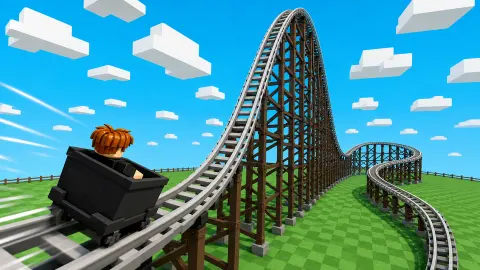




About Build a Rollercoaster: Simulator
A roller coaster game usually hands you the whole kit and asks what you can do with it. This one hands you 75 coins and an empty lawn. The cheapest piece of track costs 25, the shop holds ten of them, and when they are gone a clock tells you how long until more arrive.
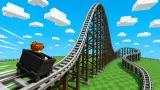
That is the idea behind Build a Rollercoaster: Simulator. It is a tycoon game before it is a building game. You are a block figure on a fenced plot of green studs. You walk to a market stall, buy track by the piece, walk back, lay it down, and the track starts earning coins that pay for the next piece.
It is by Square Dino LLC. It was published on 13 January 2026.
We should be plain about how much we saw. Our session lasted about four minutes and all of it was the tutorial. We went to the shop, bought track, entered build mode, laid track and reached the step that says "Summon a cart!". We did not get a cart onto the rails, so we have not seen a ride. This page covers the road to that point and marks the rest as untested.
The shop decides the pace
Open the block shop and the first thing you read is not a price. It is a countdown: "Restocks in: 04 minutes 16 seconds" when we looked.
Under it sat three pieces, all marked Common:
- Direct route, a straight piece: 25 coins or 3 diamonds, ten in stock.
- Turn 90, a corner: 50 coins or 5 diamonds, five in stock.
- Bumper route: 250 coins or 15 diamonds, five in stock.
So there are two limits on what you can build, and money is only one of them. Even with a full wallet, the shop sells a fixed number of each piece and then makes you wait. A green Restock button with a film icon sits next to the timer. We did not press it.
The game's own description talks about rare tracks. We saw only Common ones, and we did not scroll the list, so we cannot tell you how many pieces there are in total or what the rarer ones cost.
Diamonds are the second currency. Our counter read 0 from start to finish, and we did not learn how they are earned.
Track pays before a cart ever runs
This was the part we did not expect. As soon as our first track was down, a small yellow tally appeared in the air above it with the label 1/s. A quarter of a minute later it had gone from 20 to 33.
Our wallet in the corner stayed at 25 the whole time. Our reading is that the track produces coins by the second and holds them until you collect. A wooden sign marked Income stands at the edge of the plot. We did not test it, so we will not tell you that is where the collecting happens.
If that reading is right, the game rewards length. The description says as much: it asks for the longest coaster you can make. One coin per second from a short starting stretch is slow money next to a 250-coin piece, which is why the cheap straight piece and its stock of ten matter at the start.
Where we got stuck: "Summon a cart!"
The last banner we saw asked us to summon a cart, with arrows pointing at the grey pedestal and its red button. We clicked the pedestal five times. Nothing happened and the banner stayed.
Looking back at the session, we think we know why. The pedestal has a lit square on the ground beside it, the same kind of square that stands in front of the shop. The shop gave us nothing until we stood on its square. We clicked the pedestal from a few steps away and never walked onto its square.
That is a deduction and not something we confirmed. If the red button ignores you, step onto the square first and look for a button to appear.
It also means we cannot describe the ride. The description says you travel along your own track. We did not see it.
A real coaster has no engine either
A cart that is "summoned" at a station and sent down the rails is closer to the real thing than it sounds. The train on a real roller coaster has no motor. It is pulled up the first hill by a chain or cable and let go. The height it gained on the way up is the only fuel it has for the rest of the lap, traded for speed on each drop and bought back, a little less each time, on each rise.
The idea is old. According to Wikipedia's history of the ride, the ancestors were hills of ice built in Saint Petersburg in the 17th century, some 70 to 80 feet tall.
Wheels came later. In 1817 two rides in Paris put them on the cars and locked the cars to a track.
The American branch began with freight. A mining company in Pennsylvania built a downhill gravity railway in 1827 to deliver coal, and by the 1850s it had become a tourist attraction.
In 1884 LaMarcus Adna Thompson opened a purpose-built ride at Coney Island. Passengers climbed to a platform and rode a bench-like car down 600 feet of track.
Every one of those rides was a length of track and a car that gravity did the work for. The game starts you at the same point, with a platform, a short straight and a cart to call, and lets the track itself pay for the next piece.
Who it suits
Players who like a slow build and a number that grows while they plan the next purchase. The tutorial holds your hand step by step, which helps younger players and will test the patience of anyone who wants to start laying loops at once. If you want to design a wild coaster in the first five minutes, this is not that game: the opening is a short straight piece and a wait.
There is an AD button on the right edge, and once a notice reading "1 sec to AD" crossed the middle of the screen while we were walking.
More from Square Dino and more to build
The same studio made Build an Aquapark, which swaps the rails for water slides, and Escape Waves for Lucky Blocks, where the base you build has to survive what the sea throws at it. Its Scary Rooms: Idle Horror is another park you run for income. For a business that grows without any walking, try Idle Airport Tycoon, and for rails without the shop, Train Master. The rest are under strategy games.
Screenshots
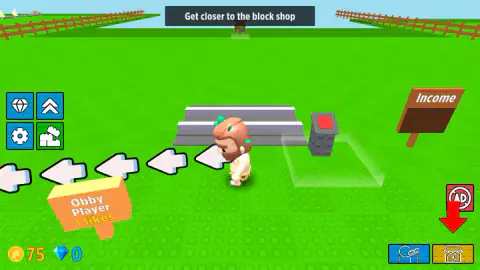
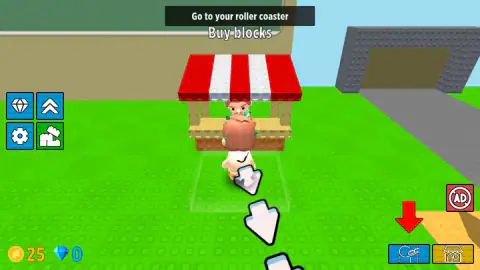
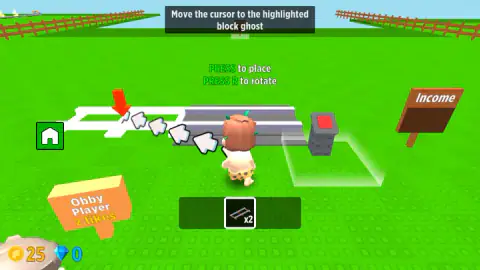
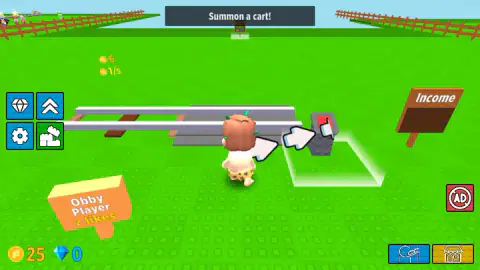
Taken by opening the game ourselves and letting it run — not supplied by the publisher, and not the same picture every other site shows.
How to play Build a Rollercoaster: Simulator
- Follow the banner. A dark strip at the top of the screen always names the current step, and white arrows on the ground point the way. The first step reads "Get closer to the block shop".
- Open the shop. Stand on the lit square in front of the stall with the red-and-white awning. A green Open button appears; click it or press E.
- Buy track. The shop is a list. Each row has a piece, its stock, a price in coins and a price in diamonds. We bought the straight piece, Direct route, then closed the window with the X.
- Go back and build. On your plot, press the brick button in the left column. The screen clears, your pieces appear in a bar at the bottom, and a white outline shows where the selected piece can go. Move the cursor onto the outline and click.
- Leave build mode and call a cart. The green home button returns you to the normal view. The banner then sends you to a grey pedestal with a red button beside the platform.
What our session taught us:
- Use the two buttons in the bottom right corner. We spent half a minute walking across the lawn after the arrows and never reached the stall. One click on the yellow shop button put us in front of it. The blue coaster button took us home the same way. During the tutorial a red arrow hangs over the one you need.
- The banner is not a button. We clicked it several times. It is only text.
- The square matters. The Open button did not exist until the figure stood on the lit square. Clicking the stall from outside it did nothing.
- Count before you buy. We spent 50 of our 75 coins on two straight pieces. The corner piece costs 50 on its own, so the opening budget does not stretch to both.
- Read the prompt bar, not your speakers. The only sound in our session came as the game opened.
Controls
| W or the arrow keys | Walk the block figure around the lawn |
|---|---|
| Yellow shop button (bottom right) | Took us straight to the block shop |
| Blue coaster button (bottom right) | Took us back to our own plot |
| Open button, or E, on the lit square in front of the stall | Opens the block shop; it only appears while you stand on the square |
| Brick button (left column) | Enters build mode; a green home button in the same place leaves it |
| Mouse in build mode | Move the cursor onto the white outline and click to lay the selected piece |
| R in build mode | Rotates the piece according to the on-screen prompt; not tried by us |
Features
- A plot of green lawn of your own, with a station platform and a red-button pedestal that calls the cart
- A block shop with limited stock that refills on a timer; ours read a little over four minutes
- Three track pieces on the first screen of the shop, priced from 25 to 250 coins, each also sold for diamonds
- A build mode that shows a white outline where the next piece can go
- Income that ticks up over the track once a piece is laid; ours read 1 coin per second
- A step-by-step tutorial with a banner at the top and arrows painted on the ground
- Made by Square Dino LLC
Game details
- Developer
- Square Dino LLC
- Release date
- January 2026
- Last updated
- August 12, 2026
- Added here
- November 2025
- Technology
- HTML5 (WebGL)
- Platforms
- Browser (desktop, keyboard and mouse), Browser (mobile & tablet)
- Classification
- Simulation , Strategy
- Download size
- 12.9 MB
- Ad requests
- 2 (few)
- Has a save
- Yes
- Saved progress
- Saving, when available, is managed by this game. Mava cannot confirm your level.
Measured by opening the game ourselves on 2026-09-11, not taken from the feed. Twelve seconds on a phone-sized screen, with ad requests counted and blocked rather than loaded.
FAQ
How do you play Build a Rollercoaster: Simulator?
You start with 75 coins on an empty lawn. Go to the block shop, buy track pieces, return to your plot, press the brick button to enter build mode and click the white outline to lay each piece. Then you call a cart at the red-button pedestal. In our session we got as far as the cart step and did not see a full ride.
How do you open the block shop in Build a Rollercoaster: Simulator?
Stand on the lit square in front of the stall with the red-and-white awning. A green Open button appears only while you are on that square; click it or press E. The banner at the top of the screen is just text and cannot be clicked. The yellow shop button in the bottom right corner took us to the stall faster than walking.
How much do tracks cost in Build a Rollercoaster: Simulator?
On the first screen of the shop we saw three pieces: Direct route for 25 coins, Turn 90 for 50 and Bumper route for 250. Each also has a price in diamonds. All three were marked Common. The game's description mentions rarer tracks, which we did not see.
What does "Restocks in" mean in the block shop?
Each piece has a limited stock, 10 of the straight piece and 5 of the other two when we looked, and a timer at the top counts down to the next refill. Ours showed a little over four minutes. Beside it there is a Restock button with a film icon, which we did not press.
How do you earn coins in Build a Rollercoaster: Simulator?
Once our first track was down, a small tally appeared over it and climbed by one coin per second. Our wallet did not change while it rose, so our reading is that the income has to be collected. We did not find out where, and we did not see what a ride with a cart pays.
Why does nothing happen when I click the red button to summon a cart?
It did nothing for us either when we clicked it from a few steps away. The shop works only when you stand on its lit square, and the pedestal has the same square beside it, so our advice is to walk onto the square first. That is a deduction: we ran out of session before testing it.
Who made Build a Rollercoaster: Simulator?
It is by Square Dino LLC, the studio behind Build an Aquapark and Escape Waves for Lucky Blocks. It was published on 13 January 2026.
Can you play Build a Rollercoaster: Simulator on a phone?
It is listed for PC, Android and iOS. We played on a computer with keyboard and mouse and did not test a phone ourselves, so we cannot tell you how build mode handles on a small screen.