






About +1 Skipping Stone Throw
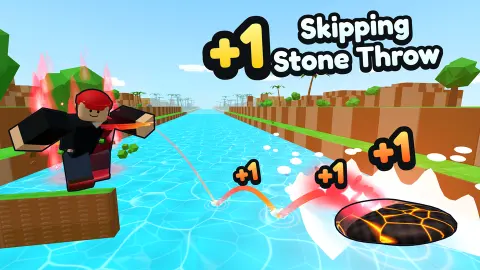
Most stone-skipping games are about the flick: an angle, a power bar, a release you get right or wrong. +1 Skipping Stone Throw takes the flick away from you. Your character stands on a yellow slab at the edge of a canal, the stone goes, and the only real question is how much Skill you had when it left your hand.
That makes it a different kind of game from the name. It is a growth loop in a 3D park built from blocks, close in spirit to the +1 games where every action adds one to a counter. Here the action is a throw, and the counter is a pile of trophies the game calls Wins. One throw, one Win; that is the +1 in the title.
Flagwin Studio put the game on 26 October 2026. We played it two days later for ten minutes on a computer, got through the first tutorial goal and made nine throws, so what follows is the opening hour seen up close, not the late game.
One Win per throw, and the arithmetic behind it
The game runs on two numbers, and they do different jobs.
Skill is your strength. At the starting x1 multiplier, each of our throws added exactly 4.2 Skill, and the bar under your character rolls over to a new level every 10. The first tutorial goal, Get 30 Skill, fell on our eighth throw, and we finished three levels up from where we began.
Wins are the money. The trophy counter on the left went up by one on every throw we made, from nothing to nine. Wins are what the stones, pet eggs, trails and skins in the shop are bought with.
Then there is the portal near the spawn. It is labelled World 2, and the sign under it says Throw with 100M Skill. At 4.2 a throw that is tens of millions of throws, which tells you plainly how the game is built: the steady part is only the start, and the Multiplier next to your Skill, the stones, the pets and the Rebirth button are what make the numbers climb.
The Rebirth button carries a percentage that rose from 5% to 20% while we played. We did not press it, so we cannot tell you what a rebirth resets or what it gives back.
Where our stones sank
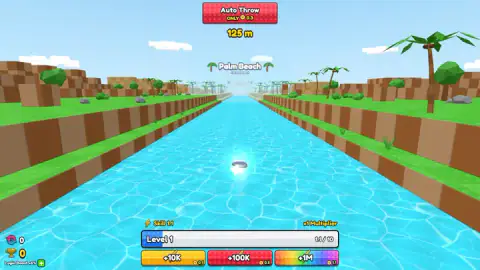
Every throw starts the same way, with a long straight canal, grassy banks cut in steps, and palm trees. A distance counter runs at the top of the screen while the stone skips away from you.
Our first throw sank at 217 metres and our best went to 271. In between, the splashes crept up a few metres at a time. Nine times as much Skill bought about a quarter more distance, so early on Skill matters more for what it adds to your total than for how far it sends the stone.
Each splash happened under a big sign reading Palm Beach. Beneath it, in smaller letters, the next stretch is named: Cactus Desert. The game says each coloured zone of the river pays its own Wins, so the first real goal of a long session is to land a stone past that sign. We never did.
The game also promises rare throws that trigger a special scene and multiply your Wins: a Secret Throw at 1 in 100, a Colossus Throw at 1 in 1,000 and a Void Throw at 1 in 10,000. None turned up in our nine throws, which is what those odds would predict.
What the real thing teaches about a skipping stone
The game turns skipping into a number, but the real skill is one of the better-studied bits of playground physics. In 2004 a team led by Christophe Clanet in Marseille launched thin discs at water with a machine and reported in Nature that the best angle between the stone and the water is about 20 degrees. Tilt it much more or much less and the stone digs in early.
Spin is the other half. A stone thrown flat with a hard flick of the wrist keeps its tilt from one bounce to the next, the way a spinning top stays upright. Without spin it wobbles, catches an edge and sinks.
The Guinness record for skips is 88, set by Kurt Steiner in Pennsylvania in 2013. That is the thing the game skips over: in the real world, the angle and the spin are the whole sport. Here they are handed to you, and Skill stands in for years of practice on a riverbank. Next time you are near flat water, try a real stone held nearly flat with a spin of the wrist, and you will feel how much the game is doing for you.
The park around the pad
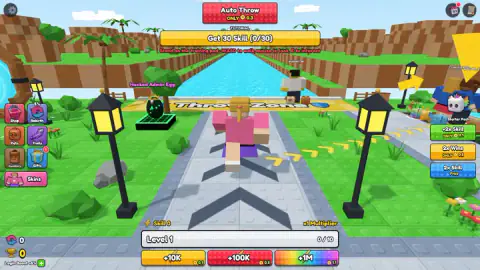
The spawn is busy. A green-shirted character next to the path says his first throw barely reached the water and points you to the start. To the right there is a Free Chest to claim, a Starter Pack and a pet egg on a stand. A button column on the left opens Shop, Rebirth, Pets, Trails, Inventory, Gifts and Skins.
Other characters with names over their heads walk around and use the same Throw Zone, many with small pets trotting behind them. Lines in the top-left corner report someone leaving the game or hatching a Brook Otter. The game presents them as other players; we did not deal with any of them.
Most of the remaining screen is shop. Auto Throw sits at the top, Skill and Win doublers on the right, and three bundles of Skill under the level bar, each priced in a currency marked with a small yellow coin. A "Login Boost +5%" label sits under the counters, and the card asking you to log in to save your progress came up three times in ten minutes. None of it stops you playing, but young players should know those buttons are purchases.
Our ten minutes, and what is still ahead
We played one session on a computer with keyboard and mouse. We picked Ponytail, closed the login card each time it came up, finished Get 30 Skill and saw the next goal, Equip a new stone, with the hint to buy one on a pedestal. That is where we stopped: Level 4, nine Wins, a best throw of 271 metres.
We never bought or equipped a stone, hatched an egg, claimed the chest, rebirthed, or reached Cactus Desert or World 2. The game is listed for phones and tablets with a joystick and on-screen buttons, but we did not try it on a touch screen.
Who it suits
It suits players who like watching a number climb and a camera chase a stone down a river, and younger players who want something to do with one key and no way to lose. If you want to aim and flick the stone yourself, this is not that game.
The same counting loop runs through +1 Grass Cutting: Become Stronger and +1 Pickaxe: Break Blocks 3D. For a throw-and-wait game with more control over the cast, try Tiny Fishing. More growth loops are in our clicker games.
Screenshots
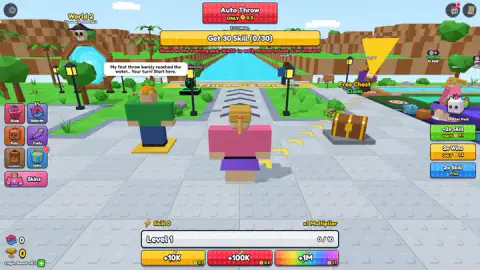
Taken by opening the game ourselves and letting it run — not supplied by the publisher, and not the same picture every other site shows.
How to play +1 Skipping Stone Throw
- Pick a character. The first screen offers six, three under Boys and three under Girls, and notes that more live in the Skins menu.
- Close the login card if it appears. The X in its top-right corner works, and you can play without an account.
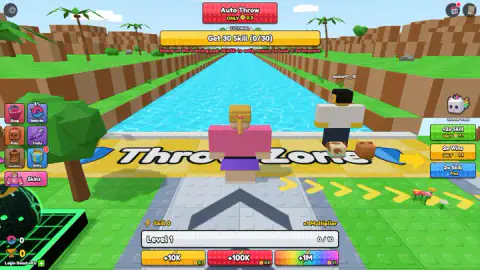
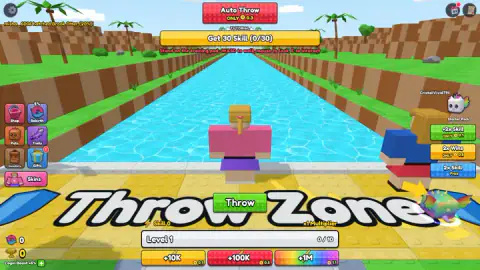
- Walk straight ahead with W. Past the street lamps the grey path ends at a yellow pad with Throw Zone written across it, right at the water.
- Stand on the pad and throw. A green Throw button sits on the pad under you, and the game lists E as the throw key. The camera rides along with the stone to the splash, then cuts back to you.
- Watch the bottom bar. Skill fills a level bar every 10 points, and the trophy counter on the left gains one Win per throw.
Tips from our session
- The pad is the yellow slab, not the targets. Red-and-white rings sit by the pools on the right of the spawn, and the tutorial's "Stand on the training pad" points at neither of them clearly. We lost our first few minutes on the path with Skill stuck at 0.
- Skill only moves when a stone flies. Walking around, pressing E at nothing or clicking the scenery gave us nothing at all.
- Do not judge your Skill by the distance. Our ninth throw went only about fifty metres further than our first.
- Mind the buttons on the edges of the screen. The coloured offers on the right and the bottom are purchases. One stray click got us "Purchase failed, please try again"; nothing was charged, but it is easy to hit one by accident.
Controls
| W A S D | Walk; the game's tutorial line says "WASD to walk" |
|---|---|
| Mouse | Look around |
| E | Interact, and throw, according to the game's own instructions |
| Green Throw button | Appears on the Throw Zone pad under your character |
| Space / T | Jump, and auto-hatch at an egg, according to the game's instructions; we did not use them |
Features
- Six characters to start with, three under Boys and three under Girls, and more in the Skins menu
- A yellow Throw Zone pad at the edge of a straight canal; the camera follows the stone to the splash
- Every throw we made added 4.2 Skill at the x1 multiplier and one Win to the trophy counter
- A level bar that fills every 10 Skill
- Named river zones: our stones always sank near the Palm Beach sign, with Cactus Desert written as the next one
- A portal to World 2 that asks for 100M Skill
- A guided tutorial: Get 30 Skill first, then Equip a new stone
Game details
- Developer
- Flagwin Studio
- Release date
- October 2026
- Last updated
- October 27, 2026
- Added here
- October 2026
- Technology
- HTML5 (3D)
- Platforms
- Browser (desktop, keyboard & mouse), Browser (mobile & tablet, touch)
- Classification
- 3D , Arcade , Clicker , Multiplayer , Simulation
- Saved progress
- Saving, when available, is managed by this game. Mava cannot confirm your level.
FAQ
How do you play +1 Skipping Stone Throw?
Walk your character down the paved path to the yellow Throw Zone at the edge of the canal and throw from there. The camera follows the stone as it skips down the water, and when it sinks you get Skill and one Win. Skill makes later throws stronger, and Wins are what the shop runs on.
What does the +1 mean in +1 Skipping Stone Throw?
It is the reward for a throw. Each of our throws put a small +1 and a trophy above the character and raised the trophy counter by one Win. In our session the count went from 0 to 9 in nine throws.
How do you get Skill fast in +1 Skipping Stone Throw?
Stand in the Throw Zone and keep throwing: at the starting x1 multiplier each of our throws added 4.2 Skill. Skill did nothing while we wandered on the path. The game also sells Skill boosts and a 2x Skill offer, which we did not use.
How far can the stone go in +1 Skipping Stone Throw?
Our best throw reached 271 metres, our first 217. The distance grew slowly as Skill went up from 0 to about 38, and every stone sank near a sign reading Palm Beach. The next zone, Cactus Desert, is named under that sign, but we never got there.
How do you finish the tutorial in +1 Skipping Stone Throw?
The first goal is Get 30 Skill, which took us eight throws from the Throw Zone. The next goal is Equip a new stone, with the hint to buy a stone on a pedestal. We stopped there, so we cannot say what comes after.
Do you need to log in to play +1 Skipping Stone Throw?
No. A card asking you to log in to save your progress, with Google, Microsoft and Apple buttons, appeared three times in ten minutes, and each time the X in its corner closed it and play went on. Without signing in we cannot promise your Wins will be there next time.
How do you get to World 2 in +1 Skipping Stone Throw?
The portal near the start says Throw with 100M Skill. We ended our session with under 40 Skill, so World 2 is far beyond a first visit, and the game's rebirths, pets and multipliers are clearly meant to close that gap.
Is +1 Skipping Stone Throw multiplayer?
Other named characters walk around the park and the Throw Zone, many followed by pets, and lines such as someone leaving the game or hatching a pet appear in the corner. We did not play with or against anyone, so treat it as a shared space rather than a match.