





About Weaponsmith Evolution - Weapon Merge
Most merge games are content to be a board. You push two things together, a better thing appears, a number in the corner goes up, and the only way to lose is to run out of room. Weaponsmith Evolution - Weapon Merge keeps that board, and then puts a door at the bottom of it with a monster behind the door.
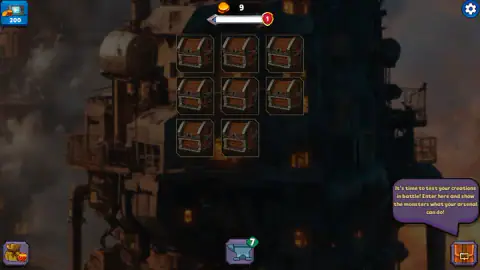
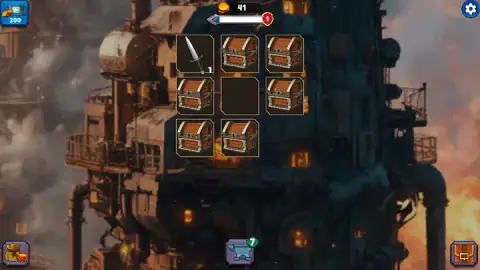
The board is a forge: nine squares stacked three by three, hanging over a soot-black industrial tower with chimneys burning orange behind it. Almost every square starts with a closed treasure chest on it. Chests become weapons, and the one thing you can do with a weapon is drag it onto an identical weapon, at which point both disappear and one weapon a level higher takes their place. Our first pair of plain daggers became an emerald one with a 2 stamped in its corner.
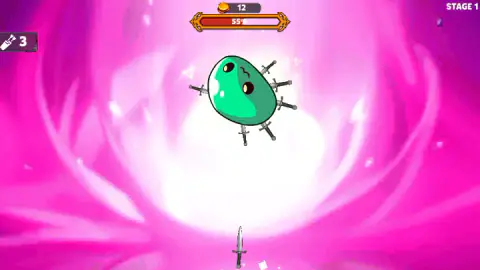
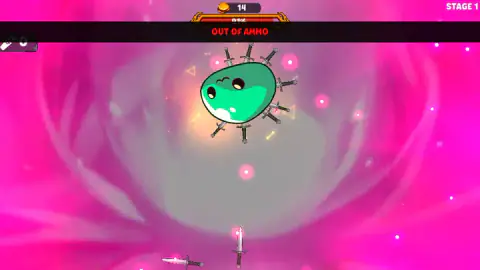
Then there is the other half, and it is where the game actually happens. A tutorial bubble points at the button in the bottom-right corner — "It's time to test your creations in battle! Enter here and show the monsters what your arsenal can do!" — and behind it is a loadout screen, and behind that is a round green slime floating in the middle of a hot pink background with STAGE 1 written in the corner. Daggers appear one at a time at the bottom of the screen. You throw them. A counter in the top-left corner goes down by one each time.
We went in with a level-1 dagger. The bar above the slime read 55 per cent, then it read 94, and then the counter hit zero and a red OUT OF AMMO banner fell across the screen with the slime still alive and bristling with blades. That is the shape of this game: the fight is not a test of reflexes, it is an audit of what you built upstairs.
The game is credited to Ermac Alex.
This one went up in February 2025, was last updated a year and a half later.
Here is what this page is built on. One sitting of about four minutes at a desktop with a mouse: through the opening tutorial, onto the forge board, one pair merged, one weapon card opened and read line by line, one trip into STAGE 1, and one loss. We never won a stage, never met a boss, never opened the shop, and never played it on a phone. Everything below either happened on our screen or is marked as something we could not check.
Nine squares, and the arithmetic that fills them
Merging is doubling, and doubling is brutal on a small board. Two level-1 daggers make a level-2. Four make a level-3. Eight make a level-4. Sixteen make a level-5.
Now look at the board again: nine squares. A level-4 weapon needs eight level-1 weapons on screen at the same time, which is the whole forge but for one square. A level-5 is simply impossible to assemble in one pass — you have to build the halves, keep them, and work around them.
This is why The board is full is the message you will see most, and why it stops being an annoyance and starts being the puzzle. Every merge gives you a square back. Every chest that ripens into a weapon takes one away. At its tidiest our board held one level-1 dagger, one level-2 dagger and seven chests, which is nine squares with nothing spare. The moment nothing matched anything, the game sat there waiting for a move we did not have.
It also explains the SELL button, which looks like a mistake until you understand the counting. In a merge game with a generous board, selling is for players who have run the numbers. Here it is basic housekeeping, and a developer reading this will recognise the trade: a smaller board turns a relaxing merge loop into a resource-management one without adding a single rule.
The fight is decided before you walk into it
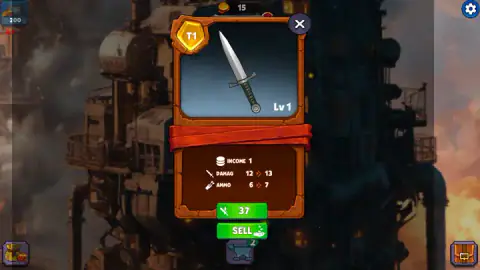
Three numbers ride on every weapon card, and the fight only reads two of them. Damage is what one throw takes off the monster. Ammo is how many throws you get. There is no dodge, no block, no second weapon mid-fight and no way to retreat and come back better armed. You bring a number of shots and a number per shot, you multiply, and if the product is smaller than the monster you lose — and you find out at the far end of a bar that was almost full.
That inverts the usual merge-game failure. In the games this one is descended from, you lose when the board jams. Here a jammed board is an inconvenience you can sell your way out of, and the real loss happens on a screen where you have no decisions left to make. Which means the fight is a scoreboard for the forge, and the forge is the game.
An upgrade buys one point of damage and one more throw
The one upgrade price we saw up close was 37, on a tier-one dagger at level 1.
It offered one more point of damage — 12 becoming 13 — and one more throw in the bag. One point of each, for a price that is a good slice of a session's earnings.
Set that beside merging, which takes two level-1 daggers and hands back a level-2 outright, and the hierarchy is obvious: merging is the fast lane and the upgrade button is the slow one, for when you have the coins and nothing on the board that matches anything else.
The third number is where the coins come from. Each weapon's card lists an income figure — ours was 1 — and the coin counter at the top of the forge did climb steadily while we were busy fumbling drags, from single digits up past forty. A weapon sitting idle on the board is not dead weight taking up a square; it is the thing paying for your next upgrade. The counter in the top-left corner is a different one, it never moved off 200 the whole time, and it carries a small video badge, which we left alone.
One more thing we could not pin down: a small green number rides on the anvil button at the bottom of the board and will not sit still. It dropped to two and was back at seven a moment later. We never worked out what it counts, and we would rather say so than guess.
More puzzles on Mava Games
If it is the board-management half you came for, Sand Blocks and Block Crush are the same squeeze without the monster — grids that punish you for the piece you placed three moves ago. If it is the think-first half, Hero Rescue Puzzle and Pull Him Out Online both hand you one irreversible move at a time and let you live with it, which is exactly what walking into STAGE 1 with six daggers feels like. The rest are in puzzle games.
Screenshots
How to play Weaponsmith Evolution - Weapon Merge
- Drag, do not click. Clicking a chest did nothing for us, and clicking a weapon opens its card rather than moving it. The only move that changes the board is picking a weapon up and dropping it somewhere else.
- Drop it on something identical. Two level-1 daggers make a level-2 dagger. Dropping a weapon on a chest, on an empty square or on the background just puts it down again.
- Open the card before you commit. A click on a weapon brings up a panel with its tier badge, its level, its three numbers, an upgrade price and a SELL button.
- Take the bottom-right button when you have something to fight with, and press FIGHT on the loadout screen that follows.
- In the fight, drag the dagger at the bottom into the monster, and keep an eye on the ammo counter in the top-left corner rather than on the monster.
What the session taught us:
- The keyboard is not connected to anything. We tried the arrow keys, Enter and letters. The board never moved. This is a mouse game that happens to be running in a desktop window.
- The drop has to land square. A drag that finishes a few pixels off the target square leaves both weapons exactly where they were, with no feedback to tell you why. We lost most of a session to near misses before we started aiming at the middle of the destination.
- SELL is not an admission of defeat. It is on every weapon's card, and it is the only tool the game gives you for clearing a square you need back.
- Do not take a level-1 weapon into the first fight. Six throws is not enough, and you will find that out at ninety-odd per cent.
- You can afford to wait. The coin counter climbs while you do nothing, which is unusual in a merge game and is the reason the next section matters.
Controls
| Left mouse button, dragging | Picks a weapon up and drops it on another square; dropped on an identical weapon, the two become one weapon a level higher |
|---|---|
| Left mouse button, dragging (in a fight) | Throws the dagger waiting at the bottom of the screen at the monster |
| Left mouse button, clicking | Opens a weapon's card, with its three numbers, its upgrade price and the SELL button |
| Keyboard | Nothing we could find. Arrow keys, Enter and letter keys all left the board exactly as it was |
Features
- A nine-square forge board, and almost every square starts with a closed chest sitting on it
- One verb: drag a weapon onto a matching weapon and get one weapon a level higher
- Every weapon carries three numbers — income, damage and ammo — and the fight only cares about the last two
- Our level-1 dagger went into STAGE 1 with six shots and came out with none: the red OUT OF AMMO banner is how you lose
- An upgrade priced at 37 offers that dagger one more point of damage and one more shot: 12 becomes 13, and 6 becomes 7
- The coin counter climbs on its own, because every weapon left on the board has an income value
- Credited to Ermac Alex
Game details
- Developer
- Ermac Alex
- Release date
- February 2025
- Last updated
- August 10, 2026
- Added here
- April 2025
- Technology
- HTML5 (2D)
- Platforms
- Browser (desktop, mouse), Browser (mobile & tablet, touch)
- Saved progress
- Saving, when available, is managed by this game. Mava cannot confirm your level.
FAQ
How do you play Weaponsmith Evolution - Weapon Merge?
You drag one weapon on top of an identical one and the pair becomes a single weapon a level higher. That happens on a board of nine squares, most of which start out holding closed chests. When you have something worth carrying, you take it through the button in the bottom-right corner into a fight, and throw it at a monster until either the monster dies or your ammo runs out.
Why does Weaponsmith Evolution keep saying the board is full?
Because merging is subtraction. Two weapons go in and one comes out, so every merge frees a square, while every chest that turns into a weapon takes one. With only nine squares there is very little slack, and the moment nothing on the board matches anything else, you are stuck. The way out is the SELL button on a weapon's card, which clears the square it was sitting in.
What does OUT OF AMMO mean in Weaponsmith Evolution?
It means the fight is over and you did not win it. Each weapon carries a fixed number of shots, shown on its card as ammo and counted down in the top-left corner during the fight. When that counter reaches zero a red OUT OF AMMO banner drops across the screen. In our fight it arrived with the monster's bar in the nineties and the monster still standing.
What do the three numbers on a weapon card mean?
Income, damage and ammo. Damage is how much a single throw takes off the monster, ammo is how many throws you get before the fight ends, and income is what that weapon earns you while it sits on the board. The dagger we opened showed income 1, damage 12 and ammo 6.
Is it better to upgrade a weapon or to merge two?
Merge, whenever you can. The upgrade button on our level-1 dagger was priced at 37 and offered exactly one point of damage and one extra shot. Merging two level-1 daggers produced a level-2 weapon outright. The upgrade button is the slow lane, for when you have the coins but nothing on the board to pair up.
Does Weaponsmith Evolution - Weapon Merge have ads?
Yes, between screens rather than during play. More than once a dark panel came up reading "We skipped the ad this time - enjoy the game!" with a Continue playing button under it, which is the portal telling you it let you off that round. There is also a counter in the top-left corner with a small video badge in its corner, which we did not press, so we cannot tell you what it pays out.
How many stages does Weaponsmith Evolution have?
We cannot tell you. The one we reached was labelled STAGE 1 and we lost it, so everything past it is a gap in this page. What the board does make clear is that the stages are meant to be climbed slowly: the weapon you can build in your first few minutes is a dagger, and a dagger was not enough for the first monster.
Who made Weaponsmith Evolution - Weapon Merge, and does it work on a phone?
It is credited to Ermac Alex. It was published in February 2025 and updated in August 2026. It is listed for PC, Android and iOS and in both landscape and portrait, and the whole game is drags and taps, so a touchscreen loses nothing. We only played it on a desktop.