





About Spider Evolution
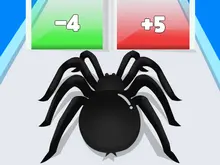
Most runner games tell you how you are doing with a score in a corner. Spider Evolution prints the number over your head, and over everybody else's. Every spider on the track wears its level like a name tag, yours included, and the colour of the tag tells you where you stand before you get close.
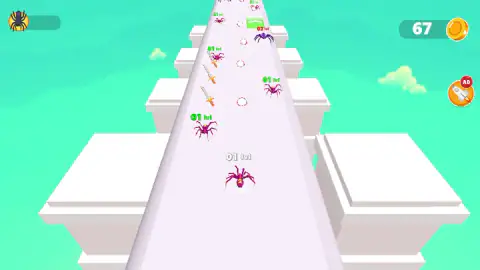
The frame is a lane runner. A purple spider runs forward by itself along a white track in the sky. You move it left and right. Along the way stand other spiders, rows of swords and a green block, and somewhere beyond them is the end of the level.
We have to be plain about that last part. We played for about four minutes, started three runs and failed all three, each within about twenty seconds. We did not finish a level. What follows is what those runs, the menus and one stray scene in a town showed us, with the gaps marked.
The game's listing credits Snackgamer Studio. It has been available since December 2024.
The number over your head is the whole scoreboard
Your spider starts a run tagged 01 lvl in white. The other spiders are tagged the same way, and the colour changes with the comparison. Level 01 spiders had green tags. The single level 02 spider had a red one.
The town scene, described further down, confirms the pattern from the other side. There our spider was level 02, and the tags we could read in red were 04 lvl and 07 lvl.
So the game shows you its arithmetic before you commit. Runners of this family usually work like that: you take what is at or under your number, you grow, and you keep away from anything above it until you have grown enough. We did not last long enough to watch our own tag change. But the colours are an honest warning, readable from a long way down the lane.
There are also things on the track with no number at all: a row of swords down the left, a row of white discs with a red dotted rim down the middle, and a green see-through block standing across part of the lane. We never touched any of them, so what each one gives or takes is not something we can report.
Two levels that are not the same level
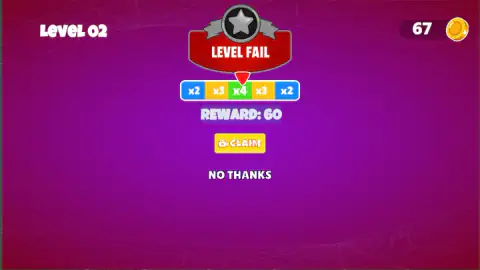
The fail card says LEVEL 02 in its top corner. The spider it belongs to was tagged 01 lvl a few seconds earlier. Both are right.
The corner number is the stage. The tag is the spider. Our spider began every run at 01, even straight after the town scene where it had been 02, so the tag does not seem to carry over from one run to the next. What does stay is the coin counter, and the two cards on the start screen carry level badges of their own.
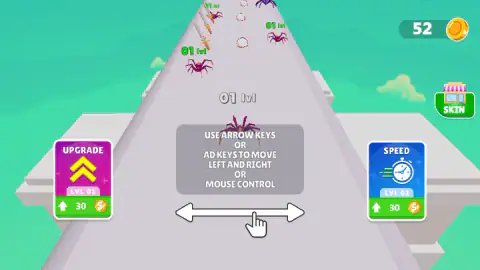
UPGRADE shows two yellow arrows pointing up and SPEED shows a stopwatch. We did not buy them, so their exact effect is not ours to describe.
Failing still pays, and the card offers more
Here is what the coin counter did across our three runs.
| Run | Coins before | Coins after | REWARD on the card |
|---|---|---|---|
| First | 52 | 52 | 0 |
| Second | 52 | 67 | 60 |
| Third | 67 | 82 | 45 |
Two things stand out. The 15 coins of the second and third runs were already in the counter when the fail card appeared, before we had pressed anything. And the first run paid nothing at all, so a failed run can also leave you empty-handed.
The card then makes an offer. Under the LEVEL FAIL banner is a strip of five boxes, x2, x3, x4, x3, x2, with a red pointer over it, and the pointer was in a different place each time we looked. Below it is a yellow CLAIM button with a small video-camera icon.
When the card read 60, the pointer sat on the green x4 box in the middle. Sixty is four times 15, and 45 is three times 15, so the offer looks like the run's own coins multiplied by wherever the pointer stops.
We pressed CLAIM on the third card. No video played for us and the counter stayed at 82, so we cannot confirm the multiplied sum is paid. With the two cards priced at 30, even an unmultiplied failed run gets you halfway to one.
The town we cannot place
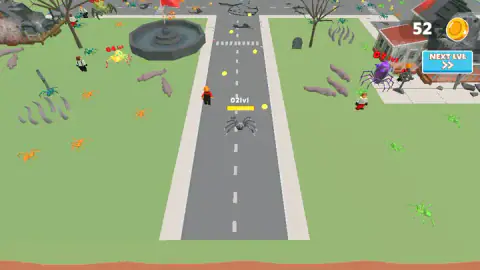
Our session did not open on the lane. It opened in a town: a grey road with a dashed line, lawns on both sides, a stone fountain, bare trees, a tombstone, and houses with red roofs wrapped in cobwebs.
Our spider there was grey, tagged 02lvl, with a yellow bar under the tag. Small people were walking about, one in an orange hard hat. Spiders in orange, green and teal wandered the grass, and a purple one several times our size stood by a house.
A blue NEXT LVL button sat under the coin counter. We pressed it and landed on the start card of the lane. The counter already held 52 coins at that moment, so the game was most likely resuming something saved earlier. Our best guess is that the town is what waits at the end of a lane. It is a guess, and we never got back there to check.
Real spiders grow in steps too
The word in the title is borrowed loosely. Evolution, in biology, happens to a species over many generations, never to one animal in an afternoon. What the game shows is growth.
On that it is closer to the truth than it might seem. A spider wears its skeleton on the outside, and that shell cannot stretch. So a spider grows in jumps. It sheds the old shell, which is called moulting, swells while the new one is still soft, and then hardens at the larger size. Most species do this several times before they are adults, and female tarantulas carry on for life.
A counter that clicks from 01 to 02 is a fair cartoon of that. So is the red tag. Spiders are hunters, plenty of them eat other spiders, and in those meetings size settles most arguments.
What four minutes did not show us
A finished level, first of all, and whatever the game does when you reach the end of the lane.
We did not see our tag go up. We did not buy UPGRADE or SPEED, open the SKIN shop on the start screen, or press the round rocket button marked AD that sits on the right during a run. We steered with the keys only and did not try the mouse.
Who it is for
Someone who likes short runs and a visible reason for losing. A failed run costs seconds and still pays, and the upgrade prices are low enough that the second or third attempt can be a stronger one.
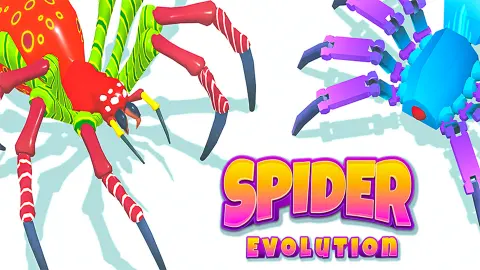
The spiders are blocky and bright purple, closer to toys than to anything from a nature film, but they are spiders and there are a lot of them. The listing's own age label is E10+.
More games about growing bigger
Animal Evolution Simulator drops the lane and lets you roam a forest, starting as a worm and levelling into larger animals. Dinosaur Shifting Run is a race where you change form to suit the ground instead of steering, and Jurassic Merge: Dino Evolution does the growing by merging two alike into one stronger. The rest are under arcade games.
Screenshots
Taken by opening the game ourselves and letting it run — not supplied by the publisher, and not the same picture every other site shows.
How to play Spider Evolution
- The run opens on a card that lists the controls: arrow keys, A and D, or the mouse. Two upgrade cards sit beside it, UPGRADE on the left and SPEED on the right.
- Click TAP TO START. The spider sets off down the lane without waiting for you.
- Steer left and right. You never speed up, slow down or jump.
- Read the tags ahead of you. Each spider on the lane has a level over its head, in green or in red.
- If the run ends early you get a LEVEL FAIL card. Click NO THANKS to go back to the start card.
What three failed runs taught us:
- Spend before you run. Both cards cost 30 coins at their first level and we had 52 from the first minute. We bought neither, and all three runs went the same way. It is the first thing we would change.
- Red is ahead of you on the right. In both runs we photographed, the one red-tagged spider stood on the right-hand side of the lane, a few seconds from the start. We were holding the right arrow.
- The lane has no walls. The track is a strip with open sky on either side and stepped blocks below it. We cannot tell you whether it was the red spider or the edge that ended our runs, so respect both.
- NO THANKS is the way out. It answered on the first click. We lost more than a minute on our first fail card by clicking everything else.
Controls
| Left / Right arrow keys, or A / D | Move the spider left and right across the lane, as the game's own start card says; the spider runs forward by itself |
|---|---|
| Mouse | The start card names "mouse control" as the third way to steer; we used the keys |
| Click on TAP TO START | Starts the run from the card that shows the controls and the two upgrade cards |
| Click on NO THANKS | Leaves the LEVEL FAIL card and returns to the start card; it worked first time for us |
Features
- A straight white lane in the sky with stepped blocks on both sides and no walls
- A level number printed over every spider, yours included, green or red depending on how it compares with yours
- Swords, white discs and a green block laid out along the lane between the rival spiders
- Two upgrade cards on the start screen, UPGRADE and SPEED, each priced at 30 coins at level 01
- A LEVEL FAIL card with a sliding pointer over a strip of multipliers from x2 to x4
- A second scene, a cobwebbed town with people on foot and far bigger spiders, behind a NEXT LVL button
- A SKIN shop button on the start screen
Game details
- Developer
- Snackgamer Studio
- Release date
- December 2024
- Added here
- March 2025
- Technology
- HTML5 (Unity WebGL)
- Platforms
- Browser (desktop)
- Classification
- Clicker , .io , Multiplayer
- Saved progress
- Saving, when available, is managed by this game. Mava cannot confirm your level.
FAQ
What is Spider Evolution?
It is a 3D lane runner by Snackgamer Studio. A purple spider runs forward by itself along a white track, you move it left and right, and every spider on the track carries a level number over its head. Coins from each run pay for two upgrade cards on the start screen.
How do you control the spider in Spider Evolution?
The game's start card gives three options, the left and right arrow keys, the A and D keys, or the mouse. You only steer sideways, because the spider moves forward without any input. A click on TAP TO START begins the run.
What do the green and red numbers over the spiders mean?
Each number is that spider's level. In our runs our own spider was level 01, other level 01 spiders had green labels and a level 02 spider had a red one. In the town scene, where ours was level 02, the labels we saw in red were 04 and 07. Red marked a higher level than ours every time we looked.
Do you get coins when you fail a level in Spider Evolution?
We did, twice out of three. Two failed runs each added 15 coins to the counter before we pressed anything, and one run added none. The LEVEL FAIL card then offers a larger figure through its yellow CLAIM button, which carries a video-camera icon.
How much do the upgrades cost in Spider Evolution?
On the start screen there are two cards, UPGRADE and SPEED. Both were at LVL 01 and both cost 30 coins when we played. We did not buy either, so we cannot say what the next level costs or how much each one changes a run.
Why does the fail screen say LEVEL 02 when my spider says 01 lvl?
They are two different counts. The number in the corner of the LEVEL FAIL card is the stage you are on. The number over the spider is the spider's own level, and it read 01 at the start of every run we played.
Can you play Spider Evolution on a phone?
It is listed for PC only, in landscape. We played on a desktop with a keyboard and mouse and have not tried a phone, so we do not list it as a touch game.
Who made Spider Evolution?
The game's listing credits Snackgamer Studio. It was published in December 2024.