








About The Adventures of Big Joe
Most digging games give you a button for the shovel. You press, something breaks, a number goes up. The Adventures of Big Joe takes the button away. Joe digs only when you stop, which turns the whole game into a question of where to stand rather than what to press.
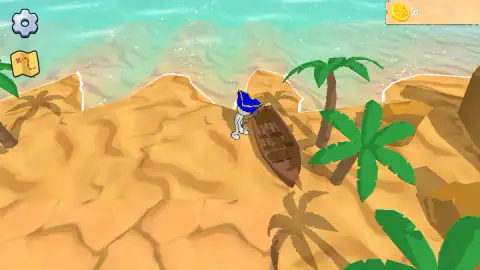
Joe is a small white figure in a blue tricorn hat, the pirate's three-cornered kind. He starts on a beach with a wooden rowing boat pulled up on the sand, palm trees, low rocks and turquoise water behind. The camera looks down at him from above and behind, and it follows him as he walks. In the top left sit a settings gear and a little treasure map with a red X and a dotted route. In the top right, a gold coin counter starts at zero.
The game is by TurtleGamesStudio. The game's listing gives Big Joe from August 2026.
What digging looks like on the island
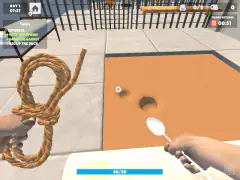
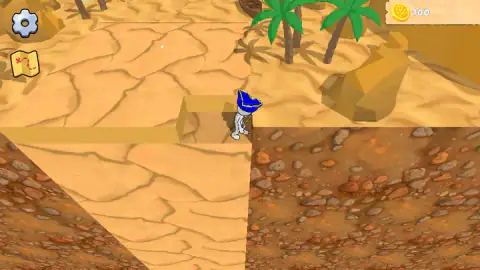
The ground you dig is easy to spot once you know it. It comes in raised, flat slabs of dry, cracked sand, a little like a dried-out riverbed, set into the softer beach. When Joe digs, a square chunk of slab disappears, leaving a box-shaped hole with orange earth inside.
Further inland the island changes colour. Beside the slabs, at a lower level, lies a floor of pebbles and red earth, and with Joe standing on a slab edge the screen looks more like a desert quarry than a beach. It is the same island, seen from the middle of the work.
The coins came while this was happening. The counter moved twice, in two jumps of exactly 100: once in the first minute and a half of play, and once a little over two minutes in, after which it stayed at 200 to the end of our session. Joe was digging in both stretches, but we cannot tell you which hole paid which hundred.
Pirates, shovels and the map with an X
The red X on Joe's map is the oldest joke in pirate stories. Real pirates of the late 1600s and early 1700s rarely buried anything; their loot was spent, shared out or lost at sea. The buried-treasure pirate comes mostly from fiction, above all from Robert Louis Stevenson's Treasure Island of 1883, with its map, its X and its dig on an island.
Big Joe borrows that picture whole: the tricorn hat, the beached boat, the map in the corner and the idea that the treasure is under the sand. What it adds is the rule about standing still. In the story, the digging is the dull part. Here it is the only thing you do, and the game asks you to be patient about it.
What we did not see
We played for about four minutes and did not finish the first level. We never dug up a chest or one of the artifacts the game's description talks about, and we never saw a level-complete screen, a second island or a way to lose. Nothing chased Joe and there was no timer on screen.
We did not open the treasure map or the settings, so we cannot tell you whether the map shows the whole level or only marks where the treasure is. We did not find anywhere to spend coins. We also played only on a computer, so the on-screen joystick is untested.
Who it is for
Big Joe suits younger players and anyone who likes slow, tidy games. There is no fighting, no clock and almost nothing to read. The one thing that is not obvious at the start is that you must stop to work, and a child who holds the arrow down the whole time will see Joe walk and nothing else. Once that clicks, the game is about clearing every slab of cracked sand on the island.
If you want a fast game, this is not one. If you like the feeling of finishing a job square by square, it is.
More digging and more TurtleGamesStudio
From the same studio, Mars Colony swaps the pirate for a robot preparing a planet for settlers, and Snake 2048 is a quick arena game about growing a snake of cubes. For more treasure under the sand, try Loot Island - Treasure Digger. Miner, Dig It All goes straight down with dynamite and a drill. Browse the rest of the adventure games.
Screenshots
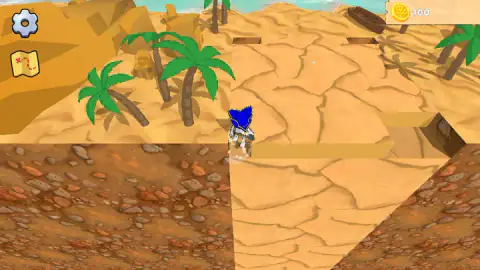
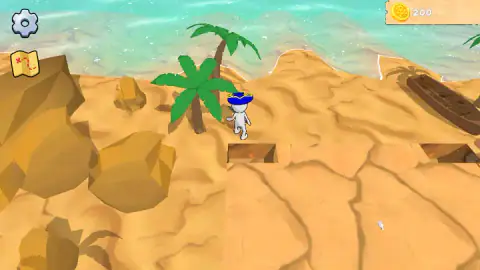
Taken by opening the game ourselves and letting it run — not supplied by the publisher, and not the same picture every other site shows.
How to play The Adventures of Big Joe
- Walk Big Joe with the arrow keys. The game says WASD and an on-screen joystick work too.
- Head for the ground that needs digging: the raised, flat slabs of cracked sand, which look different from the soft, rippled sand of the beach.
- Let go of the keys. Standing still is the dig command, and Joe works on the ground beside him.
- Keep moving and stopping until the slabs are gone. The rules say a level ends when all the ground has been dug up.
Tips from our run
- Do not click. We clicked on the ground and on the sand several times and nothing happened. Everything goes through movement.
- Move in short taps. Joe digs in the pauses, so a tap, a stop and a tap again keeps him working. That is how we played the whole session, and that is when the holes appeared.
- Watch the edges of the slabs. The holes we made were neat square bites out of the cracked sand, so the slab edge shows you where Joe has already been.
- The beach is not the job. The soft, rippled sand around the boat and the palms is scenery. Stop on it and nothing is cut away.
Controls
| Arrow keys | Walk Big Joe around the island |
|---|---|
| WASD or the on-screen joystick | Also move Joe, according to the game's own instructions (we used the arrows) |
| Stand still | Joe starts digging the ground next to him |
| Gear (top left) | Settings, which we did not open |
| Treasure map (top left) | A map with a red X and a dotted route; the instructions say you can also move the map with the keys or the cursor, and we did not open it |
Features
- A small pirate in a blue tricorn hat, a 3D island seen from above and behind, and no attack, enemy or timer in the part we played
- Digging with no dig button at all: Joe only works when you stop walking
- Raised slabs of cracked sand that lose square chunks as Joe digs, over a lower floor of pebbles and red earth
- A coin counter in the top right that went from 0 to 200 in our four minutes, in two steps of 100
- A treasure map icon and a settings gear as the only other buttons on screen
- A level that ends when all the ground has been dug up, according to the game's rules
Game details
- Developer
- TurtleGamesStudio
- Release date
- August 2026
- Last updated
- August 11, 2026
- Added here
- July 2026
- Technology
- HTML5 (3D)
- Platforms
- Browser (desktop), Browser (mobile & tablet, touch)
- Classification
- Adventure
- Saved progress
- Saving, when available, is managed by this game. Mava cannot confirm your level.
FAQ
How do you play The Adventures of Big Joe?
You walk a small pirate called Big Joe around a 3D island with the arrow keys, WASD or an on-screen joystick. There is no button for digging. When you stop moving, Joe digs the ground beside him, and square chunks disappear from the slabs of cracked sand.
How do you dig in The Adventures of Big Joe?
Stop walking. Big Joe digs only while he is standing still, and a tutorial card early on makes the same point. Clicking on the ground did nothing for us, and holding a key just keeps him walking, so the trick is to park him next to the ground you want gone and wait.
How do you finish a level in The Adventures of Big Joe?
The game's rules say a level is complete when all the ground has been dug up. We played for about four minutes and did not get that far, so we never saw a level-complete screen or what comes after it.
What are the coins for in The Adventures of Big Joe?
The counter in the top right went from 0 to 100 and then to 200 while Joe was digging. We did not find a shop or any screen where coins are spent, so we cannot say what they buy.
Are there treasure chests in The Adventures of Big Joe?
The game's own description promises chests and buried artifacts, but we did not dig one up in our session. What we saw was sand, holes, a rowing boat, palm trees and rocks, plus a treasure map icon we did not open.
Who made The Adventures of Big Joe?
It is by TurtleGamesStudio. It was published in August 2026.
Can you play The Adventures of Big Joe on a phone?
It is listed for PC, Android and iOS in landscape, and the instructions mention an on-screen joystick for touch screens. We played it on a computer with the keyboard, so we have not tested the touch controls.