




About Fat Hedgehog Boris
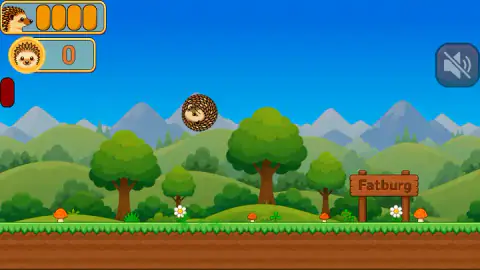
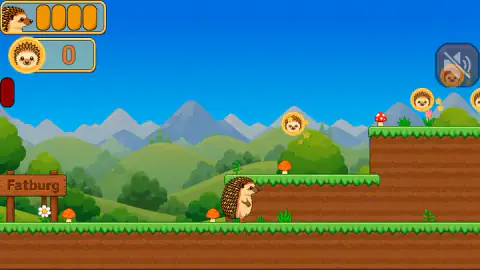
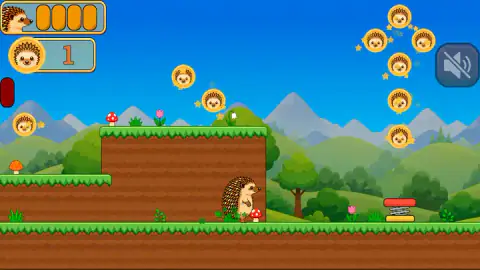
The signpost on the first hill says Fatburg. The coins hanging over the grass are not coins at all: each one is a gold disc stamped with a hedgehog's face, laid out in arcs and little clusters with a sparkle beside them. And the first thing that walks towards you is a burrito. Two legs, a filling of lettuce and meat, and an expression that has already made its mind up about you.
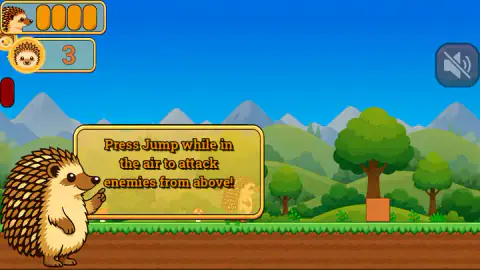
Boris is round, and the game makes that his entire move set. The arrow keys walk him along the hillside, Space gets him off the ground, and the attack is the same button again: press Space while you are already in the air and he tucks into a ball of spines and comes down on whatever is below. The game stops the level to tell you so, with a card and a large portrait of Boris pointing at it.
The game is credited to VaiYa Team. Fat Hedgehog Boris went up in August 2026 and was updated the next day.
Now the honest part, because this page is built on less than we would like. We played it on a desktop with a keyboard for about four minutes, got through the menu into level one, picked up three coins and never reached the end of that level. We were never hit, not once. A good share of those four minutes went on hammering Space at a brown crate that never broke. So levels two onward, the Store button on the menu, what the spring in the ground is for and what happens when something finally touches Boris are all absent from this page, and we would rather point at the hole than describe it from the outside.
Fifteen tiles on the first page, and only one of them lit
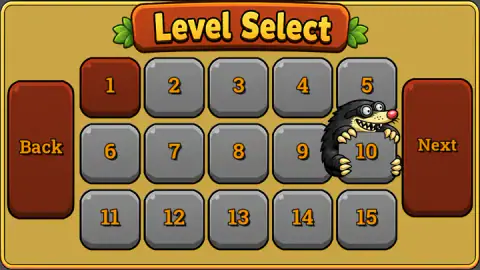
The level select is a yellow board with fifteen numbered stone tiles on it, five across and three down, a Back panel on the left and a Next panel on the right. Tile one was dark red, which is how the game marks the level you can play. The other fourteen were grey.
The Next panel matters more than it looks. It means fifteen is a page, not a total, and that there are more levels than the board shows at once. We cannot tell you how many, because the only way to find out is to unlock them, and we unlocked none.
There is one more thing on that board worth noticing before you press anything: a mole, black and shaggy with a wide grin full of teeth, leaning out from behind tile ten. Nothing explains it. It is simply there, on the menu, between you and the levels you have not opened — the kind of small joke that tells you the game was drawn by someone having fun rather than assembled from a kit.
Fatburg runs on junk food
Everything in this world is about eating too much, and the game never once says so out loud. The town on the signpost is Fatburg. The hero is called the fat hedgehog, although the Boris who walks along the grass looks perfectly trim. The enemy that comes at you is a wrapped burrito that has grown legs.
The coins carry it furthest. In most platformers the collectible is a neutral token: a ring, a gem, a star. Here the money has Boris's own face pressed into it, the way a head goes on a currency, and you spend the level chasing discs of yourself through the air. The menu has a Store button sitting next to Play, which is presumably where those discs go. We never opened it.
The display keeps the same discipline. Four orange capsules sit beside a small picture of Boris in one corner, with the coin counter under them, and that is the lot. The capsules stayed full for our entire run, so all we can report is that nothing in the first stretch of level one managed to take one off us. Whether they measure health, or weight, or both at once, we would be guessing — and the name of the game makes guessing tempting enough that it is worth saying plainly that we do not know.
What a real hedgehog's ball is actually for
The move Boris attacks with is a real animal's panic button, run backwards.
A hedgehog curls up because a muscle wrapped around the edge of its spiny skin contracts and pulls the whole coat closed over the soft parts, the way a cord closes a drawstring bag. Inside that coat an adult carries somewhere between five and seven thousand spines, and they are not quills or bone: they are keratin, the same stuff as your hair and fingernails. It is pure defence. The animal shuts the door and waits for whatever is outside to lose interest.
The game takes that gesture and points it downwards. Boris curls in mid-air exactly as a real hedgehog curls on the ground, and then the thing that is meant to be a closed door becomes a falling weight with points on it. That is why the attack has to start with a jump, and why pressing the button at ground level does nothing: the move only means anything when there is a drop under it.
The name is an inversion too. Being a fat hedgehog, in the real world, is the goal. Hedgehogs hibernate, and a young one goes into winter on whatever it managed to put on in autumn. British hedgehog rescue guidance works to a threshold of around 450 grams for a healthy youngster to get through hibernation, with better odds above that — which is why rescuers weigh them in autumn and feed up the ones that are short. A thin hedgehog in October is the emergency. A fat one is the success story.
So a game that sets a chubby hedgehog loose in a town called Fatburg to fight food is making a joke that runs precisely opposite to the biology. Boris, by the standards of anyone who has ever carried a hedgehog into a shoebox in November, is doing fine.
More platformers worth a few hills
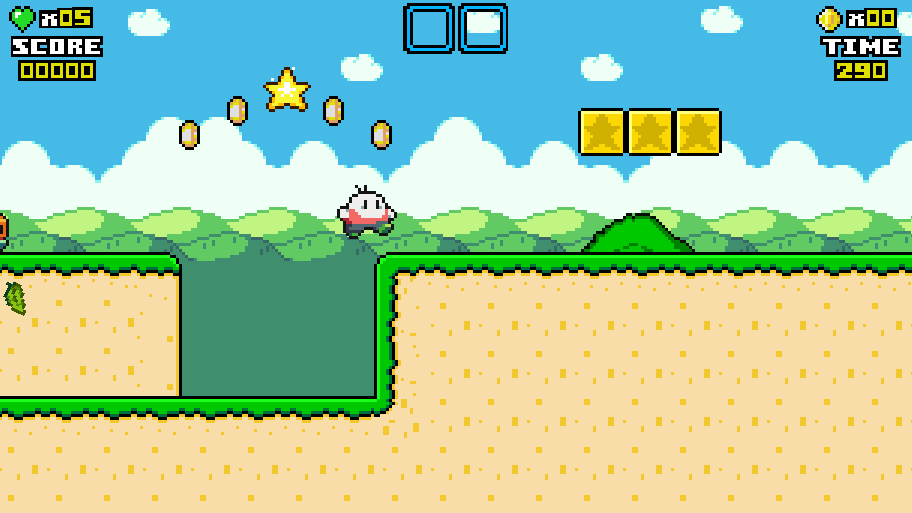
The same studio's Wheelchair parkour: No limits is their only other game, and it swaps the hillside for city rooftops, speed and gaps. Mushroom Runners is the closest neighbour to this one: run, jump, climb, collect, reach the end. The Adventures of Big Joe keeps the side-on world and hands you a shovel instead of a curl, so the collecting is the whole job rather than the decoration. And Robby: Climb and Jump Tower takes the same jump and points it straight up, which is a clean way to feel how much of this game lives in the moment you are in the air. The rest of the shelf is in adventure games.
Screenshots
How to play Fat Hedgehog Boris
- Start from the grid, not from a title screen. Play takes you to Level Select, a board of numbered tiles. Only the first one was lit for us; the rest were grey.
- Walk with the arrow keys. Left and right, one speed, no run button. Boris covers ground at a stroll, so a stretch of hillside takes longer than you expect.
- Jump with Space. The first tutorial card in the level exists to tell you exactly this, which is a fair sign of who the game is aimed at.
- Press Space again in the air to attack. That second press is the whole combat system. Boris curls up and falls, spines first, on enemies and on blocks.
- Pick up the coins on the way. They sit in arcs above the ground, so most of them are collected by jumping rather than walking.
What our run actually taught us:
- Space is useless when you are standing still. We spent a long stretch pressing it at a crate at ground level and nothing happened. The attack needs the fall: get above the thing first, then press.
- Holding the arrow key does not make him faster. There is one walking speed and no amount of pressing changes it.
- The cards are the manual. There is no help screen and no text anywhere else. If a card appears, read it, because that mechanic is about to be needed.
- Watch the corner, not the character. The coin counter is the only thing on the display that moves. Ours went from zero to one to three across the run, which is a more reliable measure of progress than the scenery, since the hills repeat.
- One oddity we cannot explain. A dark red rounded button sits half off the left edge of the frame for the whole level. We never pressed it and we do not know what it is.
Controls
| Left and right arrow keys | Walk. Boris moves at one speed and there is no run button |
|---|---|
| Space | Jump |
| Space again, while in the air | The downward attack. Boris tucks into a ball of spines and drops. A card in the first level teaches it |
| Speaker button (top right) | Mutes the game. It is the only button on screen while you are playing |
| Back and Next (Level Select) | Page through the level grid. Fifteen tiles fit on the first page |
Features
- A hillside platformer with its own small economy: the coins are gold discs stamped with Boris's face, hanging in arcs and clusters you have to jump through
- One attack, and it is the jump: press it a second time in the air and Boris becomes a ball of spines falling on whatever is underneath
- A level grid rather than a single run — fifteen numbered tiles on the first page, with a Next panel that pages on to more
- Enemies made of fast food. The first one to walk at us was a burrito with two legs and a scowl, in a town the signposts call Fatburg
- A display with nothing spare in it: four orange capsules beside Boris's face, a coin counter, and a mute button
- The level teaches itself with cards that pop up mid-run, one for the jump and one for the air attack
- Made by VaiYa Team
Game details
- Developer
- VaiYa Team
- Release date
- August 2026
- Last updated
- August 24, 2026
- Added here
- July 2026
- Technology
- HTML5 (2D)
- Platforms
- Browser (desktop, keyboard), Browser (mobile & tablet, touch)
- Classification
- Arcade
- Saved progress
- Saving, when available, is managed by this game. Mava cannot confirm your level.
FAQ
How do you play Fat Hedgehog Boris?
You walk right along a hillside with the arrow keys, jump with Space, and collect gold coins stamped with a hedgehog's face. Pressing Space a second time while you are in the air turns Boris into a falling ball of spines, which is how you deal with enemies and with blocks in your way. Each level is picked from a numbered grid rather than reached in one continuous run.
What are the controls in Fat Hedgehog Boris?
The left and right arrow keys walk, Space jumps, and Space pressed again in mid-air is the downward attack. The game teaches both of those with cards that appear in the middle of the first level. The only other button on screen while you play is a speaker icon in the top-right corner that mutes the sound.
How many levels does Fat Hedgehog Boris have?
More than fifteen, and we cannot give you the number. The Level Select screen lays out fifteen numbered tiles on its first page and puts a Next panel beside them, which means at least one more page exists. When we played, only the first tile was open and the other fourteen were greyed out.
What are the enemies in Fat Hedgehog Boris?
Fast food, as far as we got. The first thing that walked at us in level one was a burrito with two legs, a filling of lettuce and meat, and an angry face. A grinning mole also leans out from behind one of the tiles on the level select screen, which suggests it turns up later, although we never met it in play.
What is the row of orange capsules in the corner?
Four orange capsules sit beside a small picture of Boris in the top-left corner, above the coin counter. We can only tell you what they did, which is nothing: they stayed full from the first screen to the last, because nothing ever touched us. What empties them, and what happens when they are gone, we did not see.
Does Fat Hedgehog Boris work on a phone?
It is listed for Android and iOS as well as PC, and lists it as a landscape game, which matches the wide view we played in. We only played it on a desktop with a keyboard, so how the walk, the jump and the air attack are handled on a touchscreen is something we have not checked ourselves.
Who made Fat Hedgehog Boris?
VaiYa Team, according to the game's listing. It was published in August 2026 and updated the following day. We found no studio website to confirm the name against a second source, so it rests.
Is Fat Hedgehog Boris free to play?
Yes. It runs in the browser with nothing to install and no account to make. The menu has a Store button next to Play, which we never opened, so we cannot tell you whether what is inside costs anything or is paid for with the coins you collect.