
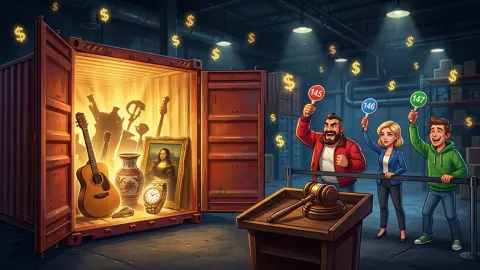










About Container Auction
Lose an auction in Container Auction and the game does something most games would never risk: it opens the container anyway and shows you what you walked away from. Our first defeat came with a panel reading Total Value $1,188, and under it, Missed: $678. The second was worse.
Those two figures are the entire design, and the arithmetic between them is the point. Subtract the winning bid from the Total Value and you land exactly on the Missed line. A container that went for $1,510 held $4,539 of goods, and the screen duly reported $3,029 missed. So it is not telling you what the contents were worth. It is telling you what the person who outbid you just earned.
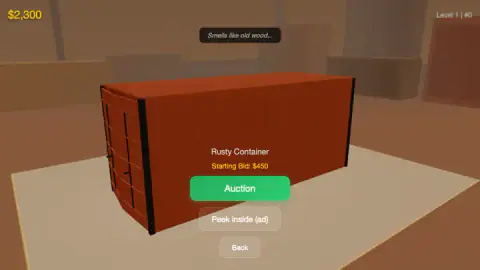
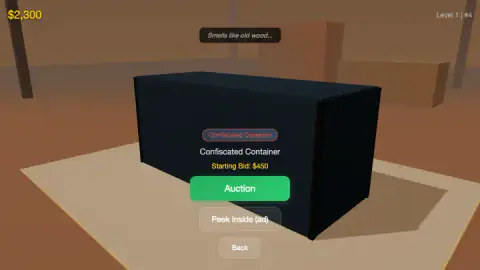
Everything before that happens behind closed doors. A round opens with three locked containers to choose from, each with a starting price and one line of text floating above it — Smells like old wood…, Fabric spotted…, Metallic glint in the gap…, Wires visible… That line and that price are all you get for nothing. A green Auction button starts the bidding. A grey one underneath offers a proper look inside in exchange for watching an advert.
Flagwin Studio made it. It was published in April 2026.
We played it on a desktop in late October: four minutes, six shortlists, five bidding rounds, no container won.
Three bots, three purses, one clock
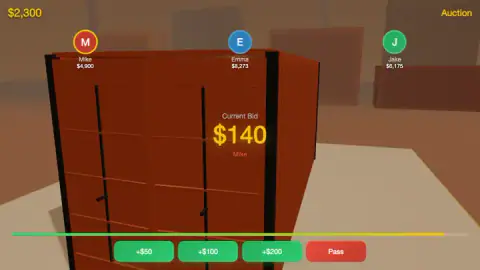
The auction screen puts your rivals along the top as coloured circles with their names and their cash: Mike in yellow, Emma in blue, Jake in green. Their money is visible at all times, and in our session all three of them were richer than we were — Jake by nearly three to one.
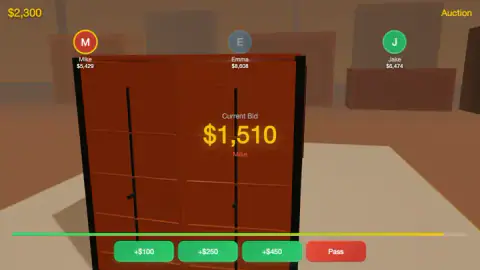
The game's own tutorial card, the one headed Bid Against Bots, promises that each has its own strategy, and the little we saw fits. Mike was the aggressive one in every round, leading the bid at $140, at $510 and at $1,510, and posting "Don't even try" over his own number while he did it. Emma raised from $140 to $190 without hesitating. Jake, the richest of the three, never led a bid in front of us.
The clock is the pressure. It runs as a bar beneath the container, fading from green towards yellow, and a round is short enough that reading the hint, checking three purses and choosing a raise is more than you can comfortably do twice. Both of our defeats were the clock, not a decision.
What losing teaches you here, and what it would cost to learn it by winning
The result screen is unusually generous for a game that wants you to keep playing: it prices a container you did not buy and shows you the margin you missed.
Taken together, our two losses say something uncomfortable about the bots: they were not overpaying. One container sold for $510 and held goods worth more than double that. The other sold for $1,510 and held three times as much. In both cases the winning price was a bargain, which means that in both cases, passing was the wrong call.
That is a sharper lesson than a victory would have given us. A win tells you what one container was worth. A loss tells you where the ceiling was, and whether you stopped short of it.
The line over the doors, and the advert behind it
The free clue is deliberately thin. A smell, a glint, a strip of fabric: a phrase that narrows the field without settling anything, because old wood could be furniture or it could be pallets. The game's notes talk about peeking through a gap in the doors; in play, that gap is this one sentence.
The real preview costs an advert. Peek inside (ad) sits under the Auction button on every container screen, clearly optional, and it is the only advertising the game put in front of us. Nothing interrupted a round. We never pressed it, so we cannot say how much it reveals — only that the trade it offers is information for attention, which is the trade the whole game is about.
Why the real trade is built the same way
Abandoned-container auctions are a real business, and the rule that makes them interesting is the same rule this game copies: you bid before you look.
Self-storage units get sold because of a lien. When a renter stops paying, the facility has a legal claim on the contents, and state self-storage lien statutes in the United States set out what it must do before selling — notify the tenant, wait out a default period, advertise the sale. At the sale itself the door goes up and bidders look in from outside the unit. They do not step in, open boxes or handle anything. A glance from the doorway is the inspection.
Cargo works on the same principle with a different legal engine. Goods that arrive at a port and are never collected become abandoned by statute — under United States customs law, merchandise left unclaimed for six months may be sold — and seized goods are disposed of the same way, through public auction. That is where the Confiscated Container in this game gets its name and its slightly ominous label.
Economists have a name for what that does to the bidding. When every bidder is competing for the same unknown value and each has only a guess, the person who wins is, by definition, the one whose guess was highest — and a guess that beats everyone else's is more likely to be too high than too low. Three petroleum engineers at Atlantic Richfield, Capen, Clapp and Campbell, set this out in 1971 after watching oil companies bid for offshore leases and lose money on the ones they won. They called it the winner's curse, and it is why experienced bidders deliberately shade their offers below what they think something is worth.
Container Auction puts you inside that problem and then, kindly, marks your homework. Our two losses both showed the winner clearing a healthy margin, which says the bots were shading their bids correctly and we were shading ours too hard. That is the game: not guessing what is in the box, but working out how far below your guess you should stop.
What we have not seen
Four minutes at Level 1 in a single location leaves most of this game untouched. The main menu lists Auction Series, Market Trends, My Office, Profile and a Skill Points counter sitting at zero, and we opened none of them. Market Trends in particular suggests prices move between rounds, which would change how you value a hint, but we cannot confirm it.
Because we never won, we never opened a container, never sold anything, and never saw the rarity ladder the game's notes promise, from common up to legendary. We played with a mouse on a desktop, so the touch version is the listing's word rather than ours.
More games by Flagwin Studio
Dream Home is the same studio's building game, where the money goes on walls and furniture instead of locked doors. Game Factory hands you a studio and asks you to pick genres and budgets, which is the valuation half of this game without the gavel. Smash and Break shares the chunky low-detail look and spends it on destroying things rather than selling them. If it is the spending itself you enjoy, Shopping Simulator is nothing but. The rest are in puzzle games.
Screenshots

How to play Container Auction
- Pick one of the three containers on the Choose a container screen. Each shows a starting bid and a one-line hint about what is inside.
- Read the hint and the price together, then press the green Auction button to walk into the bidding.
- Raise with one of the three green buttons, or get out with the red Pass. The bar under the container is the clock for the whole round.
- When the bar empties, the highest bid on screen takes the container. Win it and you open it and sell what is inside; that is the loop the game describes, and the part we never reached.
- Press Main Menu on the result screen to go back and start the next round.
What four minutes taught us that the tutorial did not:
- The raise buttons are not fixed. With the bid at $140 they read +$50, +$100 and +$200. With the bid at $1,510 they read +$100, +$250 and +$450. The game scales your options to the price, which means that at the top end even the timid button is a real commitment.
- Your purse does not refill, and theirs appears to. Ours read $2,300 on the first screen and $2,300 on the last. Across the same session Mike climbed from $4,900 to $5,429 and Emma from $8,273 to $8,608.
- Clicking is the only input we got to work. Pressing Enter during a round never raised our bid; the clock simply ran down while we sat there.
- The starting bid tells you nothing about the value. The container we lost at $510 held more than twice that.
- You can walk up to things you cannot afford. One shortlist offered a Mystery Container at a starting bid above our entire purse. The game let us stand in front of it, read its hint, and go back.
Controls
| Click a container on the Choose a container list | Shortlist it and walk up to its doors |
|---|---|
| Click the green Auction button | Open the bidding on the container in front of you |
| Click one of the three green raise buttons | Put your money on top of the current bid; the three amounts change with the price |
| Click the red Pass button | Drop out of the round and let the bots fight over it |
| Click Peek inside (ad) | Offer to show you the contents in exchange for watching an advert |
| Click Back | Leave a container without bidding and return to the shortlist |
| Click Main Menu | Close the result screen after an auction ends |
Features
- Each round opens with three locked containers to choose from, each with its own starting price
- A single line of text floats over the doors as the only free clue: a smell, a glint, a strip of fabric
- Three named bots bid against you, Mike, Emma and Jake, each with a purse shown above their head
- A bar under the container is the clock, and when it empties the highest bid on screen has won
- Raise amounts scale with the price: +$50/+$100/+$200 at a bid of $140, +$100/+$250/+$450 at $1,510
- Losing still opens the container, and the result screen prints what was inside and what the winner made on it
- Container types carry different reputations, from a Rusty Container to a Confiscated one to a Mystery one
- The main menu holds Auction Series, Market Trends, My Office, Profile and a Skill Points counter
Game details
- Developer
- Flagwin Studio
- Release date
- April 2026
- Last updated
- October 23, 2026
- Added here
- February 2026
- Technology
- HTML5 (3D)
- Platforms
- Browser (desktop), Browser (mobile & tablet, touch)
- Classification
- Simulation
- Saved progress
- Saving, when available, is managed by this game. Mava cannot confirm your level.
FAQ
How do you play Container Auction?
Each round starts with a shortlist of three locked containers, each showing a starting bid and one line of text about what is behind the doors. You pick one, press the green Auction button and bid against three computer rivals using three raise buttons or a red Pass. When the bar under the container empties, the highest bid wins, and the winner opens the container and sells what is inside.
What does Missed mean on the You Lost screen in Container Auction?
It is the profit you handed to whoever outbid you. The screen prints the Total Value of the goods inside and then subtracts the winning bid from it, and the remainder is labelled Missed. One container we lost went for $1,510 and held $4,539, so the screen read Missed $3,029.
Can you look inside a container before bidding in Container Auction?
Only a little, and only for free in one form. A short line hovers over the doors — things like "Smells like old wood..." or "Metallic glint in the gap..." — and that hint plus the starting price is what you bid on. A grey button marked Peek inside (ad) offers a proper preview in exchange for watching an advert. We never pressed it.
Who are Mike, Emma and Jake in Container Auction?
They are the three bots you bid against, shown as coloured circles along the top of the auction screen with their cash underneath. The game's own tutorial card, titled Bid Against Bots, says each one has its own strategy. They also talk: Mike posted "Don't even try" over his bid during one of our rounds.
Does Container Auction have ads?
Every advert we met was something the game offered rather than imposed. The grey Peek inside (ad) button under each container trades a look at the contents for a video, and nothing interrupted the four minutes we played. We declined the preview every time, so we cannot say how long that video runs.
What do the raise buttons do in Container Auction?
They put a fixed amount on top of the current bid, and the amounts are not fixed across the game. With the bid at $140 the three buttons offered +$50, +$100 and +$200; with the bid at $1,510 they offered +$100, +$250 and +$450. The game scales your options to the price, so at high bids even the cheapest raise is a real commitment.
Who made Container Auction?
Container Auction was published in April 2026 and was last updated in June 2026. The same page's text also mentions April 2025, so the listing contradicts itself on the year.
Can you play Container Auction on a phone?
It is listed for desktop, mobile and tablet, and the whole game is built around tapping buttons rather than keys, which suits a touchscreen. We played it on a desktop with a mouse and did not test it on a phone, so we cannot say how the auction clock feels on a smaller screen.