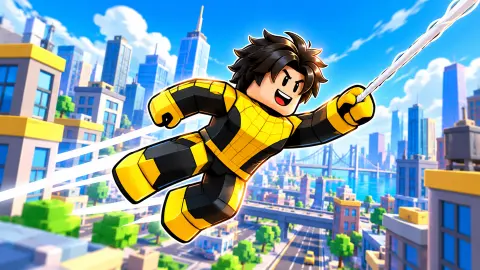


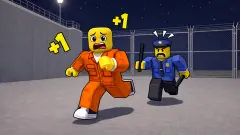


About Web Shoot +1
Web Shoot +1 puts a number under your runner and asks you to make it bigger. Every movement adds to Speed, little sneaker icons marked +1 rise as it counts, and treadmills painted with multipliers stand around the map promising to make each movement worth more. It is a training game more than a race: the goal on screen is the next level, and the way there is moving.
The game comes from Devord Studio, which also made ASMR Tower: +1 Jump, and it was published on 3 November 2026. We played one short session on a computer, all of it at level 3, from the starting area to the biggest treadmill we found. That is not far, and everything below stays inside it. What the session did show clearly is how the numbers on screen relate to each other, which the game never explains.
Speed and the level bar are the same number
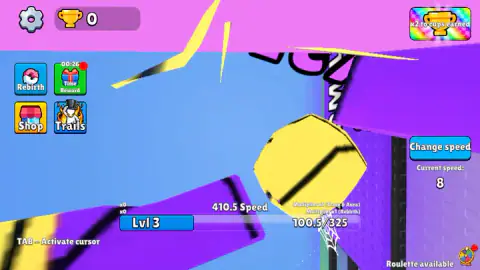
The bar at the bottom looks like an experience bar, and the Speed counter looks like a separate stat. In our session they moved together, point for point:
| Speed | Level bar |
|---|---|
| 410.5 | 100.5 / 325 |
| 411.5 | 101.5 / 325 |
| 414 | 104 / 325 |
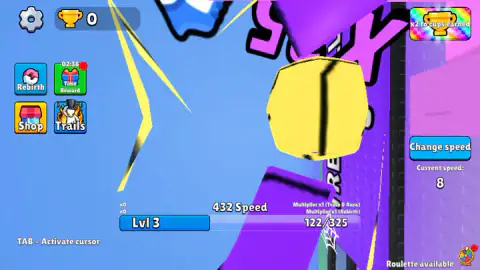
| 432 | 122 / 325 |
So the bar is your speed counted from where level 3 begins, and in our session nothing else moved it. That makes it easy to plan: the gap on the right of the bar is the speed you still have to gain. It also suggests that anything that raises speed faster, a bigger treadmill or a higher multiplier, fills the level at the same rate.
Speed did not grow while we stood still
The first forty seconds or so of our session were spent parked in the Newbie Zone, by the signs for the X1 and X5 treadmills and a lucky wheel. The counter sat at 410.5 the whole time, while the game showed "Click to keep playing". Other runners went past; ours did not move, and neither did the number.
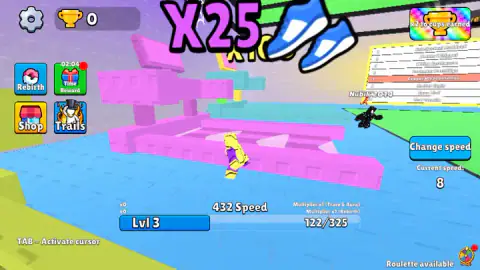
Once our runner was in motion the +1 icons appeared around him, and the counter climbed from 410.5 to 432 in about half a minute. Then he stopped, and for the last minute of the session he stood at the pink treadmill under the big X25 sign with no input. Speed held there from the moment he stopped.
Standing near a treadmill, then, earned nothing for us. We could not settle two things. Our captures do not show whether he was on the belt itself. And the Special offer that opens the game sells a pink "Bubble Gum Treadmill" with x25 speed for 1.5 USD, while the X25 treadmill we stopped at is pink too; whether it works without the purchase, our run does not show.
The other counters on the screen
Several numbers share the screen, and not all of them are what they look like.
- Current speed, under the Change speed button on the right, read 8 from start to finish while trained Speed went up by more than twenty. It is a separate setting. We did not see what changing it does.
- Two multiplier lines sit above the right end of the bar: one for Trace & Aura, which by its name belongs to the Trails button, and one for Rebirth. Both read x1 for us. By their labels, they are the two ways the game offers to speed up the climb.
- Time Reward, the gift button on the left, carries a countdown in real time. It ran down from just over a minute when we started, then restarted at three minutes, and it kept counting while the game waited for a click. The cup counter at the top stayed at zero throughout, so whatever it pays did not arrive on its own.
- Cups have their own buttons: a green "+50 For Free" with a video icon and a rainbow "x2 to cups earned". We pressed neither.
Other runners on the map
Other runners with name tags moved around the same streets, and a board on one wall lists names made of a word and an animal. The listing's own leaderboard for the game uses the same kind of animal names. Whether those runners were people playing at the same time, our session could not tell.
Not the same game as Obby: +1 Web Swing
Searches for this title run into Obby: +1 Web Swing, a different game by another developer with a similar idea. Web Shoot +1 is the Devord Studio one, with the treadmills, the Newbie Zone and the bar that tracks your speed.
More games where every step counts
ASMR Tower: +1 Jump is Devord Studio's take on the same idea with jump power, and I am Crazy Bird is the studio's open-city bird game. SKATE: +1 Speed builds a speed number on a skateboard before a course, and +1 Speed: Escape Prison does it in a cell block. More in our clicker games.
Screenshots
How to play Web Shoot +1
- Click inside the game. While the tag "Click to keep playing" sits at the top, the game is waiting for you. One click cleared it.
- Close the offer. A Special offer window opens over the game. The red X in its corner closes it.
- Move. The game's listing says each movement adds to the Speed number above the bar at the bottom; the +1 icons show it counting. We did not confirm the movement keys.
- Fill the bar. The bar under Speed is your level. When it is full, you reach the next one.
- Press Tab for the menus. The corner of the screen says "TAB – Activate cursor", which frees the mouse pointer for the buttons on the left.
Tips from our run:
- Read the right-hand side of the bar as what you still need. At 122/325, the next level was 203 points of speed away.
- Do not park. Standing still, even at a treadmill, added nothing for us.
- Ignore Current speed when you check progress. It is a different number.
Controls
| Click inside the game | Takes control back when the "Click to keep playing" tag is at the top of the screen |
|---|---|
| Tab | Frees the mouse pointer for the menu buttons, according to the hint in the corner of the screen |
| Movement | The game's listing does not list the keys; the arrow keys gave no response in our test and we did not confirm another set |
| Red X | Closes the Special offer window without buying anything |
Features
- Every movement adds to a Speed number, shown with small +1 sneaker icons
- The level bar moves point for point with Speed: at 432 Speed we were at 122 of the 325 needed for level 3
- Treadmills marked X1, X5 and X25 stand in the map, starting from the Newbie Zone
- Two multipliers under the bar, one for Trails (Trace & Aura) and one for Rebirth, both at x1 for us
- A Time Reward countdown that keeps running while the game waits for you
- Other runners on the map and a wall board of names
Game details
- Developer
- Devord Studio
- Release date
- November 2026
- Last updated
- November 9, 2026
- Added here
- November 2026
- Technology
- HTML5 (WebGL)
- Platforms
- Browser (desktop)
- Saved progress
- Saving, when available, is managed by this game. Mava cannot confirm your level.
FAQ
How do you get speed in Web Shoot +1?
By moving, according to the game's listing, which says each movement adds +1. In our session the Speed counter only rose while the runner was in motion, with small sneaker icons marked +1 rising around him. It went from 410.5 to 432 in about half a minute and did not change while he stood still.
What does the level bar count in Web Shoot +1?
Your Speed. Each point of Speed moved the bar by exactly one point in our run: 410.5 Speed matched 100.5 on the bar and 432 matched 122. At level 3 the bar fills at 325, so the number on its right tells you how much speed is still missing.
Do treadmills give speed if you just stand on them in Web Shoot +1?
Not that we saw. Our runner came to rest at the pink X25 treadmill and stayed there for about a minute without any input, and Speed held at 432. Our captures do not show whether he was on the belt itself, or whether that treadmill needs the paid Bubble Gum offer, so keep moving rather than waiting.
What is Current speed in Web Shoot +1?
A separate setting next to the Change speed button, not the Speed you train. It read 8 for our whole session while the trained Speed went from 410.5 to 432. We did not see what changing it does.
Do you have to pay to play Web Shoot +1?
No. The game is free, but a Special offer for a Bubble Gum Treadmill with x25 speed, priced at 1.5 USD, opened at the start and again about a minute later. The red X closes it and the game carries on.
Who made Web Shoot +1?
Web Shoot +1 is credited to Devord Studio, the studio behind ASMR Tower: +1 Jump and I am Crazy Bird. It was published on 3 November 2026 and lists it in English and Russian.