

About SKATE: +1 Speed
Skateboard games usually sell you a trick list: ollies, grinds, a combo meter. SKATE: +1 Speed has none of that on its first screen. What it has is a number. It sits on the left under the word SPEED, it starts at 1, and almost everything else you can see is a way of making it bigger.
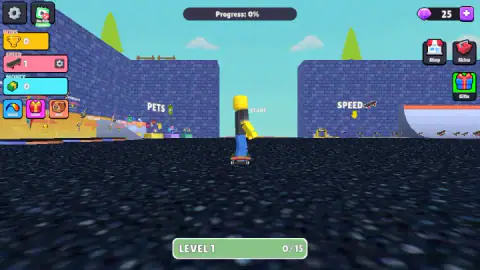
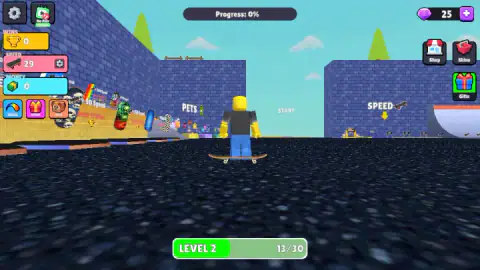
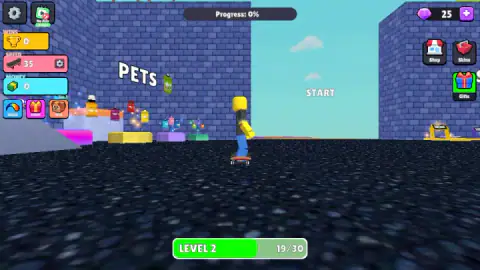
The setting is a plaza of dark asphalt boxed in by blue brick walls. Your skater is a figure built from blocks, yellow head and blue trousers, standing on a board and seen from behind. Three signs hang in the air around the plaza: PETS on the left, START straight ahead and SPEED on the right. The idea of the genre is simple. You bank speed in the safe area first, and then you spend it on an obstacle course.
The game is credited to Alexander Grishin, the developer behind two other +1 speed games on this site. It was published at the end of May 2026.
Now the honest part. We played for about four minutes and never left the plaza. The Progress bar at the top of the screen read 0% from the first second to the last, we finished with no wins and no money, and we did not see a single obstacle. So this page can tell you how the opening works, what every counter on screen means and how to avoid the mistake that cost us our session. It cannot review the course.
The level bar is the speed counter in another shape
Two numbers change on screen while you train, and it took us a while to see that they are the same number.
The game opens with speed at 1 and a bar at the bottom reading LEVEL 1, 0/15. The next time we looked, speed was 29 and the bar said LEVEL 2, 13/30. That adds up exactly: one point to start with, fifteen to clear level 1 and thirteen into level 2. Later readings fit the same sum. Speed 35 came with 19/30, and speed 39 with 23/30.
So a level is a bundle of speed points, and the bundles grow. The first asked for 15 and the second for 30. We stopped seven points short of level 3, which means we cannot tell you whether a new level hands out a prize or only a bigger target.
One thing the pattern does tell you: there was no shortcut in what we saw. Money stayed at zero and the gem counter stayed at 25, so every point came from time on the board.
What is around the plaza
The plaza works as a shop floor as much as a training ground.
Under the PETS sign there is a row of small figures on coloured pedestals. On the opposite side, the SPEED sign has a yellow arrow pointing down at a line of skateboards on stands, with a white quarter-pipe ramp curving up behind them. The wall on the far left is hung with decorated board decks. We did not skate up to any of them, so the prices and what each one adds are beyond what we can report.
The buttons repeat the same offer. On the left, under the counters, sit Trails, Daily and Pets. On the right are Shop, Skins and Gifts, below a gem counter with a plus sign. A gear and a No Ads button share the top left corner.
The Daily Rewards window runs for five days. Day one was already ticked when we saw it. The others showed a stack of cash marked ×1000, a trophy marked +150, a pile of gems marked ×100 and, on the fifth day, a purple character. A timer said the next one was 24 hours off. Two buttons sit underneath: a purple Claim button with a film-clapper icon, and a yellow Take All button with the number 25 on it.
Ads came once. About three and a half minutes in, the screen dimmed, the words "Ads break" appeared and a short countdown ran over the skater. Play carried on afterwards.
On a real board, nobody hands you speed
The fastest anyone has gone standing on a skateboard is 146.73 km/h. Guinness World Records credits that run to the British rider Peter Connolly, at a gravity sports event in Les Éboulements, Quebec, in September 2017.
None of that speed was banked in advance. Downhill skaters get it from the slope, and they keep it with a tuck: back knee folded in behind the front one and chest down on the front thigh, so the body hides from the wind. What they practise for years is the opposite skill. Slowing down means throwing the board sideways into a slide, or standing tall with arms spread to catch the air before a corner.
SKATE: +1 Speed turns that upside down. Here speed is something you store on flat ground, a point at a time, and carry to the course afterwards. It is the logic of a training montage, not of a hill. Whether the game then makes that speed hard to handle, the way a real hill does, is the question our session did not get far enough to answer.
Who it is for
It suits players who like watching a number grow and do not mind that the growing comes before the game. Younger players who know block-figure obstacle courses will recognise the layout at once: the lobby, the pets, the skins, the course behind a gate.
It is less suited to anyone who wants skateboarding itself. We saw no tricks, no grinds and no score for style. And if a floating word that looks like a button but is not one would annoy you, be warned that it annoyed us for most of four minutes.
More +1 speed games by Alexander Grishin
The same developer made +1 SPEED: Escape School, where the speed counter climbs as you run through corridors, and +1 Speed: Escape Prison, which adds a stamina counter to the same idea. Keyboard Escape: +1 Speed | Sweets puts the course on a giant keyboard. For a skateboard game of the older kind, with coins to grab and obstacles to dodge, there is Skate Hooligans. The rest are under arcade games.
Screenshots
Taken by opening the game ourselves and letting it run — not supplied by the publisher, and not the same picture every other site shows.
How to play SKATE: +1 Speed
- Close the Daily Rewards window. It covers the screen as soon as the game opens. The red ✕ in its top right corner gets rid of it.
- Move with the keyboard. W, A, S, D or the arrow keys push the skater around. Holding W rolled ours forward with little puffs of dust behind the wheels.
- Watch the SPEED counter. It is the pink box on the left, between WINS and MONEY. It climbs as you skate.
- Fill the level bar. The green bar at the bottom fills as speed comes in, and rolls over to the next level when it is full.
- Head for START. The course begins past that sign, and the Progress bar at the top measures how much of it you have covered.
What our session taught us:
- START is a place, not a button. It looks like a menu label floating in the middle of the screen, and we clicked it again and again. Nothing happened. It is a sign in the world, and the only way to reach it is to skate there.
- Clicking the scene does nothing at all. The same goes for PETS and SPEED. The mouse is for the buttons at the edges of the screen; the keyboard does the playing.
- Standing still earns nothing. The speed counter stayed on 35 through a long stretch in which we only clicked. It moved again when we went back to the keys.
- Speed arrives quickly at first. We went from 1 to 29 in about a minute, without leaving the plaza.
Controls
| W, A, S, D or arrow keys | Skate around; holding W rolled our skater forward and kicked up dust behind the board |
|---|---|
| Space | Jump, according to the game's listed controls; the speed counter ticked up after we held it |
| Right mouse button (drag) | Turns the camera, according to the game's listed controls; we did not use it |
| Left click on the side buttons | Opens Trails, Daily, Pets, Shop, Skins and Gifts; clicking signs in the scene does nothing |
Features
- A walled starting plaza with three signposted corners; PETS, START and SPEED
- A speed counter that started at 1 and reached 39 in about four minutes inside the starting plaza
- A level bar under the skater that fills with the speed you gain; 15 points for level 1, 30 for level 2
- Daily rewards over five days, from cash and trophies to gems and a character on day five
- Side menus for trails, pets, skins, a shop and gifts, plus a gem counter that opens with 25
- Made by Alexander Grishin
Game details
- Developer
- Alexander Grishin
- Release date
- May 2026
- Last updated
- June 1, 2026
- Added here
- April 2026
- Technology
- HTML5 (3D)
- Platforms
- Browser (desktop, keyboard and mouse), Browser (mobile & tablet)
- Saved progress
- Saving, when available, is managed by this game. Mava cannot confirm your level.
FAQ
How do you play SKATE: +1 Speed?
You skate a block-built character around a walled plaza with the WASD or arrow keys while a speed counter climbs. The course itself lies beyond the START sign, and a Progress bar at the top shows how far along it you are. In our session we stayed in the plaza, so Progress never left 0%.
How do you start a race in SKATE: +1 Speed?
Not by clicking START. The word is a sign standing in the scene, not a button, and clicking it did nothing for us however many times we tried. Your skater has to be moved with the keyboard; we did not get as far as crossing that point, so we cannot describe what happens there.
How does the speed counter go up in SKATE: +1 Speed?
In our session it rose around the moments we held a movement or jump key, and it sat still while we only clicked. It went from 1 to 39 in roughly four minutes that way. We cannot say whether the game counts time on the board or distance covered.
What does the LEVEL bar at the bottom mean in SKATE: +1 Speed?
It tracks the speed you have gained. Level 1 took 15 speed points and level 2 asks for 30, and every reading we took matched the speed counter exactly. We did not fill level 2, so we do not know what a new level gives you.
Does SKATE: +1 Speed have ads?
Yes. About three and a half minutes into our session the screen dimmed and showed the words "Ads break" over a short countdown. There is also a No Ads button in the top left corner, which we did not press.
What are the daily rewards in SKATE: +1 Speed?
A Daily Rewards window opens with the game and lists five days. Day one was already ticked for us; the rest showed a thousand cash, 150 trophies, 100 gems and, on day five, a purple character. The next reward was 24 hours away.
Who made SKATE: +1 Speed?
It is credited to Alexander Grishin, who also made +1 SPEED: Escape School and +1 Speed: Escape Prison. It was published on 31 May 2026.
Can you play SKATE: +1 Speed on a phone?
It is listed for Android and iOS as well as PC, in landscape, with on-screen controls. We only played it on a desktop with keyboard and mouse, so we cannot tell you how the touch controls feel.