

About Tank Craft 2
Most tank games end a level when the last enemy explodes. Tank Craft 2 does not. We blew up the yellow machine in Level 1, the enemy counter dropped to zero and no victory sign came. A grid slid in from the right instead, the screen said GATHER THE LOOT, and the win was held back until we had merged two cannons.
You fight from the side, on a road running under a smoking volcano, in a green tank with a cap and a large round eye. What falls from the enemy goes into a grid, matching parts combine into better ones, and the better part goes on your tank. Then you do it again against something harder, or so the map suggests.
Here is how far we got. Everything below comes from one ten-minute session on a computer, using the mouse almost throughout. We made three attempts at Level 1, lost two, won the third, fitted our new cannon and reached the map. We did not play a second level.
The game is credited to SecGame, and its listing also calls it TankCraft 2: Hell Bosses War. It was published on 29 March 2026 and last updated on 29 October 2026.
The yellow machine is beatable, but not up close
Level 1 has one opponent: a yellow vehicle with a horn on top, a long chain gun and a spiked wheel at the front. It comes down the road at you. On our first two attempts it got alongside our tank and stayed there, and we fell from nearly full health to nothing in about half a minute. The hits are small, we caught a 7 and a 3, but they do not stop.
Losing looks odd. The turret comes off and lands behind the hull, the edges of the screen stay red, and then nothing changes. We waited some 40 seconds on the second defeat and saw no retry button. A reload put us back at Level 1 with a full bar. That may be particular to our session.
The third attempt went differently, because we landed a hit while the machine was still far up the road. The shell took 10 off it, about a third of its bar. It then backed away and kept firing from a distance, and a little later it was a cloud of black smoke with coins and a blue crystal flying out. We finished with roughly a quarter of our health left. Our reading is that distance is what saved us, and that three shells is the price of this enemy. One win is thin proof of either.
An honest note on the shooting. We played this with clicks, on the shell box and around our own tank, and the reload bar dropped after some of them. We cannot tell you which click fired. We never pressed Space or drove with A and D during a fight, which also means we never tried simply backing away. The keyboard is what the game itself tells you to use, so start there.
Two cannons become one, and the number proves it
The grid has five rows of five cells. After the kill, a cannon with a green tip and one orange stripe appears under a blue hand. Click it and it lands in the grid. A second arrives, and a green panel labelled MERGER shows two small cannons with a plus between them. Drag one onto the other and you are left with a single cannon with two yellow stripes.
The stripes are the game's word for quality: the panel for that cannon says quality, shows two stripes and marks it better. The real proof came in the workshop. Before installing, the figure beside the cannon icon at the top of the screen read 10, which matches the 10 we had seen floating over the enemy. Afterwards it read 15. So the merged cannon raised our firepower from 10 to 15, half as much again from two pieces you got for free.
On paper that turns a three-shell enemy into a two-shell one. We did not get to test it in a fight. The old one-stripe cannon came back to our inventory after the swap, which suggests it is waiting for the next one-stripe cannon to merge with.
The MECHANIC shelf, and what 12 coins buy
After the win you land in a cave with tools on chains and four big buttons: WAREHOUSE, INVENTORY, MECHANIC and a fourth that the tutorial's hand kept covering, which is the one that led us to the map. Shield, cannon and chevron figures run along the top. Ours read 150, 10 and 500, and only the cannon figure moved when we installed. The panel for our new cannon also listed a 1.1 beside chevrons, yet the 500 stayed put, so we do not know what that one means.
MECHANIC opens a shelf of eleven parts: two sets of tracks, a green and a black turret, two cannons, and a handful of stranger items that look like a rocket launcher, a small rotor gun and a gadget with a red cross. The game's listing talks of thousands of combinations. We saw eleven parts at one stripe each, and merging is presumably where the numbers multiply.
We checked two prices. A two-stripe cannon is listed at 15 coins, and the screen offers to sell yours for the same 15. The black turret costs 120 and shows 80 beside the shield. We had 12 coins after our win, so the shelf is out of reach for a while. Your first upgrades come from the loot.
The map has five points, and fog beyond them
The lit button opens a parchment map. A green circle marked 1 sits by a cave, with an arrow pointing to a red circle marked 2. Points 3, 4 and 5 run on to the right, each surrounded by small red tanks, and a bank of white cloud covers everything east of them. Our reading is that more points wait under the fog. Our session ended here.
What we did not reach
- Level 2 and beyond, and with them any harder enemy.
- A boss. The game's listing promises demonic ones from the volcano. We saw a volcano with a red doorway, and nothing came out of it.
- Boosters. The listing gives Z, X and C, or 1, 2 and 3. Nothing in Level 1 called for them.
- WAREHOUSE, the INVENTORY button, NEWS and the gear. We did not open them.
- Any purchase or sale, or the keyboard in a fight.
- A phone. The listing describes a joystick on the left and a fire button on the right. We used a computer.
Who it is for, and more to play
It suits someone who enjoys watching a number go up because of something they did with their hands. The first level is a tutorial with one enemy and a hand showing you every step. Anyone wanting a hard fight will have to go past what we saw. Our two defeats were down to not knowing the controls, so read the hint.
SecGame's other games in our catalogue have nothing to do with tanks. Rough Ball has you hop a purple ball up cave walls, and Cut In Half launches a knife you cannot steer.
For more tanks, Tank 1944 is a 3D tank game with a gun that reloads by percentage, and TANK ARENA MULTIPLAYER is a top-down deathmatch for four tanks.
More in our shooting games.
Screenshots
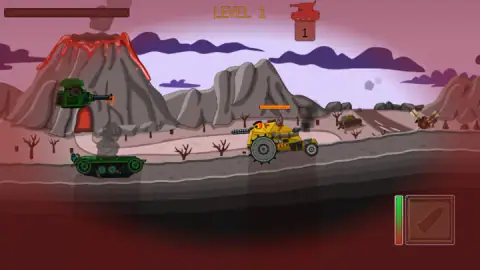
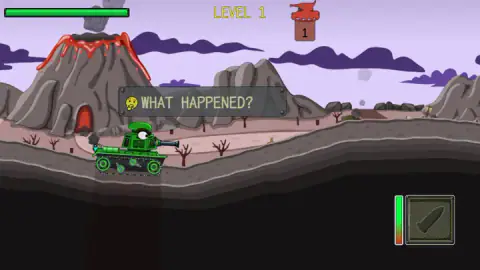
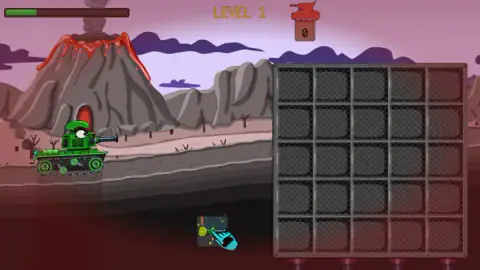
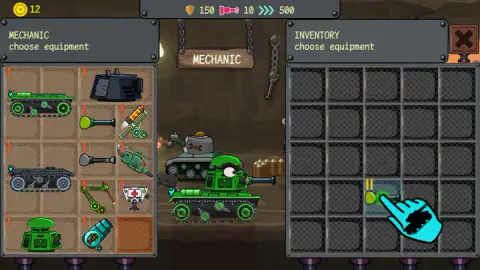
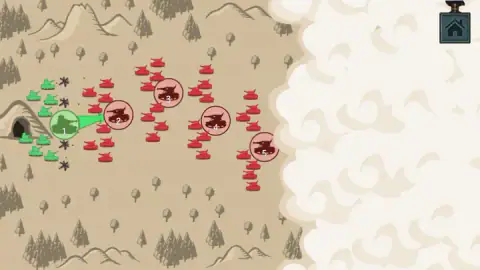
Taken by opening the game ourselves and letting it run — not supplied by the publisher, and not the same picture every other site shows.
How to play Tank Craft 2
- Read the hint quickly. Below your tank, a small picture shows A and D for driving, W and S for swinging the barrel and Space for firing. It is gone within seconds.
- Hit the enemy before it reaches you. One red tank icon at the top with a 1 under it means one enemy left. Your health is the long green bar on the left; the enemy's is the short orange bar above it.
- Gather the loot. After the kill, click the part under the blue hand. It goes into the 5x5 grid, and a second one follows.
- Merge. Drag one cannon onto the other. The VICTORY sign appears, with a house button under it.
- Install, then move on. In the cave, follow the hand: MECHANIC, your merged cannon, INSTALL, the cross at the top right, then the lit button at the far right. That opens the map.
Tips from our run:
- Watch the bar beside the shell box. It empties when a shot goes off and refills over a few seconds, so that is your rhythm.
- Read the screen edges. They turn red as your health falls, and at the end the whole picture is tinted. It is a quicker warning than the bar in the corner.
- Do not wait for a retry button. We never got one. See the next section.
- Ignore the shelf for now. You will not have the coins for it after one win.
Controls
| A and D | Drive left and right, according to the hint the game shows before the first fight; we did not test them in a fight |
|---|---|
| W and S | Swing the barrel up and down, according to the same hint; also untested by us |
| Space | Fire; the hint puts this key on the shell box at the bottom right |
| Click the part under the blue hand | Moves your loot into the 5x5 grid |
| Drag a part onto a matching part | Merges them into one better part |
| Click a part in INVENTORY, then INSTALL | Fits it to your tank; the part it replaces goes back to the inventory |
| Z, X and C, or 1, 2 and 3 | Boosters, according to the game's listing; none came up in Level 1 for us |
Features
- A one-tank Level 1 against a yellow machine with a spiked wheel, under a smoking volcano
- A 5x5 loot grid that slides in when the enemy dies; the level is not won until you use it
- Merging two one-stripe cannons gives one two-stripe cannon, which took our firepower from 10 to 15
- A cave workshop with a shelf of eleven parts: tracks, turrets, cannons and stranger add-ons
- Parts priced in coins: 15 for a two-stripe cannon, 120 for a black turret, against the 12 coins we held
- A vertical bar beside the shell box that empties when you fire and refills in seconds
- A map with five numbered points and fog over everything east of them
Game details
- Developer
- SecGame
- Release date
- March 2026
- Last updated
- October 29, 2026
- Added here
- January 2026
- Technology
- HTML5
- Platforms
- Browser (desktop), Browser (mobile & tablet, touch)
- Saved progress
- Saving, when available, is managed by this game. Mava cannot confirm your level.
FAQ
How do you play Tank Craft 2?
You fight in a side-on view, then spend what you win on your tank. A hint before the first fight shows A and D to drive, W and S to swing the barrel and Space to fire. When the enemy dies, its loot goes into a 5x5 grid, where you merge matching parts. In a cave workshop called MECHANIC you install them, and then a map sends you to the next fight.
How do you merge parts in Tank Craft 2?
Drag one part onto a matching part in the 5x5 grid. A green MERGER panel and a blue hand show you the move in Level 1. We dragged a one-stripe cannon onto another one-stripe cannon and got a single cannon with two stripes. The merged part still has to be installed in the MECHANIC screen before it does anything.
Why does Level 1 of Tank Craft 2 not end when the enemy explodes?
Because the level also teaches the loot. After the kill the enemy counter drops to 0, a sign says GATHER THE LOOT and a grid slides in. The victory sign came only after we had collected two cannons and merged them. Click the part under the blue hand, then follow the hand; clicks elsewhere did nothing useful for us.
Why did my tank stop moving after it was destroyed in Tank Craft 2?
It happened to us twice in Level 1: the turret was knocked off, the edges of the screen were red and the scene simply stayed there. No retry button came up in the 40 seconds or so we waited. A page reload brought us back to Level 1 with a full health bar. We cannot say whether this is normal or particular to our session.
What do the numbers at the top of the MECHANIC screen mean in Tank Craft 2?
They sit beside three icons: a shield, a cannon and a set of chevrons. Ours read 150, 10 and 500 at the start. The cannon figure is your firepower: our shells took 10 off the enemy with a 10 cannon, and the figure rose to 15 when we installed a merged one. We did not change the other two, so we cannot prove what they do.
Are there bosses in Tank Craft 2?
The game's listing says demonic bosses come out of the volcano, but we did not meet one. Our session covered Level 1 only, where there was one enemy, a yellow machine with a spiked wheel. The volcano and its glowing red doorway are in the background the whole time, and that doorway is all we saw of any hell invasion.
Who made Tank Craft 2?
The game is credited to SecGame. Tank Craft 2 was published on 29 March 2026 and updated on 29 October 2026. Its listing also gives the name TankCraft 2: Hell Bosses War.