



About Robbie: Draw your Sword
A game called Draw your Sword sets up an expectation: something to draw it against. In the minutes we spent with Robbie: Draw your Sword there was nothing. No enemy, no wave, no health bar. There was a blond, blocky boy in a walled yard, and a number at the top of the screen that grew every time we clicked.
That number is the game. It sits next to a sword icon, it counts strength, and each click of the mouse adds to it. In our session the amount was always the same: +22.3, floating up beside Robbie as a little sword and then gone.
So this is a clicker dressed as a sword game. Knowing that before you start saves you the first few minutes of looking for a fight.
The game's listing names no studio, only its distributor. It has been available since July 2024.
Our session was about four minutes on a desktop, all of it in the opening yard. We swung, we walked from one side to the other, and we left every menu closed. What follows describes that yard and that counter, and says plainly where our knowledge stops.
Every swing is worth the same 22.3
Most clickers hide their arithmetic. This one prints it. Each swing shows its value next to Robbie, and the counter at the top moves by exactly that much.
We followed it across more than a dozen swings. It read 451.8 early on and 742 near the end, and every step in between was 22.3. No swing was worth more than another, and none missed.
That tells you two things about the opening. Three swings are worth about 67, so the counter moves quickly even with slow clicking. And nothing we did in the yard changed the rate. Where we stood, which way we faced and how far we had walked made no difference.
What would change it is on the right of the screen.
Three boosts, two minutes each
Down the right edge are three purple buttons. Each has a small TV icon in the corner and the label "2 min."
| Button | What the name promises |
|---|---|
| Current strength X2 | Doubles the strength you already hold |
| Received strength X2 | Doubles what each swing gives |
| Autoclick | Swings for you |
The TV icon is the price. Pressing a button asks for an advert before anything else happens. We played our session without any of the three, so the table above is the buttons' own wording and not something we measured.
It is still worth knowing what they are before you play. The first two are not the same thing: one acts on the total, the other on the 22.3. And Autoclick tells you what the game expects from a long session. It expects the clicking to be handed over at some point.
Six tiles we left closed
On the left there is a block of six blue tiles: Wheel, Gifts, Trace, Characters, Pets and Sound. Wheel and Gifts each carried a green dot, the usual sign that something is waiting to be collected. Above them a small clock read 00:00:00 in every screenshot we took.
We did not open any of them. Characters and Pets are the two that hint at where the game goes after the first yard, and we cannot tell you what they cost or what they change.
The yard itself has one more hint. Beside the lawn stands a wooden platform with a flight of steps, and on it three straw nests. Each holds something dark with a glow around it, one yellow, one purple, one blue. We did not climb up to them.
Coins, and the rest of what we did not find
The second counter at the top has a gold icon. It read 0 when we started and 0 when we stopped, with strength past 700 by then. Whatever earns coins, it is not swinging on the lawn.
We also did not see anything that the strength is for. Nothing in the yard asked for a certain amount, nothing was for sale on the screen we played, and Robbie looked the same at the end as at the start.
The rest of the yard is scenery as far as we could tell: a stone wall with a red cloth hanging from the top, a round tower in one corner, a teal floor with orange stripes beyond the grass. We walked up to the wall and found no door.
Who it is for
Players who like watching a number go up and do not need a reason for the first few minutes. The loop is as plain as a clicker gets, one input and one counter, with a 3D yard to stand in while you do it.
It is not for someone who read the title and wants sword fights. And if you prefer a clicker that explains itself, this one does not: there was no tutorial and no task on screen in our session, so the purpose of the coins, the pets and the nests is left for you to discover.
More clickers with a body to move
Gym Simulator Online, Escape is the closest thing we have: each click is a lift, and the strength you build is spent on bosses, so the number has somewhere to go. Run Clicker: Tap Muscle Up turns the clicking into a footrace. Robby +1 To Speed Per Second drops the clicking altogether and pays you for time, even standing still, and Click That Button strips the idea down to a single red button. The rest are filed under clicker games.
Screenshots
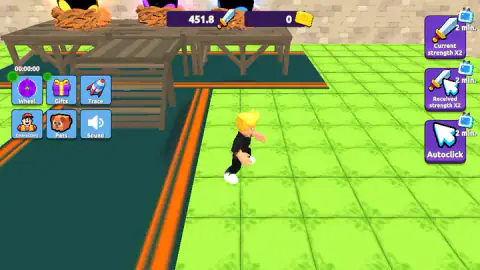
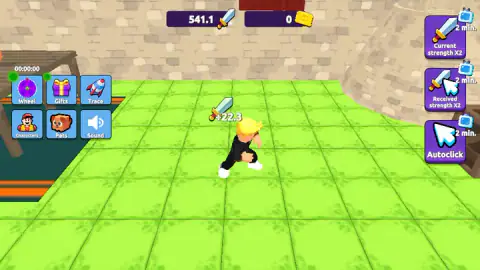
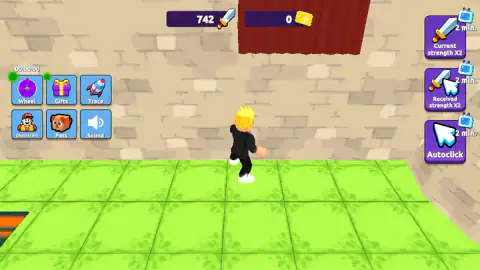
Taken by opening the game ourselves and letting it run — not supplied by the publisher, and not the same picture every other site shows.
How to play Robbie: Draw your Sword
- Wait for the yard to load. In our session there was no title screen and no Start button: Robbie was standing there and the game was already counting.
- Click the left mouse button. That is one swing, and the counter with the sword icon goes up.
- Use W, A, S and D to walk. The camera follows from behind.
- Keep clicking. The second counter, the one with the gold icon, is for coins.
What those minutes taught us:
- The click counts anywhere. We clicked on the grass, near Robbie, far from him and at the top of the screen. Each click paid the same amount. There is nothing to aim at.
- Walking pays nothing. We held W for a full second without clicking and the counter did not move. Strength comes from the mouse, not from the legs.
- Your first clicks are already swings. By the time we first read the counter it stood at 429.5, after the clicks we had spent getting the game to respond.
- Mind the right edge. The three purple buttons there are not part of the yard. A click on one of them brings up an advert request instead of a boost.
Controls
| Left mouse button | One sword swing; each one added 22.3 to the strength counter, wherever on the screen the click landed |
|---|---|
| W, A, S, D | Walk Robbie around the yard; walking on its own added nothing to the counter |
| Purple buttons (right edge) | Three timed boosts marked with a TV icon and "2 min."; each one asks for an advert first |
| Blue tiles (left edge) | Wheel, Gifts, Trace, Characters, Pets and Sound; we did not open them |
| Space and right mouse button | Jump and turn the camera, according to the game's instructions; we did not see either at work |
Features
- A strength counter that climbs by the same 22.3 with every click
- No title screen in our session, the yard is live from the first click
- Three timed boosts on the right, Current strength X2, Received strength X2 and Autoclick, each for 2 minutes
- Six tiles on the left, among them Wheel, Gifts, Characters and Pets
- A second counter for coins, which stayed at 0 for our whole session
- A walled yard to walk around, with a wooden platform carrying three glowing nests
Game details
- Developer
- Partner studio
- Release date
- July 2024
- Last updated
- August 10, 2026
- Added here
- March 2025
- Technology
- HTML5 (Unity WebGL)
- Platforms
- Browser (desktop, mouse and keyboard), Browser (mobile & tablet)
- Saved progress
- Saving, when available, is managed by this game. Mava cannot confirm your level.
FAQ
What kind of game is Robbie Draw your Sword?
It is a 3D clicker. You walk a blocky blond character around a castle yard, and every click of the mouse is a sword swing that adds to a strength counter at the top of the screen. In our session each swing added the same 22.3. We saw no enemies and no obstacle course in the opening yard.
How do you play Robbie Draw your Sword?
Click the left mouse button to swing. Each swing raises the counter with the sword icon. W, A, S and D walk Robbie around, but walking alone earns nothing. The game's instructions also list Space to jump and the right mouse button to turn the camera.
How much strength does one click give in Robbie Draw your Sword?
In our session every click gave 22.3, shown as a small sword icon floating beside the character. The amount did not change between the first swing we counted and the last, and it was the same wherever the click landed. Two of the purple buttons promise to double it for two minutes.
What do the three purple buttons do in Robbie Draw your Sword?
They are timed boosts, each marked "2 min." and a small TV icon. Their names are Current strength X2, Received strength X2 and Autoclick. Pressing one asks for an advert before anything else happens. We played without them, so we cannot tell you how much faster the counter moves with one running.
How do you get coins in Robbie Draw your Sword?
We did not find out. The coin counter sits next to the strength counter and it read 0 from our first minute to our last, while strength went past 700. Swinging and walking around the first yard did not earn a single coin.
Is there a way to win Robbie Draw your Sword?
We did not see one in the minutes we played. There was no level counter, no task and no opponent in the opening yard, only the strength number going up. The tiles for Characters and Pets suggest things to unlock, but we did not open them.
Can you play Robbie Draw your Sword on a phone?
It is listed for PC, Android and iOS, in both landscape and portrait. Our own session was on a desktop with a mouse and keyboard, so the phone side is the listing's word and not something we tried.
Who made Robbie Draw your Sword?
The game's listing names its distributor as the developer and no separate studio, so we cannot point to the team behind it. The game has been available since July 2024, with its last update dated August 2026.