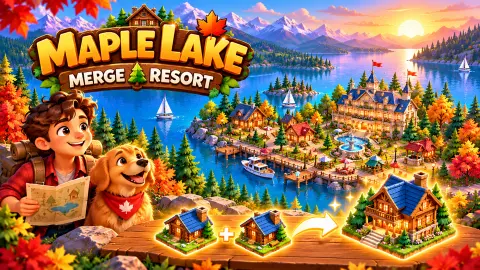








About Maple Lake
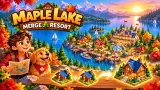
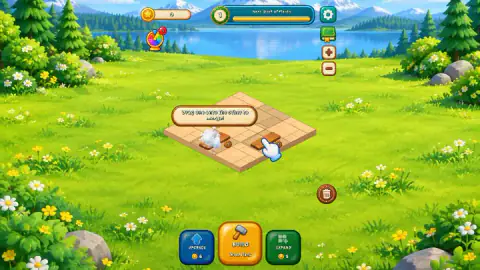
Maple Lake gives you an empty square of paving beside a lake and one big yellow button. Press BUILD and a wood plank lands on the plot. Press it again, drag one plank onto the other, and the two become a Stack of Planks. Everything else in the game is built the same way: identical pieces, merged two at a time.
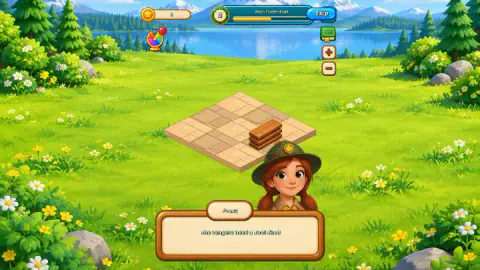
The game is by Jovany Nady and was published in October 2026. In our first session, on a computer with the mouse, we got as far as the tutorial, the first contract from a ranger called Poppy, and a plot packed with planks. We did not finish that contract or buy any land. So this page explains how to read the first plot, and credits the later game to the game's listing.
Read a full bar as the cue to merge
Beside the level number, a bar names the next building: "Next: Stack of Planks" at level 1. The game never explains the bar. In our session it rose one step with every plank we built. With no planks it was empty. One plank filled half, and the second filled it.
After the merge the level became 2 and the bar read "Next: Timber Cage". The single stack put it at half. One new plank moved it to three quarters, and a second filled it again. We never removed a piece, so we cannot say whether the bar counts what stands on the plot or what you have built so far.
Our reading, if the pattern holds: a full bar means the pieces for the next building are already on your plot and only need merging. We could not test it, because the session had no second merge. What we did see is that building past a full bar gains nothing there. We kept pressing BUILD, and six more planks left the bar exactly where it was.
Nine cells, and land you cannot afford yet
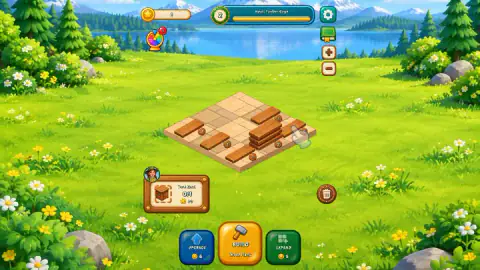
BUILD cost us nothing. The coin counter at the top did not move however many planks we built. The limit is space: the first plot is three cells by three. When the ninth piece landed, the BUILD button turned dark and a banner said "The plot is full! Merge buildings, or EXPAND."
EXPAND is not the way out at that point. Its button shows 5 coins. You start with none, and the first merge left us with 1. Pressing EXPAND only brought the reply "Land costs 5. Keep earning!"
So on a full plot, merging is the way out that costs no coins. Every pair of planks you join frees a cell, and eight loose planks are four merges waiting to happen. Better still, merge as you go and never see that banner.
The first contract is a count, not a delivery
Poppy asks for a Tool Shed, and her card stays on the left with a counter. Click the card and a window called The Old Camp spells out the terms: "Tool Shed or better", and "On your plot: 0/1".
Two lines there change how you play. A better building also counts, so merging past the Tool Shed should not lose you the contract. And the game says your buildings stay on the plot: the contract checks what you own, it does not take it away. When you own enough, you have to click the card yourself. We did not reach a Tool Shed, so we read these terms rather than tested them.
What the game's listing adds
According to the game's listing, the story runs to 7 chapters and 24 contracts, buildings from level 5 up earn money on their own, and decorations raise that income. Its instructions also say that dropping a building onto a different one swaps their places, and that dragging one to the bin removes it. We saw the bin on the right of the plot and a prize wheel with a red 1 at the top left, and used neither.
More merge games
Coffe Merge House and The Flowers Merge and Sell Bouquets also have you merge pieces to fill customers' orders. Boat Merge pairs boats on a water track for coins, and Mergetopia does it with sea creatures. More in our puzzle games.
Screenshots
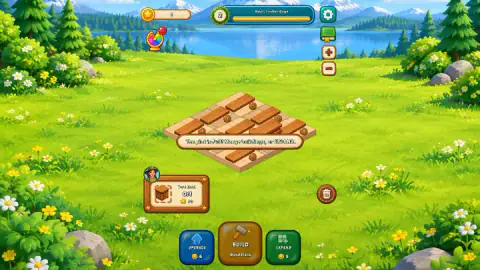
How to play Maple Lake
- Click BUILD. A piece appears on a free cell of the plot; the game picks the cell. The label under the button names the piece, Wood Plank at the start.
- Drag one piece onto an identical one to merge them. Each piece carries a small number: planks are 1, a Stack of Planks is 2.
- Read the contract card on the left. Ours showed a Tool Shed and a counter at 0/1.
- Merge your way up to the building on the card, then click the card. That is what the game's own note says to do; we did not get that far.
- When you have the coins, EXPAND adds land and UPGRADE improves what BUILD gives you, according to the listing's instructions.
Tips from our session
- When the bar at the top is full, try merging before you build again. That is our reading of the bar, explained below.
- Drop the piece onto the cell where you want the new building. In our one merge, the stack stood where the dragged plank was dropped.
- Do not read the 20 on the contract card as a price. It sits under the counter, and the listing's instructions say contracts pay cash, so we take it for the reward. We did not collect it.
Controls
| Click BUILD | Puts a new piece on a free cell of the plot; the label under the button names it (Wood Plank at the start) |
|---|---|
| Drag one piece onto an identical one | Merges the two into the next building |
| Click the contract card | Opens the request with its counter and coin amount; the game says to tap it again once you own what it asks for |
| Click EXPAND or UPGRADE | Spends coins on more land or on better pieces from BUILD, according to the listing's instructions; each button shows its price |
| Drag a piece to the bin | Removes it, according to the listing's instructions |
Features
- Everything starts as a Wood Plank: two planks merge into a Stack of Planks, and so on up
- BUILD cost no coins in our session; the limit is the plot, nine cells at the start
- A bar beside the level number names the next building; in our session it rose with every plank we built
- Contracts from characters such as Poppy the ranger count what stands on your plot; the buildings stay
- EXPAND costs 5 coins and UPGRADE 6 at the start, and you begin with none
- A story in 7 chapters and 24 contracts, according to the game's listing
- No energy system and no waiting timers, according to the game's listing
Game details
- Developer
- Jovany Nady
- Release date
- October 2026
- Last updated
- November 6, 2026
- Added here
- October 2026
- Technology
- HTML5
- Platforms
- Browser (desktop, mouse)
- Saved progress
- Saving, when available, is managed by this game. Mava cannot confirm your level.
FAQ
How do you play Maple Lake?
Click BUILD to put a wood plank on the plot, then drag one plank onto another to merge them into a Stack of Planks. Keep merging identical pieces into bigger buildings, and watch the contract card on the left for what a character wants standing on your plot.
Why can't I build any more in Maple Lake?
The first plot has nine cells. When every cell is taken, the BUILD button turns dark and the game says the plot is full: merge buildings, or EXPAND. Merging is free and clears a cell each time; EXPAND costs 5 coins at the start.
How do you complete the Tool Shed contract in Maple Lake?
The request reads Tool Shed or better, and its counter shows how many stand on your plot, 0/1 at first. The game says your buildings stay on the plot and that you tap the contract card once you own enough. We did not get as far as a Tool Shed in our session, so we cannot say how many merges it takes.
What does the bar at the top of Maple Lake mean?
It names the next building, for example Next: Stack of Planks, and in our session it rose with every plank we built: half with one plank, full with two. The game does not explain it. We read a full bar as a sign that the pieces for the next building are already on the plot and it is time to merge, but we did not get to test that.
How much does it cost to expand the plot in Maple Lake?
The EXPAND button shows 5 coins at the start, and UPGRADE shows 6. You begin with no coins and we had only 1 after the first merge, so pressing EXPAND gave the message Land costs 5. Keep earning.
Does Maple Lake have energy or timers?
The game's listing says it has no energy system and no waiting timers. That matches our short session: BUILD never asked for a coin or a wait, and the only thing that stopped us was a full plot.
Who made Maple Lake?
It is credited to Jovany Nady and was published in October 2026. We played it in a browser on a computer with the mouse; the game's listing gives mobile browsers, Android and iOS as well.