






About MACHFURY
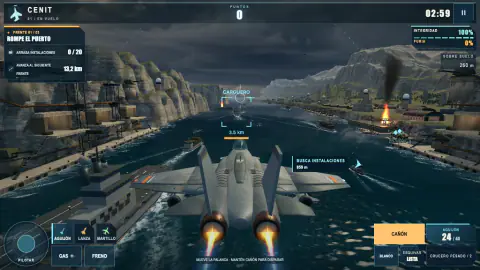
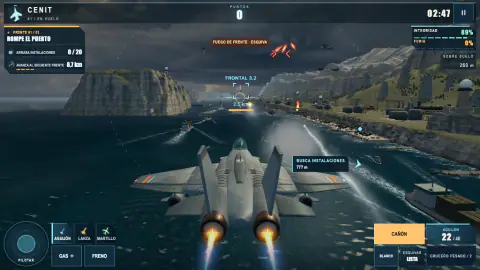
You take over the Cenit just as it reaches the coast, already in the air and already being shot at. MACHFURY is a fighter jet game for the browser, and what separates a good first flight from a wasted one is not your aim. It is the small panel at the top left, which tells you what this stretch of the mission wants destroyed and how far away the next stretch is.
Each mission is short, two to three minutes by the campaign screen's own count, and split into three sectors. The panel changes with each one. Read it before you spend a missile on the first plane that crosses your nose.
Stinger and Lance draw on the same reserve
There are three missiles, and the first two share one stock. In our test flight the count read 24 on entry. Two Stinger shots took it to 22, and when we switched to Lance the panel still said 22. It is one reserve, shown out of 40.
That matters because the two do not cost the same. A Stinger takes one from the reserve per press. A Lance takes three, and with fewer than that the game refuses the shot and tells you to find a blue ring. So a count of 22 means twenty-two Stingers or seven Lances, not both.
Hammer, on key 3, is the heavy cruise missile, with splash damage. It has a counter of its own, which stood at 2 in our flights, and the F key fires it directly.
Blue rings rearm, green rings repair
Supplies hang in the air as rings, and you collect one by flying through the middle. A blue ring refills missiles: in an earlier flight of ours the reserve went from 24 to 36 in one pass. A green ring with a cross repairs the jet. Ours brought up an 18% repair notice, moved the hull reading from 61% to 79% and added 500 points.
Check both numbers before you turn. The hull percentage sits at the top right and the missile count at the bottom right. Leaving the targets costs time on a clock that counts down, so go for the ring you actually need.
Breakwater, sector by sector
The campaign screen lays the first mission out before you take off. Sector one, Breach the Harbor, asks for 20 ground facilities. Sector two is the naval blockade, with 8 ships to sink.
Sector three is the fortress: 14 fighters and 24 more facilities. After that comes Coloso, a flying fortress that closes this mission and returns in later ones.
In flight, the panel adds a second line under the count: the distance to the next sector. We watched the count reach 20 of 20 and turn green with kilometres still to run. Nothing else needs doing in that stretch, so keep flying and save your missiles for what comes next.
100 missions, and you can start anywhere
The campaign has 100 missions in seven worlds: 30 on the coast, 20 over the city and 10 each in the arctic, the volcano, the mountains, the desert and the jungle. They are not handed out one at a time. On our save, with a single mission complete, every mission we opened in the coast and city lists was already marked ready to fly.
Each mission keeps a best score, a best time and up to three medals, and you can fly it again to improve them. Our own Breakwater stands at 2:45 with two of the three.
Arcade or Expert: an arcade game, not a simulator
MACHFURY is arcade air combat. You start in the air, and there is no take-off or landing to learn. In Arcade the jet is steadied for you, the missile lock is wide and the flares are assisted. Expert takes most of that away: the cannon heats up and the ground becomes something you can fly into. Best scores are kept separately for each mode.
It is built for a computer with a keyboard and mouse. The game takes over the mouse pointer to steer. Esc pauses the flight and gives the pointer back, and the orange RESUME FLIGHT button takes it again.
MACHFURY is one of our own games. Two of the others are Traffic Assault, a motorcycle game with the police in your mirrors, and Breachfall, a territory game set in a candy world.
For more ways to fly, see our airplane games or the rest of the shooting games.
Screenshots
How to play MACHFURY
- Open SETTINGS and leave the flight mode on Arcade while you learn. The choice applies from your next sortie.
- Press PLAY. The first mission is Breakwater, or Rompeolas if your browser is set to Spanish.
- Steer with the mouse, the arrow keys or W A S D. Let go and the jet levels out by itself.
- Hold the left mouse button or Z to fire the cannon.
- Press 1, 2 or 3 to pick a missile. Press Space or the right mouse button to fire it.
Two keys are easy to miss. Tab moves the missile lock to another target. C rolls the jet and drops flares, which is what the warning FIRE AHEAD · EVADE is asking for.
Controls
| Mouse, arrow keys or W A S D | Steer the jet. Let go and it levels out by itself. |
|---|---|
| Left mouse button or Z | Hold to fire the cannon. |
| 1, 2 or 3 | Choose a missile: Stinger, Lance or Hammer. |
| Right mouse button or Space | Fire the missile you chose, one per press. |
| Tab | Move the missile lock to another target. |
| C | Roll the jet to dodge and drop flares. |
| F | Fire the heavy cruise missile. |
| Shift and Ctrl | Boost and brake. |
| Esc | Pause and get the mouse pointer back. |
Features
- 100 missions in seven worlds: 30 on the coast, 20 over the city and 10 in each of the other five.
- Every mission is three sectors with their own order and quota, flown in two to three minutes.
- Stinger and Lance share one missile reserve, shown out of 40. A Lance takes three of it per shot.
- Blue rings refill your missiles. Green rings repair the jet.
- Arcade steadies the jet and widens the missile lock. Expert adds cannon heat and crashes into terrain.
- Each mission keeps a best score, a best time and up to three medals.
Game details
- Developer
- Mava Games
- Release date
- November 2026
- Last updated
- November 9, 2026
- Added here
- November 2026
- Technology
- HTML5 · WebGL 2 (3D)
- Platforms
- Browser (desktop, keyboard and mouse)
- Saved progress
- Saving, when available, is managed by this game. Mava cannot confirm your level.
FAQ
Is MACHFURY a flight simulator?
No. It is an arcade fighter jet game. You start in the air, with no take-off or landing to learn, and Arcade mode steadies the jet and gives you a wider missile lock. Expert mode removes most of that help.
Is MACHFURY a free fighter jet game?
Yes. It plays in the browser with no download. Your missions, medals and best scores are stored by the browser you play in, so come back on the same one.
Can I play MACHFURY on a phone?
It is built for a computer with a keyboard and mouse, and that is how we have tested it here. We have not confirmed it on phones.
Why did the game pause at the start?
On a computer, the game asks to take control of the mouse pointer to steer. If the browser blocks it, you see a pause screen. Press the orange RESUME FLIGHT button to try again; if it keeps happening, the game suggests Chrome or Edge.
How long does a mission take?
Two to three minutes. Each mission is three sectors with a quota and a countdown clock, and some of them end with a boss, the flying fortress Coloso.