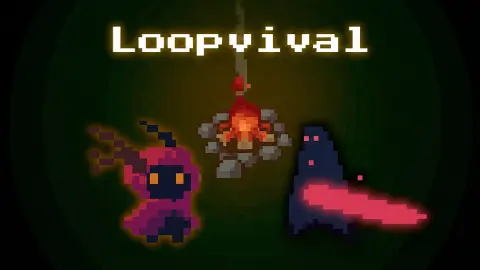





About Loopvival
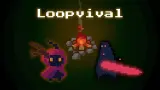
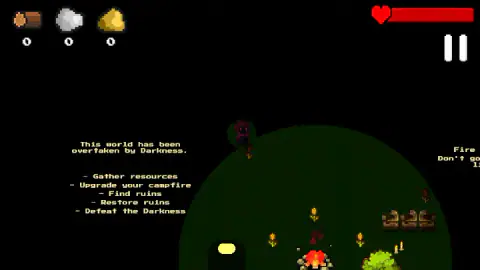
Most survival games open by handing you a map. Loopvival opens by taking one away. The screen is black. In the middle of it sits a ring of grey stones with a fire burning inside, and that fire lights a circle of grass about a third of the screen wide. Everything past the edge of the circle is not dim. It is nothing.
Three counters sit in the top-left corner — wood, stone and gold — and a red health bar with a heart runs along the top right. Down the left-hand side the game writes out what it wants from you: gather resources, upgrade your campfire, find ruins, restore ruins, defeat the Darkness. Over on the right it adds the only piece of advice it offers, which is also the rule the whole game is built on: Fire = safety. Don't go beyond its light.
The game is credited to DDK and was published on 25 January 2026.
Now the part a page like this usually leaves out. Our run lasted about four minutes. In that time the three counters never moved off zero — not one log, not one stone — and the game killed us more than once. We never saw what hit us. So this page is short, and it describes those four minutes rather than retelling what the game promises further in.
What a roguelite is, and why the campfire matters
The word is doing real work here, so it is worth being exact about it.
Rogue was a dungeon game from around 1980 with one unbending rule: the dungeon was built fresh every time, and when your character died, that character and everything on it were gone for good. A whole family of games grew from it and took its name; enthusiasts even met in Berlin in 2008 to write out the traits that make one. The trait nobody argues about is the ending. Death wipes the run.
A roguelite breaks that one rule and leaves the rest standing. The world still resets, the map is new, your gear is gone — but one thing crosses the line with you, so your twelfth attempt starts further along than your first did. The design question in a roguelite is which thing is allowed to persist.
Loopvival's answer is the campfire, and the game says so plainly: each cycle takes the world back to the beginning, and the fire's progress stays. That is its promise, not our finding — we never got a counter off zero, and we never saw a cycle end. But it explains the shape of what you see in the first second. It is why the fire sits at the centre of the map rather than off at one edge, why the second line of the checklist is about feeding it rather than arming yourself, and why the dark is allowed to be this lethal. If every death were total, a map this hostile would simply be unfair.
The dark here is not dim, it is absent
Light from a single source falls away with the square of the distance: stand twice as far from a fire and you get a quarter of the light. That is why a real campfire gives you a bright patch, a short blurred margin, and then very little.
Loopvival makes it absolute. There is no blurred margin: the lit grass has a hard edge, and past it the screen is pure black, with no silhouettes and no suggestion of ground. Whatever is out there, you meet it at the moment it reaches you.
Then the game sets a line of text beside the fire telling you not to go, and hands you five objectives that cannot be done without going. That is the tension it runs on, and you feel it inside the first minute.
What we did not see
We picked up no resources at all, so we never upgraded the fire, never found ruins, never restored one, and never had a use for the Q key. We met nothing we could point at and call an enemy. We did not see a cycle reset, or what carries over when it does. We did not play it on a phone, although it is listed for Android and iOS and the instructions describe an on-screen joystick.
If you last longer than we did, you will see things this page does not describe. That is the honest state of it.
More games in the dark, and out of it
One Bit is the closest relative on the site: pixel-art, stripped down, built around one idea and a great deal of dying. Diner in the Storm swaps the dark for a storm and asks you to make choices rather than swings. Dig out of Prison is the other game here about collecting the right material in the right order. For something that simply lets you hit what is in front of you, there is Stickman Ghost Online. The rest are under adventure games.
Screenshots
How to play Loopvival
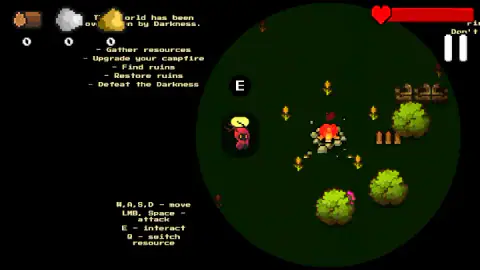
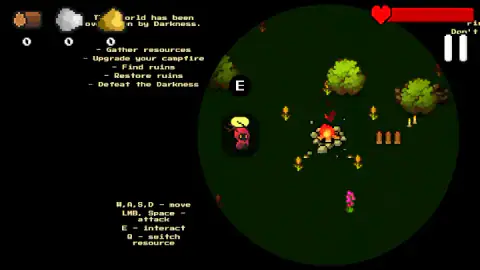
- Click into the game, then read the bottom-left corner. The control legend is printed on the grass: W, A, S and D move, the left mouse button or Space attacks, E interacts, and Q switches which material you are putting into something.
- Stay inside the circle at first. The lit disc around the fire is the safe ground the game tells you about, in those words. Leaving it is how our run ended, twice.
- Watch for the E. When something next to you can be used, a black circle with a white E appears above your character. We got it standing beside the campfire itself.
- Feed the fire, then go further. The checklist asks for resources first and an upgraded campfire second, and only then for ruins to find and restore. The order is the game's own.
- Read the Second chance panel before clicking it. When you die, a grey panel with that title covers the middle of the screen and your health bar behind it is empty.
Things worth knowing before a first try:
- Your character is easy to lose track of. It is a small hooded figure in red with glowing eyes and a yellow light at its head, and on dark grass that light is often the only part of you you can pick out.
- The two Second chance buttons carry no words. One shows an arrow curling into a loop, the other a red heart with a small badge in its corner. We clicked the heart and play carried on; we did not try the other, so we cannot tell you what it does.
- The pause button is the pair of white bars, top right. It opens a wooden panel with Continue, a sound slider, a music slider and a flag for the language.
- Nothing on screen counts time. There is no clock and no day counter. The only thing moving against you is the health bar.
Controls
| W, A, S, D | Move |
|---|---|
| Left mouse button or Space | Attack |
| E | Interact; a black circle with a white E appears above you when something is in range |
| Q | Switches which resource you are putting into something, per the on-screen legend; we never carried one |
| Pause button (top right) | Opens a panel with Continue, a sound slider, a music slider and a language flag |
Features
- A pitch-black map with one lit circle in it, around a stone-ringed campfire
- A five-line checklist printed on the grass: gather, upgrade the fire, find ruins, restore them, beat the Darkness
- Three resources tracked in the corner — wood, stone and gold — and a health bar with a heart
- A Second chance panel on death, with two unlabelled buttons: a looping arrow and a red heart
- A roguelite structure the game describes itself: the world resets each cycle, the campfire's progress does not
- Made by DDK, in English and Russian
Game details
- Developer
- DDK
- Release date
- January 2026
- Last updated
- August 10, 2026
- Added here
- November 2025
- Technology
- HTML5
- Platforms
- Browser (desktop, keyboard & mouse), Browser (mobile & tablet, touch)
- Saved progress
- Saving, when available, is managed by this game. Mava cannot confirm your level.
FAQ
How do you play Loopvival?
You move with W, A, S and D, attack with the left mouse button or the Space bar, and press E to interact when a black circle with an E appears above your character. The game prints a checklist on screen: gather resources, upgrade your campfire, find ruins, restore them, and defeat the Darkness. A note beside the fire warns you not to go beyond its light.
Is Loopvival a roguelike or a roguelite?
The game calls itself a roguelite, and the difference is the one that matters. In a roguelike, death wipes the run completely. In a roguelite, something survives it. Here the game says the world goes back to the beginning each cycle while the campfire's progress stays, which is what puts it on the roguelite side.
What is the campfire for in Loopvival?
It is the light and, according to the game, the only thing that persists. The text on the right of the screen reads "Fire = safety. Don't go beyond its light.", and the second item on the checklist is to upgrade it. The lit circle around it is the only ground you can see; outside it the screen is black.
Why is most of the screen black in Loopvival?
That is the design, not a fault. The map is unlit except for the disc around the campfire, and the edge of that disc is hard rather than faded, so there is no half-light to peer into. Anything outside reaches you before you see it.
What happens when you die in Loopvival?
A grey panel headed Second chance covers the middle of the screen, with the health bar empty behind it. It offers two buttons with no words on them: one shows an arrow curling into a loop, the other a red heart with a small badge. We pressed the heart and play continued; we did not try the other.
Can you play Loopvival on a phone?
It is listed for PC, Android and iOS in landscape, and the game's own instructions describe an on-screen joystick with buttons for attack, interact and switching resource. We played it on a desktop with a keyboard and mouse, so we cannot tell you how the touch controls feel.
Who made Loopvival?
It is credited to DDK and was published on 25 January 2026. Our database carries no developer for it, and we found no second source to check the name against.
Is Loopvival free?
Yes. It runs in the browser with nothing to install and nothing to pay, here or, where it is listed at a price of zero.