



About Kick a Lucky Block: Tsunami Waves
In most kicking games the kick is the whole event: you hit the thing, a number tells you how far it went, and you line up the next one. In Kick a Lucky Block: Tsunami Waves the kick is the part that gets you into trouble. A moment after it we were no longer the caveman we started as. We were a different small creature, standing far out on the grass, with a band of crackling blue water behind us and a banner telling us to wait.
That is the game's idea, and its instructions put it in three steps: kick the lucky block as far as you can, turn into a Brainrot where it lands, and escape the tsunami. The farther the kick, the game's own description says, the bigger the reward and the longer the way home.
The game is credited to Square Dino LLC. It was published at the end of April 2026.
Now the honest part. Our session lasted four minutes and we were not good at it. It took most of the first minute to find the kicking strip, we cancelled more kicks than we made, and the two that did go off earned nothing. The counters in the corner read Speed: 0 and Kick: 0 when we started and the same when we stopped. So this page is strong on the first five minutes, which are confusing, and thin on everything a longer run would unlock. Where we lean on the game's own text, we say so.
What the two kicks showed us
Both kicks ended the same way, so we can describe one round with some confidence.
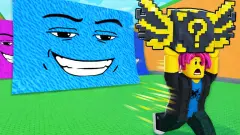
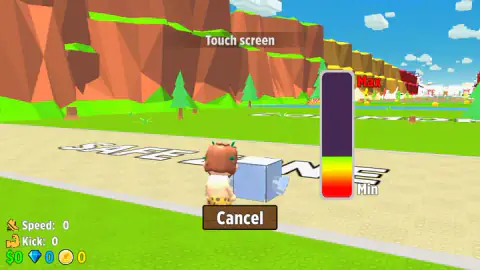
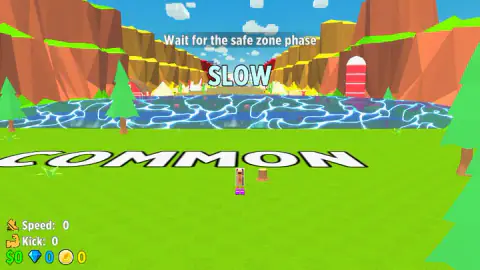
The power bar opens with your character beside a pale blue cube that has a face on it. That is the lucky block. Click, and the view jumps to the grass beyond the sand, where the word COMMON is written on the ground. A small figure stands by the lettering, and it is not the caveman. The first time ours had purple feet; the second time it had a square black head with red on it. Two kicks, two different creatures.
A banner reads "Wait for the safe zone phase", with the single word SLOW in large letters under it. Across the valley behind, where a river had been, there is a wide band of bright blue water with white lines running through it like electricity. We take SLOW to describe the wave, but the game did not explain it and we will not pretend to know.
Then, by our notes, the message changed to "Run to safe zone". We have no screenshot of that moment. What we can say for certain is that well under half a minute after each kick we were the caveman again, on the sand, looking at the KICK button, with $0 and every other counter at zero.
Why nothing? We cannot say. Both of our landings were in COMMON, the nearest zone, with a kick stat of 0. Whether a common result pays so little that it does not show, or whether we failed to get home, is exactly what a longer session would settle.
The plot, the shop and the Rebirth
Your starting plot is more than a spawn point. The game's description says you place the Brainrots you collect there and they earn income. We had none to place, but the plot next door, behind a blue wall, showed how it looks: a figure on a pedestal with 20k$/s floating over it and a rarity word beneath.
Three brown buttons sit on the left of the screen: a market stall, a pair of arrows and a gear. The arrows opened a window called Rebirth. It offers to reset your upgrades for a permanent rise in income; the first step doubles money and asks for a kick power of 1k. With a kick power of 0 that was a long way off.
That window has a "Skip rebirth" button priced at 100 diamonds. We had none, and pressing it took us to the Shop. The shop has three tabs: MONEY, SKINS and BRAINROTS. On the first, the top row gives ten diamonds for watching a video and the second turns ten diamonds into 10K of cash. Below those come diamond packs with prices written in dollars and cents, starting at $1.40. We did not press any of them, and nothing stopped us playing without them.
Where the word brainrot comes from
The game uses Brainrot as a plain noun for its creatures, the way another game would say pets. The word has a longer history than the memes it is borrowed from.
Brain rot, written as two words, was Oxford University Press's Word of the Year for 2024. According to Wikipedia, its use rose 230% in a single year, and it describes online content of little value and the feeling of having watched too much of it. The same article traces the first recorded use to Henry David Thoreau's Walden, published in 1854.
Since then the term has attached itself to a wave of absurd, deliberately nonsensical internet characters, and browser games have turned those into something to collect. That is the sense here. Nothing we saw is a licensed character; these are the studio's own blocky figures with one-word names. The joke fits the mechanic, too: you do not choose your creature, the block does.
Who it is for
It suits players who like short loops with a number that grows: kick, run, bank, upgrade, kick again. The look is bright and blocky, there is no violence in anything we saw, and a round is over in seconds.
It does not suit anyone who wants the game to teach them. We got one line of text at a time and no explanation of the stats, the zones or the wave. Expect your first minutes to go the way ours did. And if a shop with priced packs is a problem in your house, know that it is one button away from the start.
More from Square Dino and more lucky blocks
The same studio made Escape Waves for Lucky Blocks, which is the closest thing to this one: the same waves and the same blocks, but you carry them home instead of kicking them. Its other games here are quite different: Scary Rooms: Idle Horror is a tycoon set in a haunted attraction and Animals vs Zombies is a rescue adventure.
From another studio, Kick Lucky Blocks Online builds a whole training hub around the kick, and +1 Speed: Escape Prison is the plainest take on speed as a stat you grow. The rest are under action games.
Screenshots
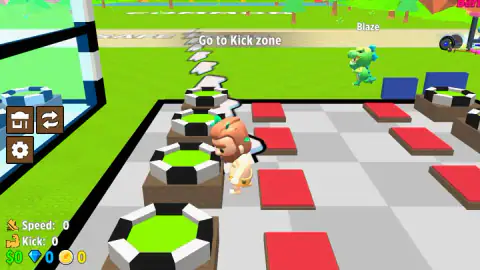
Taken by opening the game ourselves and letting it run — not supplied by the publisher, and not the same picture every other site shows.
How to play Kick a Lucky Block: Tsunami Waves
- Leave your plot. You begin on a grey chequered floor among red pads and green-topped pedestals, under a banner that says "Go to Kick zone".
- Follow the white arrows with W. They cross the grass to a strip of sand with SAFE ZONE written on it in large letters.
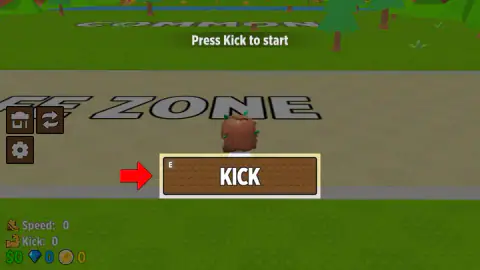
- Press KICK. On the sand the banner changes to "Press Kick to start" and a wide brown button appears, with a red arrow pointing at it.
- Stop the power bar. A tall bar runs from Min, in red, to Max, in purple. Click the screen to kick.
- Get back. You are now a different creature, out in a lettered zone. The instructions say to escape the wave.
What four minutes taught us:
- Use W, not A. The arrows run straight away from the camera. A moved us sideways, off the path, and we stood on the plot for a while wondering why nothing was happening.
- Do not click where the KICK button was. When the power bar opens, a Cancel button sits almost exactly where you just clicked. A second click in the same place closes the bar. We did that four times before working it out.
- Any other spot kicks. Both of our kicks came from a click on open ground, well away from Cancel.
- The bar does not wait for you. It was filled to a different height each time we looked, so it moves on its own and the click decides the power.
- The small E on the button suggests a keyboard shortcut. We clicked the button with the mouse and it worked; pressing Enter did not.
Controls
| W | Walks forward; it is what carried us along the white arrows to the sand strip |
|---|---|
| A | Moves sideways, which takes you off the arrow path |
| KICK button (marked with a small E) | Appears on the sand strip; clicking it brings up the power bar |
| Click anywhere on the power-bar screen | Kicks the block at whatever level the bar shows |
| Cancel | Closes the power bar without kicking and returns you to the KICK button |
| Three brown buttons on the left | A market stall, a pair of arrows and a gear; the arrows opened the Rebirth window |
Features
- A home plot with rows of pedestals and a trail of white arrows that leads to the kicking strip
- A vertical power bar from Min (red) to Max (purple) that you stop with one click
- After each kick you play as a different creature; we got two different ones from two kicks
- Ground lettered by rarity, starting with COMMON just past the sand
- Two trainable stats, Speed and Kick, shown at all times; both start at 0
- Three currencies on screen: cash, blue diamonds and gold coins
- A shop with MONEY, SKINS and BRAINROTS tabs, and a Rebirth that trades upgrades for a money multiplier
- Made by Square Dino LLC
Game details
- Developer
- Square Dino LLC
- Release date
- April 2026
- Last updated
- September 7, 2026
- Added here
- March 2026
- Technology
- HTML5 (3D)
- Platforms
- Browser (desktop, keyboard & mouse), Browser (mobile & tablet, touch)
- Saved progress
- Saving, when available, is managed by this game. Mava cannot confirm your level.
FAQ
How do you play Kick a Lucky Block: Tsunami Waves?
Walk from your plot along the white arrows to the sand strip lettered SAFE ZONE and press the KICK button that appears. A vertical power bar comes up; click anywhere except Cancel to kick. The game's instructions say you then turn into a Brainrot where the block lands and have to escape a tsunami. In our two kicks we did change into another creature each time, and came back with nothing.
How do you kick the block in Kick a Lucky Block: Tsunami Waves?
Stand on the sand strip, click the wide brown KICK button, then click the screen while the power bar is showing. The one thing not to click is the Cancel button under your character: it sits right where your pointer already is after pressing KICK, and it closes the bar without a kick. We cancelled four times that way.
What do Speed and Kick mean in Kick a Lucky Block: Tsunami Waves?
They are the two stats in the bottom left corner, and both read 0 when you start. The game's own description says you buy weights and train your legs to kick farther. We did not find the trainers in our short session, and both numbers were still 0 when we stopped.
What is a Brainrot in Kick a Lucky Block: Tsunami Waves?
It is the game's name for its collectible creatures. Each kick turned us into a different one, and the shop has a whole tab for them. The game's description says you collect them and place them on your plot to earn income; on a neighbouring plot we saw one on a pedestal with 20k$/s written above it.
What does Rebirth do in Kick a Lucky Block: Tsunami Waves?
The Rebirth window, opened with the two-arrows button, offers to reset your upgrades in exchange for a permanent rise in income. The first step it showed us doubles money, from 1.0x to 2.0x, and asks for a kick power of 1k. We had a kick power of 0, so we could not try it.
Does Kick a Lucky Block: Tsunami Waves have in-game purchases?
It has a shop with a MONEY tab that sells blue diamonds. One row gives diamonds for watching a video, one turns diamonds into cash, and the rows below list packs with prices written in dollars and cents. We did not press any of them, and we played our whole session without spending or being asked to.
Who made Kick a Lucky Block: Tsunami Waves?
It is credited to Square Dino LLC. It was published at the end of April 2026 and was last updated in September 2026. It is listed for PC, Android and iOS in English and Russian; we played it on a desktop computer.