


About Impossible Parkour 3D
Most browser games treat the tutorial as a courtesy you can click past. Impossible Parkour 3D treats it as a door. The first screen has one button on it, and the screen you see when you fail says in small white letters: "Please complete the tutorial level before going to menu!"
We can vouch for that line, because we read it more often than anything else in the game. We played for about four minutes on a desktop keyboard and did not get through the tutorial. Every attempt ended on the game-over screen. We never saw the menu, a numbered level or the finish flag from close up.
So this page is about the first stretch of the game: what the tutorial shows, what it asks of you and why it is easier to fail than it looks.
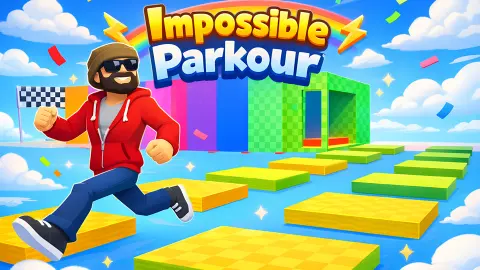
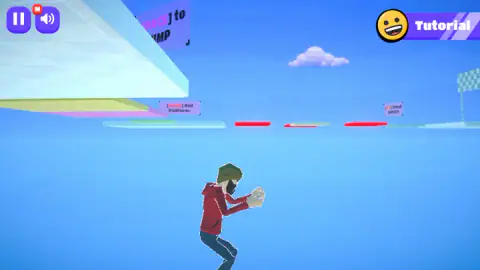
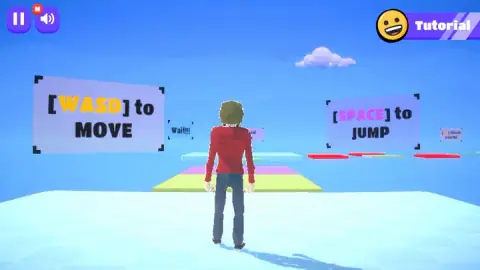
The game itself is a platform course in the sky. A runner in a red hoodie and a green beanie stands with his back to you on a pale chequered slab, and coloured platforms lead away from him with nothing but blue underneath. The game is credited to NISHAD GAMES and has been available since early 2026.
The tutorial is a locked door, not a suggestion
The opening screen is a flat purple page with the words "Let's learn how to play!" and one button under them. There is no Play, no level list and no settings on it. You start the tutorial or you do nothing.
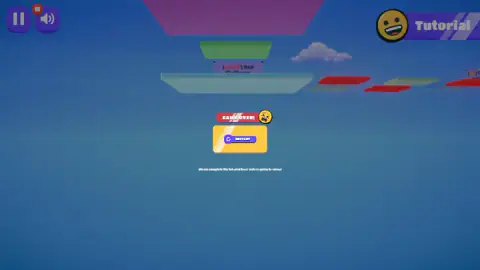
The lock shows again when you fail. The game-over screen is a red banner with a crying face, a yellow panel and a single RESTART button. Under it sits the line about completing the tutorial before going to the menu. There is no second button that leads anywhere else.
That changes how the first minutes feel. In most games a failed tutorial costs nothing, because you can leave it. Here it is the first level in everything but name.
It is fair to say we underestimated it. The label in the top right corner says "Tutorial" next to a grinning face, and the course looks short. It took our whole session all the same.
What the signs tell you: move, jump, wait, avoid red
The tutorial teaches by planting signs along the course, and from the starting platform you can already see five of them.
The two large ones name the keys. Between them, further along the course, a small one reads "Wait!!!" A little further on, a sign reads "[Avoid] Red Platform." Off to the right a last one mentions check points.
Put together, they describe the whole game in order. You move, you jump, you stop before an edge instead of running at it, and you treat one colour as forbidden. The check-point sign suggests that the course saves your place somewhere along the way. We did not reach that spot, and each of our restarts began at the very start.
The red platforms are easy to pick out. After the avoid sign the course becomes a row of slabs leading right, and the red ones sit between pale ones, in turn. We counted three red ones in view. What happens when you land on red we cannot tell you, because we never got that far.
Where the first stretch goes wrong
Seen from the start, the floor looks continuous. The pale slab runs into a yellow-green strip, the strip into a pink one, and a blue platform waits behind them. From that angle it reads as one long ramp.
The game-over screen corrects the picture. When you fall, the camera ends up under the course and looks back up at it, and from below the layout is easier to read. The yellow and pink strips are joined. After them we could see open air, then a small green block, then the blue platform with the avoid sign beside it.
So the first real test appears to be that gap, a few steps into the course. We did not watch the fall happen from the outside; this is our reading of where the camera ended up. It would also explain the "Wait!!!" sign: stop, look at the edge, then jump. We ran straight on instead.
The practical advice is simple. Walk the first two strips in short presses of W, stop on the pink one, and use Space from a standstill until you know how far a jump carries.
Why a jumping game is called parkour
The word comes from the French parcours, a course or route, and in particular from the obstacle courses used in military training. The sport that took the name is about crossing a stretch of city by running, vaulting and jumping, with no equipment.
Browser games kept the word and changed the place. There are no walls to climb here and no rooftops, only slabs in the air and the question of whether you can get from one to the next. What is left of the sport is the idea of a fixed route that you learn by failing on it.
That is also the honest way to read the title. The first course we met was not impossible, but it does not forgive a held key.
Who it is for
Players who like to repeat a short course until their hands know it, and who do not mind starting again from the first platform. The keys are the standard ones and there is nothing to read beyond the signs.
It is a poor fit if you want to look around before committing. You cannot open the menu first, and we cannot tell you what waits behind it. The listing speaks of 25 levels; we saw none of them.
More running and jumping games
Tower Of ASMR is the closest relative here, a 3D climb on foot from check point to check point. Bridge Bounce: Jump Challenge cuts the idea down to one button and a broken bridge. Rooftop Run is parkour in first person, where the runner jumps on his own and you aim the view, and Parkour Runner 3D is a three-lane street runner despite its name. The rest are under action games.
Screenshots
Taken by opening the game ourselves and letting it run — not supplied by the publisher, and not the same picture every other site shows.
How to play Impossible Parkour 3D
- On the purple opening screen, click the only button. It reads "Start Toturial", spelling included.
- You start on a wide pale platform. Two large signs float ahead: "[WASD] to MOVE" on the left and "[SPACE] to JUMP" on the right.
- Press W in short bursts to walk forward over the yellow strip and the pink one.
- Jump with Space where the floor stops. Past the pink strip there is open air before the next platform.
- If you fall, click RESTART. You begin again on the starting platform.
What four minutes taught us:
- There are no rails. One second of D sent the runner over the right-hand edge of the very first platform. The picture we took at that moment shows him in mid-air with the floor above him.
- Holding W is not a plan. We held it for about a second and a half on each attempt, without a jump, and each attempt ended in a game over.
- Read the small signs before you move. The two big ones give you the keys. The rules are on the little ones further away.
- The course turns. It runs straight ahead at first and then goes off to the right, towards the flag.
Controls
| W A S D | Move the runner; W is forward, away from the camera |
|---|---|
| Space | Jump, according to the sign at the start of the tutorial |
| Left click on "Start Toturial" | Opens the tutorial level; it is the only button on the first screen |
| Left click on RESTART | After a game over, puts you back on the starting platform |
| Pause and speaker buttons, top left | Pause and sound; the speaker carries a small badge with the letter M |
Features
- A course of flat coloured platforms hanging in an open sky, with nothing underneath
- Floating signs that teach one rule each, from "[WASD] to MOVE" to "[Avoid] Red Platform."
- Red platforms set between pale ones on the way to a chequered flag
- A tutorial that has to be finished before the menu opens
- A game-over screen with a single button, RESTART
- A third-person camera behind a runner in a red hoodie and a green beanie
Game details
- Developer
- NISHAD GAMES
- Release date
- January 2026
- Added here
- November 2025
- Technology
- HTML5 (3D)
- Platforms
- Browser (desktop)
- Saved progress
- Saving, when available, is managed by this game. Mava cannot confirm your level.
FAQ
How do you play Impossible Parkour 3D?
You steer a runner across flat platforms that hang in the sky. W, A, S and D move him, and Space jumps. The signs in the tutorial add one more rule, which is to keep off the red platforms. Leave the course and the game ends with a RESTART button.
Can you skip the tutorial in Impossible Parkour 3D?
Not as far as we could see. The first screen has one button, which starts the tutorial, and the game-over screen carries the line "Please complete the tutorial level before going to menu!" We did not finish the tutorial in our session, so we never saw the menu.
What do the red platforms do in Impossible Parkour 3D?
A sign in the tutorial reads "[Avoid] Red Platform." and the red ones are placed between pale platforms on the way to the flag. We never got far enough to step on one, so we cannot say whether it ends the run at once or does something else. Treat red as a gap you have to clear.
How many levels does Impossible Parkour 3D have?
The game's listing speaks of 25 levels. We cannot confirm the number, because our whole session was spent in the tutorial level that comes before them.
Why do I keep getting game over in the Impossible Parkour 3D tutorial?
The platforms have no rails and there are gaps between them. In our run, holding W for about a second and a half without jumping was enough to end the attempt every time. Use short presses and jump before each edge.
Can you play Impossible Parkour 3D on a phone?
It is listed for PC, Android and iOS, and the listing mentions an on-screen joystick and buttons. We played on a desktop with a keyboard only, so the phone version is the listing's word and not something we tested.
Who made Impossible Parkour 3D?
The game's listing credits NISHAD GAMES. The game has been available since early 2026.