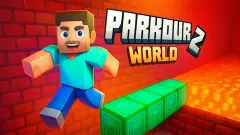





About Parkour World
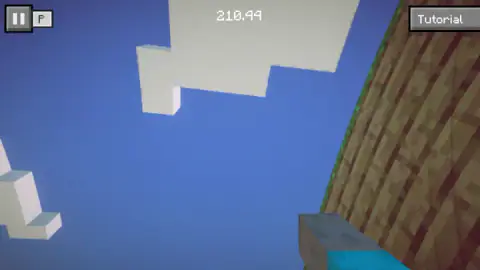
Most parkour games in a browser show you the runner from behind or from the side, so you can see exactly where the feet are before a jump. Parkour World does not. You look out through your character's own eyes, with a pixelated arm in a cyan sleeve in the bottom corner of the screen, and the only way to judge a gap is to look at it.
That choice shapes everything. A third-person game forgives a lazy camera because the runner is always in view. Here, if the view drifts toward the sky, you are jumping blind. It happened to us more than once.
We should be clear about how far we got. We played Parkour World on a desktop with a keyboard for about four minutes, and we spent all of them inside the tutorial area. We did not open the first chest, did not reach a numbered level and did not see a results screen. Everything below comes from that session and our screenshots; the parts we did not reach are marked as such.
The game is credited to NISHAD GAMES, the same studio behind Parkour World 2 and Impossible Parkour 3D. It was listed in January 2026, updated in August.
The clock at the top of the screen
The number in the middle of the top bar is a stopwatch, in seconds and hundredths. We noted it in every screenshot, and it matched the time that passed on our side almost exactly: about 214 seconds on the counter across 217 seconds of our session.
More telling is what it did not do. In those four minutes we tilted the view, bumped into walls and stood still, and the clock never once stopped or went back to zero. It does not reward caution. Whatever it measures, it measures all of it.
We cannot tell you whether the game saves your best time or compares it with anything. That would show up at the end of a level, and we never got there.
What the tutorial looks like
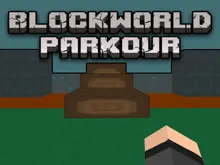
The tutorial is a small, walled-in space of wooden plank walls on grass under a blue sky. In the clearest view we had, a wooden sign on the left taught the jump, a low grey stone wall crossed the path at knee height, and at the far end stood a chest beside a second sign, with a blue triangle floating above it and pointing down.
Nothing on screen spelled out the goal, but the blue marker does that job. It is the same trick many 3D games use: put one bright object in a world of brown and green, and the player walks toward it without being told.
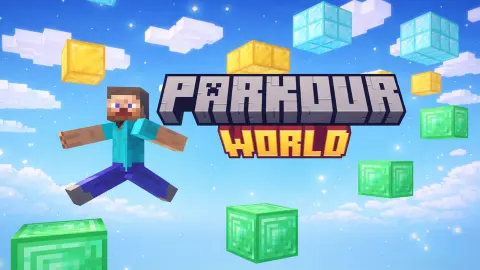
Everything in the world is built from square blocks with pixel textures, clouds included. That makes distances easier to read than in a smooth 3D world. A block is a unit, and once you know how far one jump carries you, you can count the blocks to the next ledge.
Parkour began as an obstacle course
The word parkour comes from the French parcours du combattant, the military obstacle course. The method behind it is credited to Georges Hébert, whose "natural method" trained people in basic movements such as walking, running, jumping, climbing and balancing. The sport that took the name grew up in France in the mid-1990s.
The tutorial courtyard is a parcours in the oldest sense: a short course with a wall to get over and a point to reach. Two ideas from the real sport carry straight into the game.
The first is the precision jump, which means landing accurately on a small or narrow surface. On a block world, almost every jump is one. Missing by half a block is the same as missing by ten.
The second is the speed discipline: getting from A to B as fast as possible through an obstacle course. Parkour World puts a running stopwatch on the screen, which is the same idea. Separate keys for walking and running turn that into a decision before every gap: run for distance, or walk for control.
What we did not see
We never left the tutorial, so the levels are known to us only through the game's listing. It says each level has its own obstacles and that the first ten are relatively simple before the difficulty climbs. We did not see a level number, a checkpoint, a fall into the void or a finish line.
Next to the pause button there is a second small button with a flag-like icon. We did not find out what it does. The listing also mentions phones and tablets, but we only played on a computer with a keyboard.
Who it is for
Parkour World suits players who already like first-person movement and are happy to learn a camera as well as a set of keys. The tutorial and the blocky look make it approachable for younger players, and there is no fighting in what we saw.
The first minutes are the hard part. If keeping the view level feels like a chore, a third-person runner will be kinder, because you can always see your own feet.
More from NISHAD GAMES
Parkour World 2 is the sequel from the same studio. Impossible Parkour 3D is another of its jumping games, and Climb Up! takes the studio up the side of a mountain. For a parkour game seen from the side, try Vector Parkour. More games to explore are in adventure games.
Screenshots
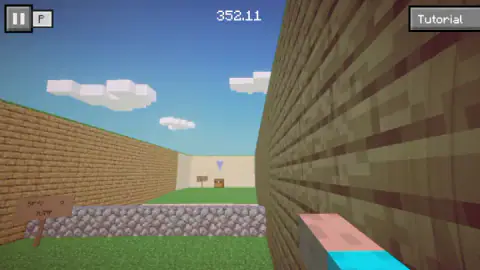
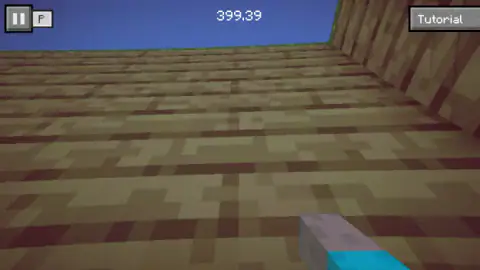
Taken by opening the game ourselves and letting it run — not supplied by the publisher, and not the same picture every other site shows.
How to play Parkour World
- Start in the tutorial area. A Tutorial button sits in the top-right corner while you are there.
- Move with W, A, S and D, and hold Shift to run, as the game's listing explains.
- Jump with Space. A wooden sign in the first courtyard teaches the same key.
- Head for the chest at the end of the courtyard, under the floating blue marker, and press E to open it, according to the listing.
- Use the pause button at the top left, or Esc, when you need a break.
What our session taught us:
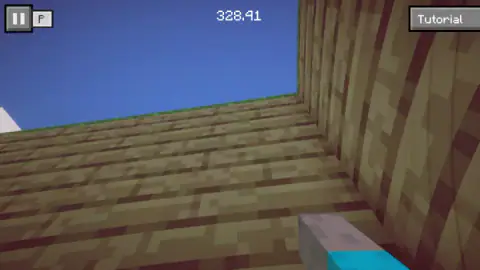
- Look before you leap, literally. In four of our eight screenshots the view pointed mostly at the sky, and in three more it faced a wooden surface up close. Neither tells you where the next landing is. Get the horizon back in front of you before you press Space.
- The white shapes in the sky are clouds. They are built from the same square blocks as everything else, and from below they look like platforms. They are not where you are meant to land.
- The clock does not wait for you. It kept running while we stared at the sky and while we stood still against a wall.
- The courtyard is a lesson in one picture. Sign, low wall, chest: the layout tells you to jump the wall and walk to the chest before any text does.
Controls
| W A S D | Move (from the game's listing) |
|---|---|
| Shift | Run (from the game's listing) |
| Space | Jump; a sign in the tutorial courtyard teaches it |
| E | Open a chest (from the game's listing) |
| Esc or the pause button, top left | Pause and resume |
Features
- A first-person view, so you judge every jump from behind your own outstretched arm
- A stopwatch at the top of the screen, in seconds and hundredths, that kept running for our whole session
- A walled tutorial courtyard with a jump sign, a low stone wall and a chest under a floating blue marker
- A Tutorial button that stays in the top-right corner while you learn the controls
- Separate keys for walking, running and jumping, so speed is a choice you make before each gap
- Levels that the game's listing says get harder after the first ten
Game details
- Developer
- NISHAD GAMES
- Release date
- January 2026
- Last updated
- August 10, 2026
- Added here
- November 2025
- Technology
- HTML5 (WebGL)
- Platforms
- Browser (desktop)
- Saved progress
- Saving, when available, is managed by this game. Mava cannot confirm your level.
FAQ
How do you play Parkour World?
You move with W, A, S and D, run with Shift and jump with Space, according to the game's listing. You see the world in first person, from behind your character's arm. A built-in tutorial area teaches the jump with a sign before you reach the levels.
Is Parkour World timed?
A clock at the top centre of the screen counts up in seconds and hundredths. In our session it ran at the speed of a real clock for about four minutes and never stopped or reset. We cannot say whether it saves a best time, because we did not finish a level.
Is there a tutorial in Parkour World?
Yes. The game starts you in a tutorial area, and a Tutorial button stays in the top-right corner. We saw a walled courtyard with a sign teaching the jump, a low stone wall and a chest at the far end.
How many levels does Parkour World have?
We do not know the total. The game's listing says each level is different and that they get noticeably harder after the first ten. We spent our session in the tutorial and did not reach a numbered level.
What does the E key do in Parkour World?
The game's listing says E opens a chest. In the tutorial courtyard we saw a chest at the far end with a blue marker floating above it, which looks like the first goal. We did not reach it, so we cannot say what it holds.
Who made Parkour World?
The game is credited to NISHAD GAMES, the studio behind Parkour World 2, Impossible Parkour 3D and Climb Up!. It was published in January 2026.
Can you play Parkour World on a phone?
It is listed for desktop, mobile browsers, Android and iOS. We only played it on a computer with a keyboard, so we cannot say how the touch controls feel.