










About Feeding A Black Hole
Most incremental games put you in charge of something that grows: a bakery, a mine, a spaceship. Feeding A Black Hole puts you in charge of something that does not move at all. The black hole sits in the middle of the screen, a small dark disc with a soft glow around it, and it stays exactly there for the whole game. Everything else drifts around it.
What drifts are asteroids, three pale rocks at the start, drifting slowly on a dark background with a faint grid. Your job is to break them. Each one pays money, the money buys upgrades, and the upgrades let you break more rocks, faster, for more money. That loop is the whole game, and the interest lies in which upgrade you buy next.
Feeding A Black Hole is made by Dwang. It was published in February 2026. The screen is almost bare: a money counter at the top, a level bar at the bottom, and two tabs on the right.
The two upgrades: damage or more rocks
The $ tab holds two panels, and the choice between them is the first real decision of the game.
Base Damage, in the Mining panel, raises your damage from 10 to 12 on its first step. More damage means each rock breaks sooner, so the money arrives sooner. It is also the cheapest thing in the shop, at 1 coin.
Asteroid Count, in the Asteroids panel, raises the number of rocks on screen from 3 to 5, for 3 coins. More rocks means more money per minute, but only if you can break them. With low damage, two extra rocks are two more things you cannot finish quickly.
That is why the order matters. Damage first makes every later rock cheaper to break. Count first only makes sense once breaking is fast. The two ladders are long, 100 and 50 levels, so you will be switching between them for a long time.
Value Distortion and the skill panel
The second tab on the right opens a separate panel. At the start it holds a single round node marked with a dollar sign and an arrow. Select it and a card appears: Value Distortion. The card says space-time is curved, so every asteroid is worth more, and that it instantly increases asteroid value by 1X.
This is a different lever from the shop. Base Damage and Asteroid Count change how fast you break rocks. Value Distortion changes what each rock pays. The panel looks like the root of a tree, with room for more branches below, and the game's description promises a large skill tree. We saw only this first node, and its cost line was too small for us to read.
What a black hole really does with what it eats
The card's line about curved space-time is not just flavour. In Einstein's general relativity, mass bends space and time around it, and a black hole bends it so far that nothing, not even light, can climb back out past a boundary called the event horizon.
A real black hole does not chase its food. From far away its gravity is the same as that of any other object with the same mass, so things in orbit around it stay in orbit. That is why the black hole in this game sits still while the asteroids drift around it. It is closer to the real thing than a hole that roams around swallowing everything.
When matter does fall in, it rarely drops straight down. Gas and dust spiral inward and pile up into a flat spinning ring called an accretion disk. Friction in the disk heats it to millions of degrees, hot enough to glow in X-rays, and that glow is how astronomers find most black holes. The soft halo around the hole in the game is a small nod to that disk. Feeding a black hole, in the real sense, means keeping material spiralling in, which is roughly the job the game gives you.
How far we got, and what we did not see
We played level 1 of 30, and only level 1. We never filled the level bar, so we did not see the reward screen where, according to the game's instructions, you choose one of three random bonuses. We did not see prestige either. The instructions describe it as a reset of all your progress in exchange for a permanent bonus to asteroid value, so that the next run goes faster.
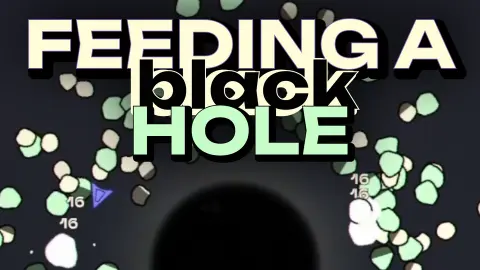
One more thing the title screen hints at: the rocks floating behind the logo come in several colours, green, purple and blue among them, while level 1 had only pale ones. The instructions mention new asteroid types as an upgrade, and the coloured rocks are probably those, but we did not unlock any.
Who it is for
Feeding A Black Hole suits players who like watching numbers climb and deciding what to buy next, and anyone who wants a game that asks for a mouse and a few minutes rather than fast reflexes. There is no way to lose that we saw, no timer and no enemy.
If you want action, this is not it. The screen is quiet, nearly empty, and the black hole never moves.
More games like Feeding A Black Hole
Block Shooter: Shoot the Blocks is another game by Dwang, built on the same idea of breaking things for money and upgrading the tools that break them. Space Cleaner also has you clearing asteroids for upgrade money, against a fuel clock. Idle Gravity Breakout 2 is an idle game built on gravity, with a prestige reset of its own, and Deep Drill is a calmer idle mining game. The rest are in the clicker category.
Screenshots

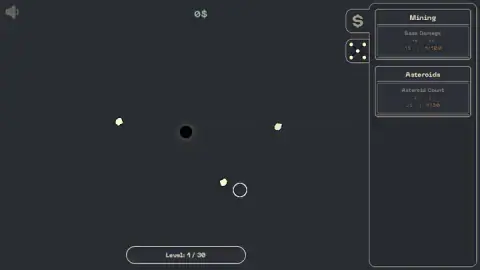
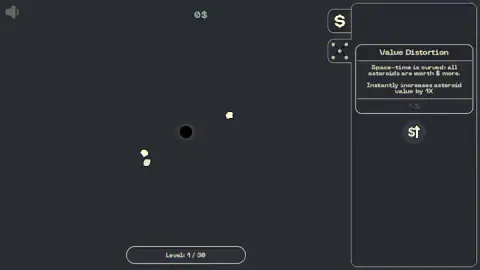
Taken by opening the game ourselves and letting it run — not supplied by the publisher, and not the same picture every other site shows.
How to play Feeding A Black Hole
- Press Play on the title screen. Level 1 opens straight away, with no tutorial.
- Move the cursor, or your finger on a phone, over the asteroids. According to the game's instructions, that is what breaks them and collects their money.
- Open the $ tab on the right and buy upgrades in the Mining and Asteroids panels.
- Open the tab below it, the one with a small network of dots, to spend on the skill panel.
- Watch the bar at the bottom. It counts your level out of thirty.
Tips from our run:
- Do not chase the black hole. We tried the arrow keys, Enter and clicks on the hole itself. Nothing moved. The hole is a fixed point, and all the action is in the rocks around it.
- Clicking buttons does not earn money. We spent four minutes clicking panels and pressing keys, and the counter read 0$ in every screen we saw. The rocks pay; the interface does not.
- The first purchase is decided for you. Base Damage costs 1 coin and Asteroid Count costs 3, so your first coin can only go one way.
- Dim cards are out of reach. With 0$ in our pocket, both upgrade cards stayed in dim grey.
- The speaker icon is a volume control. Click it in the top left corner and a slider drops down, so you can turn the sound down rather than off.
Controls
| Mouse or finger | According to the game's instructions, moving the cursor over asteroids is what breaks them and earns money |
|---|---|
| $ tab (top right) | Opens the shop with the Mining and Asteroids upgrades |
| Node tab (under the $ tab) | Opens the skill panel, which starts with a single node, Value Distortion |
| Speaker icon (top left) | Opens a volume slider |
| Arrow keys | Nothing that we could see; the black hole does not move |
Features
- A black hole that stays fixed in the middle of the screen, with three pale asteroids drifting around it at the start
- A shop with two upgrades from the first second, Base Damage and Asteroid Count, priced at 1 and 3 coins
- A long upgrade ladder behind them, 100 levels for Base Damage and 50 for Asteroid Count
- A separate skill panel that opens on one node, Value Distortion, which raises what every asteroid is worth
- Thirty levels, counted on a bar at the bottom of the screen
- A level-up reward chosen from three and a prestige reset, according to the game's instructions
Game details
- Developer
- Dwang
- Release date
- February 2026
- Last updated
- August 10, 2026
- Added here
- December 2025
- Technology
- HTML5 (2D)
- Platforms
- Browser (desktop, mouse), Browser (mobile & tablet, touch)
- Classification
- Clicker , .io , Multiplayer
- Saved progress
- Saving, when available, is managed by this game. Mava cannot confirm your level.
FAQ
What is Feeding A Black Hole?
Feeding A Black Hole is a free incremental clicker by Dwang, playable in the browser. A black hole sits still in the middle of the screen, asteroids drift around it, and every asteroid you break earns money for upgrades that make the next ones faster and more valuable.
How do you play Feeding A Black Hole?
The game's instructions say to move your cursor, or your finger on a phone, over the asteroids to break them and collect the money. Spend it in the $ tab on Base Damage or Asteroid Count, and in the skill tab on nodes such as Value Distortion. The arrow keys do nothing, and the black hole itself never moves.
How do you get money in Feeding A Black Hole?
Money comes from breaking asteroids. In our run we clicked buttons and pressed keys for four minutes and the counter at the top stayed at 0$, because none of that touches an asteroid. Put the cursor on the rocks instead.
Which upgrade should you buy first in Feeding A Black Hole?
Base Damage costs 1 coin and Asteroid Count costs 3, so Base Damage is the only thing you can afford with your first coin. It raises your damage from 10 to 12, which means each asteroid breaks sooner. Asteroid Count, from 3 rocks to 5, pays off once you can break them quickly.
What does Value Distortion do?
Value Distortion is the first node in the skill panel. Its card says space-time is curved, so all asteroids are worth more, and that it instantly increases asteroid value by 1X. It multiplies what each asteroid pays rather than how fast you break it.
How many levels does Feeding A Black Hole have?
The bar at the bottom of the screen reads Level 1 / 30, so there are thirty levels. We played only the first one. The game's instructions say each level-up lets you pick one of three random rewards, and that prestige resets your progress for a permanent bonus.
Can you play Feeding A Black Hole on a phone?
Yes. It runs in a mobile browser, and the game's instructions say a finger does the same job as the mouse cursor. There is nothing to download and no sign-in.
Who made Feeding A Black Hole?
It is made by Dwang. It was published in February 2026 and last updated in August 2026.