
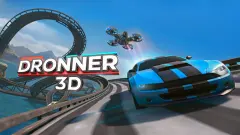


About Cyber Truck Drive Simulator
Several portals describe Cyber Truck Drive Simulator as a drive across Mars. Press START and what you actually get is a stopwatch in a desert on Earth. The first level puts a red DESTINATION pin on a rise about 110 metres away, gives you roughly half a minute to reach it, and puts up a panel reading "LOSE!" the moment the clock passes zero.
That clock is the game. The canyon floor is broken rock and dry scrub, the pickup is heavy, and a damage bar in the corner counts every knock. Half a minute is less than it sounds.
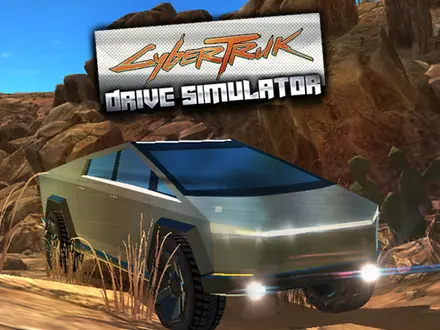
The frame around it is small and honest: a level panel with eight buttons, a Free Ride map with no clock, and a flat-panelled pickup modelled on the electric one everyone was arguing about that winter.
It was published on 5 December 2019 by Hit Games, a Turkish studio founded that same year; their HITGAMES.ORG logo sits on the title screen next to an advert for their taxi game. Its ratings are scattered across small portals rather than piled on one big one — 4.0 out of 5 from 475 votes on one, 358 votes and roughly 120,000 plays on another. It never landed on the biggest games portals, which is why nobody has written a proper page about it.
What a level looks like when you play it
The title screen shows the pickup in silver against a dark sky, with the logo spelled CyberTruk and three buttons: START, FREE RIDE and MORE GAMES. An HB Taxi thumbnail sits in the bottom-left corner. START does not start a level. It brings up the level panel, with eight level buttons, MORE GAMES and CLOSE, and on our first visit only LEVEL 1 was lit.
LEVEL 1 drops you behind the truck on a dirt track in a sandstone canyon. The top of the screen carries everything: a bar reading %100 on the left, the countdown in the middle with Drift and Total Drift counters under it, and restart and pause buttons on the right. A round speedometer sits at the bottom. Ahead, above a heap of boulders to the right of the track, the red pin reads DESTINATION with the distance in brackets: 113 metres when we started.
We never got the truck far. The pin never came closer than 105 metres, and the drift counters stayed at zero. Every run ended the same way: the clock stopped at -0.01 and a panel titled "LOSE!" came up with RESTART, GARAGE and MORE GAMES, the HITGAMES.ORG logo, and a "TRY NOW!" advert for HB Taxi. RESTART reloads the level, with LOADING... on the panel while it does. By the end of our first two runs the bar in the corner had fallen from %100 to %83. Pressing C put us inside the cab, looking out past the windscreen pillar at the pin. A later click on the panel took us back to the title screen.
Speed is not the problem; the boulders are. About 110 metres in 30 seconds is under 15 km/h, a jogging pace. The pin sits beyond the rocks, not on the track, so keep the truck rolling from the first second and pick your way round the boulders rather than over them.
Why the truck will not fly for you
Plenty of browser driving games let you steer in mid-air: tap left over a jump and the car rotates, because the developer wired an invisible turning force to the keys. This one does not. Once the last wheel leaves the ground, the truck is a projectile. A tyre pressing on nothing pushes nothing, so the rotation you take off with is the rotation you land with.
Mass does not change the flight, only the arrival. A heavy truck and a light hatchback leaving the same lip at the same speed trace the same arc — that is Galileo, and it has held for four centuries. What mass changes is the landing, because there is more energy to swallow. That is the damage bar. With half a minute on the clock, you have no time to spend in the air anyway.
Free Ride, and the goal you set yourself
The FREE RIDE button opens a map with no clock and no destination, the opposite of the levels. The philosopher Bernard Suits, in The Grasshopper: Games, Life and Utopia (1978), defined playing a game as the voluntary attempt to overcome unnecessary obstacles. Free Ride hands you the canyon and leaves the obstacle to you. Get to the top of that ridge. Land this one on all four wheels. Reach the edge of the map without the damage bar dropping below half. The moment you say it out loud, you have a win condition.
The truck is not a Tesla, and this is not a Tesla game
Worth stating plainly, because the artwork invites the confusion. Cybertruck is a registered trademark of Tesla, Inc. This game is an independent, unlicensed browser title by Hit Games, not affiliated with, endorsed by or licensed by Tesla or any other vehicle manufacturer. The vehicle you drive is a lookalike model built for the game, with no connection to any production car's real specifications.
The timing explains it. The angular electric pickup was unveiled in November 2019 and dominated internet argument for weeks; this game went up on 5 December 2019, less than a fortnight later. It is a period piece from the corner of the industry where a studio turns a news cycle into a playable game in days.
Playing it unblocked at school
There is nothing to install and nothing to sign into. The whole thing is a single Unity WebGL page, so on a locked-down Chromebook it behaves like any other web page. Two honest caveats: it is a 2019 game with a real 3D scene, so expect a slow first load on an old school laptop, and it is keyboard only — a tablet gets you a menu you cannot drive out of.
More by Hit Games, and other cyber truck games
Hit Games built a run of these lightweight driving titles. Real Taxi Driver 3D came first, in August 2019, and Real City Truck Simulator followed in March 2020, swapping the canyon for city streets and a much longer wheelbase. In between, in February 2020, the studio returned to the subject with Uber CyberTruck Drive Simulator.
If it is the rough ground you came for, Tractor Trial covers similar off-road, break-the-vehicle territory — eight courses where only the cab can break. For driving with a competition attached, try Superbike Hero or Stock Car Hero, or browse the whole driving category.
Screenshots
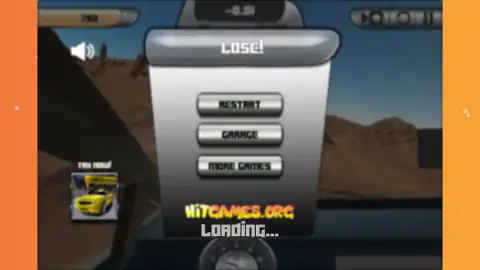
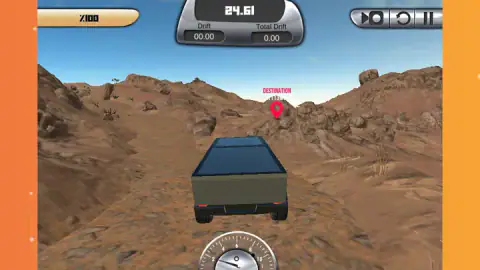
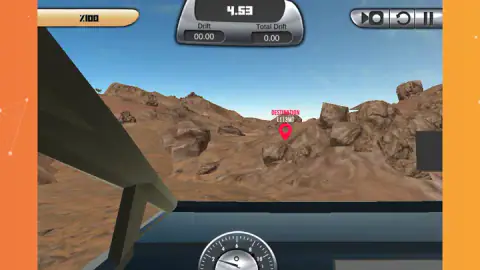
Taken by opening the game ourselves and letting it run — not supplied by the publisher, and not the same picture every other site shows.
How to play Cyber Truck Drive Simulator
- Pick a level. START opens a panel of eight buttons, LEVEL 1 to LEVEL 8, with CLOSE to back out. On a first visit only LEVEL 1 is lit. FREE RIDE sits on the title screen.
- Drive with W A S D or the arrow keys. W is the throttle, S brakes and then reverses, A and D steer.
- Head for the red pin. The DESTINATION marker floats over your target with the distance underneath in metres. There is no arrow and no marked route; you pick the line.
- Beat the clock. The countdown sits at the top of the screen. Reach the pin before it passes zero.
- Press C to change the view. It swaps the chase camera for a view from inside the cab.
Four things worth knowing before your first run:
- Space is the handbrake, not the brake. The portals listing this game say "brake with Space". Space locks the wheels. To slow down under control use S; to swing the tail round a rock, use Space.
- Chase camera for the rocks, cab camera for the pin. The view from behind shows what you are about to hit; from the cab, the pin sits over the dashboard and lining up on it is easier.
- The damage bar is not decoration. It lost 17 points in each of our first two half-minute runs, so every boulder you nudge costs something.
- Do not aim for air. See below. Every jump you take is a jump you cannot correct.
Controls
| W / A / S / D or arrow keys | Throttle, steer, and brake or reverse — S is the pedal that actually slows you down |
|---|---|
| Space | Handbrake. It locks the wheels rather than braking gently, so use it to swing the tail, not to stop |
| C | Cycle the camera, from the chase view behind the truck to a view from inside the cab |
| Mouse | Menus, the level panel and the restart and pause buttons on screen. There is no mouse steering |
Features
- A level panel with eight buttons, LEVEL 1 to LEVEL 8, plus a separate Free Ride map with no clock
- A red DESTINATION pin over the target, with the distance to it in metres
- A countdown of about half a minute: reach the pin before it passes zero or the "LOSE!" panel comes up
- A damage bar that starts at %100 and drops as the truck takes knocks
- Drift and Total Drift counters under the clock
- Several camera views on one key, including a view from inside the cab
- Restart and pause buttons in the top-right corner of the screen
Game details
- Developer
- Hit Games
- Release date
- December 2019
- Last updated
- December 6, 2019
- Added here
- March 2023
- Technology
- HTML5 (Unity WebGL, 900×600)
- Platforms
- Browser (desktop), Chromebook
- Classification
- 3D , Action , Driving , Simulation
- Download size
- 0 MB
- Ad requests
- 1 (few)
- Has a save
- No
- Saved progress
- Saving, when available, is managed by this game. Mava cannot confirm your level.
Measured by opening the game ourselves on 2026-09-10, not taken from the feed. Twelve seconds on a phone-sized screen, with ad requests counted and blocked rather than loaded.
FAQ
Is Cyber Truck Drive Simulator an official Tesla game?
No. It is an unlicensed fan-made browser game by an independent studio, Hit Games, and it is not affiliated with, endorsed by or licensed by Tesla or any other vehicle manufacturer. The truck in it is a lookalike model built for the game, not a manufacturer-supplied vehicle.
Who made Cyber Truck Drive Simulator?
Hit Games, a Turkish studio founded in 2019 that runs the portal hitgames.org. Its HITGAMES.ORG logo sits on the title screen and on the fail panel, and the studio published a companion title, Uber CyberTruck Drive Simulator, on 14 February 2020.
How many levels does Cyber Truck Drive Simulator have?
The level panel lists eight, LEVEL 1 to LEVEL 8. On our first visit only LEVEL 1 was lit and the rest were greyed out, so they open one after another. FREE RIDE, on the title screen, is a separate map with no clock.
How long do you get to finish a level in Cyber Truck Drive Simulator?
About half a minute. On LEVEL 1 the clock at the top of the screen counts down from roughly 30 seconds, and the red DESTINATION pin starts about 110 metres away. When the clock passes zero it stops at -0.01 and a "LOSE!" panel offers RESTART, GARAGE and MORE GAMES.
What does the C key do in Cyber Truck Drive Simulator?
It changes the camera. A level starts with a chase view from behind the truck, which shows the rocks around you. Pressing C took us inside the cab, looking out past the windscreen pillar with the destination pin in view.
Does the truck take damage?
Yes. A bar in the top-left corner starts at %100 and goes down as the truck takes knocks. In two of our runs it had fallen to %83 by the time the clock ran out.
Is Cyber Truck Drive Simulator free, and does it work on a school Chromebook?
It is free, with no download, no installer and no account. It is a single Unity WebGL page, so it runs on a locked-down Chromebook as long as the site is reachable, but it needs a physical keyboard — there are no touch controls.
Is the game set on Mars?
Several portals say so, but what you drive through is a desert on Earth — a sandstone canyon under a blue sky, with cacti and dry scrub between the rocks. The official key art shows the same.