








About Camel Destroyer
A game called Camel Destroyer makes a clear promise in two words. So here is the result of our first session before anything else: in about four minutes the counter at the top of the screen never left 0, and the camel's health never left 100. We destroyed nothing, and nothing hurt us.
That is not a complaint about the game. It is a warning about how it starts. You are dropped into a street with a camel and a handful of round buttons. Nothing chased us and we saw no mission written on screen, so the first job is working out what the camel can do.
This page covers that first job and stops where our session stopped. We walked, jumped, pressed the attack button and looked at the city. We did not find a weapon, a vehicle or anything that changed the score.
The game is credited to AtakaGames. It was published in September 2025.
The screen tells you more than the street does
With no text to guide you, the buttons are the manual. Down the left edge sit a sound button, a heart with the number 100 under it and a shield badge with a flame inside. The heart is plainly your health. We never lost any, so we cannot say what takes it away.
Across the top there is a circle with a number, 0 for us, and a row of nine grey marks to its right. All nine stayed grey for the whole session. They look like slots waiting to be filled, but we did not fill one and will not guess what they count.
The right edge has the three buttons you play with: a running camel, an arrow pointing up, and a camel with lines coming out of its mouth, marked F. Above them is a question mark. We did not open it; it is the first thing we would press next time.
A blue ring circles the camel while the F button is grey
The session opened with the camel inside a see-through bubble, with a yellow ring floating at chest height. A minute and a half later the bubble was gone. We never saw it come back.
What did come back, again and again, was a ring of blue light with small sparks on it, turning round the camel's neck and shoulders. Each time we saw it, the F button on the right was greyed out. The one time the ring was missing, the button was black.
We take that to mean the ring is the attack and the grey button is its wait. That is a reading of what was on screen, not something the game told us. What we can say is that the ring touched nothing in our run: no building fell and the counter stayed at 0.
What we did not see
Most of what the game's description promises. It talks about weapons hidden in the city, cars to drive, a helicopter, and animals and people to meet. In four minutes we saw one small car at the end of a street and no weapon at all.
We also never scored, never took damage and never pressed the sprint button. Nothing here was tried on a phone, where the instructions say a joystick and pop-up buttons replace the keys.
Who it is for
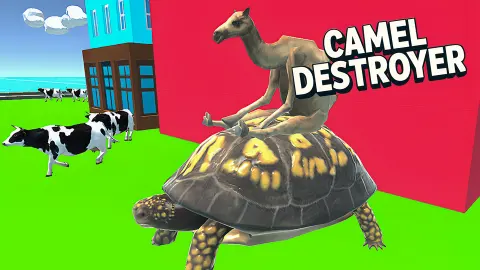
It suits players who like being left alone in a toy city to poke at things, and who do not need a mission in the first minute. The city is bright and simple: striped towers, glass blocks with green frames, round trees.
If you want a target and a timer from the first second, the opening will feel empty. Give it longer than we did before you judge it.
More animal and sandbox games to try
I am Crazy Bird is the nearest thing we have played: a city seen through the eyes of a bird, with a marker that counts the distance to the next mission. Dinosaur Park Jurassic Dino World walks a horned predator through streets full of pedestrians, with ability buttons on screen. Duck Family Simulator Animal Games is the calm one, a drake on a fenced farm with a story mode and a free mode. If it is the breaking you came for, Solar Smash hands you the weapons at once and a planet to use them on. The rest are in the shooting games category.
Screenshots
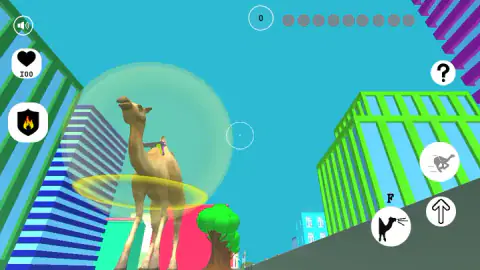
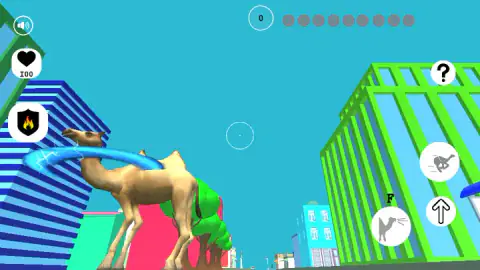
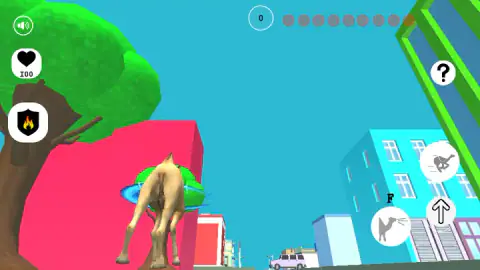
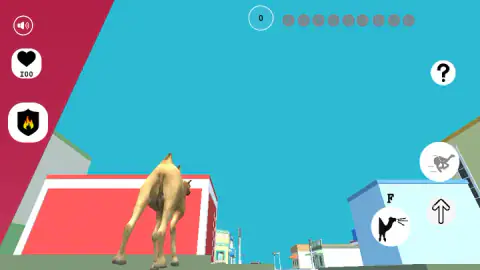
Taken by opening the game ourselves and letting it run — not supplied by the publisher, and not the same picture every other site shows.
How to play Camel Destroyer
- Hold W to walk the camel forward. The game's instructions give A, S and D for the other directions.
- Press Space, or click the round button with the arrow pointing up, to jump.
- Press F, or click the round button marked F, to attack. The instructions say the same key fires a weapon once you have one.
- Hold Shift to speed up and press E to pick up an item, again according to the instructions. We used neither.
- Keep an eye on the circle at the top. It read 0 for us from start to finish.
Tips from our session:
- Jump early. From the street the towers fill the view. One click on the jump button put our camel level with the rooftops, with the rest of the city below the skyline.
- Watch the F button, not only the camel. It was black at some moments and grey at others, and the grey ones matched a blue ring around the camel. More on that below.
- Do not expect a score for walking. We covered a few streets and the counter did not move. Whatever fills it, moving around is not it.
Controls
| W, A, S, D | Move the camel (the game's instructions; we used W) |
|---|---|
| Space or the up-arrow button | Jump; a click on the button put our camel level with the rooftops |
| F or the camel button marked F | Attack, and fire a weapon once you carry one, according to the instructions |
| Shift or the running-camel button | Speed up, according to the instructions; we did not use it |
| E | Pick up an item, according to the instructions; we found nothing to pick up |
Features
- A camel seen from behind in a city of flat-coloured blocks, striped towers and round green trees
- Three round buttons on the right edge for sprint, jump and attack, with the attack one marked F
- A heart that reads 100 and a shield badge with a flame on the left edge
- A counter at the top that starts at 0, with a row of nine grey marks beside it
- A blue ring that crackles round the camel while the F button is greyed out
- A question-mark button in the top right corner
Game details
- Developer
- AtakaGames
- Release date
- September 2025
- Last updated
- August 10, 2026
- Added here
- July 2025
- Technology
- HTML5 (3D)
- Platforms
- Browser (desktop, keyboard & mouse), Browser (mobile & tablet)
- Saved progress
- Saving, when available, is managed by this game. Mava cannot confirm your level.
FAQ
What is Camel Destroyer?
Camel Destroyer is a free 3D browser game by AtakaGames in which you control a camel in a city of brightly coloured block buildings. The screen gives you a jump button, an attack button marked F and a sprint button, plus a counter that starts at zero. We played it for about four minutes and did not score.
What are the controls of Camel Destroyer?
According to the game's instructions you move with W, A, S and D, jump with Space, attack or fire with F, speed up with Shift and pick things up with E. On screen there are round buttons for sprint, jump and attack that you can click as well. We used W, F, Space and the two buttons for jump and attack.
How do you jump in Camel Destroyer?
Press Space or click the round button with the arrow pointing up, on the right edge of the screen. One click on that button lifted our camel from the street to the height of the rooftops around it. That is the quickest way we found to see over the first block.
What does the F button do in Camel Destroyer?
The game's instructions give F two jobs, attacking and firing a weapon. The button shows a camel with lines coming out of its mouth. In our session a crackling blue ring circled the camel whenever that button was greyed out, and the button was black again when the ring was gone.
Can you drive cars or fly a helicopter in Camel Destroyer?
The game's description says you can drive cars, fly a helicopter and find weapons hidden around the city. We did not get that far. In about four minutes we saw one car from a distance and never left the camel, so we cannot confirm how any of it works.
Is Camel Destroyer free, and do you need to download it?
It is free and runs in the browser with nothing to install. It is laid out as a wide, landscape frame. It is listed for Android and iOS as well as computers, but we only played it on a computer.
Who made Camel Destroyer?
The game is credited to AtakaGames. It was published in September 2025.