





About ArrowShift: Classic
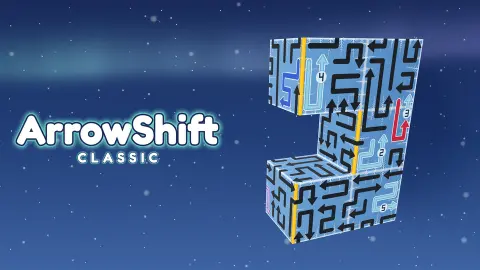
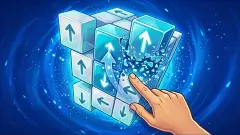
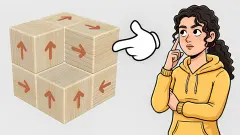
The cube in ArrowShift does not look like a puzzle board at first. It looks like a gift box someone wrapped with black ribbon and forgot to tidy. Those ribbons are arrows, and most of them do not stay on one face: a line starts on the front, runs up and over the edge, turns along the top and ends in a head pointing somewhere you cannot quite see.
One rule holds the puzzle together. Every arrow wants to leave the cube in the direction of its head. It can only go if the path in front of it is empty. Pick the wrong one and the cube tells you so, at the price of a life. Pick the right ones in the right order and you can run the counter at the top down to zero.
ArrowShift: Classic is by pure pixel games and was published on 26 October 2026. We played its first stage on a computer, mouse in hand, for about ten minutes.
A blocked arrow says so, and charges a life
Most of the arrows on a fresh cube are stuck behind others. When we clicked one of them, the game did not quietly ignore us. The arrow turned red, the words WRONG MOVE appeared above the cube, and Lives fell from three to two.
The Arrows counter did not move. The blocked arrow stays where it was, so a mistake costs you a life and gains you nothing. A clear arrow, by contrast, leaves the cube completely and a small GOOD floats where it used to be.
This is why turning matters so much here. Dragging the cube cost us nothing in the whole session, and it is the only safe way to check where a head points when the line bends over an edge. A click is a commitment; a drag is just a look.
Stage 1 is the tutorial, and it has four steps
There is no separate practice board. The tutorial runs on Stage 1 itself, with all 18 arrows in place, a card at the bottom of the screen and a white glove pointing at the cube.
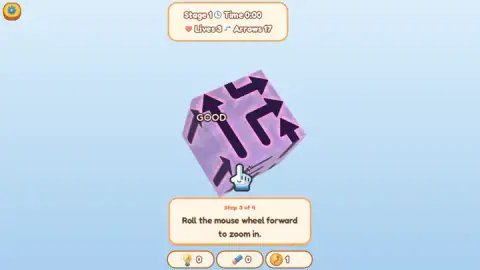
Step 1 asks you to hold the left button and drag to turn the cube. Step 2 makes one arrow glow and explains why it is the right one: its way is clear, so it slides off. Step 3 asks you to roll the mouse wheel forward to zoom in.
We never rolled the wheel, so we never saw step 4. The game did not hold the stage hostage over it: arrows kept leaving when we clicked them, with the step 3 card still on screen. If you want the tutorial out of the way, do what each card asks; if you would rather play, the cube is already live.
The clock in the readout stayed at 0:00 through all of this. Whether it starts once the tutorial is finished, or only counts in Time Attack, we cannot say from what we played.
The pause card's Exit button starts you over
Press Esc and a card marked PAUSED covers the left side of the screen. It has two yellow buttons, Settings and Exit, and a red cross in its top corner.
Exit looks like the way back to the game. It is not: its icon is a house, and it takes you to the stage menu. Open Stage 1 again and you are on a fresh cube with 18 arrows and the tutorial from step 1. We found this out the hard way, more than once. The red cross is the button meant to close the card; we did not try it ourselves.
On the right of the pause card sits the leaderboard, which refreshes every 30 seconds. Ours was topped by names like Indigo Guanaco, Dear Dolphin and Colonial Booby, which read like handles handed out to guests rather than chosen, and listed us as YOU, outside the top ten, with no points.
Coins, a bulb and an eraser
Under the cube there are three counters. Two of them, a light bulb and an eraser, stayed at zero for the whole session, and we never had one to use. Their icons suggest a hint and a way to remove an arrow, but the game did not show us what either does.
The third counter shows a coin. Its number went up during our session, from 1 early on to 8 near the end, and it did not drop back when we restarted the stage. Whatever you earn, then, survives a trip to the menu. The game's listing talks about unlocking cube skins, and the menu has a Shop button; we did not open it, so we cannot tell you what the coins buy.
How it compares with the other arrow cubes here
Arrow-off-the-cube puzzles have become a small family of their own. In Arrow Cube 3D the arrows sit on a hollow cube; Arrow Free 3D carves them into a white one; Arrow Escape 3D colours each arrow and also gives you three hearts for mistakes.
What sets ArrowShift apart is everything around the cube rather than the rule itself. It counts arrows down in a readout, keeps a clock, splits its stages into Standard and Time Attack, and puts a live leaderboard behind the pause button. Its arrows are also long, many of them folding over two faces, so a single line can hide the reason another one is stuck.
Where our session stopped
We played for about ten minutes and never left Stage 1. We cleared three arrows in one attempt, lost one life on a blocked arrow in another, and went back to the menu through the pause card several times. We did not finish the tutorial, open Time Attack, the Shop, the Settings or the log-in, or use the bulb and eraser. We played on a computer only. We saw no advert during the session.
Who it suits
ArrowShift suits players who like a puzzle that is quiet and readable: one rule, no timer pushing you on the stages we saw, and a mistake that is always explained. Being able to spin the cube freely makes it friendlier than flat arrow grids for anyone who thinks better with their hands than in their head. If you want a flat board instead, Escaping Arrows uses the same idea on a grid with three lives. For more, browse our puzzle games.
Screenshots
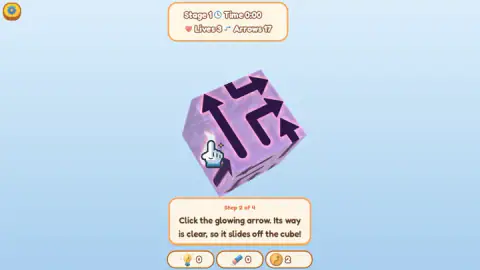
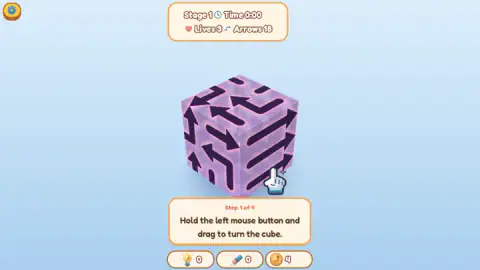
Taken by opening the game ourselves and letting it run — not supplied by the publisher, and not the same picture every other site shows.
How to play ArrowShift: Classic
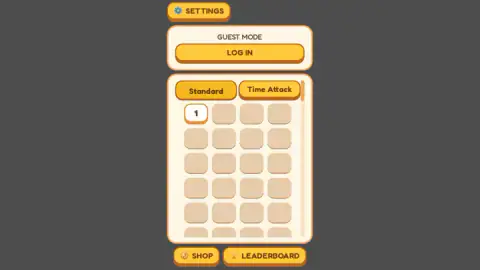
- On the menu, stay on the Standard tab and click stage 1, the only one open. A loading bar runs before the cube appears.
- Hold the left mouse button and drag to turn the cube. Turning is free and changes nothing on the board.
- Follow each arrow from its tail to its head, across edges if it bends. If nothing sits between the head and the edge of the cube, that arrow is free.
- Click a free arrow. It slides off, the word GOOD flashes, and the Arrows counter drops by one.
- Clear every arrow before you run out of the three Lives in the readout at the top.
Tips from our session
- Read the head, not the line. The long body of an arrow does not matter for whether it can leave; what matters is what lies beyond the head.
- Turn the cube after every arrow you clear. Removing one line often frees another on a face you were not looking at.
- The game lets you keep clearing arrows while a tutorial card is still on screen. We took the count from 18 to 15 with the zoom prompt still waiting.
- Do not press Esc to think. It opens the pause card, and the obvious button on it sends you back to the menu.
Controls
| Left click on an arrow | Sends that arrow off the cube, if its path is clear |
|---|---|
| Hold left button and drag | Turns the cube to show the faces behind |
| Mouse wheel | Zooms in and out, according to the game's tutorial |
| Esc | Opens the pause card, with the leaderboard beside it |
| Tap, drag and pinch | The touch versions of send, turn and zoom, according to the game's own instructions |
Features
- A purple cube whose arrows are long bent lines that run from one face over the edge onto the next
- A readout at the top with the stage, a clock, three lives and the number of arrows still on the cube
- Stage 1 holds 18 arrows and doubles as a four-step tutorial
- A blocked arrow flashes red under the words WRONG MOVE and costs a life; a clear one leaves with a GOOD
- Two ways to play from the menu, Standard and Time Attack, with stages unlocked one at a time
- A coin counter that kept its total when we restarted the stage
- Guest mode by default, with an optional log-in and a leaderboard that refreshes every 30 seconds
Game details
- Developer
- pure pixel games
- Release date
- October 2026
- Last updated
- October 27, 2026
- Added here
- October 2026
- Technology
- HTML5 (3D)
- Platforms
- Browser (desktop, mouse), Browser (mobile & tablet, touch)
- Saved progress
- Saving, when available, is managed by this game. Mava cannot confirm your level.
FAQ
How do you play ArrowShift: Classic?
A cube is covered in arrows, and each arrow is a bent line ending in a head. Click an arrow and it slides off in the direction its head points, but only if no other arrow is in the way. Drag with the left mouse button to turn the cube and find the arrows that are free. The aim is to clear them all; the counter at the top shows how many are left.
What happens if you click a blocked arrow in ArrowShift?
The arrow flashes red, the words WRONG MOVE appear above the cube and you lose one of your three lives. The arrow does not leave, so the arrow counter stays where it was. Turning the cube costs nothing, so look before you click.
How many arrows are on the first stage of ArrowShift: Classic?
Stage 1 starts with 18 arrows, shown in the readout at the top of the screen. Each arrow you send off lowers the count by one; in our session we took it down to 15 while the tutorial was still running.
Does the Exit button in the ArrowShift pause menu resume the game?
No. Exit, the button with the house icon, takes you back to the stage menu, and when you open Stage 1 again it starts from the full count of arrows with the tutorial from step one. The pause card also has a red cross in its corner, which is the button meant to close it.
What is the difference between Standard and Time Attack in ArrowShift?
They are two tabs on the stage menu. Standard holds the stage grid, opened one stage at a time. Time Attack sits next to it; we did not play a Time Attack round, so we cannot tell you how its clock works.
Do you need an account to play ArrowShift: Classic?
No. The game starts in guest mode and the Log In button above the stage grid is optional. You still appear on the leaderboard, listed as YOU at the bottom until you score.
Can you play ArrowShift: Classic on a phone?
It is listed for Android and iOS as well as PC, and the game's instructions describe touch controls: tap to send an arrow, drag to turn the cube and pinch to zoom. We played it on a computer with a mouse and did not try it on a touch screen.
Who made ArrowShift: Classic?
It is by pure pixel games. It was published on 26 October 2026 and was updated the following day.