





About Animal Hospital 3D
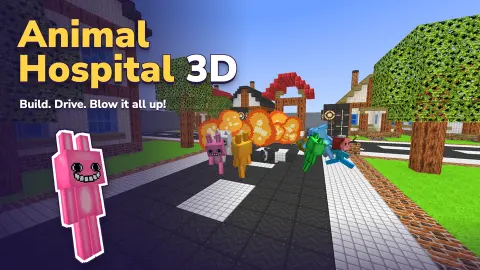
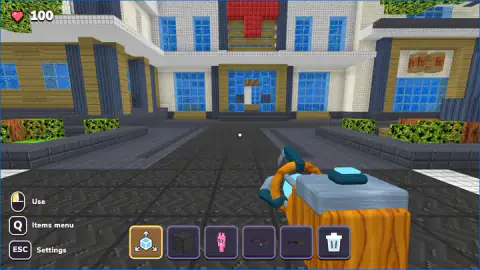
The name says hospital and the name says animals, so you would expect patients. A queue of sick pets, a bandage, a timer. Animal Hospital 3D has none of that. It puts you on a tiled plaza in front of a hospital built from blocks, a big red cross over the door, and hands you a bar of six things to put in the world. What happens next is up to you.
That is what a sandbox game is: no goal, no score, nothing to finish. The game's own listing says it plainly, a physics sandbox with "no single goal to win". The only number on screen is a heart with 100 next to it, and in our ten minutes it never moved.
We played one session of about ten minutes with a keyboard and mouse. We stayed on that plaza the whole time, put down rabbits and stone blocks, and tried most of the slots. We did not get far into what the listing promises, and this page says where we stopped.
Ten minutes on the plaza
We started looking straight at the hospital doors with the grab tool in hand. It is an orange and blue gadget, and the prompt beside it read Use. We never got it to pick anything up.
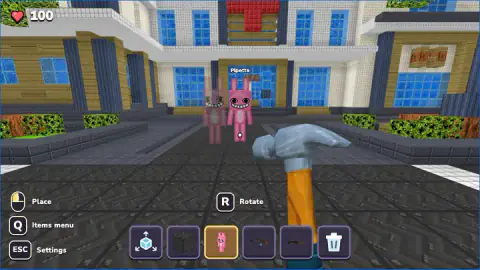
Pressing 3 brought out the pink rabbit. The rabbits are tall, about the height of the player, with black eyes and a full row of square white teeth. The first one we placed was named Pipetto. Then came Pumpkin and Dumpling, standing on the plaza and by the flower bed to the right, each with its name floating overhead. We did not see them walk or react to anything.
After that we turned to the raised bed under a big blocky tree and placed dark stone blocks along its edge. Each block showed as a see-through cube first, then went solid on the click.
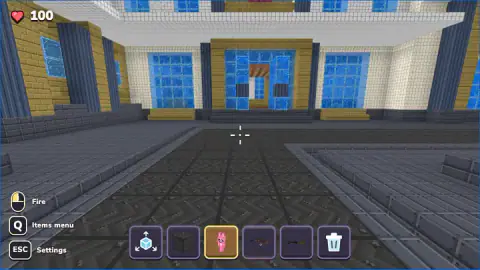
Pressing 4 switched the prompt to Fire and turned the small dot in the centre into a crosshair. We did not fire.
About four minutes in, our view tipped over to one side. The hospital leaned across the left of the screen and the canopy of the tree filled the rest. It stayed that way until the end of the session, and we did not work out why or how to set it straight. Health still read 100.
What the listing promises that we did not reach
The game's own description is much bigger than the plaza we saw. It says an Items menu, opened with Q, holds rabbits, cats, a doctor, a nurse, cars, crates, bombs, levers and doors. It promises ragdoll physics, so characters stumble and fly when something hits them. It also lists a tool for grabbing and throwing them, several guns and explosives, cars and a helicopter, and wiring with levers, timers and lamps.
It names eight worlds. The city hospital is one; the others are a flat arena, a modern villa, a shopping mall, a village, a medieval castle, a prison and a pirate galleon. Worlds save automatically, and some worlds and items unlock after a short video.
We cannot confirm any of that. We did not open the Items menu, visit the main menu or leave the hospital world. So if the hospital in the title made you expect patients, the listing suggests the hospital is a stage, not a job.
A pile of sand with no rules
The word sandbox comes from the playground, and the playground version has a history. In 1885 a Boston charity tipped heaps of sand into a chapel yard in the city's North End so that small children had somewhere to dig. The idea came from the sand piles in Berlin's public parks. These "sand gardens" are usually counted as the start of the American playground movement.
What made them work is the same thing that makes this game work, when it works. A heap of sand has no rules and no end. Nobody tells a child what to build or when it is finished, and that is the point: the material is the game, and the reason comes from whoever is playing.
Animal Hospital 3D follows the same idea. There is no score because there is nothing to score. The plaza, the blocks and the grinning rabbits are the sand. If you arrive needing a task, you will feel lost within a minute. If you arrive wanting to see what happens when you put three rabbits named Pipetto, Pumpkin and Dumpling outside a hospital door, you are already playing it.
Who it is for
It suits younger players and anyone who likes to set up a scene and look at it, with no clock and no way to fail. It does ask you to work out the slots on your own, since nothing explains them beyond the one-word prompt. Players who want a goal, a level or a patient to cure should look elsewhere.
If you like dropping characters into a world just to see what they do, Toybox: Pixel World Sandbox does it in 2D. For building with no rush, Dream Home is a 3D house builder. For a block world with rivals and a clock, Sky Wars: Battle of the Islands is the opposite of this one. The rest are in 3D games.
Screenshots
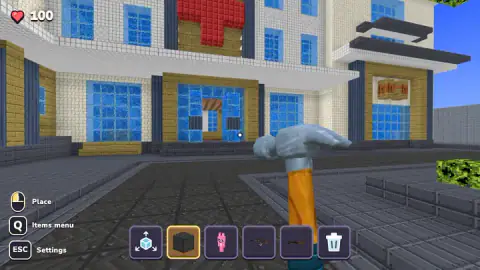
How to play Animal Hospital 3D
- Look at the bar at the bottom. Six slots: a grab tool, a dark stone block, a pink rabbit, a rifle, a shotgun and a bin. Click one or press its number, 1 to 6.
- Read the prompt at the left. It changes with the slot. The grab tool says Use, the block and the rabbit say Place, the guns say Fire and the bin says Delete.
- Aim at the ground. With the block or the rabbit selected, a see-through copy shows where it will land.
- Left click to place it. The copy turns solid. Rabbits get a name the moment they arrive.
- Press Esc for the settings: Resume, Sound off, Main menu and the aim sensitivity.
Tips from our session
- Trust the prompt, not the hand. While placing a rabbit or a block you hold a hammer, which looks like a breaking tool. It is not: the prompt says Place, and that is what the click does.
- The see-through preview snaps next to whatever is already there. The preview for our next stone block sat flush against the first one without any fiddling.
- R Rotate only appears when the rabbit is selected. If you want one facing the camera for a picture, turn it before you click.
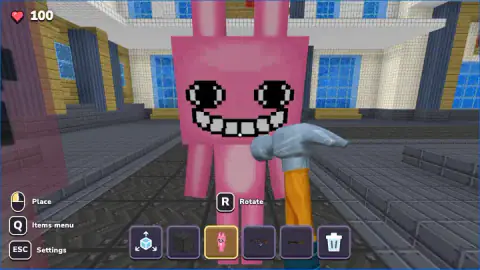
- Place rabbits a few steps away. One we put down right in front of us filled the whole screen with a grin.
- The bin is a hooked cane, not a hammer. Select it only when you mean to remove something.
Controls
| Left click | Does what the prompt at the left says for the selected slot: Use, Place, Fire or Delete |
|---|---|
| 1-6 | Choose a slot in the bar at the bottom |
| Mouse | Look around |
| W A S D | Move (per the listing) |
| R | Rotate the piece before placing it. The prompt shows when the rabbit is selected |
| Q | Open the Items menu (shown on screen; we did not open it) |
| Esc | Settings, with Resume, Sound off, Main menu and aim sensitivity |
| Space / Shift / F / Right click | Jump, run, use doors and vehicles, aim (per the listing; not tested) |
Features
- No goal, no timer and no score: the game drops you on a plaza in front of a block-built hospital and leaves the rest to you
- A six-slot bar: a grab tool, a dark stone block, a pink rabbit, a rifle, a shotgun and a delete tool
- The click changes meaning with the slot, and a label at the left always tells you which: Use, Place, Fire or Delete
- A see-through copy of the piece shows exactly where it will land before you click
- Every rabbit you place gets its own name tag; ours were Pipetto, Pumpkin and Dumpling
- Health sits at 100 in the corner; nothing on the plaza touched it in our ten minutes
- The listing promises eight worlds, vehicles, explosives and ragdoll physics; we saw only the hospital plaza
Game details
- Developer
- Partner studio
- Release date
- October 2026
- Last updated
- October 26, 2026
- Added here
- October 2026
- Technology
- HTML5 (WebGL 3D)
- Platforms
- Browser (desktop), Browser (mobile & tablet, touch)
- Classification
- 3D
- Saved progress
- Saving, when available, is managed by this game. Mava cannot confirm your level.
FAQ
Can you treat animals in Animal Hospital 3D?
Not in what we played. The hospital is the setting, a block-built building with a red cross on the front, and the animals are pink rabbits you place yourself. In ten minutes we saw no patients, no treatment and no doctor's tasks. The game's own listing describes it as a physics sandbox with no single goal, and calls the city hospital one of its worlds.
Is there a goal or a way to win in Animal Hospital 3D?
No. There is no score, no timer and no level to finish. The listing says so directly: you create a world, place characters and items, and experiment. The only number on screen is a health counter at 100, which did not move in our session.
How do you place a rabbit in Animal Hospital 3D?
Press 3, or click the pink rabbit in the bar at the bottom. A see-through rabbit appears where you are looking; aim at the ground and left click to make it solid. Each one arrives with a name tag over its head, such as Pipetto, Pumpkin or Dumpling.
What do the six slots in the bar do?
From left to right: a grab tool (the prompt reads Use), a dark stone block and a pink rabbit (both read Place, and you hold a hammer), a rifle and a shotgun (the prompt switches to Fire and a crosshair appears), and a bin (Delete). The listing says the Items menu, opened with Q, holds many more things to put in the bar.
Why is my view tilted sideways in Animal Hospital 3D?
It happened to us about four minutes in: the hospital leaned across the screen and the treetops filled the rest, and it stayed that way until the end of our session. We did not find what caused it or a key that straightens it. The settings panel, opened with Esc, has a Main menu button if you want to start again.
How many worlds does Animal Hospital 3D have?
The game's listing names eight: a flat arena, a modern villa, a city hospital, a shopping mall, a village, a medieval castle, a prison and a pirate galleon. We only saw the hospital plaza, where the game started us. The listing also says some worlds and items unlock after a short video and that worlds save automatically.
Can you play Animal Hospital 3D on a phone?
The listing says yes: a joystick on the left to move, swipes to look, and on-screen buttons for actions, jumping and the Items menu. We played with a keyboard and mouse, so we cannot say how the touch version feels.