







About FreeCell Solitaire
In our first FreeCell deal, move 37 shut us out. All four free cells were full: the 3♦, 5♠, K♠ and 2♥. No column was empty. Not one useful card could move. We pressed Undo ten times, kept the cells clear on the second try, and won in 54 moves.
That is FreeCell in one scene. Every card is face up, so luck plays no part. What runs out is room to park cards. This page opens the FreeCell mode of Solitaire 8 Collection, our own set of eight solitaire games. The Games button holds the other seven. Free cell solitaire is free here, in your browser, with no download and no account.
Free cells decide how many cards you can move
Cards move one at a time. The game does the steps for you, though, so a run can go in one drag. The guide gives the rule: “as many cards as free cells plus one, doubled for every empty column.”
- Four free cells, no empty column: 5 cards.
- Four free cells and one empty column: 10 cards.
- One free cell, no empty column: 2 cards.
- No free cell, no empty column: 1 card.
In our games, single drags moved runs of 7, 8 and even 10 cards. Each card you park cuts that number down. Fill the last cell and you are back to one card at a time.
Four choices that won our deals
We won all five deals we played, in 53 to 65 moves. Each choice below starts with a sign you can see on the table.
Empty a short column before you fill a cell. The sign: a column with only one or two cards. Move them onto other columns. An empty column doubles the run you can move. A parked card only takes a slot.
Park only what blocks you, and clear it fast. The sign: the card you need sits under one or two others. Park those, free your card, then put the parked cards back on a column. The cells stay open for the next problem.
Let low cards go up on their own. The sign: an ace near the bottom of a column. Do nothing. “Auto-play cards that are no longer needed” is on, so the game sends them up for you. You save a move and a cell.
Don’t count on taking a card back down. The sign: the card you need is already on a foundation. By default, “Allow moving a card down from the foundation” is off. We tried it anyway, and the game would not let the card come down. Plan without that route, or switch the option on in Settings first.
Our mistake at move 37, and the fix
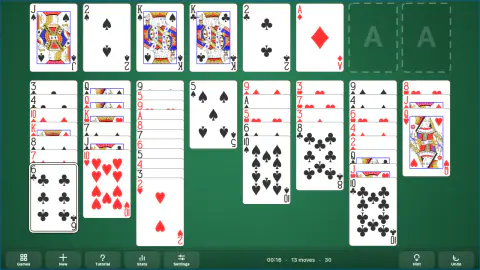
The trouble began early. By move 13 of that deal, the cells already held the J♠, 2♠, K♠ and K♣. With no empty column, we could move only one card at a time.
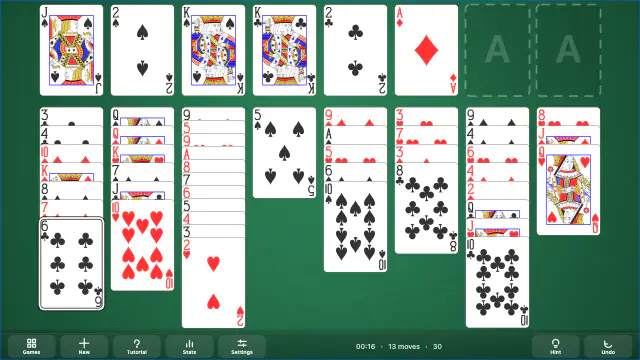
At move 37 it got worse. The 3♦, 5♠, K♠ and 2♥ filled the four cells, and nothing useful could move. That is the sign to stop: four full cells and no empty column.
The fix was Undo. It goes back one move each time you press it. We pressed it ten times and played that stretch again. This time we kept the cells free. We won the deal in 54 moves.
Use Undo for this, not New. New starts a fresh deal.
Deal numbers and the FreeCell settings
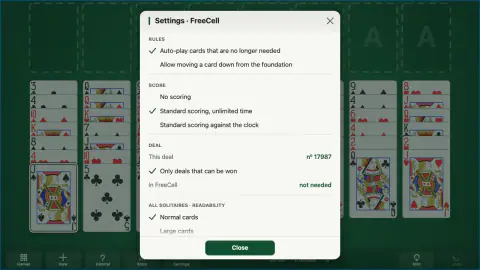
Press Settings in the bottom bar. The panel is called “Settings · FreeCell”. Under Deal, ours said “This deal nº 17987”. The bar does not show the number. The guide calls it “the same numbering everyone knows”.
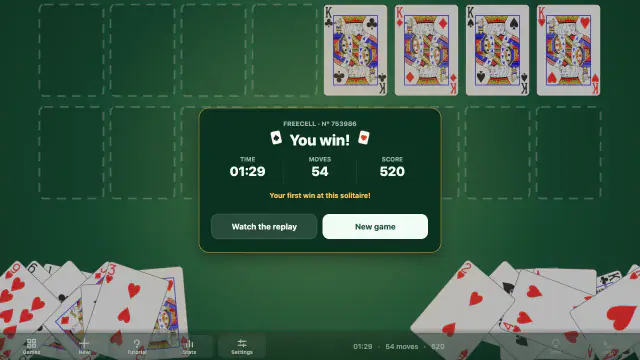
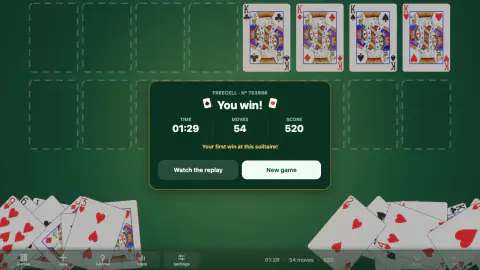
One quirk: the win screen for that same game showed another figure, Nº 753986. To note down your deal, use the number in Settings.
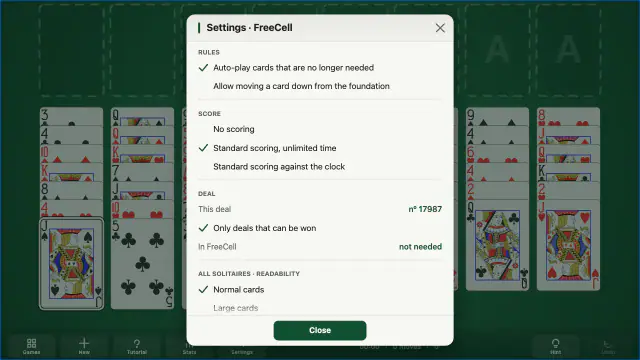
“Only deals that can be won” is ticked, with a note: “In FreeCell: not needed”. The note makes sense. FreeCell players have long known that, in the classic numbering, only one of the first 32,000 deals has no solution: number 11982. Other modes in the collection put a ✓ next to the score for a checked deal. FreeCell shows none.
The panel also sets the score. “Standard scoring, unlimited time” is the default, and all five of our wins scored 520. You can pick “No scoring” instead. Below that, under Readability, you can make the cards larger.
Daily challenge and stats
The Games menu at the top has “Daily challenge · A new winnable deal every day”. Inside, the list of today’s deals has a “Play FreeCell” button. We did not finish a challenge, so we can’t tell you more about it.
Stats keeps your FreeCell numbers apart from the other seven games. If you close the tab mid-game, the deal comes back as you left it, with the clock and the moves.
When the last king goes up, the win screen shows your time, moves and score.
More solitaire to play
FreeCell is one of eight games in Solitaire 8 Collection. Each mode has its own page, too:
- Spider Solitaire: ten columns, and you build full suits from king to ace.
- Klondike Solitaire: the classic, with hidden cards and a stock to draw from.
- Pyramid Solitaire: pairs of cards that add up to 13.
Still in the mood for cards? Browse our solitaire games and card games.
Screenshots
How to play FreeCell Solitaire
Press PLAY. The first time, a six-step guide called “FREECELL · HOW TO PLAY” opens. Its first line sums up the game: “No luck here.” Close it and the deal is in front of you.
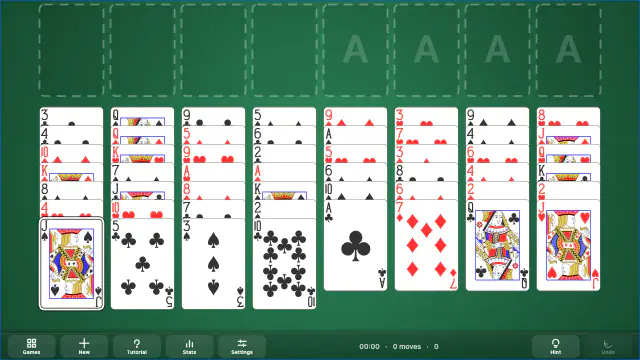
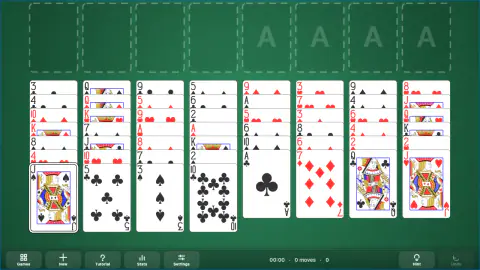
- Read the table. There are eight columns: four of seven cards and four of six. The four empty boxes top left are the free cells. The four boxes marked A are the foundations.
- Know the goal. Each foundation takes one suit, from ace up to king. You win when all four kings are up there.
- Let the aces go. The game sends them up for you. In our first deal, the A♣ went up before we touched a card.
- Make your first move. Drag the last card of a column onto a card one rank higher, in the other color. A red 5 goes on a black 6. The move count in the bar goes up by one.
- Park a card only when you must. Drag it into an empty free cell. Each cell holds one card. Take it back out as soon as it fits on a column.
- Send cards home. Double-click a card to send it to its foundation. Double-click the table to send up all that can go. A single click moves nothing.
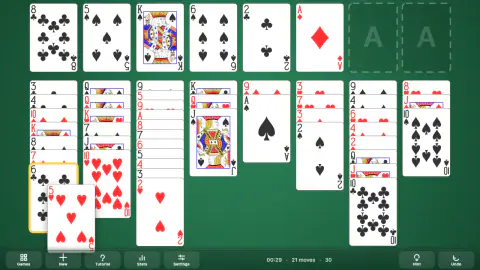
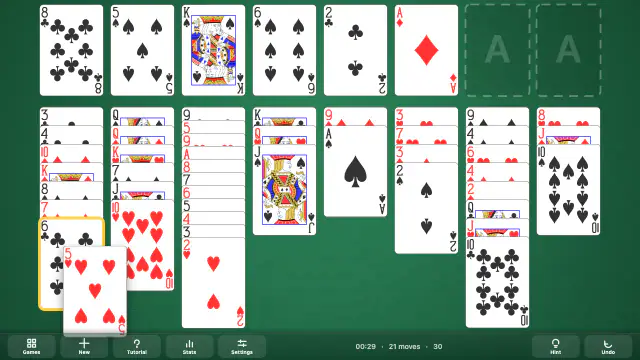
Here the 5♥ is on its way to the 6♣. Now look at the top left. All four cells are taken. The move works, but the next one may not.
Controls
| Drag a card | Moves it. Drag a run and the game moves the whole run if you have room. |
|---|---|
| Double-click a card | Sends it to its foundation. |
| Double-click the table | Sends up every card that can go. |
| Single click | Moves nothing. Where a card goes is your call. |
| Undo | Takes back one move. Press it again to go back more. |
| Settings | Shows the deal number and the FreeCell rules. |
Features
- All 52 cards face up from the first move: no luck, no hidden cards
- Four free cells, and runs of cards that move in a single drag
- The deal number, shown under Deal in Settings
- Auto-play that sends up cards you no longer need
- Undo that steps back one move at a time
- A daily challenge in the Games menu and stats kept just for FreeCell
Gameplay video
Game details
- Developer
- Mava Games
- Official site
- solitaire8collection.mavagames.com
- Release date
- August 2026
- Last updated
- August 9, 2026
- Added here
- August 2026
- Technology
- HTML5 · Canvas (TypeScript)
- Platforms
- Browser (desktop, tablet, mobile), Android (Google Play), iOS (App Store)
- Classification
- Cards & Board , Casual , Puzzle
- Saved progress
- Saving, when available, is managed by this game. Mava cannot confirm your level.
FAQ
How many cards can I move at once in FreeCell?
As many as your free cells plus one, doubled for each empty column. With four free cells and no empty column, that is five cards. The game moves the whole run in one drag.
Where do I see the FreeCell deal number?
Open Settings in the bottom bar. Under Deal it says “This deal nº” and the number. The win screen shows a different figure, so use the one in Settings.
Can every FreeCell deal be won?
Almost all of them. FreeCell players have long known that, in the classic numbering, only one of the first 32,000 deals has no solution: number 11982. In Settings, next to “Only deals that can be won”, the panel simply notes “In FreeCell: not needed”.
What happens when all four free cells are full?
You can only move one card at a time. If no column is empty either, you may be stuck. Press Undo to step back until a cell is free, then try a new plan.
Is this the FreeCell from Windows?
No. Solitaire 8 Collection is independent and is not affiliated with Microsoft. FreeCell is a traditional solitaire game.
Is FreeCell Solitaire free to play?
Yes. It plays free in your browser, with no download and no account. If you reload the page, your game comes back as you left it.