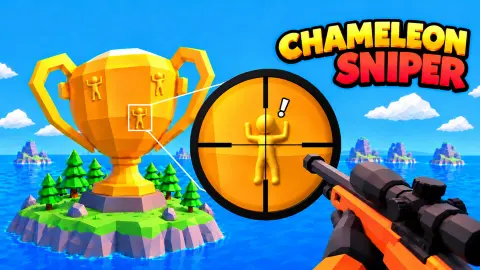





About Chameleon Sniper
Most sniper games test whether you can find the target and then whether you can hit it. Chameleon Sniper showed us its target within seconds, in plain view on a giant Rubik's cube. Ten minutes later that target was still standing, and all five of our bullets were still in the row at the top of the screen.
So be clear about what this page is. We played one island across two sessions and never spent a bullet. The counter never moved from "1 left!", and we saw no menu, shop, coins or stars.
What we can give you is the thing that stopped us, which should save you those ten minutes, along with a close look at the one target we found. For everything further on, we can only tell you what the game says about itself and mark it as such.
The game is by Minty Lants. It was published on 28 October 2026.
Click to aim did not mean click
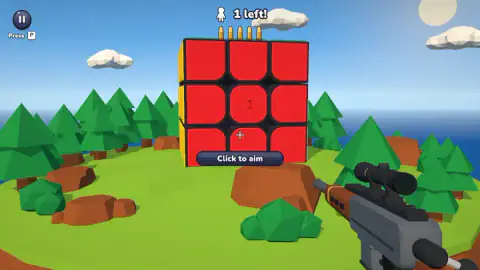
The wide view has a dark bar under the cube that reads "Click to aim", with a small white cross at the centre of the screen. We took it at its word. We clicked the bar, the tile, the figure and the middle of the screen, more than 30 times, and the scope never opened.
Space opened it straight away. At that point the bar changes to "Click to shoot", with a little mouse icon, and this time it is telling the truth about the button, at least according to the instructions.
If the game also accepts a left click to aim, it did not accept ours. That may be down to our short, quick clicks, so if you are stuck, try a longer press before you give up on it.
Five bullets, and none of them spent
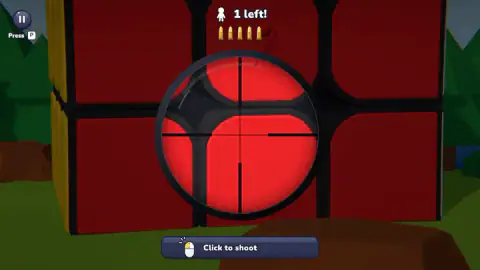
Up in the scope, we clicked six times over about half a minute: on the centre of the lens and on the "Click to shoot" bar. The row stayed at five, the counter stayed at "1 left!", and we registered no gunshot. We do not know why, and we will not guess at a fault in the game on this evidence.
We can say that those shots would have missed anyway. The cross and the lens stayed at the centre of the screen in every image we have, even though we clicked at different spots. In none of them was the figure inside the lens. Through the whole stretch it sat up and to the left of the rim, in the dimmed part of the picture, while the cross pointed at an empty red tile.
That points to the step we skipped. The instructions say moving the mouse is how you look and aim, and we never made a deliberate sweep with it. Do that first.
We then stopped touching the game for nearly four minutes, with the scope still up. Nothing happened. No clock appeared and the level did not fail, so on this island at least, you can take your time.
Red on red, and how you still see it
The figure we found was on the red face, on the centre tile of the nine, with one arm thrown above its head. There is no colour difference to go on. From the wide view it looks like a small smudge, because shading darkens its body while its head stays bright. Zoomed in, you can see it stands out from the tile like a carving.
We are inferring that this is the enemy the counter means, since we never hit it.
The light may be part of the search. With D held for a second, the island swung round to show the next face, which looked cream at one angle and grey at another. So turning is worth doing even for a face you have already checked, though we only saw this on a blank white one. Oddly, the island also swung back and forth once for several seconds when we had not pressed anything, and we cannot explain that.
Real chameleons are not trying to do this
The name leans on the popular idea that chameleons change colour to vanish into the background. Research points elsewhere. A 2008 study in PLOS Biology on southern African dwarf chameleons linked their rapid colour change to social signals, in contests between males and in courtship, and found no evidence that camouflage was the main driver.
So a real chameleon often changes colour to be noticed. This game's figure did the reverse throughout our session, holding one flat match to its tile. That is why the search here is about outline and shadow, as the instructions advise: looking for a colour would get you nowhere.
What the game promises and we did not see
The game's own description names other islands, including a trophy, a volcano and the Moon, along with a Daily Mission, harder Special Ops and a Bonus Level. It says coins come from hits, headshots and leftover bullets, and that they pay for more bullets or bigger enemies.
Its instructions say three stars allow one miss at most. Five bullets for one target would leave plenty of room to clear the cube, but little to spare for a top score. They also name four bonuses for when you are stuck: Recolor, Night Vision, Beams and Mark. We saw none of this, or how many levels there are.
Who it suits
It looks like a good fit for someone who likes hidden-object searches more than fast shooting, since nothing we saw hurried us. We saw no blood, since nothing was ever hit, though the premise is shooting human-shaped figures with a rifle. It suits you less if you want a game that explains its controls on screen, because the one label we leaned on sent us the wrong way.
Similar games to try
Hidden Sniper: Camo Hunter 3D has the same idea, but there the colour gives the figure away, a shade lighter than the cacti it copies. SlowMo Sniper also gives you five bullets, but for three marked figures, in the time it takes your shooter to fall. Hidden Paint 3D keeps the search on a 3D model and drops the rifle. There are more in our shooting games.
Screenshots
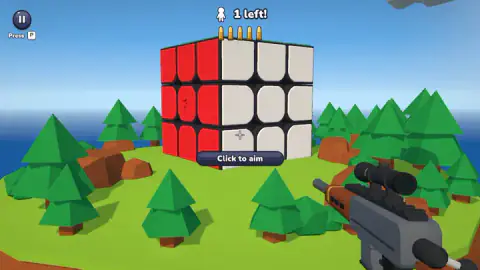
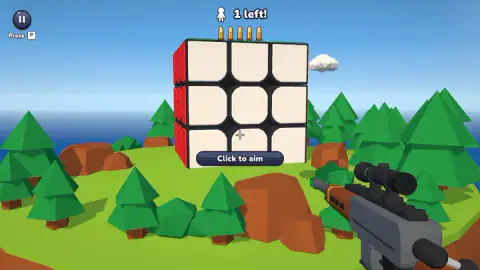
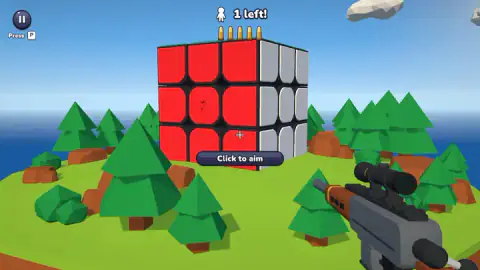
Taken by opening the game ourselves and letting it run — not supplied by the publisher, and not the same picture every other site shows.
How to play Chameleon Sniper
- Look over the cube from the wide view. The figure is the same colour as its tile, so look for a raised outline and a shadow.
- Turn the island if you need another side. D turned it for us. The instructions say A and the arrow keys do too.
- Raise the scope with Space. The instructions also offer the right mouse button. Ignore the left click, whatever the label says.
- Move the mouse until the cross sits on the figure. That is how the instructions say aiming works. We never got this far.
- Left click to fire. The instructions say any hit is enough, and that a headshot pays extra.
Tips from our run:
- Do not click the Click to aim label. It reads like the way in, and for us it was not.
- Hold Space, or tap it once. A long press kept the scope up only while we held it. The one quick tap we tried left it up for the rest of the session.
- Use the dark part of the zoomed view. The picture outside the lens is dimmed, not hidden, so you can find the figure there and steer towards it.
- You do not have to rush this one. We saw no clock on the cube island.
Controls
| Space | Raises the scope; we confirmed this one |
|---|---|
| Right mouse button | Also zooms, according to the game's instructions; we did not try it |
| D | Turns the island; we confirmed this one |
| A or the arrow keys | Also turn the island, according to the game's instructions; we did not try them |
| Mouse | Looks around and aims, according to the game's instructions; we never got it to line up a shot |
| Left click | Fires while zoomed, according to the game's instructions; our clicks spent no bullets |
| P or the two bars at the top left | Pause, according to the label on screen; we did not press it |
| Drag, arrows and a held AIM button on touch screens | Look, turn and aim, releasing to fire, according to the game's instructions; we did not try touch |
Features
- A low-poly island with a giant 3x3 Rubik's cube in the middle, ringed by pine trees, rocks and sea
- A red figure on a red tile, with no colour difference to help you, only its raised outline and shading
- A counter reading 1 left! above a row of five bullets
- A scope that magnifies the whole view and darkens everything outside the lens, so you can still see past its rim
- An island you turn with the keyboard, with faces that change tone as the angle changes
- No clock on screen on the cube island, and no failure in ten minutes of play
Game details
- Developer
- Minty Lants
- Release date
- October 2026
- Last updated
- October 29, 2026
- Added here
- October 2026
- Technology
- HTML5
- Platforms
- Browser (desktop, keyboard and mouse), Browser (mobile & tablet, touch)
- Saved progress
- Saving, when available, is managed by this game. Mava cannot confirm your level.
FAQ
How do you play Chameleon Sniper?
You look over a small island for a figure the same colour as the surface it sits on, zoom in and shoot it. According to the game's instructions, A and D turn the island, Space or the right mouse button zooms, the mouse aims and a left click fires. We confirmed D and Space, but we did not manage to fire a shot.
Why does Click to aim not work in Chameleon Sniper?
In our run, more than 30 left clicks on the wide view never opened the scope, wherever we clicked. Pressing Space did. The game's instructions also list the right mouse button for zooming, which we did not try.
Where is the enemy on the Rubik's cube level in Chameleon Sniper?
In our run the only figure we found was on the red face, on the centre tile, with one arm above its head. It is the same red as the tile, so look for shading rather than colour. We never hit it, so we are inferring that it is the target behind the 1 left! counter.
How many bullets do you get in Chameleon Sniper?
The cube island showed five bullets for one target. The game's instructions say a level is lost if you run out, that three stars allow one miss at most, and that an upgrade adds bullets. None of ours were spent, so we did not see any of that happen.
Is there a time limit in Chameleon Sniper?
We saw no clock on the cube island, and it did not fail in about ten minutes, nearly four of them with no input at all. The game's instructions do say that running out of time can lose a level, so other levels may differ.
What do the bonuses do in Chameleon Sniper?
The game's instructions name four: Recolor, Night Vision, Beams and Mark, all meant to help you find a target you cannot spot. We never saw them or their prices, so we cannot say how well they work or what they cost.
Can you play Chameleon Sniper on a phone?
It is listed for Android and iOS, in landscape and portrait, and the instructions describe a drag to look, arrows to turn and a held AIM button that fires on release. We played with a keyboard and mouse and did not try touch.
Who made Chameleon Sniper?
The developer is named as Minty Lants and was published on 28 October 2026.