


About Race On Cars in Moscow
The name promises a race, and the card labelled Moscow gave us none. We chose it, found ourselves in the driver's seat of a red four-door car, and looked for a start line, a clock or a rival. There was a hedge, a row of tower blocks and a speed readout at zero.
That is worth knowing before you start, because Race On Cars in Moscow is three games behind one menu. The cards read Moscow, Parking and Desert. The city is a place to drive around. The other two are where the game's own instructions put the goals: a highway run where you go as far as you can without hitting traffic, and parking missions that pay money. Only the Desert card carries a record, in kilometres, and ours read 0.00.
The game is credited to 102SQUAD. It has been available since October 2025.
Our own session was short and not glorious. In roughly four minutes at a desktop keyboard we drove one stretch of the Moscow mode, left the road, and parked ourselves against a hedge for good. We did not open Parking or Desert, did not buy or tune anything, and earned nothing. What follows separates what was on our screen from what the instructions say.
What the three cards tell you
Each card is a small picture, and each picture is honest about its mode.
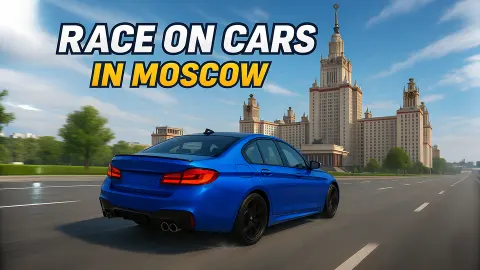
Moscow shows a blue saloon in front of pale tiered tower blocks and a line of trees. That matches what we drove through: wide asphalt, kerbs, clipped hedges, a car park, traffic lights at a junction, a white car parked beside an orange building. Nothing on screen asked anything of us.
Parking shows a white saloon rolling towards a bay painted on the ground and ringed with orange cones. The instructions call this the mode with missions on an open map, and say it earns money.
Desert shows a green saloon on a road several lanes wide, with other cars ahead of it. In the corner of the card is the line Your record: 0.00 km. So the endless run described in the instructions, where a crash ends the drive, appears to be this one, and the number to beat is a distance. We describe both from their cards, not from play.
The dashboard does more than decorate
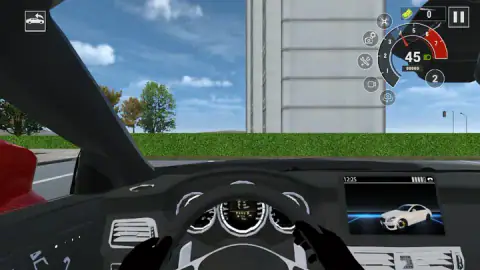
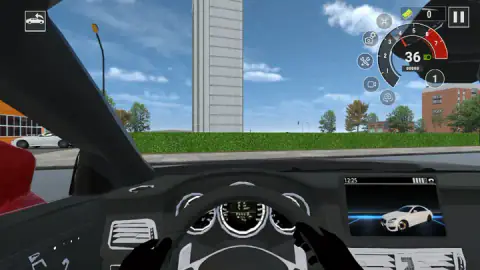
Most browser driving games give you a speed number and leave it at that. This one draws a whole cockpit: a steering wheel with hands on it, three dials behind the wheel, air vents, and a centre screen showing a clock and a small picture of a car.
The useful instruments float at the top right. A rev dial runs from 1 to 7 and turns red near the top. Inside it is your speed, and beside it a circle with the current gear. We saw it read 2 at speed and 1 at a crawl without touching a gear key, so the gearbox looks after itself. A green headlight symbol sits next to the speed.
Around the dial are five round buttons: a drone, a camera with a cog, crossed tools, a video camera and a camera with arrows. We did not work through them, so we will not tell you what each one opens. Above them, a box with a wad of banknotes counts the cash earned on this drive.
Where "checkers" comes from
The game's own description promises "checkers racing", which reads oddly in English. It makes sense in Russian. There, the word for checkers, shashki, is road slang for a driver who jumps from lane to lane through dense traffic, as a piece jumps across a board. Izvestia described it in January 2017 as active lane changes in heavy traffic when every lane is busy.
It is not a compliment. Russia wrote "dangerous driving" into its traffic rules in 2016, and that kind of weaving is one of the habits the rule names. A game is the safe place for it, and the Desert card, with its wall of cars ahead, is clearly where this one wants you to do it.
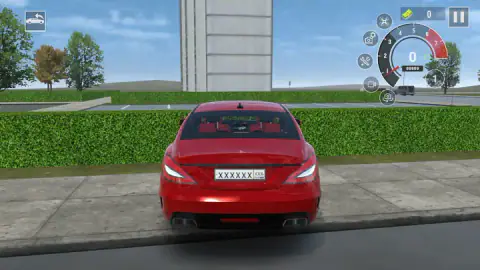
The plates are the other local detail. Behind our car was a white plate with a long main panel and a small box on the right holding a code, the letters RUS and a tricolour flag. That is the layout of a real Russian plate. The game fills both parts with rows of X, so no real registration is shown. The cars resemble real models as well, but no maker's name is written anywhere we looked, and nothing suggests a licence.
Who it is for
It suits players who like sitting in a car more than winning with one: the cabin, the dials and the choice of cameras are the best things we saw. It should also suit anyone who wants a traffic run with a single number to improve.
It is not a race against rivals on a circuit, at least not in the mode we played. And the menu holds more than we reached: a shop, a tuning screen and a balance of 20,000 to spend. The description speaks of multiplayer races and leagues too; we saw no sign of them.
More driving games to try next
For lane-hopping through traffic, Highway Traffic pays for near misses rather than distance, and Traffic Racer 3D offers a 60-second mode beside an endurance run. Driver Club: Highway Racing turns the same idea into a career. If the cones caught your eye, Car Parking 3D is all bays and barriers, and Real City Driving 2 is another city with no timer and no score. The rest are under driving games.
Screenshots
Taken by opening the game ourselves and letting it run — not supplied by the publisher, and not the same picture every other site shows.
How to play Race On Cars in Moscow
- Press Play on the first screen, which shows your car and its stats, then choose a card: Moscow, Parking or Desert.
- Hold W or the up arrow to pull away. The gear number beside the dial climbs by itself.
- Steer with A and D or the left and right arrows, and slow down with S or the down arrow.
- Press C when the view from the seat hides too much. It moves the camera behind the car.
- Go to Desert for distance or Parking for missions. According to the game's instructions, those are the modes that pay.
What a clumsy first drive taught us:
- Start with the camera behind the car. From the driver's seat the left pillar and the dashboard cover a good third of the picture. We only understood why the car would not move once we pressed C and saw its front wheels up on a pavement.
- Ease off before the first corner. We were doing 45 on the readout in second gear when a grey building filled the windscreen. By then it was too late to turn cleanly.
- A hedge is a wall. Once the nose was against it, holding W did nothing. The readout stayed at 0 for about two minutes.
- Look at the top left corner if you get stuck. A small button there shows a car with a curved arrow, which in driving games usually puts you back on the road. We did not press it, and that was our mistake.
- Do not expect the city to pay. The cash counter on the driving screen read 0 from the first second to the last.
Controls
| W / S or Up / Down arrows | Accelerate and brake. The gears change by themselves; we never pressed a gear key |
|---|---|
| A / D or Left / Right arrows | Steer |
| C | Changes the camera. One press took us from the driver's seat to a view behind the car |
| Z | Listed only as "emergency" in the game's instructions. We pressed it once at a standstill and saw no change from the driver's seat |
| Q / E | Turn signals, according to the game's instructions. We did not try them |
| Pause button (top right) | Pauses the drive |
Features
- Three modes on the menu: Moscow, Parking and Desert, each drawn with a different car
- A driver's-seat view with a steering wheel, hands, dashboard dials and a centre screen, plus a camera behind the car
- A rev dial numbered 1 to 7 with a red band, a speed readout and a gear number that changes by itself
- A distance record in kilometres, shown on the Desert card and starting at 0.00
- A starting balance of 20,000 in cash, with a shop and a tuning screen to spend it in
- Russian-style number plates, blanked out with rows of X
- Made by 102SQUAD
Game details
- Developer
- 102SQUAD
- Release date
- October 2025
- Last updated
- August 10, 2026
- Added here
- August 2025
- Technology
- HTML5 (3D)
- Platforms
- Browser (desktop, keyboard), Browser (mobile & tablet, touch)
- Classification
- Adventure , Driving , Simulation
- Saved progress
- Saving, when available, is managed by this game. Mava cannot confirm your level.
FAQ
How do you play Race On Cars in Moscow?
You pick one of three modes, Moscow, Parking or Desert, and drive with WASD or the arrow keys. The game's instructions say the highway run is about getting as far as you can without hitting other cars, and that parking mode has missions on an open map that pay money. We only drove in the Moscow mode, where nothing on screen gave us a task or a clock.
What are the three modes in Race On Cars in Moscow?
The menu shows three cards. Moscow is a city of tower blocks, hedges and car parks. Parking shows a marked bay ringed with orange cones. Desert shows a multi-lane road with other cars ahead and is the card that carries a distance record in kilometres. We played Moscow only, so the other two are described from their cards.
What are the controls in Race On Cars in Moscow?
On a computer, W and S or the up and down arrows accelerate and brake, and A and D or left and right steer. C changes the camera between the driver's seat and a view behind the car. The game's instructions add Z, described only as 'emergency', and Q and E for the turn signals. Gears change automatically.
Is Race On Cars in Moscow a real map of Moscow?
Not that we could tell. The part we drove through has grey and brick tower blocks, clipped hedges, a car park and traffic lights, and the cars wear Russian-style plates, so it has the look of a Moscow housing district. We did not see a street name or a landmark we could identify, and the game claims no official link with the city.
Why does the game's description talk about checkers?
It is very likely a literal translation of Russian road slang. Russian newspapers such as Izvestia use the word for checkers to describe a driver who hops from lane to lane through heavy traffic, the way a piece hops across a board. There is no board game inside Race On Cars in Moscow; the word describes the weaving.
How do you earn money in Race On Cars in Moscow?
The game's instructions say money comes from driving far on the highway and from missions in parking mode. You start with 20,000 on the menu. The cash counter on our driving screen stayed at 0 for the whole session in the Moscow mode, so driving around the city on its own did not pay us anything.
Who made Race On Cars in Moscow?
It is credited to 102SQUAD. It was published on 16 October 2025 and updated in August 2026. It is listed for PC, Android and iOS in English and Russian; we played it on a desktop computer with the keyboard.