


About Jelly Paint Wars
Nearly everything on your screen is orange, the timer says 0:33, and the bar at the top says you are losing 37% to 50%. That was us in our first match of Jelly Paint Wars. Everything on screen was ours. The match was being lost somewhere we were not looking.
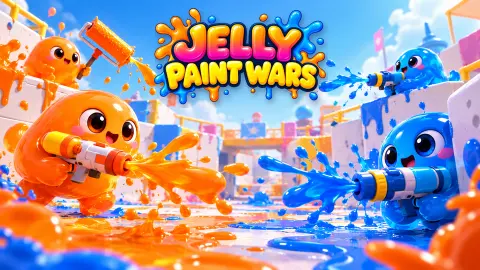
That is the first lesson of this game, and most of what follows grows from it. Jelly Paint Wars is a team paint shooter. You are a round jelly with a paint gun, on a team of four in orange against four in purple. Matches last three minutes. You can splat rivals, but that is not the score: the team with more of the floor in its colour at 0:00 wins.
It is by Tiny Chaos Games and was published on 2 November 2026. We played the tutorial and two full matches of Turf Clash on the Jelly Plaza map, on a computer, and lost both by a handful of points. Here is what those matches taught us, including how the first hour is actually laid out.
The big green button is a practice match against bots
The main menu has two ways in. The large green BATTLE button, and a smaller blue one, Online · Ranked, which carried a beta label when we played. We used BATTLE, and the result screen told us what it is: "Bot match: fewer gels and RP. Play online for full rewards."
So the seven other jellies in those matches, with names like Jelly_Kid and SirSplat, are CPU bots. That is fine for learning the controls, and it is how we spent the session. Each lost match paid 6 gels, the game's drop-shaped currency, plus one point in the piggy bank and some mastery points for the Blaster.
The detail that matters is ranking. A badge on the menu counts five placement matches, and both of our matches against CPU bots counted toward it, each with +0 RP. If ranking points are what you are after, the bot matches count toward placement but did not give us a single ranking point.
One mode to start, and what opens the rest
The game's description promises nine modes. When you open the BATTLE menu at level 1, you can pick exactly one of them. Turf Clash, "Paint the most ground in 3 minutes", is lit up. The other seven are greyed out, each with the level that opens it:
| Mode | Opens at |
|---|---|
| Zone Control | Level 2 |
| Gem Collect | Level 3 |
| Rush Paint | Level 4 |
| Weekly Mayhem | Level 5 |
| Free-for-All | Level 7 |
| Moving Hill | Level 8 |
| Wave Defense | Level 10 |
The ninth is an event on the main menu: a Daily Boss, the Frost Titan in our session, which opens at level 6.
Each of our two defeats gave about 250 XP, and after both of them the level 1 bar was about half full. At that pace, expect around four Turf Clash matches before Zone Control opens; a win may pay more, but we did not get one. So if you came for the zombie waves or the eight-player free-for-all, the first part of the game is Turf Clash practice. It is worth taking seriously, because it teaches the one skill every mode leans on: knowing where the other colour is.
Why the score says you are losing
Turf Clash looks like a game about painting fast. In our matches, it was a game about painting in the right place.
The camera follows you closely, so you only ever see the ground near your jelly. In the first match, with half a minute left, almost everything in view was orange and the bar still said Losing. In the second match, with just over a minute to go, the same thing: an orange screen and 33% to 48%. Both times, the minimap at the top left showed where the gap was. The purple sat in big patches on the far side of the arena, where our team was not.
The second thing the score teaches is that covering purple ground is the best move in the game. In the last quarter-minute of the first match, purple fell from 53% to 47.7%, and we finished on 42.4%. A share can only fall when someone paints over it. That one stretch closed most of the gap between the teams. A blank tile adds to your share; a purple tile adds to yours and subtracts from theirs.
Two smaller things from the scoreboard. The two shares never add up to 100%: in our first match about a tenth of the floor was still unpainted at the end. And the row of faces at the top of the screen, four orange and four purple, turns grey when a jelly is splatted, while the corner at the top right lists who splatted whom. A grey purple face means their side is a painter short for a moment. That is the time to push.
Ink, bombs and the special
Two bars sit at the top left. The one with the drop is your ink. By the two-minute mark of our first match it was down to about half, and it filled again later. The tutorial explains how: hold Space to melt into your own colour, which makes you faster and refills ink. So stay near your own paint when the bar runs low, rather than out on bare floor.
The second bar, with the cloud icon, charges your special, Paint Storm. The E button shows the same charge as a percentage. In the tutorial, where we were spraying at a target, it climbed to 29%. In the matches, where we painted floor and splatted nobody, it stayed at 0% for the whole first match and reached 4% in the second. Do not plan around the special early on; in our matches, painting floor alone barely moved it.
The Splash Bomb on Q is the tool you will actually use. After each throw the button counts down 5.5 seconds before you can throw again. Aim it at purple ground.
What we played, and what we did not
We played the tutorial, the daily gift screen, the main menu and two Turf Clash matches on Jelly Plaza against bots, both lost by five to seven points. We did not open the other modes, the online ranked queue, the shop, the season or training, and we did not play the Daily Boss. We barely tried Space and Shift, so we cannot tell you how melting and dashing feel. The game's listing mentions dozens of weapons, bombs, specials and jelly characters; we only used the starting Blaster. We played on a computer, not on a phone.
At the end of each match the result screen also offers "Watch ad: +6 gels", which doubles the bot match reward. We did not use it.
More team paint games
If you like the four-on-four format, Splash Rivals is the closest match: three-minute matches decided by how much floor you hold. Goo Turf puts tiny slimes with blasters into four-on-four turf battles with bot teammates. For territory without the shooting, Slime Run has you slide a slime across the arena to colour it, and Pixel Conquest claims land by closing trails against computer rivals.
More in our shooting games.
Screenshots
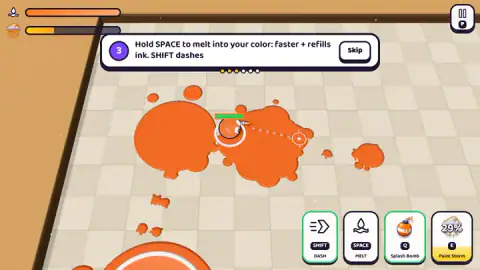
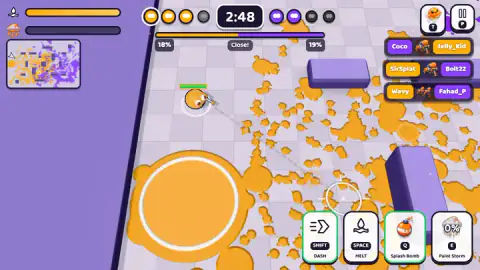
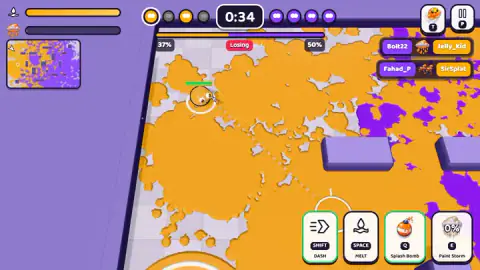
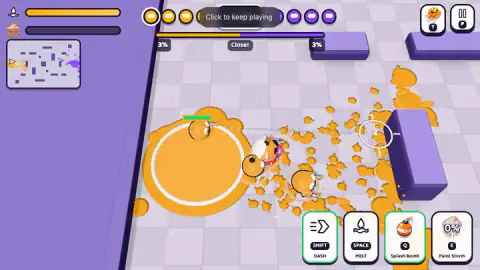
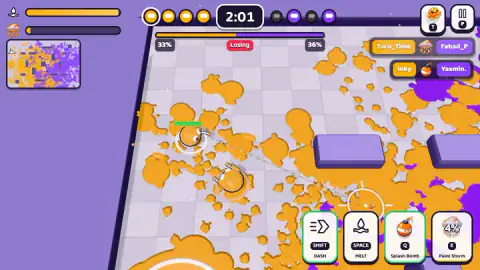
Taken by opening the game ourselves and letting it run — not supplied by the publisher, and not the same picture every other site shows.
How to play Jelly Paint Wars
- Follow the short tutorial: W A S D to move, the mouse to aim, and hold the left mouse button to spray. You can skip it at any step.
- On the main menu, press BATTLE, keep Turf Clash selected and press START. A "READY?" card shows the map name, then the timer starts at 3:00.
- Paint the floor. Watch the bar at the top: your share is on the left in orange, theirs on the right in purple.
- Hold Space to melt into your own paint and refill ink, tap Shift to dash, Q throws a Splash Bomb and E fires the Paint Storm special when its meter is full. At 0:00 the game shows "FINISH!" and the result.
Tips from our matches:
- Look at the minimap at the top left more than at your own feet. It shows where the purple is.
- Painting over purple counts twice: it adds to your bar and takes from theirs.
- Keep painting until the last second. A lot changed in our last fourteen seconds.
- Watch the ink bar at the top left. When it runs low, melt into your colour to fill it again.
- Throw the Splash Bomb into purple ground, then keep moving: the button needs five and a half seconds before the next one.
Controls
| W A S D | Move your jelly |
|---|---|
| Mouse, hold left click | Aim and spray paint |
| Space (hold) | Melt into your own colour to move faster and refill ink, as the tutorial explains |
| Shift | Dash |
| Q | Throw a Splash Bomb; the button then counts down 5.5 seconds |
| E | Fire your special, Paint Storm, once its meter is full |
| P | Pause |
Features
- Four against four, orange against purple, on a timer that runs from 3:00 to 0:00
- The team with the larger share of painted floor at the final whistle wins; the bar at the top shows both shares live
- Eight battle modes in the menu, of which only Turf Clash is open at level 1; Free-for-All opens at level 7 and Wave Defense at level 10
- A Daily Boss event, Frost Titan in our session, that opens at level 6
- The quick BATTLE button plays against CPU bots, with reduced rewards; Online Ranked is a separate button, marked beta
- Starting kit: a Blaster, a Splash Bomb and the Paint Storm special
- A first-week daily gift; day one paid 150 gels
Game details
- Developer
- Tiny Chaos Games
- Release date
- November 2026
- Last updated
- November 3, 2026
- Added here
- November 2026
- Technology
- HTML5 (3D)
- Platforms
- Browser (desktop), Browser (mobile & tablet, touch)
- Saved progress
- Saving, when available, is managed by this game. Mava cannot confirm your level.
FAQ
How do you win in Jelly Paint Wars?
In Turf Clash, the mode you start with, you win by having more of the floor in your team's colour when the three-minute timer reaches zero. Splatting rivals does not score by itself. The bar at the top of the screen shows both teams' shares during the match, and the result screen gives them to one decimal place.
Is Jelly Paint Wars online or against bots?
Both. The big green BATTLE button starts a match against CPU bots, and the result screen says so: bot matches pay fewer gels and fewer ranking points. Online Ranked is a separate button on the main menu, marked beta when we played. We only played the bot matches.
How do you unlock more modes in Jelly Paint Wars?
Modes open with your player level. At level 1 only Turf Clash is available; Zone Control opens at level 2, Gem Collect at 3, Rush Paint at 4, Weekly Mayhem at 5, Free-for-All at 7, Moving Hill at 8 and Wave Defense at 10. Each of our two lost matches gave about 250 XP and filled roughly a quarter of the level 1 bar.
Why does Jelly Paint Wars say I am losing when my area is all my colour?
Because the screen only shows the ground around you. In one of our matches nearly everything in view was orange while the score read 37% to 50% against us. The minimap at the top left shows where the other team's paint is, and that is where you need to go.
What do Space and Shift do in Jelly Paint Wars?
The tutorial says that holding Space melts your jelly into your own colour, which makes you faster and refills your ink. Shift is a dash. Your ink bar sits at the top left of the screen. We barely used either in our matches.
Who made Jelly Paint Wars?
Tiny Chaos Games is listed as the developer. The game was published on 2 November 2026 and runs in the browser with nothing to install. It is listed for computers and mobile; we played it on a computer with a keyboard and mouse.