




About City Pop Drive
Most arcade racers hand you a pedal and a finish line. City Pop Drive takes both away. The car accelerates by itself, there is no lap and no rival to beat, and what you race is a number at the top of the screen counting down from 50.
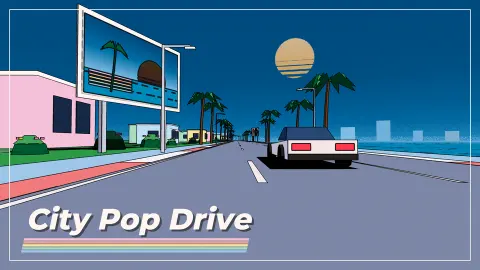
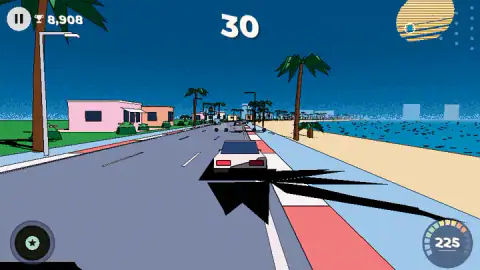
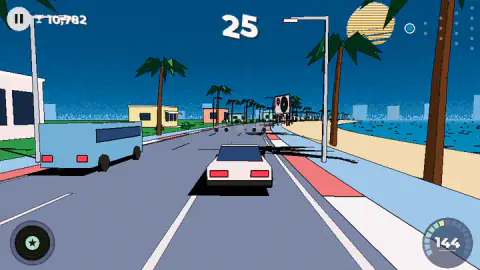
That number decides everything. You steer a white coupe down a seaside road at night, with palm trees and pastel houses on the left and the sea on the right, and you weave through the slower cars ahead. Your score climbs with every metre you cover. When the clock hits zero the run stops wherever you are, and the points become Miles, the money you spend on upgrades between runs.
The game is new. It is credited to Drunkengrad and was published on 18 October 2026. We played about ten minutes: four full runs, all on the opening seaside road. That is not far, and we say so throughout, because the parts of the game we never reached are exactly the parts its description is proudest of.
The clock is the opponent, and we never beat it
Our four runs all ended the same way: the timer reached zero somewhere along the first stretch of coast, before we saw a checkpoint. We never watched the number go up. That tells you something about the start of the game: on a car with no upgrades, fifty seconds was not enough for us to reach a checkpoint, so early runs are short and end on the clock rather than in a crash.
The game's answer is the near miss. Its instructions say that passing close to traffic adds time and fills a gauge called the Breeze meter, and that a full meter starts a Boost that knocks other cars out of the way. We did not fill it in our runs, so we cannot tell you how close counts as close. The logic is clear, though: the cars you are tempted to give a wide berth are the ones that buy you seconds.
The other answer is upgrades, which is where the Miles come in.
Where the Miles go
The results screen turns your points into Miles at a steady rate. Across our four runs the sum worked out every time at roughly one Mile for every 250 points, so our best run paid 90 Miles. A yellow button beside the total offers to double it in exchange for watching a video.
To the right sit four upgrade tracks, each a row of ten small squares with a green price button. The icons are a lightning bolt, a wheel, a steering wheel and a stopwatch, and the first step on each costs 100 Miles. The game does not label them in words, but the stopwatch row is the obvious one to buy first if, like us, you keep running out of time before the first checkpoint. Our wallet stood at 669 Miles when we stopped, enough for several upgrades we never bought.
Below the score sit four round buttons: a car, a map, a gift box carrying a small exclamation mark, and a gear. The game's listing says the cars and the other maps are bought with Miles. We did not open those screens.
The road map it borrows from OutRun
The left half of the results screen holds a small diagram of dots spreading out like a fan, with a blue ring at the narrow end and two counters beside it: 0/15 next to a chequered flag, and 0/5 next to a record sleeve.
Those two numbers have a famous ancestor. Sega's OutRun, the 1986 arcade game designed by Yu Suzuki, also put you in a convertible on a sunny coast road against a clock. Each stage ended at a checkpoint that topped up your time, and the road then split in two, so you chose your own route through a pyramid of 15 stages to one of 5 different finish lines. City Pop Drive's listing describes the same idea: a fork at every checkpoint, a scenic road or an express one, and a goal at the end of each route. Fifteen flags and five sleeves on the first map fit that shape exactly.
OutRun was also one of the first racing games to let you pick the music, choosing a track on the car radio before the start. City Pop Drive's listing says its music changes with the route you take. We cannot vouch for that, since we never reached a fork.
Why it looks like an album cover
The name is not decoration. City pop is a style of Japanese pop from the late 1970s and the 1980s, smooth and upbeat, with songs about city nights, beaches and driving. Its records came with a look of their own. The painter Hiroshi Nagai made covers of flat blue skies, palm trees, swimming pools and clean pastel buildings, the best known being Eiichi Ohtaki's album A Long Vacation in 1981. Eizin Suzuki drew Tatsuro Yamashita's For You the following year in a similar sunny, graphic style.
Decades later the genre found a new audience online. Mariya Takeuchi's 1984 song Plastic Love spread on YouTube in the late 2010s, and city pop has been a reference point for internet music and art ever since, as the genre's Wikipedia entry records.
City Pop Drive is built from that palette. The houses are flat blocks of pink, mint and butter yellow. The palms are drawn with hard black shadows, like a printed illustration. The billboards along the road show vinyl records and striped sunsets, and the sun in the corner of the sky has the same horizontal stripes. Even the collectibles fit: the game's listing says you earn a record sleeve at each goal, 25 in total across its five maps, so finishing a route is literally collecting an album cover.
What we did not reach
The game's listing promises five maps, named Seaside, Midnight Expressway, Crossing City, Maple Pass and Snow Resort, each with its own twist. We drove only the first. We never reached a checkpoint, a fork, a goal or a cover, never filled the Breeze meter, never bought an upgrade and never played on a phone. Everything above about those features is the game's own description, not our report.
Who it is for
City Pop Drive suits anyone who likes the look of a 1980s record sleeve and wants a short, calm drive rather than a race. There are no rivals and nothing to read, and steering is a single left-right gesture, so a young child can play from the first second. The challenge is patience: the opening runs end on the clock, and progress comes from slowly buying time and speed with Miles. If you want a finish line you can reach in your first five minutes, this is not that game yet.
More road games to try
For a highway full of traffic and a career of timed challenges, try Driver Club: Highway Racing. Motorcycle Racer: Road Mayhem puts you on a bike against a timer, and Moto Traffic Rider splits its city riding into missions. The rest are in driving games.
Screenshots
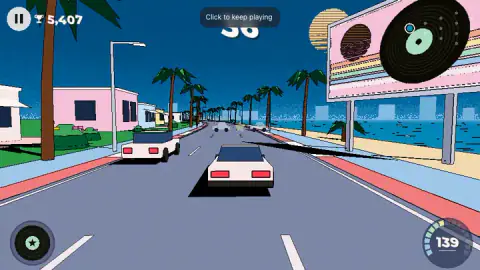
How to play City Pop Drive
- Press play on the start screen. The coupe waits under a gate with a sunset sign, and a small hand shows the gesture: drag left and right.
- Steer with a mouse drag, a finger, the arrow keys or A and D. You never press an accelerator; the car does that itself, from a crawl at the gate to well over 200 on the speedometer in a matter of seconds.
- Weave through the traffic. Cars in your lane are slower than you, so you are always catching someone.
- Watch the timer. It starts at 50 and the digits flash red as it nears the end. Per the game's instructions, close passes past other cars add time, and so does each checkpoint.
- When the clock reaches zero, the results screen shows your score, your best, and the Miles you earned.
What we learned from four runs:
- The pavement is the enemy, not the traffic. The road is edged with lamp posts, and every time we drifted onto the kerb we hit one. The speedometer fell from the two hundreds to single figures each time, and the clock kept running while the car crawled back up to speed.
- Small corrections beat big ones. Long swerves carried us straight across the lane and onto the pavement. Short nudges kept us on the asphalt.
- Score is distance. The trophy number rises with speed, so one clean run is worth more than a daring one with a crash in the middle. Our best runs scored just over 22,700; our worst, 13,446.
- The pause button is in the top left. It opens a small menu with three icons: a gear for settings, a play button to carry on, and a chequered flag to leave the run.
Controls
| Drag left or right (mouse or finger) | Steers the car across the lanes. The car accelerates on its own |
|---|---|
| Arrow keys or A and D | Steer on a keyboard, per the game's listed controls |
| P or the pause button (top left) | Pauses the run and opens a small menu with settings, resume and a chequered flag to leave the run |
Features
- There is no throttle: the car speeds up by itself, and your only job is where it goes
- Each run starts with 50 seconds on the clock, and the run ends the moment it reaches zero
- Drift onto the pavement and the lamp posts stop you dead: our speed fell from over 200 to single figures
- Points turn into Miles at the end of a run, roughly one Mile for every 250 points
- Four upgrade tracks on the results screen, each with ten steps and a first step priced at 100 Miles
- A route counter on the results screen tracks 15 flags and 5 record sleeves on the first map
- The look borrows from 1980s Japanese city pop album art: palm trees, flat pastel houses, the sea and a striped sun
Game details
- Developer
- Drunkengrad
- Release date
- October 2026
- Last updated
- October 25, 2026
- Added here
- October 2026
- Technology
- HTML5 (3D)
- Platforms
- Browser (desktop), Browser (mobile & tablet, touch)
- Saved progress
- Saving, when available, is managed by this game. Mava cannot confirm your level.
FAQ
How do you play City Pop Drive?
You steer a white coupe along a seaside road while it accelerates by itself. Drag left or right with the mouse or a finger, or use the arrow keys or A and D, to move between lanes and slip past traffic. A countdown starts at 50 seconds and the run ends when it reaches zero, so the aim is to cover as much road as possible, and reach checkpoints that refill the clock.
How do you get more time in City Pop Drive?
According to the game's own instructions, two things buy time: passing close to other cars, which it calls near misses, and reaching a checkpoint before the timer runs out. In our runs on the first road the clock only ever counted down from 50, so speed matters more than anything: every crash into a lamp post costs seconds you cannot spare.
What are Miles in City Pop Drive?
Miles are the currency you earn at the end of each run. The game converts your score at roughly one Mile for every 250 points, so a 22,000-point run paid us 90 Miles. You spend them on the results screen, where four upgrade tracks each start at 100 Miles, and the game's listing says cars and new maps are bought with them too.
What happens if you hit the pavement in City Pop Drive?
The road is lined with lamp posts on the pavement, and running into one stops the car almost completely. In our runs the speedometer fell from over 200 to single figures, and the car needed several seconds to get back up to speed while the timer kept running. Staying on the asphalt is worth more than any shortcut.
What is city pop, and why is the game called City Pop Drive?
City pop is a style of Japanese pop music from the late 1970s and the 1980s, known for smooth, upbeat songs about city life and seaside summers. Its album covers, such as Hiroshi Nagai's paintings of palm trees, pools and flat pastel buildings, are where City Pop Drive takes its look. The billboards along the road even show vinyl records, and the things you collect are record sleeves.
How many maps does City Pop Drive have?
The game's listing names five: Seaside, Midnight Expressway, Crossing City, Maple Pass and Snow Resort, with 25 record covers to collect between them. We only drove the first one, the seaside road, and never reached a fork or a goal, so we cannot describe the other four.
Is City Pop Drive free, and who made it?
It is free and runs in a web browser on a computer, phone or tablet, with nothing to install. The developer is listed as Drunkengrad and published the game on its platform on 18 October 2026.