
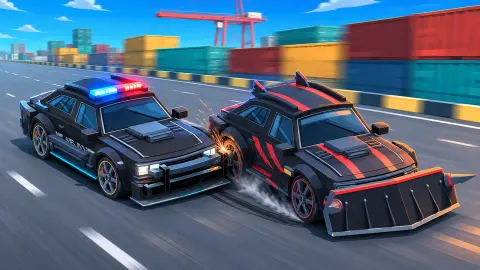












About Interceptor: Police Pursuit
Most police chase games let you ram the suspect off the road as soon as you catch up. In the chase we played, Interceptor: Police Pursuit asks for something harder: get past the car you are hunting, open a 100 m lead and hold it for three seconds, while the road through a container harbor keeps throwing traffic, cones and barriers at you.
You never press an accelerator. After the yellow countdown your car speeds up by itself and settles at about 172 km/h, with brief peaks around 180. What you do is steer, brake for the bends and decide when to boost. The look is bold and comic-like: stacked containers in red, blue and yellow on both sides, orange cranes, a city skyline beyond the water, and a white police car with a big rear wing and roof lights.
First, the limits of this page. We played one session of about ten minutes on a computer with a keyboard, all of it in the first stage, HARBOR / 01, and its mission, SPEED PURSUIT. We never passed the suspect and never saw the clock reach zero, so we cannot tell you what a win or a loss looks like. Everything below is what we saw in those attempts.
The game is credited to Octowyth Studio and has been available from November 2026.
The gap closes slowly, so the powers matter
The suspect starts 450 m ahead with a little over six minutes on the clock. At full cruising speed, in clean traffic, it took us almost a minute to bring that down to 155 m. You are faster than the car you are chasing, but not by much, and every brush with the scenery gives metres back.
That is why the two power choices count. A few seconds after GO, a STEER TO CHOOSE 1/2 banner appeared with three options, and green gates rose across the road, one per lane:
| Choice | Left | Centre | Right |
|---|---|---|---|
| 1/2 | CATCH-UP: +20% acceleration | NEAR MISS: +15% charge | LONG BOOST: +20% boost time |
| 2/2 | CLEAN PASS: passing the suspect gives 1 boost | CATCH-UP: +20% acceleration | LONG BOOST: +20% boost time |
Look at the table again: CATCH-UP moved from the left gate to the centre between the two choices. If you pick by habit you can end up with the wrong power, so read the labels each time. Once taken, NEAR MISS explained itself as passing close to traffic to recharge boost, and CLEAN PASS as passing the suspect and staying ahead for 3 seconds. The chosen powers appear as small icons on the left of the screen.
Near misses raise your bounty
The BOUNTY counter starts at 40. Each time we went past a civilian car very closely, a NEAR MISS +20 message popped up on the left and the counter rose with it. Three close passes took it to 100.
So traffic is not only an obstacle. Brushing past it is how the bounty grows, and with the NEAR MISS power it is also how your boost refills. The catch is the next section: a near miss done badly is a collision, and collisions here can cost you the whole chase.
Getting pinned is the mistake that ends a chase
This was the most important thing we learned. Twice, our car got wedged: once between a beige SUV and the barrier on the left, once tangled with a white sedan we hit at speed. In both cases the speedometer fell to between 1 and 6 km/h and stayed there.
The clock did not stop. The suspect did not wait. In the second case the gap went from about 550 m to more than 5,000 m in under two minutes. We fired the boost while pinned and the blue flames came out of the exhausts, but the car did not move. Braking and steering right did not get us loose either. We did not try steering left out of it, so there may be a way out we missed.
A milder version happens behind slow traffic. Stuck in the lane of a green car, our speed fell to 88 km/h and the target slipped from 347 m to more than 500 m ahead in a few seconds. The lesson is the same: when something blocks your lane, leave the lane.
The bar under the shield icon at the top right was full at the start of a fresh chase and shorter after our crashes. We did not see what happens when it empties.
What we did not see
The game's description talks about three modes: Sprint with speed and boost, Heavy for ramming, and Interceptor for firing pulse shots with F. It also mentions cases, rewards and police cars to upgrade. We saw only the first harbor chase in what looked like the speed mode, never passed the suspect, and never reached a garage or a results screen. We will not guess at the rest.
Who it is for, and more to play
It suits someone who likes a short, clear target and is happy to restart until the line through the traffic is clean. A chase lasts a few minutes at most, and one bad wedge against the barrier can spoil it. It is not a free-roaming police sandbox in the part we played: one road, one suspect, one goal.
If you would rather be the one running, City Chase: Escape Police is a top-down getaway where the clock counts up, and Police Drift Escape has no roads at all. Mr.Reckless Car Chase Simulator puts you on the wrong side of the law in a low-poly city. For another highway chase from behind the wheel of a police car, try Extreme Police Chase.
More in our driving games.
Screenshots
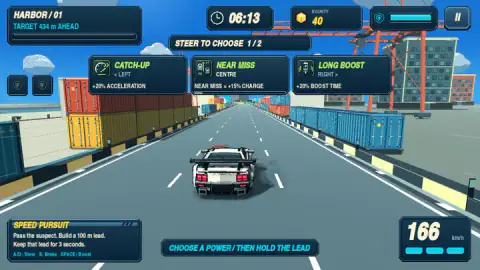
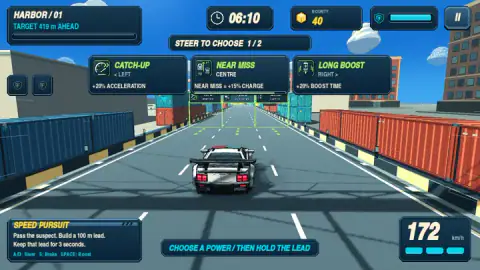
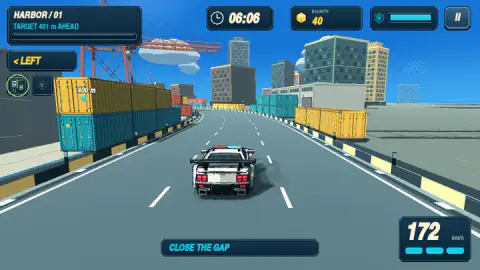
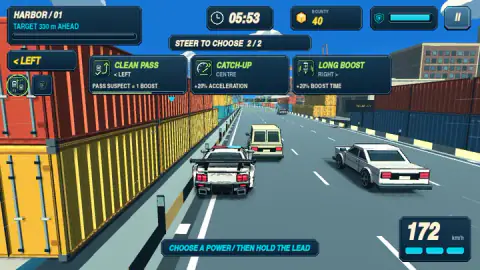
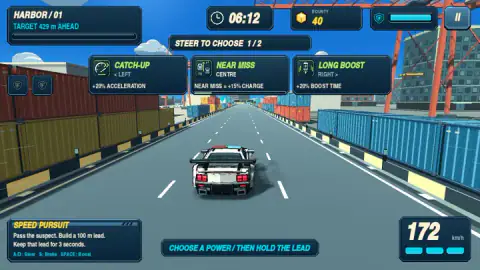
Taken by opening the game ourselves and letting it run — not supplied by the publisher, and not the same picture every other site shows.
How to play Interceptor: Police Pursuit
- Read the mission panel at the bottom left. Ours said SPEED PURSUIT: pass the suspect, build a 100 m lead, keep it for 3 seconds.
- After the countdown the car drives itself. Steer with A and D or the arrow keys, brake with S, boost with Space.
- Watch the top of the screen: TARGET … m AHEAD, a clock, your BOUNTY and a bar under a shield icon. A small marker also floats over the suspect with the distance.
- When STEER TO CHOOSE appears, drive through the gate of the power you want.
- Close the gap, go past the suspect and stay ahead.
Tips from our runs:
- Stay off the barriers when there is traffic beside you. That is where we got wedged, on both sides of the road.
- When a car is slower than you in your lane, change lanes at once. Following it cost us half our speed.
- The yellow LEFT and RIGHT hints at the top left, and BRAKE signs, appear before bends. The one time we scraped the barrier in a bend, our speed dropped to about 155.
- Drive through the floating shield icons. A shield absorbed our next scrape at no cost in speed.
Controls
| A / D or Left / Right Arrow | Steer; also how you pick a power, by driving through its gate |
|---|---|
| S / Down Arrow | Brake (shown in the mission panel; it did not free us when pinned) |
| Space | Boost, which uses the three segments under the speedometer |
| F | Fire a pulse in Interceptor mode (listed by the game's provider; not tested) |
| P / Esc | Pause (listed by the game's provider; not tested) |
Features
- The car accelerates on its own after the countdown and cruises at 172 km/h
- A SPEED PURSUIT mission: pass the suspect, build a 100 m lead and hold it for 3 seconds
- Two power choices per chase, made by steering through one of three gates on the road
- A BOUNTY that grew by 20 with every near miss in our runs, from 40 to 100
- A shield pickup that blocks damage from one hit
- A countdown of a little over six minutes and a distance marker floating over the suspect
Game details
- Developer
- Octowyth Studio
- Release date
- November 2026
- Added here
- November 2026
- Technology
- HTML5 (WebGL)
- Platforms
- Browser (desktop)
- Saved progress
- Saving, when available, is managed by this game. Mava cannot confirm your level.
FAQ
How do you play Interceptor: Police Pursuit?
After the countdown your police car accelerates by itself, so you only steer with A and D or the arrows, brake with S and boost with Space. A marker shows how many metres the suspect is ahead, and a clock counts down from a little over six minutes. In the SPEED PURSUIT mission the goal is to pass the suspect, build a 100 m lead and keep it for 3 seconds.
Do you need to press a key to accelerate in Interceptor: Police Pursuit?
No. The on-screen controls list only steering, brake and boost, and in our runs the speed climbed from 0 to 172 km/h on its own after GO. The game's provider also says the car accelerates automatically. Your job is choosing the line, not holding a pedal.
How do you choose a power in Interceptor: Police Pursuit?
A STEER TO CHOOSE banner shows three powers, each tied to the left, centre or right of the road, and green gates appear on the tarmac. You drive through the gate of the one you want. We got two choices per chase, and the order changes between them: CATCH-UP sat on the left the first time and in the centre the second.
Why is my car stuck at 1 km/h in Interceptor: Police Pursuit?
It is pinned, usually between a civilian car and the barrier, or tangled with a car it hit. In our session the car sat at 1 to 6 km/h for minutes while the clock ran and the suspect pulled thousands of metres away. Boost, brake and steering right did not free it for us, so the best fix is not getting wedged in the first place.
What is BOUNTY in Interceptor: Police Pursuit?
It is the number next to the yellow cube at the top of the screen. It started at 40 in every chase we played and went up each time a NEAR MISS +20 message appeared, which happens when you pass very close to traffic. We reached 100. We did not finish a chase, so we cannot say how it pays out.
What does the shield do in Interceptor: Police Pursuit?
Shield pickups float over the road. When you drive through one, a SHIELD READY message says it blocks damage from one hit. In our run it was spent on the next scrape against the barrier, and the car kept its 172 km/h, where an earlier scrape without a shield had dropped it to about 155.
Who made Interceptor: Police Pursuit?
The game is credited to Octowyth Studio and has been available from November 2026, so it is brand new. We found no other source for the studio and no reviews or guides beyond the game's listing. The provider describes three modes, Sprint, Heavy and Interceptor, plus cases and car upgrades; we only played the first chase.