


About The Aesthetic World of Obby
Most obby games in a browser start you at the foot of the first jump. There is a platform, a gap and a checkpoint flag, and the only question is whether you clear it. The Aesthetic World of Obby starts you somewhere else: on a path between trees, under a pink and violet sky, with a banner overhead that reads "The portal is open!" and no jump in sight.
What it gives you in place of a first jump is a direction. A yellow pin hangs in the air ahead with a number over it, and a panel in the corner says, in one sentence, what to do next. The parkour is out there in the world, and the game's first job is to walk you to it.
The game is by PlayToPlay. It was published on 15 March 2026 and updated in August. It runs in 3D in the browser with the camera behind your character.
A plain warning before the rest: we played a little over four minutes and did not get past the opening tutorial. This page covers what that opening shows, in detail, and marks clearly what comes from the developer's own description and not from our session.
Yellow markers count the metres for you
The marker is the most useful thing on the screen in the first minutes, and it is worth knowing how to read it. It is a yellow pin, the shape a map app uses, with a dark dot in the middle and a distance printed above it. When the Control card closed, the pin in front of us read 11m.
A second pin showed up further along as soon as we could walk. It read 38m at first, sitting high on the screen next to a stepped stack of blocks, while the near one had dropped to 8m. So the game shows you two things at once: where to go now and where the path leads after that.
The numbers are honest. As we walked, the near pin fell to 4m and the far one to 33m. That is a handful of metres of walking, measured by the game itself. It also means the pins work as a compass. If you turn the wrong way, the number tells you before the scenery does.
The panel in the top right corner does the other half of the job. It is a pink box with a heading and a single line of text, and during the tutorial it never changed: walk forward to the marker. It stays on screen while you play, so you do not have to remember what a card said.
What the rest of the screen tells you
The top left corner holds a cash counter: a stack of green notes with a number next to it. Ours read 0 from the first second to the last. The same green bundle also exists out in the world. One floated above the path ahead of us with a small sparkle on it, close to the block stack, and we never got near enough to touch it.
According to the developer, that money has one use: buying skins and clothes for your character. Their description counts 72 customization options. The on-screen buttons back that up as far as they can. In the bottom left corner there are two round buttons, one marked Shift with a running figure on it and one marked Tab with a piece of pink clothing. We did not press either.
Two more things were on screen that we cannot explain. Three gold stars sat over the "The portal is open!" banner the whole time, and a small yellow question mark hovered over a bush off to the right of the path. We never saw a portal, and we did not walk over to the question mark.
An open world with the courses inside it
The developer describes the game as an open world with 10 parkour locations, and says there is no levelling system: a course is finished with skill. By that account, money changes how you look, not how far you leap.
The opening fits that description. You are not on a rail. There are trees on both sides, open ground between them, a path, and pink structures in the distance, and we saw no wall or fence along the path. That freedom is also the reason the markers matter. In a corridor obby you cannot get lost. Here you can, in the first twenty metres, and we did.
What obby and aesthetic mean
Obby is short for obstacle course. The word grew up on large online sandbox platforms, where players build courses for each other: a row of platforms over a drop, a climb with nothing to catch you, a checkpoint to return to when you fall. This game is a standalone browser game in that style.
Aesthetic is the other half of the title, and it is used the way people use it online. As an adjective, it describes something arranged to look pleasing in one consistent mood, often soft and pastel. It is a label for a look more than for a kind of play. Here it matches what we could see of the sky, the pink banner and the pink panels, and it explains why half of the game's own description is about clothes.
One caution. In our session parts of the scene, the ground above all, did not draw properly, so we are not going to describe the colours of the paths or the character as the game's real look.
How far we got
A little over four minutes, all of it in the tutorial. We closed the two cards, walked seven metres along the path, and then spent the rest of the time stuck four metres from the first marker, next to the block stack, with the far pin reading 33m.
So we have not jumped, fallen, entered a portal, opened the customization screen or seen any of the ten locations. We also did not hear any sound effects after the game opened, and we never played it on a phone. If you get further than we did in your first minute, which is likely, the markers will still be the thing to watch.
More obby games to try
Your Obby Size is a stage-by-stage obby where a slider sets how big your runner is. Your Obby Parkour comes from the same line, and Space Obby moves the idea to a wrecked space station. For parkour with a prison break as the story, there is Barry Prison: Parkour Escape. More are filed under adventure games.
Screenshots
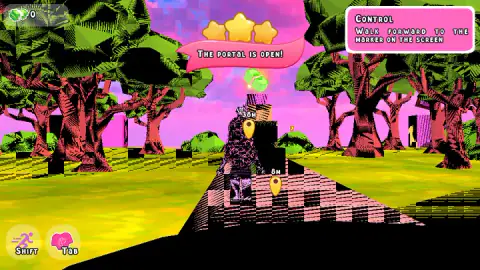
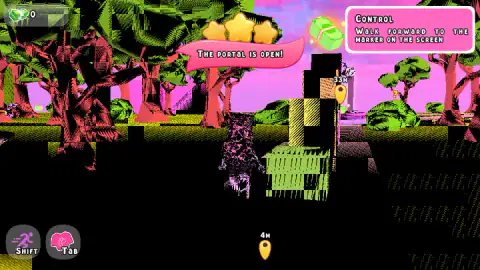
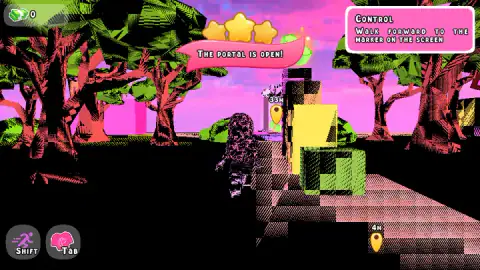
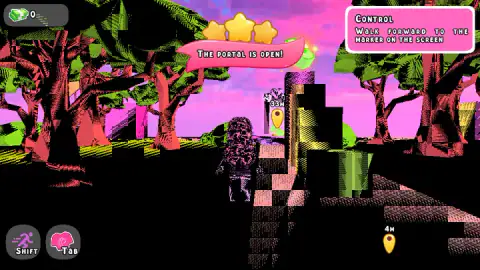
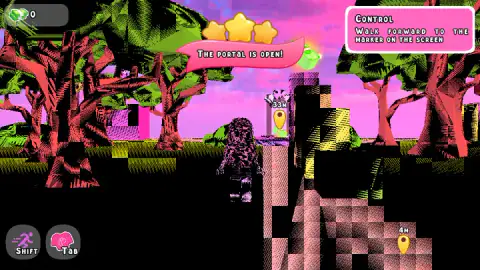
Taken by opening the game ourselves and letting it run — not supplied by the publisher, and not the same picture every other site shows.
How to play The Aesthetic World of Obby
- Read the two cards. A welcome card comes first, then one titled Control. It says the camera moves with the mouse, or with a tap on a touch screen, and that you walk with W A S D or the buttons on the left. A green Next button closes each card.
- Find the nearest marker. A yellow pin appears on screen with a distance in metres. The panel in the top right corner tells you the task: "Walk forward to the marker on the screen".
- Walk to it. Hold W. The number over the pin falls as you get closer.
- Take the course when you reach one. According to the game's instructions, Space jumps and Shift speeds you up.
- Spend what you collect. The instructions give Tab for customization and E for interacting with things in the world.
Tips from our run
- Follow the small number, not the big one. Two markers were on screen at once in our session, and the far one is the step after the one you are on.
- Line up the camera with the pin before you walk. The near marker sat off to one side of where we were looking. We pushed straight ahead anyway and ended up beside a stack of blocks.
- If the number stops falling, you are no longer walking towards the pin. Ours stopped, and it took us too long to notice.
- Clicking on a marker does nothing. We tried; the markers are signs, not buttons.
Controls
| W A S D | Move (W walked us forward in our run) |
|---|---|
| Mouse | Turn the camera, as the game's own tutorial card says |
| Space | Jump, according to the game's instructions |
| Shift | Speed up, according to the game's instructions (the on-screen Shift button shows a running figure) |
| E | Interact, according to the game's instructions |
| Tab | Open customization, according to the game's instructions (the on-screen Tab button shows a piece of clothing) |
| On-screen buttons | On touch screens the tutorial card says to tap to move the camera and use the buttons on the left to walk |
Features
- An open world to walk around, not a single corridor; the developer counts 10 parkour locations in it
- Yellow pin markers float over the place you need to reach, each with the distance left in metres
- A task panel in the top right corner spells out the current step in one sentence
- A cash counter sits in the top left corner, and green cash bundles float over the path
- Shift and Tab have their own buttons on screen, one with a running figure and one with a piece of clothing
- 72 customization options for your character, according to the developer
- Made by PlayToPlay
Game details
- Developer
- PlayToPlay
- Release date
- March 2026
- Last updated
- August 10, 2026
- Added here
- January 2026
- Technology
- HTML5 (3D, WebGL)
- Platforms
- Browser (desktop, keyboard and mouse), Browser (Android phones & tablets, touch)
- Saved progress
- Saving, when available, is managed by this game. Mava cannot confirm your level.
FAQ
How do you play The Aesthetic World of Obby?
Walk with W A S D and turn the camera with the mouse. The game opens with a short tutorial that asks you to walk to a yellow marker, and each marker shows how many metres are left. According to the game's instructions, Space jumps, Shift speeds you up, E interacts and Tab opens customization.
What are the yellow markers in The Aesthetic World of Obby?
They are waypoints. Each one is a yellow pin with a number above it, the distance to that spot in metres, and the number falls as you walk towards it. We saw two at once: a near one for the current step and a far one further along the path.
How many levels does The Aesthetic World of Obby have?
The developer describes an open world with 10 parkour locations and no levelling system: you finish a course by skill, not by upgrading. We only played the opening tutorial, so we cannot confirm the count ourselves.
What is the money for in The Aesthetic World of Obby?
A cash counter sits in the top left corner of the screen and green bundles of cash float over the path. According to the developer, the money buys skins and clothes for your character, with 72 customization options in total. Our counter stayed at 0 because we never reached a bundle.
What is an obby?
Obby is short for obstacle course. The word comes from player-made courses on large online sandbox platforms, where you jump from platform to platform and return to a checkpoint when you fall. The Aesthetic World of Obby is a standalone browser game in that style.
Who made The Aesthetic World of Obby?
The game was published on 15 March 2026 and updated in August 2026. The same developer has obby tycoon games and a tower defense game on the platform.
Can you play The Aesthetic World of Obby on a phone?
It is listed for PC and Android in landscape, and the game's own tutorial card mentions tapping the screen to move the camera and buttons on the left to walk. We played on a computer with a keyboard, so we cannot say how the touch controls feel.