


About Shortcut Race 3D
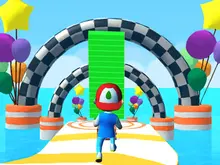
Most running games give you a lane and ask you to stay in it. Shortcut Race 3D gives you a road and hopes you will leave it. From the start line you can already see the checkered finish gate, far off across open water, while the striped road in front of you swings away in a wide loop to reach it the long way. Everything in the game exists so that you can skip that loop.
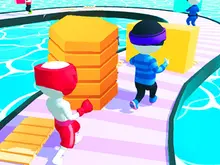
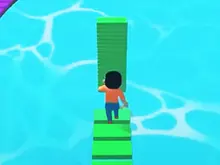
The tool is a plank. Brown wooden slabs sit in neat stacks in the middle of the road, and running through them piles them onto your runner's back. Step off the edge and the pile starts paying out: a plank drops flat under each stride and you walk across the water on a bridge laid one step ahead of you. Run out halfway across and you fall in. The screen dims, "GAME OVER" goes up, and the only button is RESTART, which puts you back on the start line rather than on the bank you were aiming for.
So the question every few seconds is not where the road goes but how much water you can afford. The planks are not free, either. The heavier your stack, the slower you run, so a runner hoarding timber for one huge crossing gets passed on the road by rivals carrying less. Four runners start each race, you and three computer rivals, and the green badge at the top of the screen reads 4th from the first step, because you set off behind all three.
The game was published in January 2022 and is credited to SquareLemurs. It is not an original idea and this page will not pretend otherwise: it is one of many browser games built on the formula of Shortcut Run, a Voodoo mobile game from 2020, and it has no connection to Voodoo that anyone has shown. We played it for this page, and we will be as plain about our own results as about the game.
What a plank really costs you
The design is a budget with two sides. On the road, every plank on your back is dead weight that makes you slower than a rival carrying fewer. Over water, every plank is one more step of ground. The game never shows you a speed figure; you notice it as the rivals drawing away on a straight while you lug a tall stack.
That is why the best players do not collect everything. They read the loop ahead, pick one bite of water they can afford, and sweep up just enough planks to cover it with a small margin. Greed is punished twice: once on the road, where the extra weight slows you, and once in the water, where a stack you misjudged runs out anyway.
Our three races, and why none of them finished
We will be honest about how our session went. We played three races on the first track, and all three ended with the GAME OVER card and the RESTART button, each in under a minute. Every time we checked the position badge it read 4th. We did not win a race, and we did not finish one.
That leaves real gaps in what we can tell you. After the third failed run, the coin counter still read zero on the title screen, so a lost race pays nothing that we could see. We cannot tell you how many coins a win is worth, or what the progress strip at the top of the title screen, numbered 1 to 5, does once you move along it. If you finish a race before we do, you will know more than this page.
What the three losses did show is where the game is hard. The road bends early, the water is always close, and there is no second chance inside a run.
Shortcut Run, Shortcut Race, Shortcut Race 3D
This game travels under three names, and knowing which is which saves you landing on the wrong one.
Shortcut Run is Voodoo's mobile game from 2020, the one that made the plank-bridge idea famous. The game on this page is not Shortcut Run and is not made by Voodoo. It borrows the formula, as dozens of browser games do.
Shortcut Race is the name under which this same browser game is sold as a ready-made template on the CodeCanyon marketplace, by an author called Zupga, and it is the title American school game portals use for it.
Shortcut Race 3D is the name on the game's listing, the version you play here, credited to SquareLemurs. The two studios' catalogues line up almost title for title, but neither has said in public whether they are one maker under two names or a seller and a buyer. We would rather leave that open than pick the tidy answer.
Six runners, one lottery
The title screen is simple. There is a settings gear at the top left, a coin counter at the top right and the numbered progress strip in the middle. On the left edge, a button with a shirt opens the characters; on the right, a button with an orange plank opens the plank designs.
Both shops work the same way. You get a three-by-two grid with one unlocked slot and five question marks, no prices on the slots and no way to choose. The only control is a green RANDOM UNLOCK button at 5,000 coins, which hands you one of the locked slots at random. Given that three lost races earned us nothing, that is a long way off for a new player.
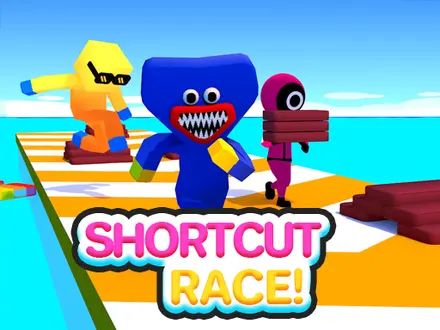
Look at the rivals and you will spot two familiar shapes: pink-suited figures and a blue furry creature, lookalikes of characters from a television drama and a horror game. Nothing on screen suggests the studio has a licence for either.
Playing Shortcut Race unblocked at school
There is no plugin, installer or login, so it runs on a school Chromebook as happily as on anything else, and your coins and unlocks stay in the browser you played on. What a school filter blocks is a website, not a game, so whether it opens depends on which sites your network allows. If it will not open, ask a teacher or play at home.
One practical point wherever you play: the game is laid out for a wide landscape screen, and we show it at that shape. Sites that squeeze it into a tall portrait box cut off the sides, and with them the coin counter, the settings gear and the position badge.
Who it suits, and where to run next
Shortcut Race 3D suits anyone who likes one clean decision repeated under pressure, in runs short enough to retry again and again in a lunch break. It is not for players who want a story, a choice of tracks from the start, or a character they can pick for themselves.
For a race where the throttle is also out of your hands, Pocket Drift scores you for sliding sideways. The rest of the shelf is in 3D games.
Screenshots
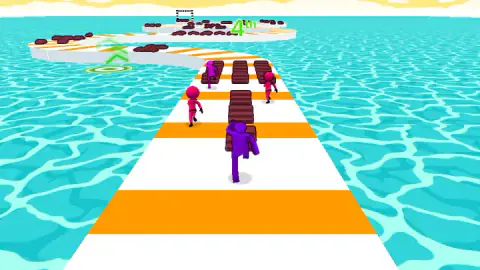
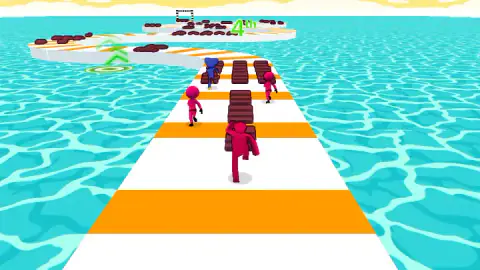
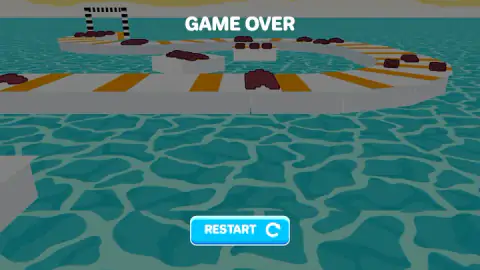
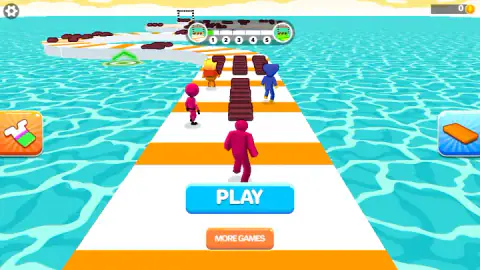
Taken by opening the game ourselves and letting it run — not supplied by the publisher, and not the same picture every other site shows.
How to play Shortcut Race 3D
- Press PLAY and start steering at once. The runner sets off the moment the button is pressed. There is no countdown and no run key.
- Steer with the left and right arrow keys, or click and drag. Forward is automatic; your one decision is which way to lean. You can press anywhere on the screen and pull from there.
- Run through the brown plank stacks. They sit in rows along the middle of the road, and whatever you touch lands on your back.
- Leave the road where the water gap is short. Aim at the far bank, not the near edge. Every stride over water spends one plank.
- Reach the checkered gate first. Beat the three rivals to it. Falling in anywhere sends you back to the start of the track.
What we learned the hard way:
- Steer in the first seconds. Each of our three runs was over in under a minute, and the road does not wait for you to settle in.
- Watch your stack, not the rivals. The pile on your runner's back is your fuel gauge. If it looks thin, the crossing you had in mind is too long.
- Link two stretches of road you can see at once. The road doubles back on itself, so the safest shortcuts join two parts of it that are both on screen, where you can judge the gap.
- A finished small shortcut beats a failed big one. There are no checkpoints, so one wet foot costs you the whole track.
- The green rings are still a mystery to us. On the first track a green ring with arrow chevrons sits on the road further along. We never reached one cleanly, so we cannot tell you what it does.
Controls
| ← / → arrow keys | Steer left and right. This is the only decision you make; the runner moves forward on its own |
|---|---|
| Click and drag left or right | The same steering with the mouse. You can press anywhere on the screen and pull from that point |
| (no run or jump key) | There is no key to speed up or stop. The up and down arrows gave no response when we tried them |
| Touch and swipe | The game's own instruction for phones and tablets. We have only played it with a keyboard and mouse |
Features
- A white-and-orange road that loops over open water, with the checkered finish gate in sight from the start line
- Plank stacks on the road pile onto your back, and each stride off the edge lays one of them as a bridge
- The taller your stack, the slower you run, so every shortcut is paid for twice
- Four runners per race, you and three computer rivals, and you start behind all of them
- Falling in the water ends the run, and RESTART sends you back to the start line, not to the bank
- Characters and plank designs come from one 5,000-coin RANDOM UNLOCK draw that picks for you
- No account and no install; coins and unlocks stay in the browser you played on
Game details
- Developer
- SquareLemurs
- Release date
- January 2022
- Last updated
- September 30, 2026
- Added here
- January 2023
- Technology
- HTML5 (Construct 3, 3D, 864×480 landscape)
- Platforms
- Browser (desktop), Chromebook
- Download size
- 6.5 MB
- Ad requests
- 3 (few)
- Has a save
- Yes
- Saved progress
- Saving, when available, is managed by this game. Mava cannot confirm your level.
Measured by opening the game ourselves on 2026-09-10, not taken from the feed. Twelve seconds on a phone-sized screen, with ad requests counted and blocked rather than loaded.
FAQ
Is Shortcut Race 3D the same game as Shortcut Run?
No. Shortcut Run is a 2020 mobile game published by Voodoo, and it made the plank-bridge idea famous. Shortcut Race 3D is a separate browser game built on the same formula, credited to SquareLemurs, with no known connection to Voodoo. The rules are the same idea; the game, the tracks and the characters are not.
How do you play Shortcut Race 3D?
Your runner moves forward by itself and you only steer, with the left and right arrow keys or by clicking and dragging. Run through the brown plank stacks to pile them on your back, then step off the road onto the water, where a plank drops under each stride. Reach the checkered finish gate before the three rival runners.
Why does my runner get slower in Shortcut Race 3D?
Because the planks you carry weigh you down. The taller the stack on your back, the slower you run, so a big stack buys a long crossing over water but costs you pace on every stretch of road. Carrying only what the next crossing needs is the whole skill.
What happens if you fall in the water in Shortcut Race 3D?
The run ends at once. The screen dims, a GAME OVER title appears and the only button is RESTART, which puts you back on the start line of the same track rather than at the point where you fell. There are no checkpoints.
How do you unlock characters in Shortcut Race 3D?
The shop, opened from the button on the left of the title screen, shows six slots with one runner unlocked and five hidden behind question marks. The only way in is a green RANDOM UNLOCK button priced at 5,000 coins, which gives you one of the locked slots at random. Plank designs are unlocked the same way from the button on the right.
Who made Shortcut Race 3D?
The game is credited to the studio SquareLemurs and has been available from January 2022. The same browser game is also sold as a ready-made template on CodeCanyon under the name Shortcut Race, by an author called Zupga, and neither party has said publicly how the two are related. The idea itself comes from Voodoo's mobile game Shortcut Run.
Can I play Shortcut Race 3D on a phone?
The game's own instruction is "Touch and swipe to move", so it is meant to work on a touchscreen. We have only played it with a keyboard and mouse, and the game is laid out for a wide landscape screen, so turn a phone sideways if you try it.
Can I play Shortcut Race 3D unblocked at school?
It runs in any modern browser with no plugin, install or login, Chromebooks included. A school filter blocks websites, not individual games, so whether it opens depends on which sites your network allows. If this one is blocked, ask a teacher rather than trying to get around the filter.