


About Mine Fight! Cut Mob Army!
Most sword games in a browser hand you a health bar, a block button and an enemy that hits back. "Mine Fight! Cut Mob Army!" hands you a sword and nothing else. In the levels we played there was no health bar, no timer and no score on screen, and nothing ever landed a blow on us.
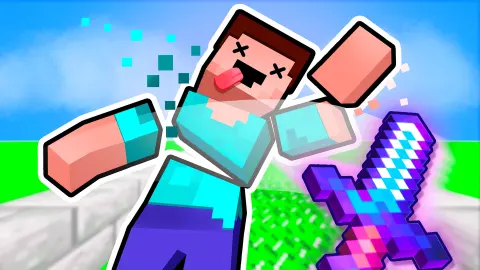
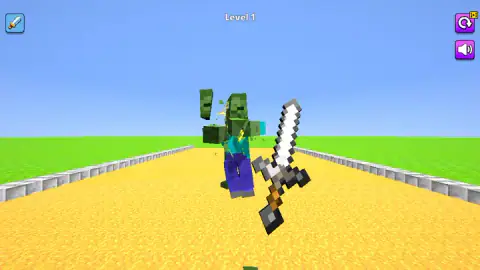
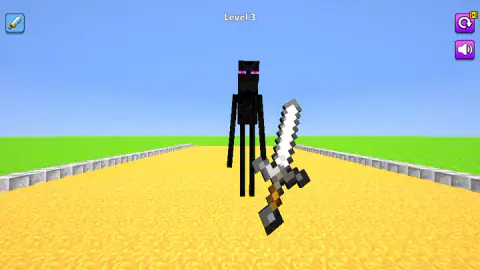
What it has is the cut itself. Every creature is built from blocks, and the sword takes those blocks off one at a time. On the first level our swing took an arm and the head off a green zombie in the same stroke. On the third, a tall black figure lost an arm, the arm stuck upright in the sand, and the figure kept standing there without it.
So this is closer to a toy than to a fight. Each level is one small scene: a creature or two on a yellow path, your sword floating in front of the camera, and as many swings as it takes.
It comes from Eccentric Studio Games, a studio that mostly makes ragdoll fighters. It was published in March 2026.
Five opponents in the first five levels
The scene barely changes at first. You stand on a yellow path with low grey stone kerbs, flat green grass on both sides and a plain blue sky. The label at the top reads Level 1, and the only thing that changes from level to level is who is standing on the path.
- Levels 1 and 2: a green zombie. Dark green head, teal shirt, purple trousers, arms held out in front. It is the same creature both times.
- Level 3: a tall black figure. Taller and much thinner than the zombie, with two purple eyes. It took us more swings than either zombie did.
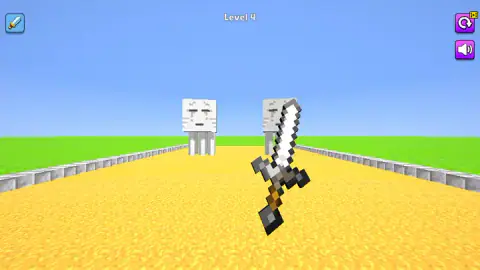
- Level 4: two white floating cubes. Each is a large white block with closed eyes and short legs hanging under it. They are the first pair, and the first enemies that are not shaped like a person.
- Level 5: a grey skeleton. Thin grey limbs and a grinning head. White sparks jumped from the spot where the blade landed.
Level 6 was over almost as soon as we swung, and what we kept of it is its ending screen. That screen looked different from the rest: a green path between stone-brick walls, a stack of wooden blocks far ahead, and a sword that was dark, almost black, where ours had been iron grey. Whether that is a new sword or just a new place, we cannot say.
We stopped as level 7 began.
Why the creatures break where they break
A block figure is the simplest body a 3D game can draw: one box for the head, one for the chest, one for each arm and one for each leg. Six boxes, held together at the shoulders, the neck and the hips. The look is often called voxel style, a word made from volume and pixel, for worlds built out of small cubes.
That simple body is the reason the cutting works so cleanly here. There is no skin to tear and no curve to slice through. The sword only has to decide which box it touched, and that box lets go of the rest. An arm comes off as an arm. A head comes off as a head.
It is also why a creature can go on standing after a hit. The tall black figure on level 3 lost one arm to our first good swing, and the other five boxes stayed up. The level only ended when enough of it was on the ground. The floating cubes on level 4 are the opposite case: there is one big box and little else, so a hit either knocks the whole thing down or does nothing you can see.
And mob, the word in the title, is older than any of this. It is short for mobile, the name early multiplayer text adventures gave to anything that could wander about by itself. Today it means any creature the computer controls.
What the game promises and what we saw
The game's own description goes further than our six levels did. It talks about hordes, about points for cutting several creatures in a row, about traps you can push enemies into, about enemies that explode and about upgrades for your sword and your hero.
We saw none of that. No level had more than two creatures. No points or coins appeared on screen at any moment, during a fight or after it. Nothing exploded, and the path had no traps on it.
The nearest thing to an upgrade is the sword icon at the top left. We clicked it before our first fight, and it opened a dark screen with a single sword in the middle and a red X in the corner. We closed it without finding out what it offers. It may be where new swords appear later on, and the dark blade we saw around level 6 points the same way, but that is a guess.
So read the description as what may come later, and this page as what the first few minutes are really like.
Who it is for
It suits anyone who wants something to do with one hand for five minutes. There is nothing to read, nothing to learn and, as far as we got, no way to fail. A young player can pick it up without help. The cutting is bloodless: the pieces are plain coloured blocks and they simply drop.
It is not for you if you want a fight. Nothing here asks for timing, defence or a plan, at least not in the opening levels. It is also a stop-and-start game. With a break after every level and levels this short, you spend a fair share of the session waiting to swing again.
We played with a mouse. The game's instructions say a swipe swings the sword on a phone, but we did not try it on one.
More games by Eccentric Studio Games
The same studio made Epic Sword Battle! Fight in the Ragdoll Arena!, where the enemies have swords too, and Fun Ragdoll Challenge! Mini Games Collection!, short first-person levels where a red fist does the job the sword does here. For blades and blocks of another kind, Knife Tower has you throwing knives into a tower of blocks. More are filed under action games.
Screenshots
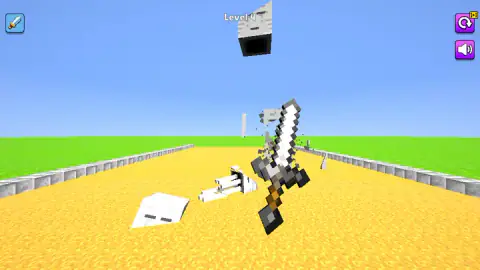
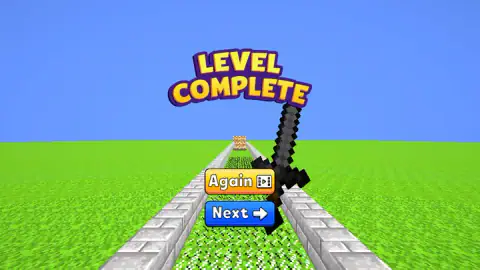
Taken by opening the game ourselves and letting it run — not supplied by the publisher, and not the same picture every other site shows.
How to play Mine Fight! Cut Mob Army!
- Find the sword. It floats just right of the middle of the screen, blade up. You do not walk or turn; the camera stays where it is.
- Swing at the creature. The game's instructions say moving the mouse aims the blade and a click attacks. We used single clicks on the body and short drags across it, and both ended with pieces on the ground.
- Keep going until it falls. One hit is not always enough. A creature can lose an arm and stay on its feet, so swing again.
- Choose Next. A Level Complete screen appears with a yellow Again button and a blue Next button. Next moves you on.
A few things we only learned by playing:
- The keyboard does nothing. We tried the arrow keys, A, Enter and Escape. None of them moved the sword or opened a menu.
- Aim at the body. The swings that ended our levels were clicks on the creature and drags that crossed it. A click on the floating sword alone did not finish anything.
- Again has a price. The Again button carries a small video badge, and so does the restart button at the top right. On web games that badge usually means an ad plays first. Next has no badge.
- Expect a pause between levels. After every Next, an ad break came up before the following level began. Six levels, six breaks.
Controls
| Mouse move | Aims the sword, according to the game's instructions |
|---|---|
| Left click / click and drag | Swings the sword; we used both in our run and the creatures came apart |
| Sword icon (top left) | Opens a dark screen showing a single sword, with a red X to close it |
| Round arrow button (top right) | Restarts the level; it carries a small video badge |
| Speaker button (top right) | Sound on or off |
| Swipe | Swings the sword on phones and tablets, according to the game's instructions |
Features
- One short level per creature; we cleared six of them in about four minutes
- Creatures are built from blocks and lose arms and heads one piece at a time
- Five opponents in the first five levels, from a green zombie to a pair of white floating cubes
- No health bar, no timer and no score counter on screen in any level we played
- After each level, Next is a plain button while Again carries a video badge
- The whole game is played with the mouse; the keyboard keys we tried did nothing
- Made by Eccentric Studio Games, the studio behind Epic Sword Battle
Game details
- Developer
- Eccentric Studio Games
- Release date
- March 2026
- Last updated
- June 26, 2026
- Added here
- January 2026
- Technology
- HTML5 (3D, WebGL)
- Platforms
- Browser (desktop, mouse), Browser (mobile & tablet, touch)
- Saved progress
- Saving, when available, is managed by this game. Mava cannot confirm your level.
FAQ
How do you play Mine Fight! Cut Mob Army!?
You hold a floating sword in front of a block creature and swing it with the mouse until the creature falls apart. The game's instructions say you move the mouse to aim and click to attack; in our session both clicks and short drags across the body worked. When the creature is down, a Level Complete screen offers Again or Next.
How many levels does Mine Fight! Cut Mob Army! have?
We do not know the total. In about four minutes we cleared six levels and had just started the seventh, and the game showed no level map or final number. Each level was a single short fight.
Can you lose in Mine Fight! Cut Mob Army!?
We never did. Across six completed levels there was no health bar on screen, nothing landed a hit on us and no fail screen appeared. Later levels may be different, since the game's own description mentions traps and exploding enemies that we did not meet.
What enemies are in Mine Fight! Cut Mob Army!?
In the first five levels we met a green block zombie twice, a tall thin black figure with purple eyes, two white floating cubes with closed eyes, and a grey skeleton. All of them are built from blocks and come apart piece by piece when the sword hits.
Who made Mine Fight! Cut Mob Army!?
It was made by Eccentric Studio Games, a studio whose other browser games are mostly ragdoll fighters. It was published in March 2026 and last updated in June 2026.
What does mob mean in Mine Fight! Cut Mob Army!?
Mob is old game slang for any creature the computer controls. It is short for mobile, a word from the multiplayer text adventures of the late 1970s and 1980s for things that could move around on their own. Here it simply means the block creatures you cut down.