






About Micro GT Racing
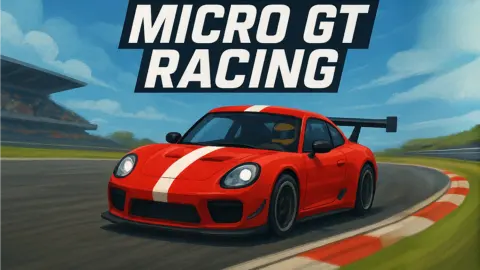
The title screen of Micro GT Racing shows a full-size red GT car with a white stripe, parked on a grand prix circuit in front of a grandstand. The race itself looks nothing like that. You drive a small pink hatchback around a desert canyon, and the seven rivals beside it on the grid include a yellow bus, a teal van and a pickup towing a trailer. The "micro" in the name is the real promise: these are toy-sized vehicles on a model track, seen from just behind and above.
That changes what racing means here. The track is narrow, edged with red-and-white kerbs, and it runs between boulders and past open patches of sand. Leave the asphalt and, in our race at least, nothing pulled us back: no invisible wall, no warning, no reset. The clock just kept running.
The game is by Breymantech, the studio behind Formula Apex Rush and Nitro Racing Gear. It was published in November 2025, and on the day we played.
Cactus County, the first track
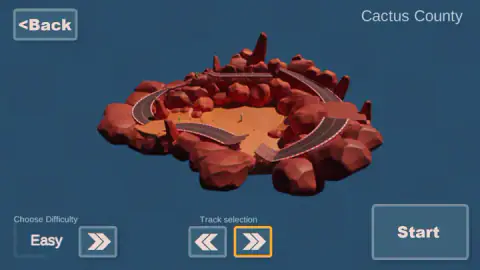
The first track on the selector is Cactus County, and before the start you see it as a small rotating island: a loop of grey road on a base of red rock, with a sandy hollow in the middle and a couple of green cacti. The road climbs onto a raised stretch along the back of the island.
From inside the race the same place feels far bigger. The canyon walls rise on both sides of the start straight, which ends at a checkered line painted across the road. Past the first corners, the kerbs disappear in places and the asphalt meets open orange sand. That sand is where the trouble starts. It is wide enough to look like a shortcut and closed off by low wooden fences and boulders, so a car that drifts onto it can end up in a pen with no clear way back to the road.
The selector has a second arrow pointing right, so Cactus County is not the only track. We did not page through the others.
The rivals are not all cars
Most racing games fill the grid with copies of the same car in different paints. In our race, the seven rivals were a mixed garage. A yellow bus, a teal van and a two-tone sports car were around us at the start line, and further along the lap we caught sight of a purple pickup with a trailer hitched behind it.
That variety is more than decoration. A bus is long and a pickup with a trailer is longer still, so passing one on a narrow canyon road takes more room than passing a car. If you are close behind a trailer when it enters a bend, the trailer swings across the line you wanted.
We did not see a garage, a car shop or any screen where you choose your vehicle. In our run the pink hatchback was simply the car we had.
Two players, one keyboard
The yellow line at the bottom of every race screen is the clearest clue to what Micro GT Racing is built for. It reads "Default controller: P1-Arrow keys:move, Respawn:H P2-WASD:move, Respawn:C", and it is there even when you race alone. The Versus button on the title screen is where that second set of keys comes in.
Splitting one keyboard this way is an old arrangement in browser racing: one player sits on the right with the arrows, the other on the left with W, A, S and D, and each gets a respawn key under their own hand. H sits closer to the arrows and C sits just under WASD, so neither player has to reach across the other. We did not play Versus, so we cannot tell you whether it splits the screen or how many laps it runs.
What our race did and did not show
We played for about ten minutes on a computer, in Arcade mode on Cactus County at Easy. It went badly, and we would rather say so than pretend otherwise. We were last from the start and stayed last. The car left the road early in the first lap, ran onto the sand and spent minutes nose-first against wooden fences. The stopwatch passed five minutes, then nine, and the counter still read lap one of three.
That run still taught us what the game does when you go wrong. It does not reset you, end the race or warn you. The only way out is to drive out or press the respawn key, and we did not press it.
We did not finish a lap, so we never saw a results screen, a reward or a lap time. We did not try Championship, Time trial or Versus, did not open Settings, did not try a harder difficulty and did not play on a phone, although the game is listed for touch screens and its only controls on screen are keyboard keys.
Who it is for
Micro GT Racing suits players who like small-scale racers with a bit of chaos on the grid, and pairs who want to race side by side at one keyboard. It is not a driving simulator, whatever the GT in the title suggests. The cars are toys and the track is a model.
If you want a different take on tiny cars, Tiny Cars builds its miniature tracks from everyday objects around a house. From the same studio, Formula Apex Rush trades the toy cars for open-wheel racers and Nitro Racing Gear is its other arcade racer. The rest are in our driving games.
Screenshots
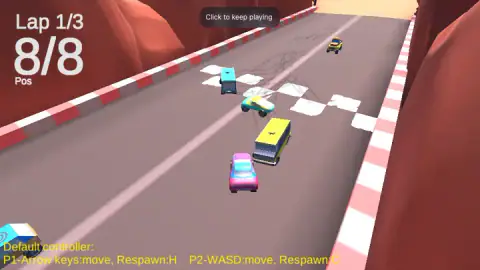
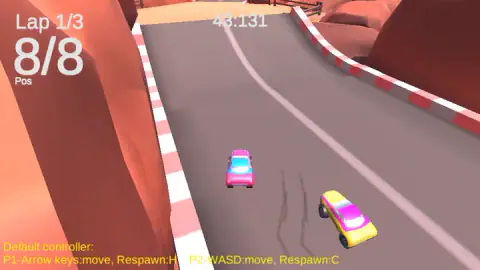
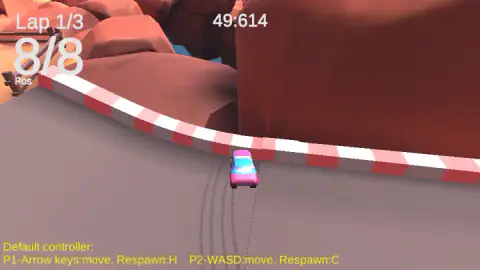
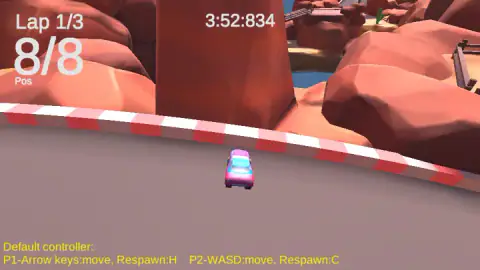
Taken by opening the game ourselves and letting it run — not supplied by the publisher, and not the same picture every other site shows.
How to play Micro GT Racing
- On the title screen, press Solo to race alone or Versus to race a second player on the same keyboard.
- Pick a mode in the Race Mode menu: Championship, Arcade or Time trial.
- Choose the track with the two arrows under the 3D model, set the difficulty in the bottom-left corner, and press Start.
- Drive with the arrow keys. The big counter in the top-left corner shows your lap out of three and your place out of eight, and a stopwatch runs at the top.
- If the car gets stuck or lands somewhere it cannot drive out of, press H to respawn it.
Tips from our race
- Click the game before you touch the keys. A dark notice reading "Click to keep playing" sat at the top of the screen as the race began. One click inside the game window gives it your keyboard.
- Learn the respawn key before you need it. The hint at the bottom of the screen names H for player 1 and C for player 2. We never pressed it, and our first lap turned into a long fight with a fence that one key would have ended.
- Off the road, reverse first. Once our car was nose-first against a wooden fence, holding forward and steering got us nowhere for minutes. Back away from the fence before you turn, or simply respawn.
- Start on Easy. The difficulty selector begins there, and with eight vehicles on a narrow road the first corner is crowded enough.
Controls
| Arrow keys | Drive player 1's car (up to go, down to brake or reverse, left and right to steer) |
|---|---|
| H | Respawn player 1's car, according to the on-screen hint |
| W, A, S, D | Drive player 2's car in a shared-keyboard race |
| C | Respawn player 2's car, according to the on-screen hint |
| Mouse click | Picks menu options; a click on the game also dismisses the "Click to keep playing" notice |
Features
- Three race modes behind the Solo button: Championship, Arcade and Time trial
- A Versus button on the title screen, with arrow keys for player 1 and WASD for player 2 on the same keyboard
- Races are three laps against seven rivals, and the grid mixes small cars with a bus, a van and a pickup towing a trailer
- Each track is picked from a rotating 3D model before the start; the first one is Cactus County, a red-rock desert loop
- A difficulty selector that starts on Easy
- A respawn key for each player, shown in yellow at the bottom of the screen during every race
Game details
- Developer
- Breymantech
- Release date
- November 2025
- Last updated
- August 10, 2026
- Added here
- September 2025
- Technology
- HTML5 (3D)
- Platforms
- Browser (desktop, keyboard), Browser (mobile & tablet, touch)
- Classification
- Driving
- Saved progress
- Saving, when available, is managed by this game. Mava cannot confirm your level.
FAQ
How do you play Micro GT Racing?
Press Solo on the title screen, pick a race mode, choose a track and a difficulty, and press Start. Player 1 drives with the arrow keys. A race is three laps against seven other vehicles, and the counter in the top-left corner shows your lap and your position.
Can two people play Micro GT Racing on one computer?
Yes, that is what the Versus button on the title screen is for. The hint shown during races gives player 1 the arrow keys and player 2 the W, A, S and D keys, each with their own respawn key. We only played alone, so we cannot say whether Versus splits the screen.
What is the respawn key in Micro GT Racing?
H for player 1 and C for player 2, as the yellow hint at the bottom of the race screen says. It is the key to reach for when your car is stuck. We did not use it in our run and lost several minutes against a fence because of that.
What race modes does Micro GT Racing have?
The Race Mode menu lists Championship, Arcade and Time trial. We raced in Arcade. Championship and Time trial were not part of our session, so we cannot say how many races a championship has or how a time trial is scored.
What happens if you leave the track in Micro GT Racing?
The race does not stop you. The red-and-white kerbs give way to open sand in places, and beyond them there are wooden fences and boulders. Our car left the asphalt in the first lap and stayed stuck on that sand for minutes while the clock kept running.
Why does Micro GT Racing say Click to keep playing?
The notice appeared at the top of the screen at the start of our race. It is the game asking for a click inside its window so that it has your keyboard; after the click the arrow keys drove the car.
Who made Micro GT Racing?
Micro GT Racing is by Breymantech, the studio listed for it, which also made Formula Apex Rush and Nitro Racing Gear. It was published in November 2025 and, when we played it.