












About Grow Slime
Most farming games in a browser start you on the field. There is a patch of soil, a seed in your hand and a prompt telling you to plant it. Grow Slime starts you in a market instead, with money in your pocket and nothing to grow. The first thing it asks is that you go shopping.
The task sits in a panel at the top of the screen: BUY SLIME EGG, an empty bar and a small 0/1 beside a blue egg. Below it, a trail of white arrows runs along the ground from your feet to one of two stalls. That is the whole tutorial. No text box explains it, and nobody stops you from wandering off.
We have now spent two sessions here. The first was short and never left the two stalls. The second lasted ten minutes and went walking, which is the part worth reporting: the square is a corner of something larger, with a fenced strip of bare soil, sunflowers, a loaded cart and sea behind all of it. What did not change in either session was the counter. We arrived with 130 coins and left with every one of them, and the task never moved off 0/1.
What comes after the egg, according to the developer, is a loop of planting it on your farm, waiting for a slime to hatch and grow, hitting the slime to collect what it drops and selling the drops to afford a better egg. The game is made by Cappella, was published in February 2026.
So what follows is that opening in detail, keeping our own eyes and the developer's instructions apart.
The square is a corner of a bigger island
Walk away from the counters and the game stops looking like a shop. A wooden fence runs along the grass, and behind it is a strip of bare brown soil, ploughed and empty. Sunflowers grow by the posts. A watering can stands in the grass, large enough to be scenery rather than an item. A cart sits loaded with crates, and the paths between all of it are packed dirt cutting across chequered green lawn.
That is the clearest hint the game gives about what it wants from you, and it gives it without a word of text: the farm is already built and waiting for something to put in it.
In front of each stall the ground changes to tan tiles with a white ring painted on it. We never stood in one. If something is going to happen at a counter, that circle is where the game expects your feet to be.
Some of the scenery is for sale. Along the grass stands a row of character figures with GET SKIN over their heads and a price under each. Behind the fence, and behind the stalls, there is sea. The ground you can walk on is small, which is a kindness in a game with no map.
The toolbar is the game's shopping list
The bottom of the screen carries seven slots and a backpack. The first slot holds a shovel. Four are empty. One is covered by a padlock with a small video badge on it. The last holds a watering can with a 3 in the corner.
Read it as a list of what the game thinks you will own by the end: two farm tools, a lock that opens for something, four gaps to fill. Neither tool did anything visible for us, which is what you would expect when nothing has been planted.
The backpack opens the Inventory. Ours was empty both times, but its filters name what the game expects you to be carrying: Slimes, Drops, Pets, Tools and Other. Pets are not mentioned anywhere in the game's own description, so that tab points at something past eggs and slimes. A red X closes the panel.
The left edge holds three round buttons from the first second: Collection, whose icon is a heap of slimes in different colours, then Skins and Shop. We clicked all three and none opened for us. On the right edge there are two more, a running figure and a figure mid-jump; the runner carries the same video badge as the locked slot.
130 coins that never moved
The counter at the top right reads 130 coins and 0 gems, the gems pink, each with a round button beside it that we never pressed. It read the same when we left as when we arrived, in both sessions, because we bought nothing.
The other prices on the square are not in coins. A board between the stalls reads No Ads with 19 USD under it, and the same offer sits as a button near the top left. The skin figures carry prices in USD too. None of it is needed to walk to a stall, and we opened none of it, so all we can report is the label.
One more thing moves through the square: characters with a name floating over their heads, a different name in each session. Whether those are other people playing, we could not tell.
Slime is a real thing, and it does grow
The slimes in games are blobs with faces, and the one on the task panel here is exactly that: pale blue, round, two dots for eyes. The word also belongs to something real and much less cute. Slime moulds are organisms that live on forest floors and rotting wood. They are not animals, plants or fungi, and the best known of them, Physarum polycephalum, is a single giant cell that spreads out as a yellow film in search of food.
In 2000 a team led by Toshiyuki Nakagaki showed that it could find the shortest route between two food sources through a maze. A later experiment laid out oat flakes in the pattern of the towns around Tokyo, and the mould grew a network that resembled the real railway map.
The game borrows the simplest part of that: a slime is something you feed and wait on, and it gets bigger. The developer describes each kind growing through stages of its own. The eggs are the game's invention; real slime moulds start from spores.
What ten minutes did not show
We never bought the egg, so we never planted anything, watered anything, saw a slime hatch, collected a drop or sold one. The only big slime we laid eyes on is the yellow one painted on the cover. We reloaded the page twice to see whether a fresh start changed anything, and it did not: the cover, then the same square, then the same empty bar. We did not play it on a phone.
What the opening does show is the shape of the thing: a walk-around farm in 3D where the shop opens before the farm does, a first task that is a purchase, a toolbar with gaps in it and a collection screen waiting to be filled. If you get past the white ring, you will have seen more of it than we did.
More games that grow while you wait
Hedgies is another farm, with a hedgehog doing the work. Juice Tycoon has a similar loop of harvesting, processing and selling. Idle Airport Tycoon trades the island for a runway, and Deep Drill is the hands-off extreme, where the machine is already running when the page loads. More are filed under clicker games.
Screenshots
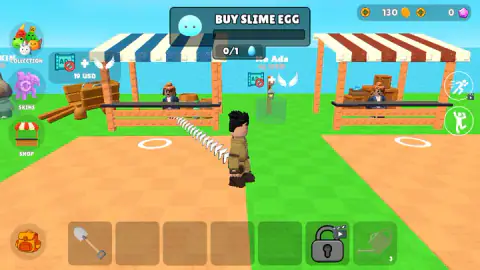
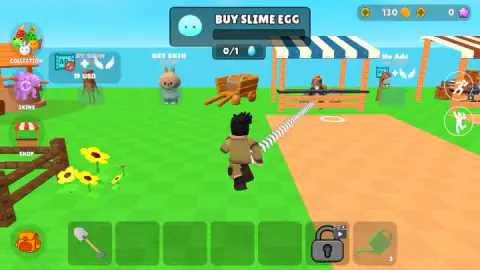
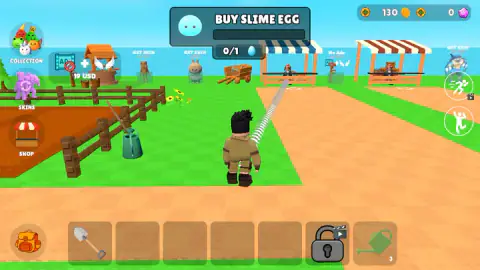
Taken by opening the game ourselves and letting it run — not supplied by the publisher, and not the same picture every other site shows.
How to play Grow Slime
- Press the purple button. The game does not start by itself: a cover comes first, with the character standing next to a fat yellow slime and a button that reads "Let's Play!" under it.
- Follow the arrows. Walk with the arrow keys; the game's instructions also list W A S D. The white arrows on the ground lead to the stall with the blue and white awning.
- Walk right up to the counter. There is a white ring drawn on the ground in front of it, and the instructions give E as the key to get a slime. Distance is what beat us: nothing works from across the grass.
- Plant it and water it. The shovel and the watering can are already in your toolbar. The developer says eggs go into the ground on your farm and hatch into slimes that grow in stages.
- Collect and sell. Still according to the developer, you hit a grown slime to make it drop something, then sell the drops and buy a better egg.
Tips from our run
- The blue egg on the task panel is the trap. It looks exactly like a buy button, and it is not one: we clicked it on a dozen different spots and the bar never filled. The panel is a reminder, not a shop.
- Clicking a stall from a distance does nothing either, and neither does clicking your own character.
- Tap a slot in the toolbar and a white frame appears around it. That is what you are holding. The shovel is already framed when you arrive, and the frame moves when you pick the can.
- The arrows always point to the same stall, the blue and white one. We saw them from three spots and they bent towards it each time.
- Expect a break. Before an ad, a countdown runs across the middle of the screen with the words "Until ads" over a number; afterwards a purple notice asks you to carry on.
Controls
| Arrow keys / W A S D | Walk around the island |
|---|---|
| Left click | Press the on-screen buttons and pick a tool from the toolbar |
| E | Get a slime, according to the game's instructions |
| Space | Jump, according to the game's instructions |
| Hold right mouse button | Turn the camera, according to the game's instructions |
| On-screen joystick and swipe | Phones and tablets move with a joystick and turn the camera with a swipe, according to the game's instructions |
Features
- You start in a market square with 130 coins, 0 gems and a single task on screen: BUY SLIME EGG
- A trail of white arrows on the ground redraws itself from wherever you stand and always ends at the same stall
- Beyond the stalls there is a fenced strip of bare soil, sunflowers, a loaded cart and sea behind all of it
- The toolbar holds a shovel and a watering can marked 3, four empty slots and one padlocked slot
- Tap a toolbar slot and a white frame marks the tool you are holding
- The backpack opens an inventory sorted into Slimes, Drops, Pets, Tools and Other
- A No Ads board and the character skins on display are priced in USD, not in coins
- Made by Cappella
Game details
- Developer
- Cappella
- Release date
- February 2026
- Last updated
- August 10, 2026
- Added here
- December 2025
- Technology
- HTML5 (3D, WebGL)
- Platforms
- Browser (desktop, keyboard and mouse), Browser (mobile & tablet, touch)
- Classification
- Casual , Clicker , Simulation , Strategy
- Saved progress
- Saving, when available, is managed by this game. Mava cannot confirm your level.
FAQ
How do you play Grow Slime?
You walk a character around a small island in 3D, seen from behind. The first task on screen is BUY SLIME EGG, and a trail of white arrows on the ground leads to the market stall that sells it. According to the developer, you then plant the egg on your farm, wait for the slime to hatch and grow, hit it to collect drops and sell the drops for coins.
Why can't I buy the slime egg in Grow Slime?
The blue egg on the task panel at the top of the screen looks like a buy button, but in our sessions it never was: we clicked it from every angle and the bar stayed at 0/1. Clicking a stall from across the grass does nothing either. The game wants you to walk your character up to the counter, where there is a white ring marked on the ground.
Where do you buy the first slime egg in Grow Slime?
At the market stall with the blue and white awning, in the square where the game starts. White arrows on the ground point to it from wherever you stand, and they redraw themselves when you move, so you cannot lose it. There is a clerk behind the counter and a white ring on the tiled ground in front.
How many coins do you start with in Grow Slime?
The counter at the top right reads 130 coins and 0 pink gems, and each has a round button beside it. Ours never moved, in two sessions, because we never completed a purchase. So we cannot tell you what the first egg costs or whether the starting money covers it.
What do the shovel and the watering can do in Grow Slime?
They sit in the toolbar along the bottom, and tapping one puts a white frame around it: that is the tool in your hands, and the shovel is the one selected when you arrive. The watering can carries a small 3 in its corner. Neither did anything visible for us, which fits a game where nothing has been planted yet.
Is Grow Slime free?
Yes, it plays in the browser at no cost. The square shows a No Ads board labelled 19 USD and character skins labelled with prices in USD, and two buttons carry a small video badge, the usual sign of a reward for watching an ad. We did not open any of them. There are ad breaks: a countdown runs across the middle of the screen before one.
Who made Grow Slime?
A developer under the name Cappella. The game was published in February 2026 and was updated in August 2026.
Can you play Grow Slime on a phone?
It is listed for PC, Android and iOS, and the game's instructions describe a joystick for moving and a swipe for the camera. We played it on a computer with keyboard and mouse, so we cannot tell you how the touch controls feel.