


About Cartoon Traffic Racing Paper Derby
Most traffic racers hand you a highway full of cars and a score that climbs as long as you dodge them. In the scene we played, Cartoon Traffic Racing Paper Derby gave us an empty avenue instead, and something else to worry about: a yellow bar called CAR CHARGE that empties as you drive, and a ramp at the end of the road that tipped our car over every time.
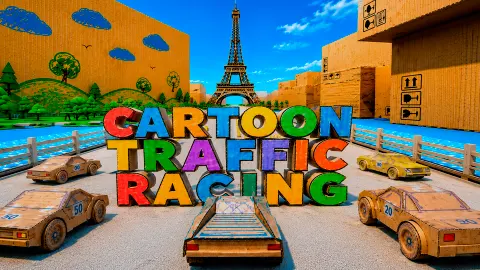
The look is the first thing you notice. The city is made of cardboard boxes with buildings drawn on them in pencil, a turquoise canal runs beside the road, and the Eiffel Tower stands at the far end. On the right bank a desk lamp, a pot of paintbrushes and tubes of paint loom over the water like monuments. Your car is a white cardboard coupe with blue pencil lines.
First, the limits of this page. We played one session of about ten minutes on a computer, only in the scene called SINGLE, and we only held the accelerator. That gave us eleven short runs of about 20 seconds each. We never steered, braked or used nitro, and we did not try the TRAFFIC scene, so everything below is about that one avenue.
The game is credited to Extreme Games and has been available from September 2026.
CAR CHARGE is the clock, and the batteries wind it back
The bar is full at the GO and starts draining straight away. By the end of the avenue there was only a sliver left. In between, the small yellow batteries standing on the road matter: each time our car drove over one, the bar was a small slice longer a moment later, still far from full.
When the bar runs out, the car does not stop dead. It loses power, the speed falls below 30 km/h, and the run ends where it is. That happened twice, both times a little short of the ramp.
So the bar, not a timer, is how long your run lasts. Steering into the batteries in your lane is the one way we found to stretch it.
The ramp at the end of the avenue
The SINGLE avenue runs straight along the canal toward the Eiffel Tower and ends at a wide ramp. Beyond it the road drops onto a cross street with a pedestrian crossing and a few vehicles standing at the side.
Nine of our eleven runs ended there. Each time, the car hit the ramp at full speed in a straight line, came down on its side or roof, and the screen went white with an explosion. The DISTANCE reading was the same every time, 0.36.
We never tried braking, steering or the handbrake before the ramp, so we cannot tell you the clean way across. We can tell you that holding the accelerator and hoping does not work. Arrive with a plan, and with some charge left for it.
What the result screen pays for
The result screen is a cardboard panel with four lines, and each one pays cash:
| Line | What it measures | What it paid us |
|---|---|---|
| TOTAL DISTANCE | How far you got | 111 to 131 |
| NEAR MISS | Passing close to something | 0 |
| KEEP ABOVE 100KM/H | Time spent above 100 km/h | 0 |
| OPPOSITE DIRECTION | Driving against the traffic | 0 |
The odd part is how money and score split. The runs that flipped at the ramp showed YOUR SCORE 0 but paid about 130, because they went furthest. The two runs that ran out of charge earlier scored higher and paid only about 110. If you want cash, every extra stretch of road is worth more than the points.
The speed line explains itself once you look at the speedometer. Holding the accelerator, the fastest we went was 74 km/h, so the 100 km/h line never paid a coin. The game lists F as nitro, which may be the way past 100, but we did not press it. Each line also has a small play button beside it, and there is a SECOND CHANCE clapperboard above the panel; we pressed neither.
What we did not see
The game's description talks about racing rivals for first place, busy traffic, several maps and cars to unlock. On the SINGLE avenue there was no one to race and no traffic on our side of the road, and we never opened a garage or shop. The TRAFFIC scene in the menu may be where the traffic lives, but we have not played it, so we will not guess.
Who it is for, and more to play
It suits someone who enjoys short runs, a strange paper city to look at, and working out a road a little better each time. Each attempt lasts well under half a minute. It is not a long racing game in the part we played: one avenue, no rivals, and a lot of restarts.
If you like a run that ends when the car loses pace, Drifting Car Master has a countdown that stops you when you crawl. For crashing on purpose, Car Smash Simulator: Crash & Tune is a sandbox of loops and dirt tracks. For a road with someone actually chasing you, try Mr.Reckless Car Chase Simulator.
More in our driving games.
Screenshots
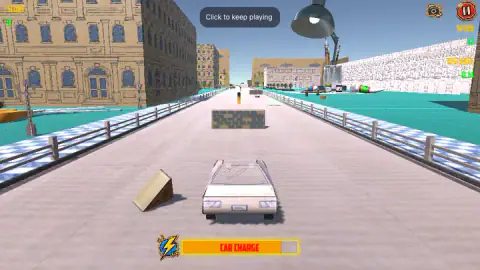
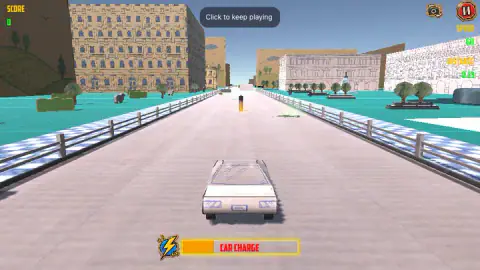
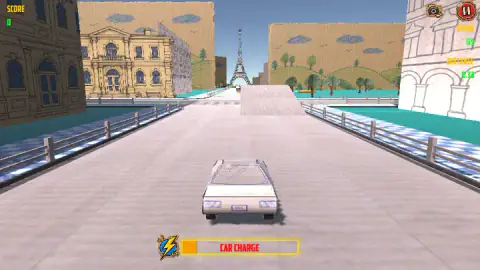
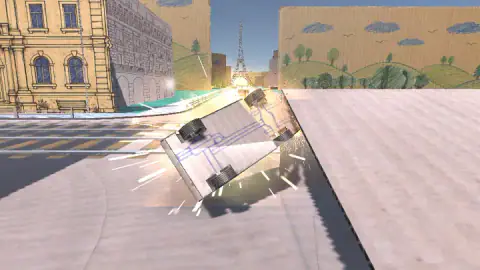
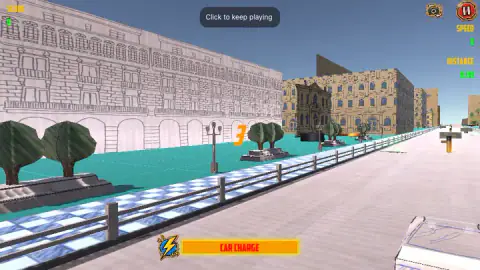
Taken by opening the game ourselves and letting it run — not supplied by the publisher, and not the same picture every other site shows.
How to play Cartoon Traffic Racing Paper Derby
- In the SELECT SCENE menu, pick SINGLE or TRAFFIC. We played SINGLE.
- Wait for the orange 3, 2, 1 and GO painted on the road ahead of the car.
- Hold W or the up arrow to accelerate. The game also lists S to brake, A and D to steer, Space for the handbrake, F for nitro, C for the camera and B to look back.
- Watch the CAR CHARGE bar at the bottom and the SPEED and DISTANCE readings at the top right.
- When the run ends, the result screen shows your score and the cash you earned. PLAY AGAIN starts the same avenue from the top.
Tips from our runs:
- Drive over the yellow batteries standing in the road. They are the only thing we saw that puts charge back in the bar.
- Do not slow down for the brick blocks. At 74 km/h our car went straight through one and it burst into pieces.
- Get ready before the end of the avenue. The ramp there ended most of our runs.
- If you are after cash, distance is what paid us, not score.
Controls
| W / Up Arrow | Accelerate; the only key we used in our runs |
|---|---|
| S / Down Arrow | Brake (listed by the game; we did not test it) |
| A / D or Left / Right Arrow | Steer (listed by the game; we did not test it) |
| Space | Handbrake (listed by the game; we did not test it) |
| F | Nitro (listed by the game; we did not test it) |
| C / B | Change camera / look back (listed by the game; not tested) |
Features
- A SELECT SCENE menu with two scenes, SINGLE and TRAFFIC
- A cardboard city with the Eiffel Tower at the end of the avenue, and a desk lamp and paintbrushes the size of buildings
- A CAR CHARGE bar that drains while you drive; batteries on the road give a little back
- Brick blocks that burst when you hit them, and small wedges that lift the car
- A wide ramp at the end of the SINGLE avenue that flipped our car every time we hit it flat out
- A result screen that pays cash for distance, near misses, staying above 100 km/h and driving against traffic
Game details
- Developer
- Extreme Games
- Release date
- September 2026
- Added here
- August 2026
- Technology
- HTML5 (WebGL)
- Platforms
- Browser (desktop), Browser (mobile & tablet, touch)
- Saved progress
- Saving, when available, is managed by this game. Mava cannot confirm your level.
FAQ
How do you play Cartoon Traffic Racing Paper Derby?
Pick a scene in the SELECT SCENE menu, wait for the 3, 2, 1, GO countdown and accelerate with W or the up arrow. The game also lists S to brake, A and D to steer, Space for the handbrake and F for nitro. A run ends when the CAR CHARGE bar at the bottom runs out or when the car crashes, and a result screen shows your score and the cash you earned.
What is CAR CHARGE in Cartoon Traffic Racing Paper Derby?
It is the yellow bar at the bottom of the screen, and it works like a battery. It starts full at the GO and drains as you drive. Driving over one of the yellow batteries on the road refills a small part of it. In two of our runs it emptied before the end of the avenue, the car slowed to under 30 km/h and the run ended there.
Why does my car flip at the end of the road in Cartoon Traffic Racing Paper Derby?
In the SINGLE scene the avenue ends at a wide ramp that drops onto a cross street. Every time we reached it at full speed in a straight line, the car landed on its side or roof and the run ended. We did not try braking or steering there, so we cannot tell you the clean way across; we can tell you that straight and flat out does not work.
How do you earn money in Cartoon Traffic Racing Paper Derby?
The result screen pays cash for four things: total distance, near misses, keeping a high speed and driving in the opposite direction. In our runs only distance paid: runs that reached the ramp paid about 130 even with a score of zero, while runs that ran out of charge earlier paid about 110.
Can you reach 100 km/h in Cartoon Traffic Racing Paper Derby?
Not with the accelerator alone, in our runs. The fastest we saw was 74 km/h, so the KEEP ABOVE 100KM/H line paid nothing. The game lists F as nitro, which may be the way past 100, but we did not test it.
Are there other cars to race against in Cartoon Traffic Racing Paper Derby?
Not in the SINGLE scene we played: the avenue was empty apart from obstacles, with a few vehicles standing on the cross street at the end. The menu also offers a TRAFFIC scene, which we did not play. The game's description talks about rivals and unlockable cars, but we did not see either.
Who made Cartoon Traffic Racing Paper Derby?
The game is credited to Extreme Games and has been available from September 2026 and was last updated in October 2026. We found no other source for the developer and no reviews or guides beyond the game's own listing.