


About Big Bob's Burger Truck
Our first day at Big Bob's food truck ended with a perfect zero. Zero burgers served, zero stars, zero dollars. Five customers gave up waiting, and one walked off because there was nothing on the menu they liked. The same screen added a line to our notebook: Fran: only one patty, please.
That day taught us more than a good one would have, and it is what this page is about. Big Bob's Burger Truck is a burger game in two halves. First you invent the burgers and set their price. Then you open the window and cook them while a queue of customers watches the clock. The two halves are linked: what you put on the menu decides how hard the cooking gets.
The game is by Selfdefiant, whose name sits at the bottom of the title screen, and it was published on 1 November 2026. You start in Maple Falls, an autumn town with orange trees and a park bench, and the game's own listing promises three towns in all.
The fair price line tells you what a patty is worth
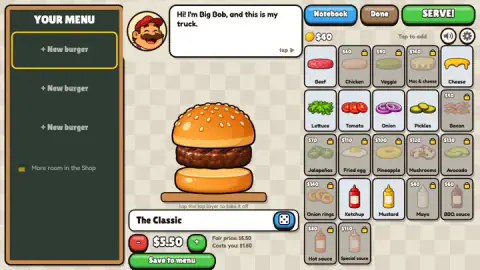
Most burger games set prices for you. Here you set them yourself, and the editor helps with two lines under the burger's name: Fair price and Costs you. They change with every layer you add, so you can see what each one is worth before you save.
We built the same burger three times, with one, two and three beef patties. The name changed on its own as the stack grew: The Classic, then Bob's Best Burger, then Double Trouble Stack.
| Burger | Fair price | Costs you | Left over |
|---|---|---|---|
| One patty (The Classic) | $5.50 | $1.60 | $3.90 |
| Two patties (Bob's Best Burger) | $7.50 | $2.80 | $4.70 |
| Three patties (Double Trouble Stack) | $9.50 | $4.00 | $5.50 |
Each extra beef patty adds two dollars to the fair price and a little over one to the cost. So the tall burger leaves you only $1.60 more than the plain one, and it needs three patties cooked to the right moment instead of one. On the first day, when you are still learning the grill, the single is the better deal.
The price starts at the fair price, and the red and green buttons move it down or up. We did not change it, so we cannot tell you how customers react to a burger priced above the line.
A menu with one burger sends people away
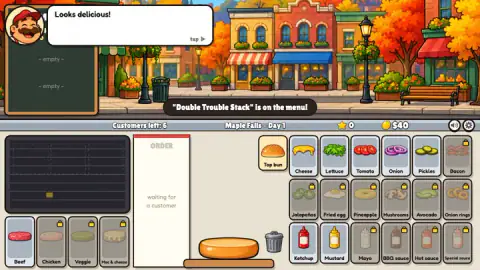
We saved only the Double Trouble Stack and pressed SERVE! A banner over the street confirmed it in the game's own words: "Double Trouble Stack" is on the menu!
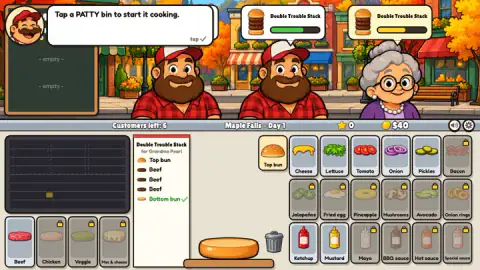
Every ticket after that asked for it, because there was nothing else to ask for. The first was Double Trouble Stack for Grandma Pearl, three patties high. Later came the same order for Little Lily, a small girl with pigtails.
At the end of the day the report split the losses in two: Gave up waiting, and Walked off (nothing they liked). Beside it, under New in your notebook, sat one line: Fran: only one patty, please. The screen does not say Fran was the one who walked off, but it is hard to read it any other way on a day when our only burger had three patties. The Notebook looks like the game's way of telling you what each town wants.
So fill more than one slot before you serve. A small menu with a single, a double and something with cheese or lettuce covers more people than one burger you are proud of.
Patties burn, and the queue does not wait
Once a customer orders, Big Bob explains the grill: "Tap a PATTY bin to start it cooking," then "It cooks by itself. Watch the ring." The ring is the whole skill. Take the patty off when it turns green.
We were slow. By the time we looked back at the grill, the first patty was black, with a red mark beside it. We started another, and that one burned too. Meanwhile the customers' patience bars went from green to yellow to red, and their faces changed from smiles to tongues out in disgust.
The counter of customers left kept dropping before we had served anyone. Then the day closed with the report: nobody served, five who gave up waiting, no profit. The bill also showed nothing spent on ingredients, even though we had burned several patties. Under it ran a bar called Road to Sunny Pier: 0 / 50 stars. Stars come from happy customers, and the next town stays shut until you have fifty.
The lesson is not complicated, but you only learn it by burning something. Start a patty the moment a ticket appears, watch it, and take it off at green before you do anything else.
Your first $40, and what is behind the padlocks
You start with $40. Eight ingredients are open: beef, cheese, lettuce, tomato, onion, pickles, ketchup and mustard. Fourteen more wait behind padlocks, each with a price on its tile.
Among those, mayo is the only one marked at $40, and bacon is next at $50. Chicken and veggie patties cost more, and mac and cheese patties are the dearest of all, at $160. A fourth menu slot is also behind a padlock, with the note More room in the Shop.
In practice, you will be selling beef burgers for a while. That is one more reason to get the single right first: it pays for everything else.
What we played, and what we did not
We played the menu editor and the first day in Maple Falls, which ended without a single sale. We did not serve a burger, so we never saw tips, a star or a customer's reaction to a finished order. We did not open the Notebook screen, the Shop or any upgrade, did not change a price, and never saw Sunny Pier or the third town. The game says P pauses; we did not try it. We played on a computer, not on a phone.
Who it is for, and more to play
Big Bob's Burger Truck suits players who like a cooking rush with a bit of planning in front of it. The menu screen is slow and thoughtful; the counter is not. If you like inventing recipes but hate burning them, the fair price line and the notebook are there to help you plan, and one patty at a time is the way to survive the first day.
For more kitchen counters, Cooking City has picture orders and a queue that counts down to closing time, Snack Stack puts you on your feet in a 3D hot-dog diner, and Doodle Boba Bubble Tea lets you build drinks instead of burgers.
More in our cooking games.
Screenshots
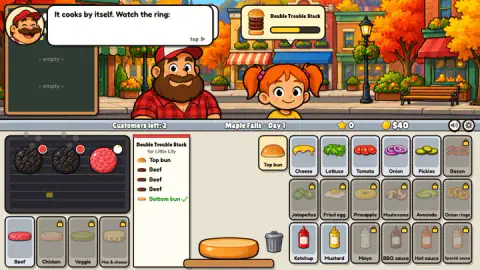
Taken by opening the game ourselves and letting it run — not supplied by the publisher, and not the same picture every other site shows.
How to play Big Bob's Burger Truck
- Press PLAY. In YOUR MENU, tap ingredients on the right to stack them on the bun. Every burger needs a patty. Tap the top layer to take it off.
- Check the name, which the game suggests for you, and the price. Press Save to menu. You have three menu slots.
- Press SERVE! to start the day. A ticket appears next to the board when a customer orders.
- Tap the patty bin in the bottom-left corner. The patty cooks on its own; take it off when its ring turns green.
- Build the burger in the order on the ticket, finish with the Top bun, and serve.
Tips from our first day:
- Save at least two burgers, and make one of them a single patty.
- Read the ticket from the bottom up. The bottom bun is already on the plate, ticked in green, and the list climbs from there.
- Cook one patty at a time and stay with it. A patty you forget is a patty you lose.
- Skip the long talks. Big Bob's tutorial bubbles keep coming during service, and the customers do not wait for them.
Controls
| Mouse click or tap | Add an ingredient to the burger in the menu editor; tap the top layer to take it off |
|---|---|
| - and + buttons | Lower or raise the price of the burger you are designing |
| Patty bin (bottom left) | Puts a patty on the grill; it cooks by itself |
| Patty on the grill | Take it off when its ring turns green |
| Topping tiles and Top bun | Stack the layers in the order the ticket lists |
| P | Pause, according to the game's own instructions (we did not try it) |
Features
- A menu editor that shows a fair price and what each burger costs you, layer by layer
- Three menu slots to start, with more room sold in the Shop
- Eight ingredients open from the start; fourteen more behind padlocks, from $40 for mayo to $160 for mac and cheese
- A grill where patties cook on their own and burn if you leave them
- Customers with patience bars and names on their tickets, such as Grandma Pearl and Little Lily
- A notebook that records what a customer wanted when they leave without buying
- Fifty stars in Maple Falls open the road to Sunny Pier
Game details
- Developer
- Selfdefiant
- Release date
- November 2026
- Last updated
- November 2, 2026
- Added here
- November 2026
- Technology
- HTML5 (2D)
- Platforms
- Browser (desktop), Browser (mobile & tablet, touch)
- Saved progress
- Saving, when available, is managed by this game. Mava cannot confirm your level.
FAQ
How do you play Big Bob's Burger Truck?
First you design burgers in the YOUR MENU screen by tapping ingredients onto a bun, set a price and save them to the menu. Then you press SERVE! and cook for real: tap a patty bin to grill a patty, take it off when its ring turns green, and stack the layers in the order on the customer's ticket. Happy customers earn stars, and enough stars open the road to the next town.
How many stars do you need to leave Maple Falls?
The end-of-day screen in Maple Falls shows a bar called Road to Sunny Pier that needs 50 stars. Our first day earned none, because we did not serve anyone in time.
Why do customers leave in Big Bob's Burger Truck?
Two reasons appear on the end-of-day screen: Gave up waiting, when their patience bar runs out, and Walked off (nothing they liked), when nothing on your menu suits them. In our first day five customers gave up waiting and one walked off.
What is the fair price in Big Bob's Burger Truck?
When you design a burger, the editor shows a Fair price and a Costs you line under the name. A single beef patty burger shows a fair price of $5.50 and a cost of $1.60. Each extra beef patty raised the fair price by $2.00 and the cost by $1.20 in our run.
What does the notebook do in Big Bob's Burger Truck?
It keeps what customers told you. After our first day the end-of-day screen added Fran: only one patty, please, on a day when our only burger had three patties and one customer walked off. Read it before you change the menu for the next day.
Why did my patty turn black in Big Bob's Burger Truck?
It burned. Patties cook by themselves and show a ring; if you do not take one off when the ring turns green, it goes black with a red mark. Put one patty on, take it off at green, then start the next.
What can you buy first with $40 in Big Bob's Burger Truck?
You start the first day with $40. Among the locked ingredients, mayo is marked $40 and bacon $50; chicken, veggie patties and everything else cost more. Expect to sell burgers before you unlock most of them.
Who made Big Bob's Burger Truck?
The title screen says Created by Selfdefiant, and Selfdefiant is listed as the developer. The game was published on 1 November 2026 and lists it for computers, Android and iOS.