




À propos de Real City Driving 2
Most free driving games give you something to chase: a lap time, a wanted level, a pile of coins on the racing line. Real City Driving 2 gives you a car and a city and then gets out of the way completely. Nothing is scored. Nothing is timed. In every frame we captured across two sessions, the only thing on top of the road was a green button in the corner that says CHANGE CAR.
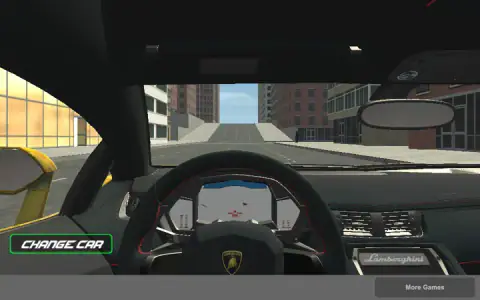
That sounds like a criticism and it is not, quite. Take the handbrake into a junction and the back of the car steps out and leaves two black lines across the tarmac. Put the nose against a shop front and hold the throttle and the rear tyres smoke. Switch to the driver's seat and you get a full cabin, badges on the wheel and all. Somebody spent real effort on how the car looks and behaves, and then spent none at all on giving you a reason to use it.
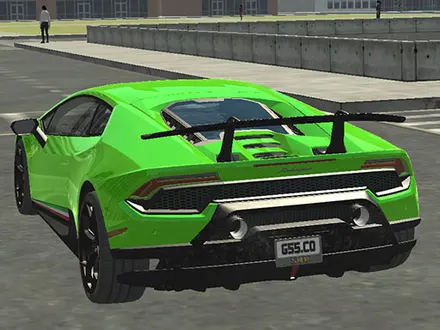
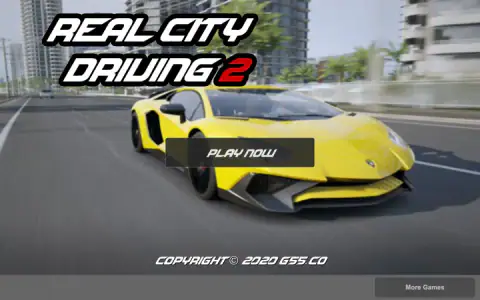
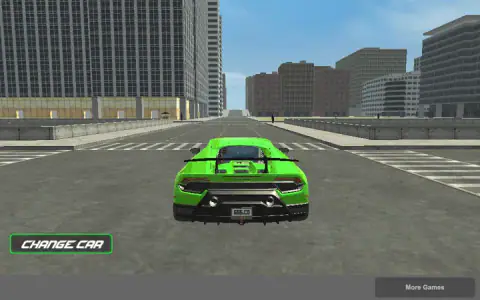
It is made by G55.CO, and the game is unusually happy to tell you so: the title screen carries its copyright line, and every car has G55.CO stamped on its rear number plate. It was published in May 2020, a big games site added it that July and has since counted 3.7 million plays with a rating of 8.4.
Six cars and one city: what is actually in it
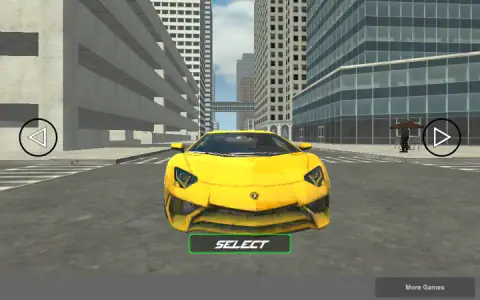
The picker holds six cars, and the colours repeat in the same order after the sixth, which is how we counted them. They are all obvious lookalikes of real supercars, down to the badges on the steering wheel. Nothing in the game claims a licence for any of them, so treat them as what they are: copies made to look right rather than to be right. None of the six lets you get out and walk.
The city is large, gridded and almost completely empty. People stand on the pavements, and in both sessions not one other vehicle moved. There is no traffic to weave through, which makes the long avenues feel like a runway. The roads are wide, the junctions are square and nothing is banked for speed, so it drives like a city laid out for walking around rather than for racing.
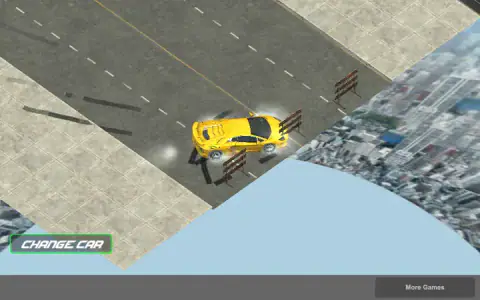
And it ends. Drive far enough down the main avenue and you meet three striped road barriers and a drop. Switch to the top-down camera there and the illusion comes apart in the best way: the whole city is a slab of streets floating over a photograph of a real skyline, far below, going on for miles that you cannot reach. On our second visit we ran into the same edge again, and left our own skid marks on the tarmac in front of the barriers.
Why the handbrake slides the car
The one technique this game rewards is a real one. In an actual car, the handbrake works on the rear wheels only. A tyre that is locked and sliding grips far less sideways than one that is still rolling, so when you pull the handbrake mid-corner the back of the car loses its hold on the road while the front keeps steering. The tail swings out and the car rotates. Rally drivers use exactly this, the handbrake turn, to get round hairpins that are too tight to steer through.
Real City Driving 2 copies the idea faithfully enough to be useful. Space locks the rear wheels, the back steps out, and the two black lines it leaves show you exactly where grip was lost. The trick is the order:
- Turn first, then pull. Steer into the corner with A or D, then tap Space. Pulling the handbrake in a straight line just makes the car skid straight on.
- Let go early. Hold Space too long and the car keeps spinning. Release it as the nose lines up with the new street, and press W to drive out of it.
- Use the square junctions. The city's crossings are all right angles, which is the shape a handbrake turn is for. It is the closest thing the game has to a skill to practise.
With no score and no timer, nobody is going to reward you for getting it right. But a clean slide round a city block is the most satisfying thing Real City Driving 2 has to offer.
What we ran into
We played with the ads blocked, so nothing interrupted us, which also means we cannot tell you how often an advert appears for a normal player.
Two things surprised us. The first is that the cars never dent. We hit the barriers at the edge of the map hard enough to knock one flat, drove into a glass shop front twice and reversed into a kerb, and the bodywork came out of all of it perfect. Crashes cost you nothing but time.
The second is the silence of the interface. There is no speedometer on screen, and the dashboard in the driver's-seat view does not give you a number you can read either. For a game whose whole subject is speed, not showing you how fast you are going is either a bold decision or an unfinished one, and after two sessions we still could not tell which.
About half a minute passes between opening the page and the title screen appearing, which is what roughly 50 MB of city costs on a fast connection. Once it is up, it stays smooth. On a phone it is a different story: the loading screen itself warns that mobiles are not supported, and although the title screen appears, we could not get past PLAY NOW by tapping. This is a keyboard game for a computer.
Where to drive next
Russian Taz Driving 2 is the same idea from the same studio, G55.CO: an empty city, no missions and a handbrake, with Soviet-era saloons instead of supercars. If you want a reason to drive, Drift City turns free roam into a score for sliding, and Stunt Simulator pays for jumps, flips and rolls. Supercars Drift Racing Cars puts supercars on a mountain circuit against rivals. If what you actually wanted was a race with a friend, Night City Racing has upgrades and a second player on the same keyboard. More in our driving category.
Captures
Comment jouer à Real City Driving 2
- Press PLAY NOW, then step through the six cars with the round arrows on either side and press SELECT.
- Drive with W, A, S and D. W is the throttle; S brakes, and reverses once you have stopped.
- Use Space as a handbrake, not as a brake. It locks the rear wheels, which is what you want going into a corner and never what you want going into a wall.
- Press C to change camera. The views cycle in a loop. The top-down one is the worst to drive with and the most interesting to look at.
- Press CHANGE CAR in the bottom-left corner to swap cars. It opens the picker again, and SELECT drops you back at the crossroads where you started, which is also the only way out of a bad place.
Tips from our sessions
- CHANGE CAR is your reset. There is no R key and no respawn. If you are stuck on a kerb or nose-first against the barriers, go back to the picker, choose the same car, and you are at the start again in a couple of seconds.
- Do not fight the top-down camera. We picked it up by accident at the edge of the map and spent a minute spinning on a pavement, because up on the screen was no longer forwards. Press C until you are behind the car before you try to escape anything.
- The kerbs do not stop you. Pavements, plazas and the grass verges are all driveable. The only things that stop the car are building walls and the road barriers at the edge.
- S is a brake first. Hold it while you are still rolling forwards and you slow down; the car only reverses once it has properly stopped, which is a second longer than you expect when a wall is coming.
- Nothing else is bound. We swept E, F, G, T, L and H one by one and compared the screen before and after. Nothing moved: no horn, no lights, no nitro, no getting out. The four driving keys, Space and C are the whole game.
- Mind the bottom strip. Under the play area sits a grey bar with a More Games button. It is not part of the drive, so keep the mouse away from it.
Commandes
| W | Accelerate |
|---|---|
| S | Brake, and reverse once you have stopped |
| A / D | Steer left and right |
| Space | Handbrake. It locks the rear wheels, so holding it into a turn slides the car |
| C | Change camera, in a loop |
| Mouse | PLAY NOW, the arrows and SELECT in the car picker, and the CHANGE CAR button while you drive |
Ce qu’il contient
- Six cars in the picker, all unlicensed lookalikes of real supercars, each with the developer's web address on its rear number plate
- One key, C, loops through the cameras, from a chase view and a driver's seat to a low wheel-level shot and a top-down view
- No score, no timer, no money, no missions and no speedometer; the only button while you drive is CHANGE CAR
- The handbrake locks the rear wheels, so the tail steps out in a corner and leaves two black lines on the tarmac
- An empty city with pedestrians on the pavements and no other moving car
- The map ends at three striped road barriers, and the top-down camera shows the streets hanging over a photo of a city far below
Fiche technique
- Studio
- G55.CO
- Date de sortie
- mai 2020
- Ici depuis
- décembre 2022
- Technologie
- HTML5 (Unity WebGL, 3D)
- Plateformes
- Navigateur (ordinateur)
- Classement
- 3D , Conduite , Simulation
- Partie sauvegardée
- La sauvegarde, si disponible, dépend du jeu. Mava ne peut pas confirmer ton niveau.
Questions fréquentes
What is Real City Driving 2?
Real City Driving 2 is a free browser driving game by G55.CO in which you pick one of six supercars and drive it around an empty city with no objective. There is no race, no timer and no money to earn. It runs in a desktop browser with nothing to install, and it came out in May 2020.
How do you win Real City Driving 2?
You do not. Nothing is scored, timed or unlocked, and the game never shows a win or lose screen. It is a sandbox - you pick a car, drive it until you are done, and press CHANGE CAR to try another one.
How many cars are there in Real City Driving 2?
Six. The picker steps through them with the round arrows on either side of the screen and a SELECT button underneath, and the colours repeat after the sixth. All six are unlicensed copies of real supercars, and every one carries the developer's own web address on the rear number plate.
How do you change the camera in Real City Driving 2?
Press C. It steps through the views in a loop. We told five apart - a chase camera behind the car, the driver's seat, a low view level with the wheels, a fixed camera at the side of the road and a top-down view.
What does the CHANGE CAR button do?
It takes you back to the car picker. Choose a car and press SELECT, and you start again at the crossroads where every drive begins. That also makes it the only reset in the game, useful when you are wedged against a wall or stopped at the barriers at the edge of the map.
Does Real City Driving 2 have a night mode?
Not in the version we serve. Some sites describe daylight and night modes, but every session we played was in daytime, and neither the menus nor any key we tried changes the sky or turns the lights on.
Does Real City Driving 2 work on a phone?
Not really. The game's own loading screen warns that it is not supported on mobiles and asks you to confirm before it carries on. On a phone-sized touch screen it does reach the title screen, but none of our taps got past PLAY NOW, in either orientation. Play it on a computer.
Who made Real City Driving 2?
G55.CO. The credit agrees everywhere it counts - the game's listing gives the company, another games site credits the same author - and the game itself prints a 2020 G55.CO copyright line on the title screen and puts G55.CO on every number plate.