






About Furry Kung Fu
We pressed Skip Tutorial. Then we lost, over and over, for four straight minutes.
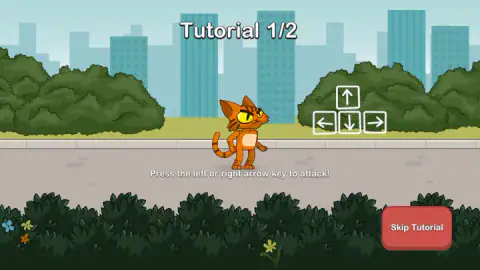
That is worth admitting first, because the tutorial we skipped is two screens long and the first of them tells you the only thing in Furry Kung Fu that is not obvious. Over a diagram of the four arrow keys, it says: press the left or right arrow key to attack. Not a punch button, not a mouse. The direction is the punch. Your cat stands in the middle of the screen and the animals walk in at him from both sides, so choosing a side and choosing to hit are the same decision, made with the same key.
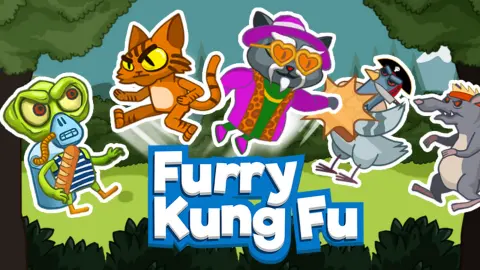
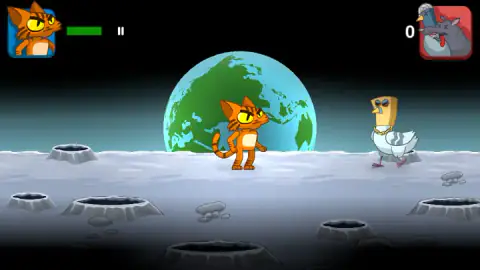
Get that wrong and the game looks broken. Clicking does nothing. The cat holds his pose, a pigeon in sunglasses and a gold chain walks up, and the counter beside the enemy portrait in the top-right corner stays where it started. That counter is not a score. It is a tally of how many of the thirty enemies you have put down, which is why ours reading 0 at the end of every round was a complete report of how we did.
Sobachka Games made it. It was published in February 2025 and was last updated in August 2026.
The three stars are one fight graded three ways
The screen before each level lists its three objectives, and reading them together tells you more about the design than any of them does alone. Defeat thirty enemies. Defeat thirty enemies leaving more than 40% of your health. Defeat thirty enemies leaving more than 90%.
There is no alternative route, no hidden collectible and no time to beat. The target never changes; only the damage you are allowed to take. That turns the green bar in the top-left corner into the actual scoreboard, and it changes what a good player looks like. Surviving is the floor. The skill the stars are asking about is whether you can finish a crowd without being touched more than a handful of times, which is a question about spacing and about facing the right way, not about pressing faster.
It also explains why the game bothers to teach you a crouch and a double jump for a fight that is mostly two directions. Against thirty enemies, defence is where the stars are.
Where the flying pots come from
A brawler in which objects are lobbed at you while you work through a crowd is not a new idea. It is close to the oldest idea in the genre.
The game usually credited with inventing the beat 'em up is Kung-Fu Master, made by Irem in 1984 and designed by Takashi Nishiyama, who built it out of the Hong Kong martial arts films of the period. You climb five floors of a temple, each ending in a boss and each on a time limit. Nishiyama's lasting trick was the floors in between: on the even-numbered ones, the hazard is not an opponent at all. Balls fall, pots drop, snakes and moths come at you while the fists keep arriving. The credit matters beyond that one cabinet, too, because Nishiyama went to Capcom afterwards and led the team that made the first Street Fighter in 1987.
Four decades later, the hazard vocabulary of a cartoon cat on the Moon is recognisably the same one. The tip printed before our fights was about dodging flying objects, and the game's own listing names the things that come at you as balls, comets, fire and pots. Pots. The same airborne crockery, in a browser.
What has changed is the hands. Nishiyama's cabinet gave you an eight-way joystick and two buttons, one for punches and one for kicks, with punches hitting harder and reaching less far. Furry Kung Fu throws both buttons away and keeps only the stick. Attacking and turning became a single key, which is why the tutorial has to state it outright, and why a new player who skips that tutorial stands in the middle of the screen doing nothing at all.
What the menu is holding back
The main menu is more game than we got to see. Alongside Levels it offers a Shop and a Survival mode, and above those sits a fighter chooser, so the orange cat is not the only one available. The game's own notes say the Survival levels open as you work through the campaign, which makes the eight-block grid the gate for everything else.
That gate held for us. We never cleared level one, so the Shop stayed shut, the second fighter stayed unpicked, Survival stayed locked, and the park on the next-level card stayed a picture. Everything the game sells — skins, weapons, the second cat — is behind a win we did not get, which is at least an honest piece of design: the currency is earned by playing, and there is nothing to spend it on until you can.
On advertising, we have less to report than we expected. Three times, the screen before a fight printed a line saying it had skipped the ad this time and to enjoy the game. Nothing played, nothing interrupted a round, and we were never asked to watch anything for a reward. That is one four-minute session on one desktop, not a guarantee.
What we have not seen
Everything past the first level, in short. We never finished a fight, so we have never watched a star fill, never bought a skin, never seen whether the double jump is as useful as the tip claims, and never met the aliens or crocodiles the game's description promises further in. The combos, the uppercut and the trick of knocking an enemy off a flying ball are the game's claims, not ours. We played by clicking on a desktop, so the touch controls are untested here as well.
More games like this one
Stickman Kombat 2D is the same side-on fight with the combos spelled out instead of hidden in a tutorial. Ragdoll Fighter hands the job to physics, so every punch arrives slightly wrong. Samurai Survivor is the thirty-enemy counter stretched to its limit, and Neko's Adventure sends another cat sideways through twenty levels without the fighting. The rest are in action games.
Screenshots
How to play Furry Kung Fu
- Pick Levels from the main menu, then a numbered block on the selection grid. Eight blocks are drawn there, each with three empty stars underneath; the first one is open and the rest are greyed out until you earn them.
- Read the tutorial. It is two screens, it costs you about ten seconds, and it hands you the control scheme.
- Press the left or right arrow key to strike on that side. Up jumps, down crouches, and the game's own instructions add an uppercut from down-then-up and a downward strike from pressing down while in the air.
- Watch what is in the air as well as what is on the ground. The game's tip screen says a double jump is good for dodging flying objects, which is the only warning you get that things get thrown at you.
- Knock down thirty enemies. That is the whole win condition, and your remaining health decides how many stars it is worth.
What four minutes of losing taught us:
- A mouse is not an input here. We clicked on the cat, on the enemy, on the ground and on the middle of the screen. The fight carried on without us every single time.
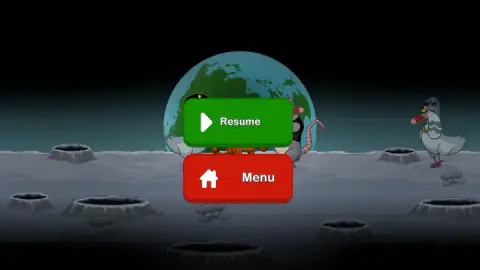
- The pause bars are easy to miss. They sit next to your health bar in the top-left corner, not in a corner of their own, and the menu they open has only Resume and Menu in it.
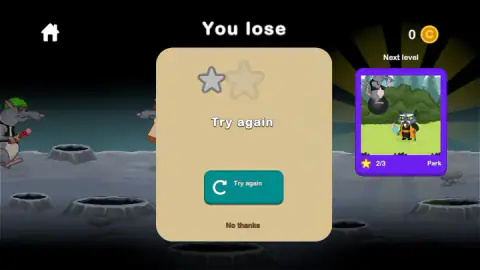
- The defeat card offers you the next level anyway. Alongside the Try again button there is a card for level two, a park, so a wall is never the end of the session.
- Nothing is banked when you lose. The coin counter on that card read 0 for us from the first defeat to the last.
- Skins are not decoration. One of the tips the game prints before a fight says that not all skins have a double jump, which makes the Shop a list of movement options rather than outfits.
Controls
| Left or right arrow key | Attack on that side, in the tutorial's own words |
|---|---|
| The same arrow pressed repeatedly | Throw a combo in that direction, according to the game's instructions |
| Up arrow | Jump; twice for a double jump, on the skins that have one |
| Down arrow | Crouch |
| Down then up | Uppercut, according to the game's instructions |
| Down arrow while in the air | Attack downwards from a jump, according to the game's instructions |
| Swipe, or tap to the left or right of your cat | The same moves on a phone or tablet, according to the game's instructions |
| The two bars beside the health bar | Pause; the menu that opens offers Resume and Menu |
Features
- A side-on fight where your cat holds the middle of the screen and the animals walk in from the left and the right
- Three stars per level that all ask for the same thing, thirty enemies down, and differ only in the health you keep
- The number beside the enemy portrait is a knockout tally rather than a score, so you can read your progress at a glance
- Eight numbered levels on the selection grid, with the first unlocked and the other seven greyed out
- A two-screen tutorial that prints the whole control scheme over a diagram of the four arrow keys
- A main menu with Shop, Levels and Survival, and a fighter chooser offering a second cat
- A tip screen that warns the skins are not cosmetic: not all of them have a double jump
Game details
- Developer
- Sobachka Games
- Release date
- February 2025
- Last updated
- October 23, 2026
- Added here
- April 2025
- Technology
- HTML5 (Unity WebGL)
- Platforms
- Browser (desktop), Browser (mobile & tablet, touch)
- Classification
- Action
- Saved progress
- Saving, when available, is managed by this game. Mava cannot confirm your level.
FAQ
How do you play Furry Kung Fu?
Your cat stands in the middle of a side-on arena and animals walk in at him from both sides, so the fight is about which way you are facing as much as how fast you hit. The tutorial's first screen says to press the left or right arrow key to attack on that side, with the up arrow to jump and the down arrow to crouch. A level is won by knocking down thirty enemies, and how much of your health bar is left when you finish decides how many of its three stars you get.
What are the controls in Furry Kung Fu?
The game teaches arrow keys and nothing else on a desktop. Left and right attack on that side, up jumps, down crouches, and the game's instructions add a combo from pressing the same direction repeatedly, an uppercut from down then up, and a downward strike from pressing down while in the air. On a phone the same moves are swipes, or taps to the left or right of your cat. There is no mouse control: we played by clicking and lost every round.
What is the goal of a level in Furry Kung Fu?
The screen before each fight lists three objectives, and all three are the same fight. They read defeat thirty enemies, defeat thirty enemies leaving more than 40% health, and defeat thirty enemies leaving more than 90% health. That makes the health bar the only scoreboard that matters, because there is no faster or harder route to a better result, only a cleaner one.
How many levels does Furry Kung Fu have?
The level selection grid shows eight numbered blocks, each with three empty stars under it. When we played, only the first was unlocked and the other seven were greyed out. The main menu also carries a separate Survival button, which the game's own notes say opens up as you work through the main campaign.
Who made Furry Kung Fu?
It was published in February 2025 and was last updated in August 2026. We found no studio website and no listing on another portal, so everything about the developer rests on that one page.
Does Furry Kung Fu have ads?
Nothing interrupted us in the four minutes we played. What we did see, three separate times on the screen before a fight, was a line from the game itself reading that it had skipped the ad this time and to enjoy the game. That is the game's own message rather than a promise about every session, so treat it as what happened to us and not as a guarantee.
How do you get coins in Furry Kung Fu?
By winning. The coin counter sits in the top-right corner of the results screen, and after a session of defeats ours still read 0. Coins are what the Shop on the main menu spends, so losing a level leaves you with exactly what you started with and no way to buy your way past the problem.
Can you play Furry Kung Fu on a phone?
It is listed for desktop, mobile and tablet, and its instructions give a full touch scheme: swipe, or tap to the left or right of your cat, with swipes up and down for jumping and crouching. We played on a desktop and did not test any of that ourselves. On a small screen the taps would have to land on the correct side of a character who is standing in the middle of the picture.