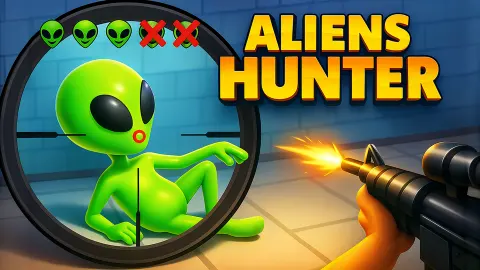
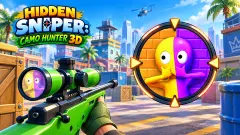








About Aliens Hunter
Most sniper games hand you the target. There is a red marker over somebody's head, the scope opens on it, and all that is left is holding still. Aliens Hunter keeps the rifle and takes the marker away. The street is full of things, three of them are aliens, and nobody tells you which.
So the game is really two jobs. First you are a spotter, turning a wide view of a city block and looking for whatever does not fit. Then you are a shooter, with a scope that shows a patch of pavement about the size of a parked car. The search is the hard half. The shot, once you know where to put it, is a drag and a button.
The game is credited to a developer listed as yzy. It was published in November 2025.
Now the honest part. We played three and a half minutes of stage 1 and did not find a single alien. The two shots we have on record both came back as "miss". This page explains the screen, the controls and what our misses taught us. It cannot tell you what a hit looks like.
Two white figures we never shot
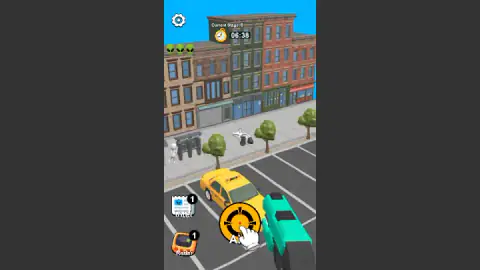
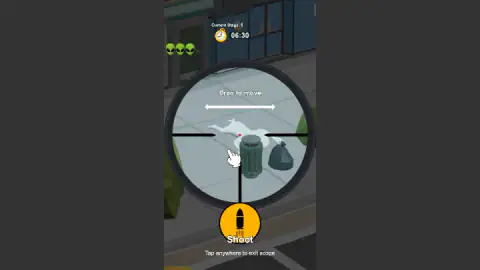
Stage 1 has two shapes that look out of place. Both are plain white, with no face and no clothes, in a street where everything else is brick, green or taxi yellow. One stands beside the bus shelter. The other lies flat on the pavement next to a bin and a black bin bag.
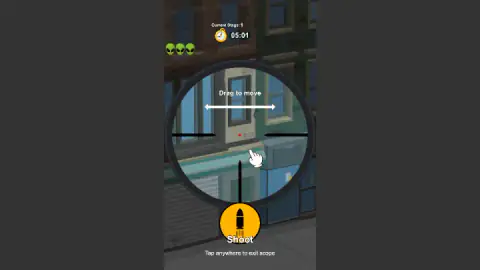
Here is the part that stings. The very first time we opened the scope, with 06:30 on the clock, the red dot was sitting on the figure by the bin. We did not press Shoot. We dragged away to look at shop windows instead, and spent the next two minutes scoping a wall.
Later, the game pointed at the same spot, as the Radar section below explains. We still cannot tell you that the white figure is an alien, because we never fired at it. If we started stage 1 again, it is the first thing we would shoot, and the figure at the bus shelter would be the second.
What Radar showed us, and what Intel might
Two helper buttons sit at the bottom left, Intel and Radar, each with a small badge reading 1.
We pressed Radar. A red broken ring with a ticked cyan ring inside it appeared on the street. It is not attached to the screen: when we turned the view, the ring stayed on the same piece of pavement. Measured against our screenshots, its centre falls on the white figure lying by the bin. By our reading, Radar marks the area around one hidden alien and leaves the last step to you.
It was also the only free one. After the press, the badge on Radar changed from a 1 to a small film clapper. We take that to mean the next scan costs a video, but we did not press it again to check.
We never pressed Intel. Late in the session a white label appeared above it reading "Tap for Alien selfies!", which sounds like a photo of what you are looking for. That is a guess from the wording, nothing more.
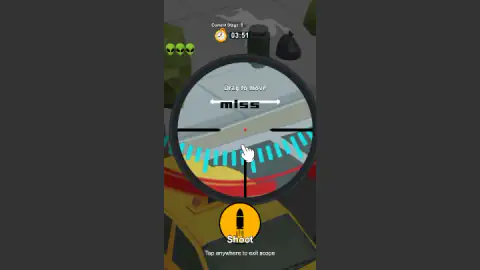
One more thing about that ring. Our two recorded misses were both fired inside it, at bare kerb. Being in the right area is not enough: the red dot has to be on the alien itself.
The clock and the menu
The clock is generous for a first stage. Our earliest reading was 06:38, taken just after the stage opened, and it runs at normal speed. When we stopped, it read 03:08 and all three alien heads were still there. We did not see it reach zero.
The menu has more on it than a Start button. At the top, a counter read 4/5 beside a lightning bolt, with 15:00 under it. We read that as an energy meter that refills on a timer, and did not test it. Next to it is a coin counter, which stayed at 0 for us, and lower down an Armory button we did not open.
Three panels sit above Start, all locked. One opens after level 4 and is labelled Find the differences. One opens after level 7 and reads, as far as we could make out the small type, AI Bio Compendium. The last opens after level 11: Hold off the giant.
A note on the picture. The game is drawn as a tall, narrow column, made for a phone held upright. In a wide desktop window it sits in the middle with grey bars on each side. Arrow keys and Space did nothing we could notice; everything is done with the pointer.
Why a scope shows you so little
The two-view design is not a gimmick. It is how real rifle scopes behave. The rule is simple and has no way round it: the more a scope magnifies, the less of the scene it shows. Wikipedia's article on telescopic sights puts it in one line: "A larger magnification leads to a smaller field of view."
That trade-off is as old as the tool. The same article names one of the first rifle sights, built by Morgan James and described by John R. Chapman in a book of 1844. In 1855 William Malcolm began making his own in Syracuse, New York. From the start, a rifleman with a scope had to know where to look before looking through it.
Aliens Hunter makes you both people. The street view is the spotter's job, and it is where the stage is won or lost. Our session is the proof: we spent most of it inside the scope, sweeping shopfronts a few metres at a time, and found nothing.
Who it is for
It suits players who like hidden-object pictures and would enjoy one with a rifle attached. There is no enemy shooting back and nothing to dodge, only the clock.
It will disappoint anyone looking for an action shooter. And younger players may need the scope rule shown to them once: drag to aim, and touch nothing but Shoot.
More games for sharp eyes
Sniper Attack2 is the more usual kind of sniper game, with targets you can see from the start, and Wild Hunting Clash puts the same scope in a forest. If the search was the part you liked, Find The Dog hides dogs in black-and-white drawings with no clock, and Hidden Object: Street Of Secrets is a detective search through city scenes. The rest are under shooting games.
Screenshots
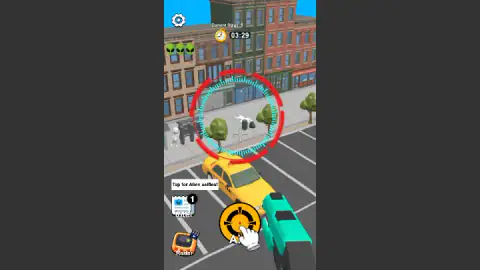
Taken by opening the game ourselves and letting it run — not supplied by the publisher, and not the same picture every other site shows.
How to play Aliens Hunter
- Press Start. The menu shows a secret agent in a black suit and sunglasses holding a rifle, with a burning saucer overhead. Start is the green button at the bottom.
- Search the street. Stage 1 is a row of brick buildings, a pavement with trees and a bus shelter, and a car park with a yellow taxi. Drag to turn the view.
- Put the white cross on a suspect. A small white cross sits in the middle of the street view. Press the yellow crosshair button and the scope opens there.
- Drag to aim, then press Shoot. The scope says "Drag to move". The red dot in its centre is your aim.
- Find them all before the clock ends. Three green alien heads at the top left stayed lit through our whole session, one for each target we failed to find.
What our session taught us:
- Inside the scope, never click. Drag. A plain click anywhere but the Shoot button closes the scope. We were thrown back to the street several times before we read the small print: "Tap anywhere to exit scope".
- Aim before you open the scope. The scope opens where the white cross is. Line it up in the wide view and you have almost no dragging left to do.
- Do not shoot the ground to test it. We fired at an empty kerb beside the taxi, twice. Both shots printed "miss" and the clock kept running.
- Suspect anything white. Read the next section.
Controls
| Drag on the street | Turns the view along the street; a small white cross stays in the middle of the screen |
|---|---|
| Yellow crosshair button | Opens the scope on the spot under the white cross |
| Drag inside the scope | Moves the aim; the red dot in the centre is where the shot goes |
| Shoot button | Fires; a wrong shot prints "miss" inside the scope |
| Click anywhere else while scoped | Closes the scope and returns to the street view |
| Radar and Intel | Two helper buttons with one free use each; we used Radar and did not press Intel |
Features
- Two views of one street, a wide one for searching and a scope for shooting, and you switch between them all the time
- Three aliens to find per stage on the first stage, shown as three green heads at the top left
- A countdown clock on every stage; our earliest reading on stage 1 was 06:38
- A Radar helper that drew a red and cyan ring on the street after we pressed it
- Three extra modes on the menu, locked until levels 4, 7 and 11
- Made by yzy
Game details
- Developer
- yzy
- Release date
- November 2025
- Last updated
- August 10, 2026
- Added here
- September 2025
- Technology
- HTML5 (3D)
- Platforms
- Browser (desktop, mouse), Browser (mobile & tablet)
- Saved progress
- Saving, when available, is managed by this game. Mava cannot confirm your level.
FAQ
How do you play Aliens Hunter?
Press Start, then look along the street for anything that does not belong. Put the small white cross on it, press the yellow crosshair button to open the scope, drag until the red dot is on the target and press Shoot. The job is to find every hidden alien before the clock runs out.
Why does the scope keep closing in Aliens Hunter?
Because a plain click or tap anywhere outside the Shoot button closes it. The game says so in small print under the button: "Tap anywhere to exit scope". Inside the scope you drag to move the aim and press only the Shoot button.
What does Radar do in Aliens Hunter?
When we pressed it, a red broken ring with a cyan ring inside it appeared on the street and stayed in place as we turned the view. By our reading it marks an area worth searching. The button's free-use badge then changed to a small film clapper, which suggests the next use costs a video.
What happens when you miss in Aliens Hunter?
The word "miss" appears inside the scope and the clock keeps running. We missed twice on stage 1 and saw no other penalty on screen: the three alien heads stayed where they were and the scope stayed open.
How many aliens are there in each level of Aliens Hunter?
Stage 1 shows three green alien heads at the top left, which we read as three targets. We did not find any of them in our session and did not reach stage 2, so we cannot say whether the number grows.
How many levels does Aliens Hunter have?
We do not know. We played part of stage 1. The menu gives one hint: its three extra modes unlock after levels 4, 7 and 11, so there are at least eleven.
Who made Aliens Hunter?
It is credited to a developer listed as yzy. It was published on 13 November 2025 and last updated on 10 August 2026.
Can you play Aliens Hunter on a phone?
It is listed for PC, Android and iOS, in portrait, and the on-screen prompts say "tap". We played on a desktop with a mouse and did not test a phone or tablet.