





Sobre Bouncy Rush
Most runners give you a jump button and ask you to press it at the right moment. Bouncy Rush takes the jump away. Your character bounces by itself every time it lands, and the only thing you control is which way is down.
Click or tap anywhere and gravity flips. The character stops falling towards the floor and starts falling towards the ceiling, where a second row of platforms is waiting. The rows scroll past with gaps in them, saw blades cross the middle of the screen, and coins float in between. Miss a platform or touch a saw and the run is over. A run can last two seconds or several minutes, and the difference is almost always one badly timed flip.
It was made by PlaySchoolGames, a studio with its own game portal, whose logo sits in the corner of every screen. It was published on 11 February 2020. On another big games site, 74 % of players who rated it gave it a thumbs up. We played it on this site, with a mouse and with touch, to work out the numbers below.
Flip, don't jump: an idea borrowed from two well-known games
Swapping the jump for a gravity switch is not new, and knowing where it comes from explains why Bouncy Rush feels the way it does.
In January 2010, the designer Terry Cavanagh released VVVVVV, a platform game whose hero cannot jump at all. He can only flip gravity and fall up to the ceiling or back down to the floor. Cavanagh had tried the idea in an earlier game of his, and VVVVVV built a whole game around it. In December of the same year, Miniclip released Gravity Guy, which turned the same idea into an endless runner: tap the screen, or press Space on a computer, to switch gravity and get as far as you can.
Bouncy Rush sits in the Gravity Guy family, with one more thing taken away. In Gravity Guy you run along the floor or ceiling. Here your character bounces constantly, so it is always in the air for part of the time. That makes timing harder to read and gives the game its one real trick: a flip in mid-air changes direction before you land, which is the only way out of a bad bounce.
Seven ranks, from E to King
There are no levels. Instead, the game over screen shows your rank in a gold medal and two or three objectives with tick boxes. Score and coin objectives count within one run, so a long run is worth more than many short ones.
| To leave rank | You need |
|---|---|
| E | 5 coins and 25 points |
| D | 10 coins and 50 points |
| C | 20 coins, 100 points and five bounces in a row without flipping |
| B | 40 coins, 200 points and 100 games played |
| A | 20 flips without landing, 400 points and hundreds of games played |
| S | 40 flips without landing, 1,000 points and 1,000 games played |
The last row explains why so few players reach King. At two points a second, 1,000 points means surviving more than eight minutes in a single run, and the flip objective means chaining 40 changes of direction without touching a platform. The scroll speed never rises, so the difficulty comes from staying focused, not from the game speeding up.
Coins and the five characters
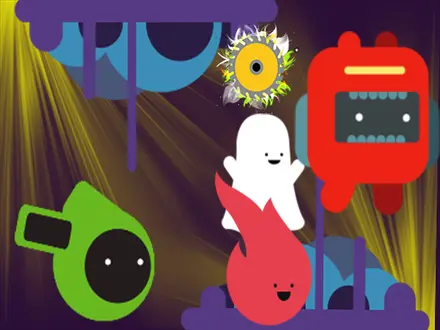
Coins are saved in your browser between sessions. They buy characters in the Shop, reached from the Home screen or the game over screen. You start with MiniVision, a small red robot, and can buy RedBall for 250 coins, Ghost for 500, Greem for 750 and a fifth character for 1,000.
Be realistic about the prices. In our short runs we collected about one coin per attempt, so the last character is a long-term goal. None of the five felt any different to fly across our runs, in speed, gravity or bounce: they change how you look and the colour of the trail behind you, and nothing else.
Bouncy Rush unblocked: what that really means
A lot of people look for Bouncy Rush unblocked, and many sites use that word in their title. What it means in practice is simple: this is an HTML5 game that runs inside the browser, with nothing to download, install or allow. That is why it opens on computers where you cannot install software.
It does not mean that a page gets around a school or office filter. Whether any game site loads on a managed network depends on the rules of that network, and no site can promise otherwise. If this page opens where you are, the game will run here in the same way as anywhere else, because it is the same PlaySchoolGames build.
Is it right for you?
It suits anyone who wants a game they can pick up in a few seconds. There is one control, no timer, and a run can be as short as you like. Younger players can manage it, though the menus and objectives are written in English, and the difficulty is real: most early runs end in under ten seconds.
Two things to know before you start. There is no keyboard support, so you need a mouse, a trackpad or a touchscreen. And the game asks for an advert when you press PLAY GAME, when you restart and when you open the Shop. How many adverts actually appear is decided by the ad service, not the game, but expect short breaks between runs.
More one-button games
If flipping gravity is what you enjoyed, Mini Switcher builds a set of levels around the same switch. ZigZag Snow Mountain uses one click to reverse a skier's direction, and Slap The Rat asks for one well-timed hit within about a second, instead of a corner. For another character that bounces by itself while you steer, try Hop Ball. You will find more quick-reflex games in our arcade category.
Cómo jugar a Bouncy Rush
- Press PLAY GAME. The run starts at once, with your character already bouncing on the bottom row.
- Click or tap to flip gravity. Anywhere on the screen works except the small icons at the top right. The character falls towards the other row and bounces there.
- Avoid the gaps. If you are falling towards a gap, flip again before you reach it. Leaving the screen at the top or the bottom ends the run.
- Avoid the saws. They appear in the middle band of the screen, which is exactly where you pass on every flip.
- Collect coins and read the game over screen. It lists your objectives for the next rank. Restart, go Home or visit the Shop.
Tips from our runs:
- Do nothing for a moment and you lose. Without a single click, our character fell through a gap after two and a half seconds. The bounce keeps you moving, not safe.
- Flip early, not late. A flip takes time to reverse your fall. If you wait until you are over a gap, you are already too deep to make it back.
- Watch the middle, not your character. The saws always come through the centre, so decide whether to cross before one arrives, then wait on your row.
- Flipping in mid-air is allowed. You can flip several times before you land, which is how you dodge a saw that you misjudged. The two highest ranks ask for exactly that.
- Score is time. You earn two points a second, whether or not you collect coins, so staying alive always beats chasing a coin next to a saw.
Controles
| Left click / tap anywhere | Flip gravity, so the character falls towards the other row of platforms |
|---|---|
| Nothing | The character bounces by itself every time it lands |
| Pause and sound icons (top right) | Pause the run or mute; clicking them does not flip gravity |
Qué trae
- A single control, since a click or tap anywhere flips gravity and the bounce is automatic
- Two rows of platforms with gaps, scrolling at a speed that never changes
- Saw blades that cross the middle of the screen, where every flip takes you
- Two points for every second you survive, so 1,000 points means over eight minutes without a mistake
- Seven ranks from E to King, each unlocked with coin, score and trick objectives
- Five characters, one free and four bought with coins for 250 to 1,000
- No keyboard support and English menus
Ficha técnica
- Estudio
- PlaySchoolGames
- Fecha de salida
- febrero de 2020
- Última actualización
- 11 de febrero de 2020
- Aquí desde
- noviembre de 2020
- Tecnología
- HTML5 (Construct 2)
- Plataformas
- Navegador (ordenador), Navegador (móvil y tableta, táctil)
- Lo que descarga
- 2.8 MB
- Peticiones de anuncios
- 2 (pocas)
- Guarda partida
- Sí
- Partida guardada
- El guardado, si está disponible, depende de este juego. Mava no puede confirmar en qué nivel vas.
Medido abriendo el juego nosotros mismos el 2026-09-10, no tomado del feed. Doce segundos en una pantalla de móvil, contando las peticiones de anuncios y bloqueándolas en vez de cargarlas.
Preguntas frecuentes
What is Bouncy Rush?
Bouncy Rush is a free one-button arcade game by PlaySchoolGames, published in February 2020. Your character bounces between a floor and a ceiling of moving platforms, and each click or tap flips gravity. You survive as long as you can while dodging saw blades and gaps.
How do you play Bouncy Rush?
Press PLAY GAME, then click or tap anywhere on the screen to flip gravity. The character bounces on its own when it lands, so the only decision is which row to fall towards. A saw blade or falling off the screen through a gap ends the run.
Is Bouncy Rush unblocked?
Bouncy Rush is an HTML5 game that runs in the browser with nothing to download or install, which is why it appears on many unblocked game sites. Whether a page loads on a school or work network depends on that network's filter, and no site can promise to get around it.
How do you rank up in Bouncy Rush?
Clear the objectives listed on the game over screen. The first rank needs 5 coins and 25 points in one run. Later ranks add tricks such as flipping gravity 20 or 40 times without landing, and a total number of games played, up to the top rank, King.
How much do the characters cost in Bouncy Rush?
The first character is free. The other four cost 250, 500, 750 and 1,000 coins in the Shop. As far as we could tell playing each one, they only change how your character looks, not how it moves.
Can you play Bouncy Rush on a phone?
Yes. The game uses taps as well as clicks, and in our test with a simulated touchscreen a tap flipped gravity just like a mouse click. It is listed as mobile ready. We have not tried it on a real phone.
Can you play Bouncy Rush with the keyboard?
No. The game has no keyboard controls at all, so Space and the arrow keys do nothing. Every action, from the menus to flipping gravity, is a mouse click or a tap.
Who made Bouncy Rush?
PlaySchoolGames, a studio that runs its own game portal at playschoolgames.com. Its logo sits in the corner of every screen, and the game links back to that site. The same studio later reused the game for a version with other characters.